This is my first LD. This game is quite simple, but has some concepts it may take a couple of games to understand.
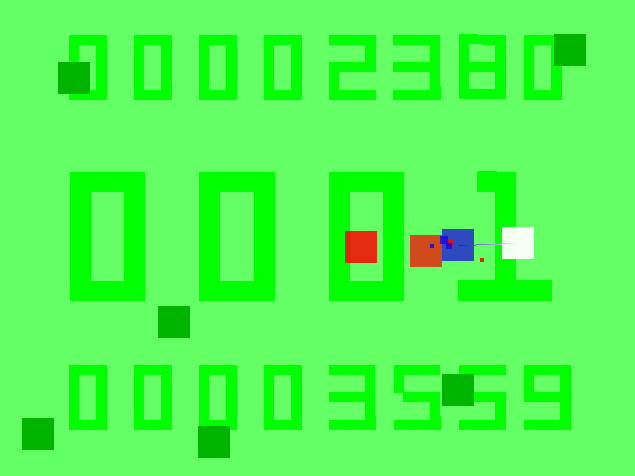
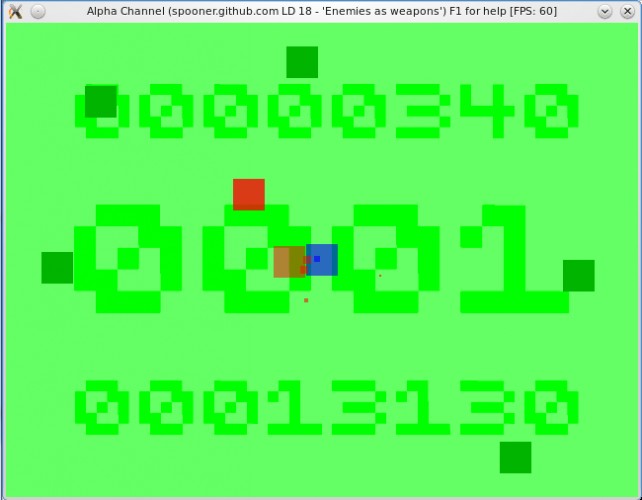
By taking control of your enemies, you can block and kill the other enemies that are nearly as tough as you are. Unfortunately, while controlling an enemy, the other enemies will continue to attack you so you need to protect yourself AND make sure you don't run out of energy, freeing your slave! Sometimes running away for a bit is the best plan...
Best, though, is play and figure it out for yourself! Press F1 for in-game help.
Spooner's entry for Ludum Dare 18 - "Enemies as weapons"
This is my first LD. This game is quite simple, but has some concepts it may take a couple of games to understand. By taking control of your enemies, you can block and kill the other enemies that are nearly as tough as you are. Unfortunately, while controlling an enemy, the other enemies will continue to attack you so you need to protect yourself AND make sure you don't run out of energy, freeing your slave! Sometimes running away for a bit is the best plan...
Best, though, is play and figure it out for yourself! Press F1 for in-game help.
License: GPL v3
== Ingame help (View by pressing F1)
It is hell being a pixel. Why can't they all just get along?
= How to play =
* Red is evil; Red wants to hurt you!
* Take control of Red, when it comes near, and use it to protect yourself from the other Reds!
* Controlling Red is strenuous and will use up your limited energy reserves (Blueness).
* All colours hurt colours that aren't the same. Green isn't too painful, though :)
= Controls =
* Arrow keys or WASD: Move self (or a controlled Red).
* Space or Return: Take/relinquish control of Red.
* P: Pause
* Control+Q: Exit game.
== Compatibility
Runs in a 640x480 window. Windows, Linux and OS X [10.6 only].
* Fixed CTD in Linux. * Fixed font rendering in Linux by changing the font (also changed font used in Windows to keep things the same). * Made OS X executable.
Hm, for some reason, it aborts when two pixels hit each others, but it's one of the few game I've been able to play so far, I'm keeping an eye on this!
@ThibG: I've not heard reports of this from anyone else and I've had about 5 people playing it a fair bit (some people have actually played it for fun; not just because I bullied them :)). If you can email me the contents of the "logs" directory (bil dot bagpuss {at} gmail dot com), I'll make every effort to sort out the problem. Details of what OS you are running it on and where you installed it would also be useful!
Oops, that was my fault with the Linux problem reported by ThibG. I will attempt to push a working Linux source/OS X binary version (1.1) tonight (or at the latest, tomorrow). The current Windows (1.0) binary version works fine.
The sound gets pretty unbearable when there are many enemies colliding at once (I actually took of my earphones). The game is quite nice, I like the minimalism and simplicity in the game mechanics. + for humourous instructions.
The sounds was too loud, and I suspect you were playing the sound constantly upon contact, which made it so loud and grating.
I like the concept, it worked very well. I didn't find the graphics great, honestly, but a solid effort. The gameplay idea could be expended into a very fun game.
Yes, the sound is indeed played by _each pixel_ in contact with an "enemy", so it soon racks up the volume. Sloppy, I know, but one of the many corners I cut during development (and I have my PC speaker volume low, so it never got to the level I realise would be on other people's machines, though a tester did comment on the volume at one point and I did lower it _slightly_). The sound _is_ intended to be a little grating (I like that it sounds like a power tool), but I'm sorry if the volume was annoyingly loud.
I don't think I'm allowed to fix the sound in the competition entry version (only porting and crash fixes allowed, I believe). Currently I'm working on fixing the Linux/OS X ports, which I'll submit as soon as I can, as part of the competition (v1.1), then I can make some non-competition tweaks, like fixing the volume, before I consider the game in a properly usable state.
@everyone: Thanks for all of the positive comments (and quite reasonable criticisms)!
It's a simple, yet quite good game. The extremly simple graphics render quite nicely, and the sound was ok too. The gameplay was fun and quite addictive, although it is repetitive.
Avast Anti-virus and Malwarebytes' Anti-Malware says it is fine (checking both the .zip and the .exe inside it, that I re-downloaded from my link). I strongly suspect that this is a false positive on your checker.
The application I used to make the exe is Ocra (for Ruby). It packages up the complete Ruby installer, the .rbw file (so it can start up the rest of my scripts) and whatever other dependencies are needed in a .exe. Mmm, I've just found several posts saying that the regular Ruby interpreter installer had tested positive for TR/Dropper.Gen and that being dismissed as a false-positive. I suspect, therefore that this is a similar situation, since my exe has most of the Ruby interpreter inside it.
Not sure if this would help you, but if you downloaded one of the copies of the Ruby Installer (not intending to _use_ it) and it came up as infected when you tested it, then you might be assured that you were safe using my exe (The installer is a very widely used application, unlike my game, that would not be left with a trojan in it for very long!). Ultimately, up to you, of course, but if you still have doubts you could run from my source version (you need to install from the aforementioned Ruby Installer, then run "gem install ocra chingu" and then run "rubyw lib/spooner_ld_18.rbw").
Nice game. Simple mechanics, but it doesn't get old that quick.
Can't think of much to say since I think the single mechanic works pretty well and there's no obvious thing to add. It might be more approachable with a more concrete visual theme, but that's about it.
I like the sound upon impact - it has a visceral feel to it. Fits the theme fairly well. Clean graphic design is pretty nice. I like the score in the background.
The enemies kind of float in from the middle of the screen sometimes - an alpha problem perhaps? Or on purpose?
Also ... I wonder how colorblind people see this game =)
@stqn: Chingu and Gosu are in fact Ruby packages (aka Ruby Gems), the former pure Ruby (so universal), the latter you will have to compile and link to some dependencies (This done via a simple "sudo gem install chingu gosu", as noted in my readme). The problem, possibly, could be getting the necessary requirements for Gosu sorted out. Unfortunately, I only have access to Ubuntu, so the instructions I give in the readme only apply to Debian-based distributions (beyond that you are on your own with http://code.google.com/p/gosu/wiki/GettingStartedOnLinux).
Sorry I can't be more helpful than that (I can't imagine you'll have a problem installing Ruby 1.8.7, or later, on your system, so I needn't mention that)!
@eli: I have actually already considered the colour-blindness problem. The most common colour-blindness is red-green (can't tell the difference between red and green colours), but that doesn't matter since my Red moves and Green doesn't and they are both to be avoided anyway. As long as the player can tell the Blue from the other two, that isn't too much of a problem (until someone tells me there is a form of colour-blindness that can't differentiate that from the others and then I am screwed!). If I was doing it properly, I suppose I should have a "colour-blind mode" that superimposes a marker on top of the player's block to make it stand out?
Not sure what you mean by "floating" enemies. There is, however, a bug with my rather naff manual collision handling that means that occasionally a block will jump to another position rather than collide correctly. I fixed this after the competition by hooking up to the Chipmunk physics engine and there are no longer any glitches like that, though that doesn't fix the version you are playing.
@eli: "The enemies kind of float in from the middle of the screen sometimes - an alpha problem perhaps? Or on purpose?" - Just realised what you meant. They intentionally spawn anywhere, except just next to the player.

Comments17
Thanks for taking a look at my game!
I like the concept, it worked very well. I didn't find the graphics great, honestly, but a solid effort. The gameplay idea could be expended into a very fun game.
I don't think I'm allowed to fix the sound in the competition entry version (only porting and crash fixes allowed, I believe). Currently I'm working on fixing the Linux/OS X ports, which I'll submit as soon as I can, as part of the competition (v1.1), then I can make some non-competition tweaks, like fixing the volume, before I consider the game in a properly usable state.
@everyone: Thanks for all of the positive comments (and quite reasonable criticisms)!
The extremly simple graphics render quite nicely, and the sound was ok too.
The gameplay was fun and quite addictive, although it is repetitive.
Can you check the files?
The application I used to make the exe is Ocra (for Ruby). It packages up the complete Ruby installer, the .rbw file (so it can start up the rest of my scripts) and whatever other dependencies are needed in a .exe. Mmm, I've just found several posts saying that the regular Ruby interpreter installer had tested positive for TR/Dropper.Gen and that being dismissed as a false-positive. I suspect, therefore that this is a similar situation, since my exe has most of the Ruby interpreter inside it.
Not sure if this would help you, but if you downloaded one of the copies of the Ruby Installer (not intending to _use_ it) and it came up as infected when you tested it, then you might be assured that you were safe using my exe (The installer is a very widely used application, unlike my game, that would not be left with a trojan in it for very long!). Ultimately, up to you, of course, but if you still have doubts you could run from my source version (you need to install from the aforementioned Ruby Installer, then run "gem install ocra chingu" and then run "rubyw lib/spooner_ld_18.rbw").
Can't think of much to say since I think the single mechanic works pretty well and there's no obvious thing to add. It might be more approachable with a more concrete visual theme, but that's about it.
Fits the theme fairly well. Clean graphic design is pretty nice. I like the score in the background.
The enemies kind of float in from the middle of the screen sometimes - an alpha problem perhaps? Or on purpose?
Also ... I wonder how colorblind people see this game =)
Sorry I can't be more helpful than that (I can't imagine you'll have a problem installing Ruby 1.8.7, or later, on your system, so I needn't mention that)!
@eli: I have actually already considered the colour-blindness problem. The most common colour-blindness is red-green (can't tell the difference between red and green colours), but that doesn't matter since my Red moves and Green doesn't and they are both to be avoided anyway. As long as the player can tell the Blue from the other two, that isn't too much of a problem (until someone tells me there is a form of colour-blindness that can't differentiate that from the others and then I am screwed!). If I was doing it properly, I suppose I should have a "colour-blind mode" that superimposes a marker on top of the player's block to make it stand out?
Not sure what you mean by "floating" enemies. There is, however, a bug with my rather naff manual collision handling that means that occasionally a block will jump to another position rather than collide correctly. I fixed this after the competition by hooking up to the Chipmunk physics engine and there are no longer any glitches like that, though that doesn't fix the version you are playing.