Update: Now works on all windows versions without compatibility mode hopefully. There was a problem with the PySFML 1.6 download for windows, compiled it from source and the game should work now.
A puzzle game, featuring zombies. Don't let anybody escape to the safehouses. With two enemy types.
Shambler: your basic human enemy, as soon as they can hear a zombie within 3 tiles of them they start to move towards the nearest safehouse. If they get there then you fail in your mission.
Sniper: trained soldiers, although they can kill your zombies, you can get back at them, as years of sitting around waiting for something to happen have removed their ability to turn 180 degrees, so if you can get behind them then you can transform them easily and when they are on your side, you can use their rifle to kill far away enemies.
The zombies in this game were caused by some mysterious magical force, they can resurrect the dead corpses of slain humans. A dead zombie however, remains dead.
Controls: * left click on a zombie to select it * right click on a tile to path towards it * press the spacebar or end turn button to advance 1 turn * as a sniper, right click on an enemy to shoot. * press R to restart the level if you get stuck
Only managed to finish making three levels in the end, but probably will add more in a post compo version. When you get past the third level you will just get a plain level with one enemy in the corner. There are level creation tools built in but they are not particularly well designed. Read below for info on how to use them.
Really enjoyed this competition and hope to take part in future ludum dares.
Here is how to create your own level: * Press E to enter the tile editor. Press one to use wall tiles and press zero to use floor tiles, click to paint * Press C to enter the collision editor, paint over the walls by clicking on them to make them colidable. * Press H to enter the entity placement editor, press 0 to place shamblers, 1 to place safehouses and 2 to place snipers. With shamblers and snipers, left click gets you a zombie and left click and shift gets you a sniper. After using the entity placement editor press R as this restarts the level and makes sure your entities will show up when you play. * Press P to play. * To save the level, press S. * If you need to skip forward to your level when you start up the game U skips forwards one level.
I could only start the game once. And ran into the safe house and lost. Seems ok, but takes a bit long with the rounds. One easy start/tutorial level that is fast to play had been nice.
Chickenwing, could you try running it in compatablity mode for windows 98, for some reason the game crashes randomly on Windows Vista and Windows 7 if you do not do this.
And about tutorial levels. Yeah I think that is a good idea, I might add some more levels and actual in game instructions later, I don't know what the competition rules are regarding extra levels are but I could definately add some for the jam. It was difficult to judge the difficulty of the levels I was making.
It is possible, remember that snipers can shoot in a straight line in a direction, and that you can turn a dead human into a zombie by moving up to them. Work out the quickest way of getting a sniper to a place where they can shoot the human, right click on the human and you should get it. Sorry if the levels are impossible to work out. I have had no playtesting except for my own, and seeing as I already knew the solutions I couldn't really judge difficulty.
@Spooner Thanks, I'm trying to get it to work for everyone without compatibility mode. I have a friend who has Windows 7 64bit and I'll try and meet up with them and see if I can get it to work. It's not a problem with my code. It is that the compiled version of PySFML you can download from the website doesn't work properly. I thought I fixed it but it seems not for Windows 7 64bit.
@ExciteMike Yeah, I'll probably release some extra levels at some point. I was working on the code for another enemy type and then I realised I only had an hour left so deleted it and tried to make some levels in the time remaininng.
@everyone If any of you can use the level editor, upload the levels you made somewhere and post the url here. I'd like to see what ideas other people can come up with.
@DrPetter Yeah, I realise that is one of the biggest problems with the game right now. There is no tutorial or instructions in game. Some people I know have been able to get it straight away, but others didn't get it even after reading the instructions multiple times. That is definately one thing I will improve if I ever get round to making a post compo version.
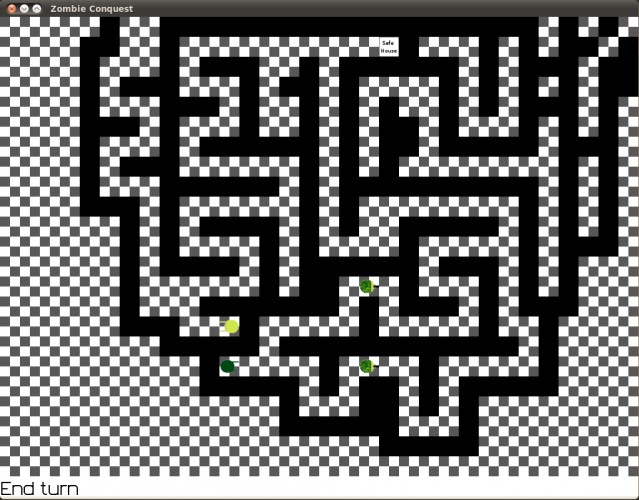


And ran into the safe house and lost.
Seems ok, but takes a bit long with the rounds.
One easy start/tutorial level that is fast to play had been nice.