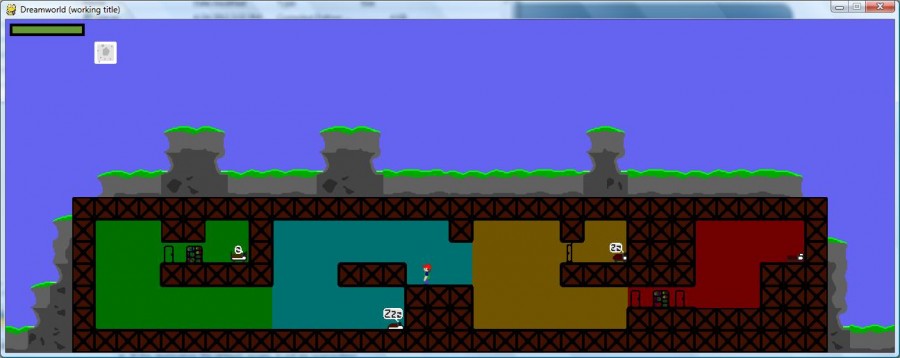
You, the player, begin as little boy waking up at night... people are unwell, with broken nightmares in their sleep. You must help them by jumping into their dream and fixing it!
Green blobs are the cause... You must attack them by holding the 'E' key, or they will attack you!
Use the 'A' and 'D' keys to move, and space bar to jump.
Sadly, this concept wasn't fully realized in time (Almost! I swear! Almost!), so you just hit the 'W' key to enter the one-and-only dream level. Also, I made some very nice piano music for it, but sound wouldn't work... *sigh* If you want to hear it and *imagine* it was part of the program, it's in the sound folder, happy.wav or happy.ogg.
Source is included with the download, you need Python 2.7 and Pygame 1.9.1 to run it.
The executable is in the /dist folder, main.exe. If it doesn't work, try launching it from the command line.
Credits: pytmx for tilemap pygame for game engine eeymontt and JoeCool17 for programming JoeCool17 and GraphiX for art
Whoops... lol, that might be helpful... I hope you guys don't mind, I fixed a show-stopping bug after the compo ended- the collision wasn't updating when the level changed.
Neat idea, you could really do something with switching between worlds to reach different areas. It's too bad it's not very complete. I have to admit, I'm not crazy about the controls....
Couldn't get the game to work, launching from command line failed as well. Failed with "IOError: [Errno2] No such file or directory: 'levels\\home.tmx'"
Same issue as Mach60KAS. Windows 7. Stack traces is:
Traceback (most recent call last): File "main.py", line 188, in <module> File "main.py", line 61, in main File "tilemap.pyc", line 8, in __init__ File "pytmx\tmxloader.pyc", line 944, in load_pygame File "pytmx\tmxloader.pyc", line 792, in load_tmx File "xml\dom\minidom.pyc", line 1920, in parse File "xml\dom\expatbuilder.pyc", line 922, in parse IOError: [Errno 2] No such file or directory: 'levels\\home.tmx'
Well, intrigued enough to install Python in order to play it! Interesting concept, and I really like the idea of going into dreams to "fix" the world. I'd say develop it further! Of note, if you don't hit "W" from where you initially spawn, it appears that you just fall into nothingness in the next level. Thanks!
The game looks nice graphically, but it seems not to work properly. If pressing w, the level switches to some cloud area where I just fall to nothingness. Otherwise I got stuck in the first level.
I like the idea of switching between two worlds like that. The graphics also look nice and the game runs fine on Linux. Kind of an odd (but interesting) resolution/screen size tho. It's a shame that it isn't more complete.
The exe file you provided didn't work from the directory it was in. Moving the contents of the dist folder into the root folder (/Dreamworld) allowed me to run the exe.
I liked your graphics and the music (I played it in the background while running your game :P ), but everything else was just incomplete. The controls were strange, collision detection with the walls was definitely off (you could cling to them by holding A/D) and I'm not sure if that was intentional or not. Once I had gotten into the dream world (and was standing in a place that didn't immediately make me fall), holding 'E' did nothing against the slimes, it just ended the game. It's an interesting idea though!


Comments25
I hope you guys don't mind, I fixed a show-stopping bug after the compo ended- the collision wasn't updating when the level changed.
Well done.
Traceback (most recent call last):
File "main.py", line 188, in <module>
File "main.py", line 61, in main
File "tilemap.pyc", line 8, in __init__
File "pytmx\tmxloader.pyc", line 944, in load_pygame
File "pytmx\tmxloader.pyc", line 792, in load_tmx
File "xml\dom\minidom.pyc", line 1920, in parse
File "xml\dom\expatbuilder.pyc", line 922, in parse
IOError: [Errno 2] No such file or directory: 'levels\\home.tmx'
If pressing w, the level switches to some cloud area where I just fall to nothingness. Otherwise I got stuck in the first level.
tcstyle: Do you mean you're falling *though* the clouds? Or just falling?
R3ason: That's the plan. :D
I liked your graphics and the music (I played it in the background while running your game :P ), but everything else was just incomplete. The controls were strange, collision detection with the walls was definitely off (you could cling to them by holding A/D) and I'm not sure if that was intentional or not. Once I had gotten into the dream world (and was standing in a place that didn't immediately make me fall), holding 'E' did nothing against the slimes, it just ended the game. It's an interesting idea though!