Game Of City Life is a new take on the old Game of Life - this time evolving a city by very simple rules applied on a city made of blocks (think New York or Washington) while managing what is built on these cities.
The game is open-ended, although "get as much population as possible" pretty much makes a good goal.
For info on who made it how, see the README (also directly shown on Github). For instructions on how to play, see ingame help. Playing requires a mouse.
Here's a longer and probably complete explanation of what's going on. This has been added AFTER the deadline, so if you want to be as confused as the first testers were, please stop reading at this line!
Everything is mouse-only. LMB+Drag moves the map, RMB+left/right-drag rotates, LMB+RMB+Up/down-drag zooms. For convenience, arrow keys scroll as well.
BLOCKS
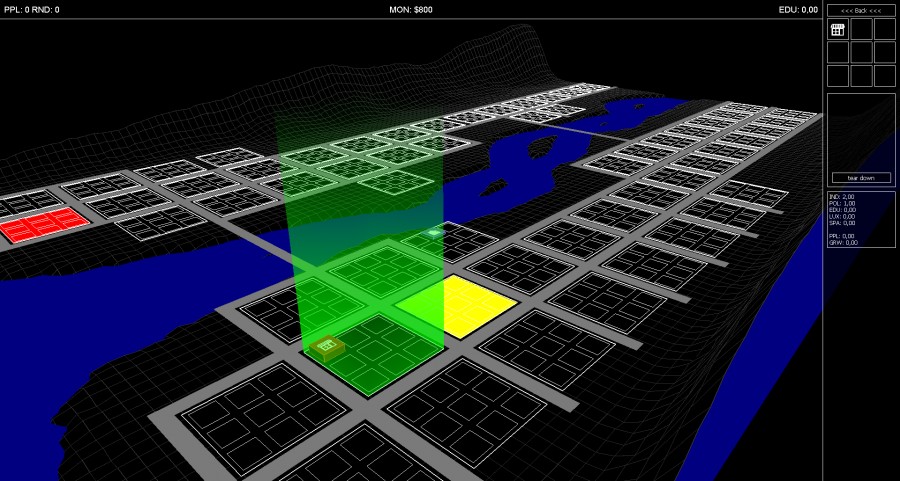
To select a block, click it. The right menu changes from the Main Menu to the Block Menu. At the top, there's a representation of what's currently on this block. Click a building icon to see its stats below. If you need the space, you can order it torn down there (returning 60% of the cost). Click an empty building slot to open the build menu.
BUILDING
Buildings are grouped by their main attributes into 5 categories: Education, Luxury, Housing, Industrial and "special". There is one special building for each category. These can only be built when the block is completely empty, the block is suited for it (shown by colored floor) and they have really high requirements.
ECONOMY
On "Next round" (or 10 times a second on Autoplay), every block is affected by those in a range around it and it's new state is computed. Housing (obviously) provides living space for the population. Industry generates money, but also Pollution. Pollution makes people want to move away. The same goes for overpopulation (i.e. after demolishing an appartment tower). Luxury does the opposite, it attracts people. As a bonus, the Park also decreases Pollution. Educational facilities add to the global Education Level of the city. The Education Level determines which advanced buildings can be constructed - most builings require it, and all Special buildings require very high education levels in addition to their price.
ACRONYMS
We really like them! They look oldschool!
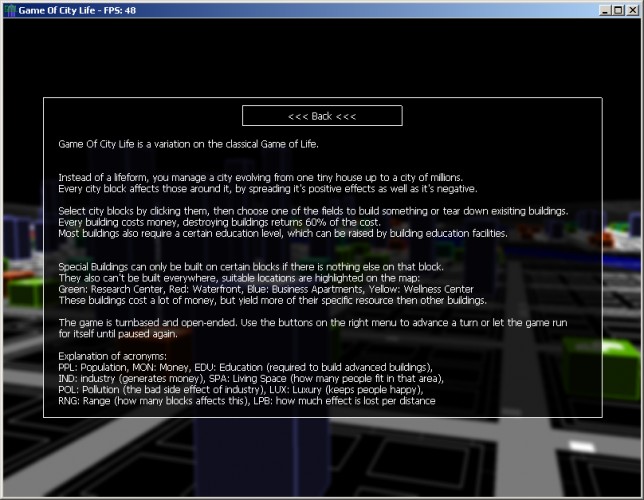
PPL: Population
RND: Round counter (the ingame date)
MON: Money
EDU: Education
IND: industry (generates money)
SPA: Living Space (how many people fit in that area)
@kevincorrigan: the only unhandled exception I know of is if there are eiter some resources missing (ie. something not extracted from archive) OR if you have no OpenAL (but in that case, the message would say exactly that). Maybe it was one of those?
Looks like it has lots of potential, but there is more explanation / clarity needed around what to do / what results to get. Maybe explain the mechanic more on the first load-in ?
Good work overall, I suggest spending more time with this.
The IRC-channel told me that was okay to do at this point, so... I have added a long description of how to play. I hope that clears things up.
Thanks for all the kind words :) Looks like we have little choice then... ;-)
We have been asked for a Linux version on another forum, so Bergmann is currently working on porting this thing over from Delphi to Lazarus. And now, he has a power outage in the middle of the day. So yeah, that's going to take some time, but we're working on it and if things pan out, we should be able to cross-compile to pretty much everything that has ogg/vorbis, OpenGL and OpenAL.
@goerp: I used to play SC4 hours on end, I guess that just *has* to show on a game like that (and some of that is even intentional) ;-)
This sounds interesting, but I couldn't run it. When I double clicked the executable I got something like "Error: No OpenAL found" and a game window opened, but presented an error: "Zugriffsverletzung bei Adresse 0049601F in Modul 'CityLife.exe'. Lesen von Adresse 00000008." Trying to close this error just pops it up again, so I had to kill it with Task Manager.
I was a little disturbed to see an 8/30 creation date for the game executable, but I guess that's the OpenAL bug fix? I'm not sure that's kosher with the competition (i.e. there are bugs in mine that I'd like to fix too but didn't). The game is a really cool idea though a little bit hard to figure out, since the impacts of the buildings aren't all obvious, and the effects of distance between them weren't clear to me. It may well be I didn't read deeply enough - the tips on the buildings referenced statistics I didn't really understand and didn't know the value of. I did really like how the screen looked, and how your buildings grew with more use. The interface worked well after I got used to it - I just didn't totally understand what I was doing or what would be valuable to accomplish. But a neat idea and well-executed. Nice work.
I would like to know how to build the star buildings, i like the autoplay button , this game has a truly potential m8. Check out my city! http://imageshack.us/photo/my-images/89/gameofcitylifel.jpg/ I think there is a little bug with the height computation, sometimes the same building grows and then decrease in an infinite loop, other times the height is limitless XD simple game? I dont think show but i see myself playing and enjoying this game ,thanks for your time
@DaveDobson: the way I understand it, bugfixing is allowed to fix "application-breaking" bugs, ie. if it doesn't start at all, but nothing gameplay-related (of course). IMHO fixing what triliyn described falls into the first category... You can check up on us on the Github repo, here's the diff: https://github.com/martok/ld-24/compare/GOCL1...GOCL1_1
@Everyone else: Porting to other platforms turned out to be more of a challenge because of the libraries we used. At least one of them is not cross-platform at all, so I think there won't be any ports. We could do Win32+Win64, that works, but it's kinda pointless. What I've been told is that it *does* work using wine on Linux.
As for it being kind of easy... let's just say "Balancing" never got crossed off on the to-do list ;-)
I enjoyed this and played it for a few hours! I didn't quite understand all of the interactions, but it's fun to experiment and try things out. I really like the wireframe graphics and ambient music!
I definitely like the idea (kind of a stripped-down SimCity) and thought it was well executed. It's a really impressive game for 72 hours. The controls were sometimes a bit clunky (a lot of clicks to add a single building) but my main problem was that nothing 'bad' seemed to happen: I could just go on autoplay and build a load of stuff, with the interactions of pollution and luxury not really presenting me any problems. I think with a bit more challenge and a bit more feedback to the player this would be a really fun game though.
Comments28
Good work overall, I suggest spending more time with this.
Thanks for all the kind words :) Looks like we have little choice then... ;-)
We have been asked for a Linux version on another forum, so Bergmann is currently working on porting this thing over from Delphi to Lazarus. And now, he has a power outage in the middle of the day. So yeah, that's going to take some time, but we're working on it and if things pan out, we should be able to cross-compile to pretty much everything that has ogg/vorbis, OpenGL and OpenAL.
@goerp: I used to play SC4 hours on end, I guess that just *has* to show on a game like that (and some of that is even intentional) ;-)
//Martok
Trying to close this error just pops it up again, so I had to kill it with Task Manager.
Check out my city!
http://imageshack.us/photo/my-images/89/gameofcitylifel.jpg/
I think there is a little bug with the height computation, sometimes the same building grows and then decrease in an infinite loop, other times the height is limitless XD
simple game? I dont think show but i see myself playing and enjoying this game ,thanks for your time
Sadly, there doesn't seem to be much challenge at all. Maybe I just got lucky.
@Everyone else: Porting to other platforms turned out to be more of a challenge because of the libraries we used. At least one of them is not cross-platform at all, so I think there won't be any ports. We could do Win32+Win64, that works, but it's kinda pointless.
What I've been told is that it *does* work using wine on Linux.
As for it being kind of easy... let's just say "Balancing" never got crossed off on the to-do list ;-)
Cant even read the readme.
Can you include the OpenAL?