Species Hunt! A game where you have to shoot birds! With a camera!
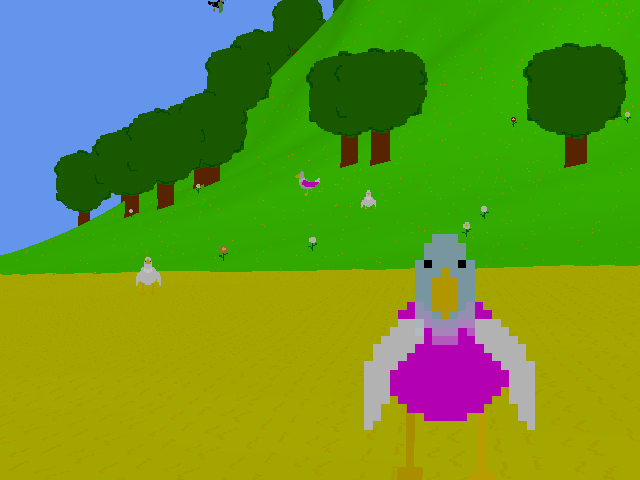
Enjoy a peaceful stroll on the beach while snapping some exotic (Ha! I mean common) birds. Try to take the best photo ever! Or fill up your collection of new species you have personally discovered, then name them after yourself! Or just enjoy the view and watch the birds muck about.
Requires XNA 4.0. Should work on most machines, but if it doesn't, let me know and I'll try to fix it ASAP!
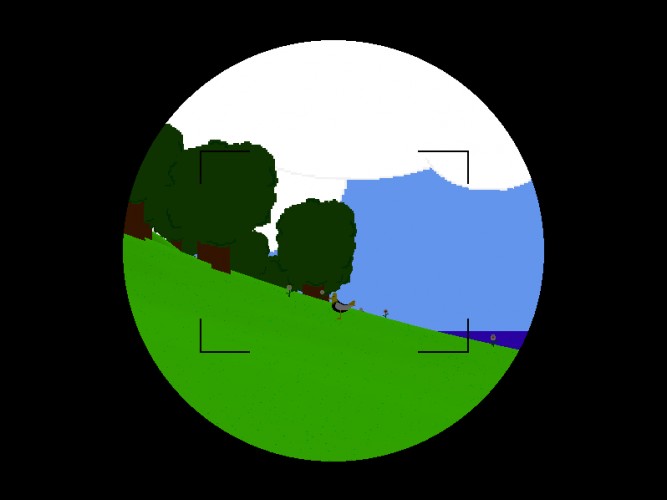
Controls are editable in-game. But a quick rundown: Move with WASD/arrows Equip camera with RMB Take picture with LMB Show/hide photo album with tab Run with shift Zoom camera with Q/E or mousewheel
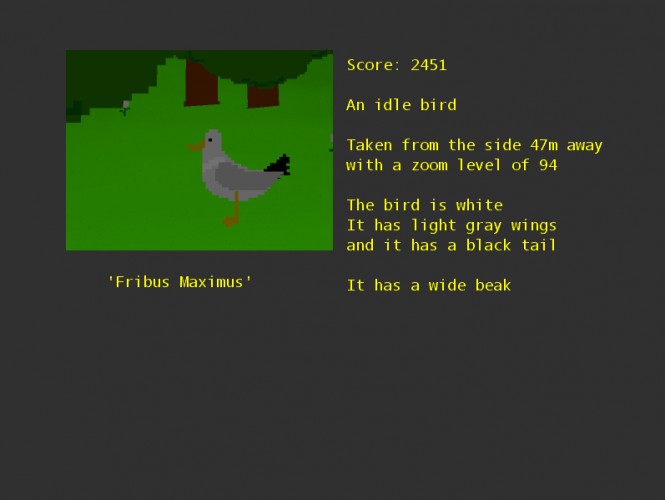
Photographs taken in-game can be saved for use outside the game. Simply click on the photo in the album, then save to disk. You can also enable autosaving every new photo taken automatically in the options menu.
Please note: Key configs are persistent, but all other options are not.
----------------------------------
Update 27/08
I've added a post-compo version with a widescreen resolution of 1280x720, which makes photographs of 1920x1080. So if you want to make prettier photographs, now you can. The system requirements went up though as you need a slightly more modern video card now. And the camera lens rectangle is slightly smaller than the photos. But other than that, everything should still work fine.
Impressive I would have liked some graphical flares (seeing as the game is about the environment) but all together very relaxing and enjoyable. Also if you stand in one place and take pictures by turning in a circle you can ramp up your species score quite fast.
@cacciatc a sound should play when you make a photo. It's not a 'traditional' camera sound though.
@Dadeyemi Right now the only fancy graphical stuff is when birds land in the water. They make a splash then (which increases your photo value!). But I didn't have the time to add other fancy things.
And yes, it doesn't take distance into account, nor obstacles, so you can just spamclick everywhere and it will most likely register a bird very far away on the other side of the island. :D
Make sure you have installed the XNA redist. And maybe you'll need to (re)install .NET framework 4. It should technically work on XP, and a crash on startup might mean one of those two is missing.
A lovely game, walking around in the environment was very relaxing especially after playing some of the more terrifying entries :-) The photo album concept is really well executed. Nice work!
This is so far my overall favourite entry. I would really really like to see this game being further expanded and polished.
I might write some more suggestions at a later time when I'm not so busy, but the first thing I noticed was that the camera shutter sound is bad. Shooting a camera - be it in real life or video games - you just kind of expect this very distinct camera shutter sound. The sound you have now is really disorienting. For the longest time I thought it meant I had failed to take a photo!
Haha, yes, I'm not happy with the camera shutter sound either. But I couldn't generate a decent camera-like sound with bfxr that doesn't hurt your ears. So I went with this one :D
I'm happy to hear any suggestions you have. I might continue working on this game, if time permits. There are a few directions this could go to and I'm very happy with the potential it has.
yeah I'm aware of that. If a bird is not completely inside the view (and it's a bit picky at high zoom levels because the math is off), then it doesn't register.
But it does not 'see' terrain, so if there's a bird somewhere in the distance, it will register that even if you can't see it.
Very interesting! I got 3636 points for a photo I took of 3 different species birds standing next to each other on the ground. The menus could have looked a little nicer and had a back button instead of ESC and stuff but I mean what is there more to say, other than more species or animals, etc? Hmm. I'm not sure if multiple birds are taken into account when photographing because it only gives info on the one at the front, but to take things like that, and flowers and trees and angles etc into account for the points would have been amazing. And if so, maybe different tree types attract different species and look better or worse etc. But yeah, what you have now is nice. Good job!
I liked it, although it felt a bit boring. Adding something like popup text after taking a photo telling you how many points you got and how many birds you caught could make things more interesting.
Also, whenever I looked straight up, the camera view glitched a bit and a bit of the skybox got clipped and replaced with a plain green color.
Also, I appreciated the fact that you could actually see your body when looking down! :D
ah what a cute game! i greatly desire more freeroaming photography games and for some reason no one really makes them. looking forward to any more work you do on this! i also like the Tribes-style skiing when you press Space
The camera sound is quite funny. It's a nice idea but I get bored pretty fast. Maybe you can make it more catchy by giving some ingame objectives ( 10x differents birds picture in 1 minute, 1 red wings walking bird picture in 1 minute etc )
This is a really nice idea. I enjoyed the calmness of it too. I also liked the way some of the birds seemed to know you were taking their photo and posed for you. :-D
Very nice idea & a lovely peaceful ambience to it. My one criticism: I couldn't really figure out what the criteria were for scoring the photos. Some info about that would make it even better.




Comments31
Also if you stand in one place and take pictures by turning in a circle you can ramp up your species score quite fast.
@cacciatc a sound should play when you make a photo. It's not a 'traditional' camera sound though.
@Dadeyemi Right now the only fancy graphical stuff is when birds land in the water. They make a splash then (which increases your photo value!). But I didn't have the time to add other fancy things.
And yes, it doesn't take distance into account, nor obstacles, so you can just spamclick everywhere and it will most likely register a bird very far away on the other side of the island. :D
The program crashes as soon as I try to open it in Windows XP.
Make sure you have installed the XNA redist. And maybe you'll need to (re)install .NET framework 4. It should technically work on XP, and a crash on startup might mean one of those two is missing.
XNA is linked above and .net 4 can be found here http://www.microsoft.com/en-us/download/details.aspx?id=17851
If that doesn't work either, please let me know because then something else is wrong :D
(I like the clouds too x) )
I might write some more suggestions at a later time when I'm not so busy, but the first thing I noticed was that the camera shutter sound is bad. Shooting a camera - be it in real life or video games - you just kind of expect this very distinct camera shutter sound. The sound you have now is really disorienting. For the longest time I thought it meant I had failed to take a photo!
I'm happy to hear any suggestions you have. I might continue working on this game, if time permits. There are a few directions this could go to and I'm very happy with the potential it has.
The left photo was a "scenic shot" and the right one was a photo of a bird. wat
Besides some flaws like that, (and the programmer art :P), it's a cute and immersive game with emergent gameplay.
But it does not 'see' terrain, so if there's a bird somewhere in the distance, it will register that even if you can't see it.
It's a bit silly, I know :D
Also, whenever I looked straight up, the camera view glitched a bit and a bit of the skybox got clipped and replaced with a plain green color.
Also, I appreciated the fact that you could actually see your body when looking down! :D