If you are running as OS that is lower than Vista, you will get an error relating to missing d3d10 .dll files. Please make sure you are running Vista or greater with a d3d10 compatible graphics card. Sorry xp users!
There is a bug if you hold A&S that it heals and upgrades simultaneously. Do this if you want to cheat and get to the end, otherwise don't!
About: terravolve was written with C++ and my own D3D10 engine library,which is still currently in development. Feel free to butcher the source code, wear protection however for your own personal safety.
This was my first Lundum Dare and I have to say it's been an amazing experience. See you next year.
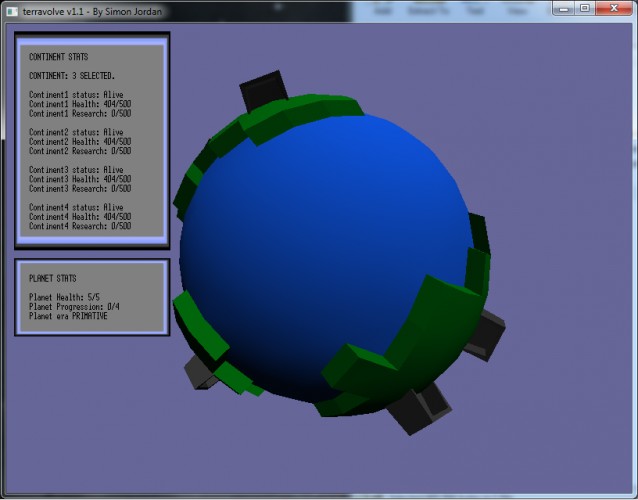
Game Summary: terravolve is a game whereby the player must manage the technological advancement and health of continents on their planet to ensure the planet progresses through ages.
in terravolve the player must balance time and resource management to avoid the destruction of the planet as the planets health gradually falls.
Can you evolve your planet beyond a space faring culture? Do you have the skill and patience to succeed?
Something I learned from my first ludum dare is that most people don't want to have to read pages of statistics and rules to play, they want to jump in and go. Although I personally thought this was rather cool and one of the most original ideas I have played so far.
This would really benefit from having the health/research levels presented in the map space, rather than in a GUI, I think. Perhaps you could do it by colour somehow? As it stands it's really hard to firstly notice which continents are in danger and secondly map continent numbers to continents on the map.
I do like the visual style, though, and the message behind it is good!
In game, I found it really difficult to control. I would use left ctrl to scroll around but every time I pressed it, the globe would jump and I would have no Idea where I was. Also, for some reason healing didn't seem to work. The continents health never went back up.
Nice, I liked the juggling element, although I had 2 issues: -Health for me is S instead of B -It was pretty hard to keep track of which continent is which, and the way the planet rotated added to the confusion (not sure if it's the speed or the general way it controls)
Could be expanded into something very interesting, perhaps making technology improvements affect each continent in a different way while keeping some of the fast-management sense.
Interesting idea but for me it became a matter of selecting a continent and holding A and S simultaneously until they had max health and research, then moving onto the next and repeating.
Unfortunatly I had so much trouble to recognize which continent is which that I couldn't enjoy it. The controls really made me angry. The basic idea is great, but the controls made it impossible to play.
It didn't really work for me. I was only able to select continent three. I also think that you would have been better off with using the arrow keys to rotate the planet.
Oh, and don't use directX10... to many people can't use it.
I installed mono 2.10 (mono-2-10-parallel-environment.deb) on my machine, but I can't seem to get it to run:
[terravolve]$ source mono-2.10-environment [mono-2.10] ~/ld24entries/terravolve @ wine terravolveGame.exe wine: Install Mono 2.8 or greater for Windows to run .NET 4.0 applications. fixme:msvcr90:__clean_type_info_names_internal (0x780b19ec) stub
Unfortunately the game is unplayable for me. I do not see the nice background box or the title text at all, and the black stat text overlaps the dark part of the planet, making parts of it impossible to read. The instructions, credits, and whatever 'O' shows do not render either - I get only a blue screen.
That's unfortunate BMacIntosh, I have had a friend test it on their machine and it worked fine. It might be a driver compatibility issue or among a numerous amount of other issues, I don't think there is much I can do however mate. I will look into it and see if there are any compatibility issues on the internet relating to D3D10 applications.
I thought it was a cool idea but I found it difficult to navigate and find the continent I wanted to save, maybe making the buildings disappear off of a continent when it dies? Or having a label saying which is which?
Maybe I'm just bad at navigating spheres the way I want to...I personally would have preferred arrow keys to rotate left/right or up/down
I couldn't play because it said I didn't have d3dx10_43.dll :( I'm sure it would've been fun though. Maybe next year you could make something more compatible. :)


Comments29
First it says "d3d10.dll" is missing, i've downloaded that.
Then "d3d10.dll", same
Lastly, error on "memmove_s" on mscvrt.dll
I'm running Windows XP 32 bit.
I do like the visual style, though, and the message behind it is good!
In game, I found it really difficult to control. I would use left ctrl to scroll around but every time I pressed it, the globe would jump and I would have no Idea where I was. Also, for some reason healing didn't seem to work. The continents health never went back up.
-Health for me is S instead of B
-It was pretty hard to keep track of which continent is which, and the way the planet rotated added to the confusion (not sure if it's the speed or the general way it controls)
Could be expanded into something very interesting, perhaps making technology improvements affect each continent in a different way while keeping some of the fast-management sense.
Oh, and don't use directX10... to many people can't use it.
Other then that, I like the idea and the 3D graphics was nice.
I installed mono 2.10 (mono-2-10-parallel-environment.deb) on my machine, but I can't seem to get it to run:
[terravolve]$ source mono-2.10-environment
[mono-2.10] ~/ld24entries/terravolve @ wine terravolveGame.exe
wine: Install Mono 2.8 or greater for Windows to run .NET 4.0 applications.
fixme:msvcr90:__clean_type_info_names_internal (0x780b19ec) stub
This is a Windows 7 64-bit laptop with DX11.
Maybe I'm just bad at navigating spheres the way I want to...I personally would have preferred arrow keys to rotate left/right or up/down
:( I'm sure it would've been fun though. Maybe next year you could make something more compatible. :)