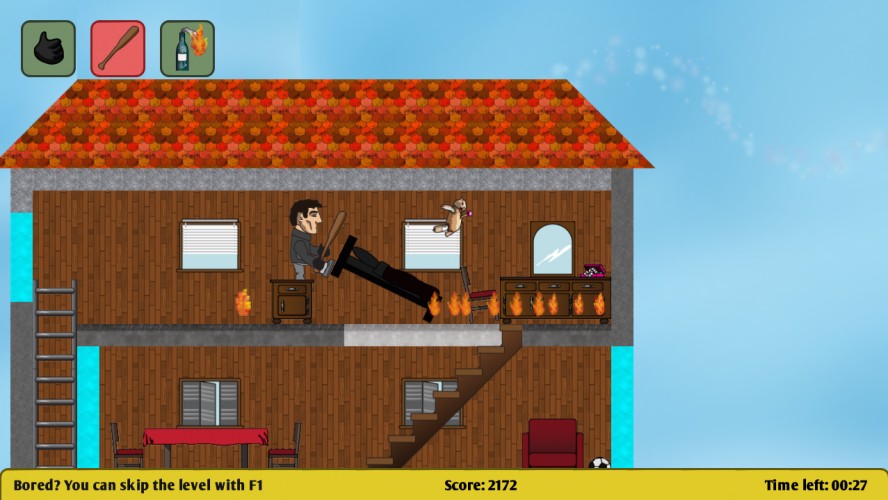
You considered yourself the Prince of Thieves, never getting caught, always slippering through the net of the cops... Until one day you fall into the trap of a sly dragon! The only way out it to accept his offer: work for him and help him gain more money and power.
His plan is very simple: if someone destroys the home of a citizen, his insecurity will push him to contract a new insurance! Therefore the more you destroy, the more money you will get at the end!
============
Controls:
Mouse: look around, control where you look & aim when you throw molotovs A/D: left and right movement W/S: climb ladder and ascend stairs space: jump shift: run Mouse left click: Use weapon Mouse right click: Kick 1,2,3: choose weapon esc: quit game f1: skip level
============
Controls (level editor)
I: insert an object at the mouse position Ctrl: remove snap while holding D: hold to duplicate an object Maj: select several objects at once 1,2,3,4: change the layer F1: load level F2: save level esc: quit level editor
You have to know the items' name in order to add them to the level, this can be easily found in the folders "assets/items", "assets/tiles", "assets/props".
Not a bad game, but it is a bit frustrating trying to "break" the items with the baseball bat. Sometimes they fly across the room, most of the time you just get a "hit" sound.
All the people talking about bugs: can you be a bit more precise? I think the most annoying thing is that you can get into platforms if you move left/right on a ladder that's close to a wall.
Another annoyance/bug might be the way the stairs work, what didn't help is that I didn't tell my level designer not to stack stairs directly on top of each other, which makes it really hard to have wtf-y behaviours...
Anyway, thanks for the feedback but when you say "broken platform engine", "too many bugs", please post more details about exactly what was bothering you. Thanks!
@csanyk: You have to use the mouse! The mouse controls where you look, the keys control where you go, just like in an fps :) That's also how you aim to throw molotovs :)
The opening dialog caught my interest, as did tossing flaming bottles of oil onto furniture. If you continue to develop this, I wasn't sure how I could clear a level and sometimes felt unsure how to deftly move through a room.
@bushmango There's not much I can do about this.. Chrome doesn't have an anti-malware built-in, it just says that when a file is "not commonly downloaded". It's on a server I own, and you can check it using any anti-virus/anti-spyware you want, it's 100% clean..
@hissssssssssss: What's your graphic cards? Do you have up-to-date OpenGL drivers? Also, can you try editing config/config.yml and set fullScreen to false?
@Spotlightor Gao: can you give more details? Where did you fall into the earth within the 2nd level? Doing what?
For the short amount of time we had to make our games, I'm very impressed with that you've got here. The graphics are clear and colorful, the dialogue is witty and funny! the theme that you have here is very cohesive and the game play is interesting. a bit of advice though should you want to pursue this project further.
I had a hard time with the control scheme- not that I didn't understand it, but I found myself gravitating toward old control scheme methods and expectations. For instance having the mouse control the direction the character faces as well as the camera made me a little bit disoriented.
I had a lot of fun whacking things, but I didn't understand what it is I did to trigger a 'win' for each level. I liked the controls and feel of the platforming - the bugs I encountered with it were that you could tap jump to climb up walls, and the player wasn't 'stuck' the ladder when using it, you could pull off to one side and get inside the ground. I moved down a ladder and kept going into the ground then popped right out into white space, but it triggered the level to complete. :D Great job on the art too, both quality and quantity.
I thoroughly enjoyed the bugs, actually. I was amazed at my teleporting skills:D
Seriously, this is a cool looking game, that needs some work done on the controls, playability, etc. I feel we can't fully see the potential of the game until you guys really spend time polishing that aspect of it. Still, it was an ambitious project and you've gotten pretty far considering the time!




Comments25
The graphics are good.
Another annoyance/bug might be the way the stairs work, what didn't help is that I didn't tell my level designer not to stack stairs directly on top of each other, which makes it really hard to have wtf-y behaviours...
Anyway, thanks for the feedback but when you say "broken platform engine", "too many bugs", please post more details about exactly what was bothering you. Thanks!
I'm running a Windows 7 32-bit PC.
@hissssssssssss: What's your graphic cards? Do you have up-to-date OpenGL drivers? Also, can you try editing config/config.yml and set fullScreen to false?
@Spotlightor Gao: can you give more details? Where did you fall into the earth within the 2nd level? Doing what?
I had a hard time with the control scheme- not that I didn't understand it, but I found myself gravitating toward old control scheme methods and expectations. For instance having the mouse control the direction the character faces as well as the camera made me a little bit disoriented.
Great game!
http://monosnap.com/image/63421EHPI24iHUp6jk01lYC7l
Seriously, this is a cool looking game, that needs some work done on the controls, playability, etc. I feel we can't fully see the potential of the game until you guys really spend time polishing that aspect of it. Still, it was an ambitious project and you've gotten pretty far considering the time!