Requires python 2.6 / pygame 1.9.1 . Apparently python 3.0 does not work with pygame (at least on a Mac). first time using pygame, so idk for sure
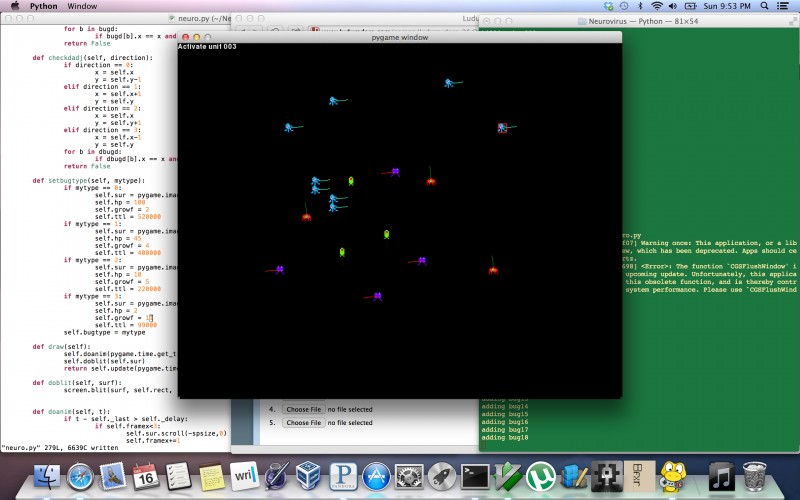
The game itself is sort of just a strange interactive art piece, since I ran out of time to make any actual way to win or lose. Press TAB to change between types of virus/robot/organism thingies and click to place them on the screen. Just place a couple and wait for about 15 minutes, and you should start seeing some strange patterns. Don't place too many because it may cause the program to crash. Don't leave it running forever either, because eventually it will crash because there is no limit on how many creatures can be created. Spits out a little debugging info to the console. Music was made in SunVox, sprites made in SpriteSomething for ipad, program coded in MacVim.
It appears python is needed to play the game and so you should not have a web link for this. "Web" implies being able to play your game from a web browser.
jerrre: I developed/ran it on Mac OSX Mountain Lion with pygame 1.9.1 for python 2.6 and python 2.6 installed. Theoretically it should run the same on windows/linux if you download the right version of pygame and python for your OS. here are the links:
Quarry: it's huge because it has a 3 minute long WAV file for the bg music
Joncom and Dark Acre: Thanks, removed. I listed that by mistake. The only way to run the game is to download the source and run it through python with pygame installed.
Tokija, The "Windows" label is for an executable file that people with Windows can double-click and play without having to install anything. The "Mac" label is for an executable file that people with a Mac can double-click and play without having to install anything. The "Web" label is for a version that people can just play in a browser, regardless of operating system. The only label under which you should be distributing straight Python files is "Source". "Source" means that you have to be able to run plain code files.
So right now, you're claiming that your code files are many things they aren't.
You've also made your game in a version of Python that most people aren't using. Which means that even Python programmers would have to install another version of Python to be able to play it.
Crowbeak: Thanks for the explanation, I removed the other links, and now just source appears. For some reason I didn't realize the field names were editable, so I thought windows at least was required. In terms of the Python version, I too, was sort of surprised about it, this was the first time I had touched pygame, and I had python 3.3 installed, only to realize that the only compatible Mac version of pygame that was all compiled and ready to go for my OS (Mountain Lion) was the one that supported 2.6. It seemed like there was a 32 bit version of pygame for 2.7 but I wasn't sure how that would work so I went ahead and dove into the 2.6 supporting version. If there is another way to do pygame for OSX for a newer version of python that doesn't involve compiling from source, let me know, that would be extremely helpful for future reference.
ceronman: Thanks a bunch! I'm going to try to learn some more about pygame and hopefully make some improvements on this, and hopefully try to finish my original idea for the gameplay at some point :)
Hmmm... very different, but hard to see exactly what was happening with the bugs and why. Cool music though :)
For next time, you might want to try pyinstaller, which creates EXEs for Python scripts. I used it for my Pygame entry in LD23, and my Pyglet one in LD25.
Comments15
Traceback (most recent call last):
File "neuro.py", line 1, in <module>
import sys, pygame, math, random
ImportError: No module named pygame
http://www.python.org/download/releases/2.6/
www.pygame.org
Quarry: it's huge because it has a 3 minute long WAV file for the bg music
Joncom and Dark Acre: Thanks, removed. I listed that by mistake. The only way to run the game is to download the source and run it through python with pygame installed.
So right now, you're claiming that your code files are many things they aren't.
You've also made your game in a version of Python that most people aren't using. Which means that even Python programmers would have to install another version of Python to be able to play it.
ceronman: Thanks a bunch! I'm going to try to learn some more about pygame and hopefully make some improvements on this, and hopefully try to finish my original idea for the gameplay at some point :)
You should try and figure out how to do that before the next ludum dare, so that you know you'll be able to create a version that people can play.
For next time, you might want to try pyinstaller, which creates EXEs for Python scripts. I used it for my Pygame entry in LD23, and my Pyglet one in LD25.