So, like all of our games, graphics and polish are lacking, but the core mechanic is there.
Controls: WASD - set move direction IJKL - set attack direciton Space - end turn early Q/E - previous/next unit R - go to build mode F - go to unit mode
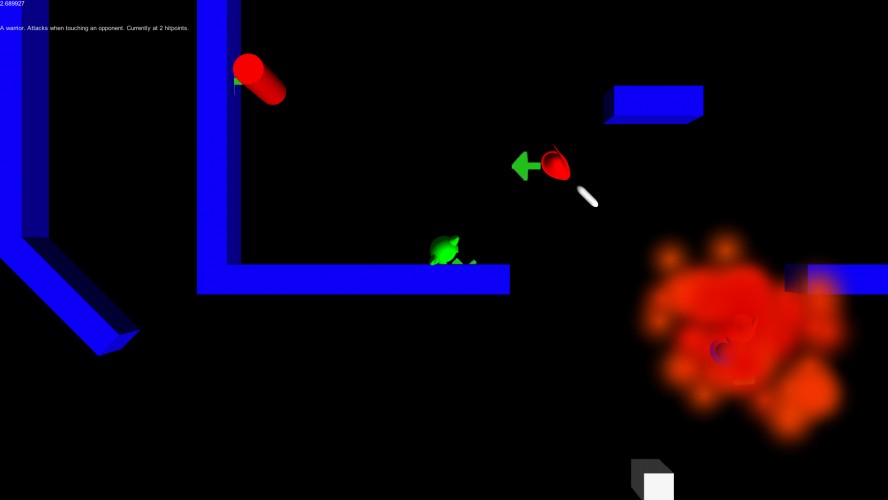
The idea is that you have 10 seconds to tell your units what to do. Once you're done with that, they'll begin to carry out the actions given them. As they're working, your opponent will plan his moves. After he finishes, you'll go back to your planning phase while his units move.
There are three kinds of units: Warrior - attacks directly in front of him - melee range Ranger - attacks in a straight line 10 units long Mage - attacks in a diameter 3 circle centered on him
By going to build mode, you can construct more units by pressing the appropriate WASD key.
Please note that we cannot vouch for the integrity of builds on OSs other than Windows - we're trusting what Unity has told us.
Programming by Gidaio and bowlercaptain, art by bowlercaptain, and 3D models by Gidaio using Blender.
There is an accompanying "_data" folder on the google drive page. I don't know why Unity doesn't bundle it in with the executable. For Modding and patching purposes, perhaps?
Cool idea but I wish it had some type of simple AI to fight against as playing by myself isn't ideal haha Solid game in every other regard though. Good job guys!
Something appears to be wrong with the "Win64" package. It seems to have the Linux files mixed in. I was able to get the Winx86 version working, though.
The concept is neat, but for a two player hotseat game I think it needs a pause screen at least, so that the players can switch controls in a reasonable amount of time and to have a better idea whose turn it is.



Comments11
There should be 'ToWarWin_64_Data'
folder next to the executable
Gidaio cant play this my windows system Not sure how to fix this
"There should be
'ToWarWin_64_Data'
folder next to the executable"
This was a Unity game? No? You must include the Data file for this to work.
The concept is neat, but for a two player hotseat game I think it needs a pause screen at least, so that the players can switch controls in a reasonable amount of time and to have a better idea whose turn it is.