I can't think of a idea for the theme, but I still want to make a game. So I decided to dig an idea that has been in my notebook for a while but I didn't have the time to make.
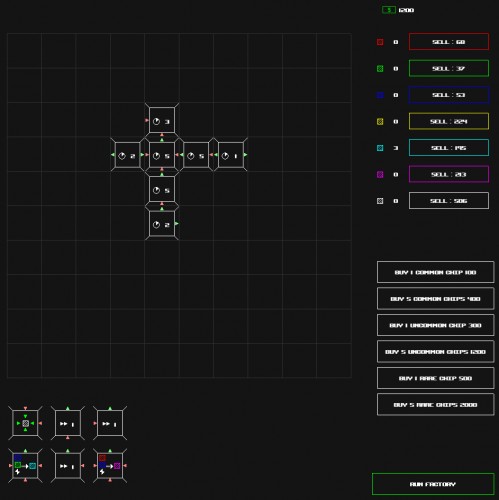
In this game, you are making a factory to produce Pixel.
Q/E : rotate anticlockwise/clockwise Space : Run the factory once.
Sell the Pixel you get for money, and buy more chips to produce more factory.
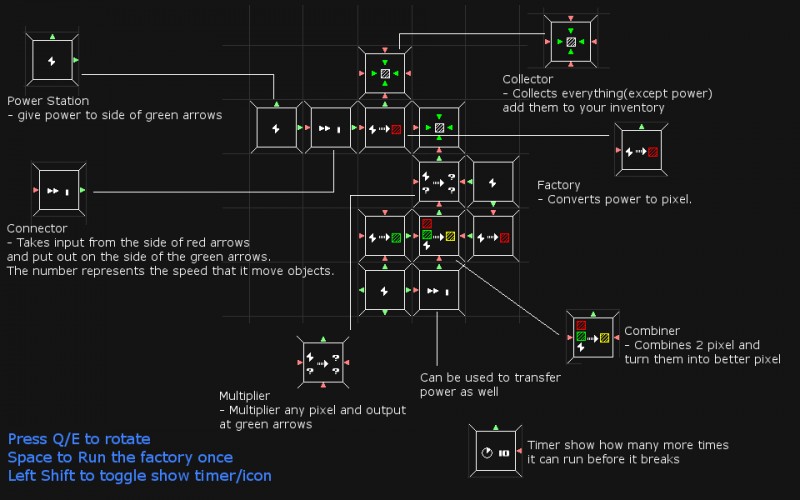
There are 6 types of chips. PowerStation : denoted by the lightning sign. This provides power to those chips that needs power. Factory : converts Power into a pixel. Connector : denoted by 2 arrow and a number. The number represents the number of object it can transfer per iteration. It also can be used to transfer power. Combiner : combines 2 pixel to form another. Requires power. Multiplier : multiplies any pixel into 2 pixel. Requires power. Collector : collects any pixel that is transferred to it which allows you to sell them.
Each chip will have 4 sides. A red arrow is a input side, and a green arrow is a output side. The chip can only take things from the input side and will only output to the output side.
To place a chip, select it from your inventory at the bottom area, and click on the grid at the top. You can rotate by press Q or E.
Chip will be destroyed after certain number of turns. You can see the time left every few seconds on the chip.
There is maximum number of chips you can hold at one time (16). If you have more than 16, any new chips is automatically discarded. So use the chips before buying more.
Rarer chips have more input sources and sometimes last longer.
If there is any question just post it here. I will answer them later.
Note : 1. I wanted to add a tutorial/help screen but it is 5am and I think I am dying from exhaustion. I (might) add it later after the compo. 2. I know this is not done according to the theme, so feel free to rate me down for the theme category. However, please give feedbacks :D that is more important than the score. 3. If you run the windows version and didn't see anything, try to set the screen resolution to be more than 960, the size of the game is 960 x 960. If it can't work, please let me know so I can fix it. 4. If you intend to run the mac version, please run it from terminal, otherwise it can't find the images.
I think this is a good start. It needs more work, but it could be a very good game. Right now, the player is just doomed to lose out on money, and it would be nice if I could manually switch between shoing what a tile does and how many turns it has left instead of it just swapping back and forth on a timer.
It works for me on Windows 8. But it was incredibly difficult to understand at first, even after reading your description. After about 5 minutes of trying to make sense of it I was able to make a working machine, but I quickly found myself running out of money due to the poor chip draws. A game like this really needs a tutorial!
Thanks for the feedback. I really wanted to add a tutorial but hooking up the system takes more time than I expected :X I will make a screenshot tutorial in a bit. =)
I know it takes a while to understand =X but when you understand the concept, the game will be interesting and rewarding :P
Sorry for those who can't run. I made this primarily on osx and didn't really build it on windows until the last minute.
I will change the variable for starting cash/price to be read from file instead and update the exe again =)
I have updated a new version with some fixes. If the game is too hard, you can adjust the config file to give yourself more money by modifying the last value. If it is still too hard, you can modify the other 3 values which are the basic selling price of the different pixel.
The second image is kind of a tutorial/guide. Look at it if you don't understand.
X
X-0r16 Dec 2013, 10:35
Running Win7, works without problems.
Nice mechanics =) I believe the timer is too short, you can't really maintain any resource flow... Replacement parts (even if not the same, could swap a duplicator with a part forwarder and get *some* output) are just generated by chance... I'm sure that you could take the game really far, just because I can't gain money here after 5 tries doesn't mean it's impossible ^_^
I just realized that OSX I need to bundle it up into ".app" and I have never done that before. I have always used clang++. I will try to do it when I wake up.
At first I closed the game because I did not understand it, but later when I tried again I got the hang of it and I like the idea of this game! I am inspired! :D next time some tooltips would be helpful though :P Also, you could have made this into the "you only got one" theme by limiting the player with 1 minute or 1 quarter of an hour. or by adding a story that you have a mean boss and he tells you that you only have 1 "day" to make profit for the company, otherwise you are fired.
Thanks for the positive feedbacks :D. I had this idea when I was playing space chem a year ago. I didn't want to reinvent the wheel so i put it in my notebook. I couldn't find any thing to make in this 2 days so I went to my note book and see which one I really want to make. I'm glad that I made it.
The idea is really great! I would love to see this with a faster timer. I'd rather see some power or pixels wasted, than waiting so long for something to happen. Turning parts would also be nice since you need some luck to get a working combination. I'm sorry if I didn't get something, that would change the experience :-[
I'd love to see a post compo version of this, since the mechanics are really cool! Keep on your good work! :)


Comments27
I know it takes a while to understand =X but when you understand the concept, the game will be interesting and rewarding :P
Sorry for those who can't run. I made this primarily on osx and didn't really build it on windows until the last minute.
I will change the variable for starting cash/price to be read from file instead and update the exe again =)
For those that still can't run, let me know =).
Nice mechanics =) I believe the timer is too short, you can't really maintain any resource flow... Replacement parts (even if not the same, could swap a duplicator with a part forwarder and get *some* output) are just generated by chance... I'm sure that you could take the game really far, just because I can't gain money here after 5 tries doesn't mean it's impossible ^_^
'Library not loaded: @executable_path/../Frameworks/sfml-graphics.framework/Versions/2.1.0/sfml-graphics'
I would love to see this with a faster timer. I'd rather see some power or pixels wasted, than waiting so long for something to happen.
Turning parts would also be nice since you need some luck to get a working combination.
I'm sorry if I didn't get something, that would change the experience :-[
I'd love to see a post compo version of this, since the mechanics are really cool!
Keep on your good work! :)