This is a game where you mine down below the surface of the earth. Try to dig up diamonds!
Using Tools
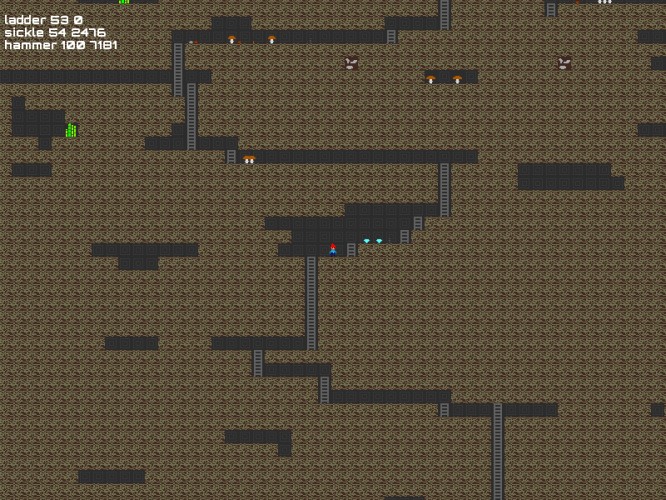
Each of your four starting gnomes has a different tool. The pick can be used to mine, the sickle can be used to harvest, the ladder can be used to climb back up, and the hammer can be used to craft more tools. Press X to pick up a tool (or resource) and C (or C with an arrow key to specify the direction) to use it. Tools wear out over time. Each tool has 100 charges in the beginning. Mining ore or diamonds wears the pick down faster.
Crafting
In order to craft, pile up the crafting ingredients in one place and use a hammer. If the available ingredients form a valid recipe, they will be transformed into a tool. If there are more raw materials around than you need, crafting will fail. These recipes are possible:
The current food energy level of each gnome is shown at the top of the screen. If the energy level falls below 20, it can not use tools. You can increase energy by eating food (pick up with X, eat with C). A hungry gnome automatically eats any food he finds next to him until he is no longer hungry. The initial energy level should last for five minutes.
Loops
You can automate complex tasks by giving a gnome looping instructions. Press R to record an instruction sequence, then give your instructions, then press again to start the sequence. Controlling a gnome again stops the loop. You can switch to other gnomes with J and K while a loop is executed.
How to run the game
There is a tarball for Linux that contains all dependencies except python and pygame, and a .zip for Windows with an .exe file that you just need to double click on.
Thanks for including dependency install instructions for Ubuntu! I also had to run: sudo pip install pytmx
I found the mechanics of the game to be a bit overwhelming. A few things about the interface made it easy to lose track of what was going on, particularly the tiny pixel art and the lack of highlighting as to which gnome was currently selected. I was barely able to coordinate myself enough to dig down a couple squares and harvest a mushroom before my gnomes starved. I can't even imagine getting enough supplies to craft. So, I'm lost but at the same time I'm impressed at everything you were able to work in. I tried recording some actions just to see if it worked and it does. That's pretty cool!
I have added a --big command line switch so you do not have to strain your eyes on the tiny pixels. I think this counts as "porting" to high DPI screens.
The recording feature is very cool, and I'm sure there's a game that could be made just out of that somehow, I like the gnome sprites and the fact that they all have their own jobs. Seems a bit lacking in goals at the minute though.
It's a cool little engine and crafting system you have. The game does kinda lack a goal/purpose though: you can get to diamonds pretty easily, which I'm guessing are for more durable tools, minecraft style- but you can't really build anything, just seems pure mining.
This is a very cool idea and good implemented, but the Game would need a tutorial to be fun from the beginning. I read through the instructions several times before I understood what to do. It is also difficult to understand what needs to be done and what the resources are. Some sounds would also be nice. Keep on the good work there is a lot of potential for a good game.
Just a little over 600 lines of code (not including libraries) ! Sure, there are a lot of little touches that would make this more approachable (I agree gnome highlighting would help, and maybe different coloured hats), but what you've got is pretty cool. I played the OUYA version, worked well. Without reading the instructions here I figured out about half of it (but not how to properly craft or record), then went back and played again knowing what to do.
Another pygame user! Pro tip for next time, most people don't want to install python/pygame, but you can freeze the .py file to an executable, look for infos about the module cx_freeze. (works for python 3.3, not 3.4 yet) As for the game, it's alright, good ideas, but I got tired fairly quick to always switch and the very slow progress, maybe using the mouse for controls would have been better.
The window is detected as unresponsive while it is generating the map, it could probably do it a bit at a time (generate an n x n block and then if elapsed time is large, wait for another update frame) so that my computer doesn't ask me if I want to close it.
I also don't fall when I walk into walls, it just sort of leaves me hanging. I thought that my tools would break when the timer reached 0, but now I assume that is hunger since it went up when I ate a mushroom. However, it is 0 for one guy and he doesn't look dead. (I guess he can't use his tool though)
Dropped resources are stacked on the same spot, so the difference in one and three wood is invisible (I also didn't realize for a while that I could pick stuff up other than tools)
It would help a lot if the status information for the selected dwarf was highlighted.
I saw some instructions in game so didn't bother to read the description here after reading crafting recipes, so I missed out on the recording controls. The game is very tedious without recording. Even with recording, if I automate a guy digging and a guy placing ladders, I still have to bring the other tools over or collect the resources manually.
The concept is cool, but the current interface/implementation is a bit awkward.
Since I seem to be commenting a lot, it would be nice to save recordings as presets (R to begin recording, 1 to save it as preset 1, then later I press 1 and it plays it) Then I could make a dig or walk or whatever presets I want.
Looks neat, and when I read about the loop mechanicsm and the teamwork aspect, I was really excited, but ... I can't use the tools :( 'Press C+ direction', what i'm doing wrong ? Is this a bug?
Wow, that's a great concept! First thing I did was to send my pickaxe gnome down below in a series of zig-zag tunnels. By the time I was able to catch up with him with my ladder gnome, he already used up his pickaxe and was stuck down below, eventually with 0 food. I managed to feed him and other gnomes but the problem is I have no iron now to craft a pickaxe. Would be nice if there were a way to craft a pickaxe without actually having one. Although maybe that would be not enough hardcore. Will play more for sure, I love the looping mechanics!
In love with your tiny sprites and underground mushroom world. My wish is for every action to have a visual cue, so I can swap, craft and record effectively.




Comments18
I found the mechanics of the game to be a bit overwhelming. A few things about the interface made it easy to lose track of what was going on, particularly the tiny pixel art and the lack of highlighting as to which gnome was currently selected. I was barely able to coordinate myself enough to dig down a couple squares and harvest a mushroom before my gnomes starved. I can't even imagine getting enough supplies to craft. So, I'm lost but at the same time I'm impressed at everything you were able to work in. I tried recording some actions just to see if it worked and it does. That's pretty cool!
I may be a bit biased to say this is a very good game, while my entry is pretty close to it :-)
I read through the instructions several times before I understood what to do. It is also difficult to understand what needs to be done and what the resources are.
Some sounds would also be nice.
Keep on the good work there is a lot of potential for a good game.
As for the game, it's alright, good ideas, but I got tired fairly quick to always switch and the very slow progress, maybe using the mouse for controls would have been better.
Dropped resources are stacked on the same spot, so the difference in one and three wood is invisible (I also didn't realize for a while that I could pick stuff up other than tools)
It would help a lot if the status information for the selected dwarf was highlighted.
I saw some instructions in game so didn't bother to read the description here after reading crafting recipes, so I missed out on the recording controls. The game is very tedious without recording. Even with recording, if I automate a guy digging and a guy placing ladders, I still have to bring the other tools over or collect the resources manually.
The concept is cool, but the current interface/implementation is a bit awkward.
Then I could make a dig or walk or whatever presets I want.