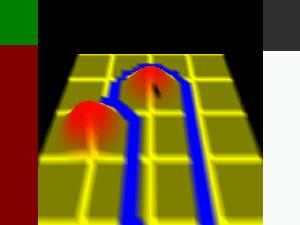
Written by R. J. Patenall for the 3rd Ludum Dare 48h game contest.
The objective of Fluid Control is to get the fluid that appears at the top of the playing area into the white marked areas but not the black marked areas (these are normally around the edge of the playing grid). This is done by raising sections of the playing grid to divert the fluid around.
The screen layout
In the center of the screen is a view of the playing grid. The view of the grid can be altered by holding the Shift key and using the cursor keys and the PgUp and PgDn keys. Also on the playing grid you can see a flashing cursor. The cursor can be moved with the cursor keys, scrolling the viewed section of the playing grid. The playing grid under the cursor can be raised by pushing the PgUp key.
As you raise sections of the grid you will see the bar on the right decrease. This bar shows how much of the playing grid can be raised; when it reaches zero you can not raise any more.
Once you believe that the fluid will get into the white areas on the playing grid, press the space bar; this will release the fluid. As the fluid reaches the white areas the bar on the left of the screen will increase. To win a level this must reach the green area.
Notes
There are only a few (3) levels but I've cheated to make nine levels, as there is less ability to raise the playing level 4 compared with level 1.