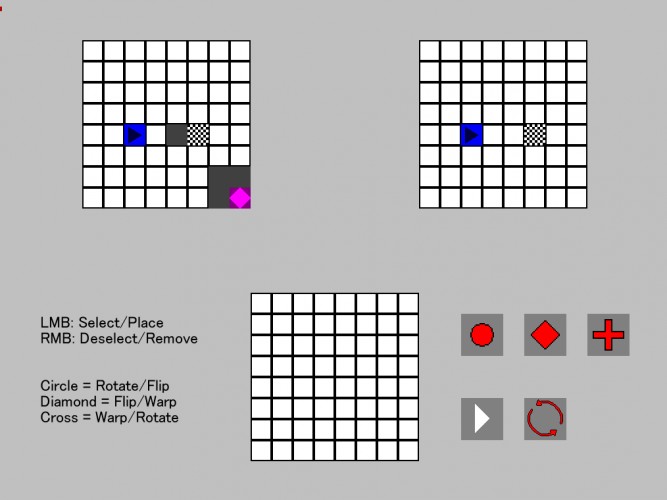
Solve a puzzle across two different parallel and connected worlds. You can place shapes onto the bottom "control" grid in order to add them to BOTH worlds. Each shape has a different effect in either of the worlds. The objective is to get the arrow to the goal by placing shapes onto the grid that affect its movement in different ways.
Select a shape by clicking its corresponding button at the bottom-right of the screen. You can deselect a shape by clicking on its button again or right-clicking anywhere. Without a shape selected, you can remove shapes from the control grid by right-clicking on them. Clicking the play button will spawn the arrows, clicking the stop button will remove them. Clicking the reset button will remove all placed shapes from the control grid. Editing is only enabled whilst the arrows are unspawned.
Shapes placed onto the control grid will not manifest in a world if there is already an object occupying that space. This includes the start and goal points, walls, and teleporters. The arrow can only warp if there is a teleporter located in its world. Else, it will do nothing and continue past the shape that is telling it to warp.
Game created using Game Maker Studio Sound effects created using sfxr adoldev.tumblr.com
A fun little puzzle game with a surprising amount of depth. Well done. The one thing which is lacking are clearer instructions one each of the separate shapes.
Very cool, finished all the levels! The "warp if possible" mechanic was a great addition. I thought the UI was fine, although I didn't understand at first where to place things.
At first I didn't understand where to put things and what they do, then I noticed help in the bottom-left corner ;) Great entry, I like this puzzle the most from all entries I played so far on this LD. Great job!
Comments18
Could definitely have used a more lively user interface.