*POST CONTEST UPDATE* I appear to have fixed the bug that broke the gameplay mechanic. You should now be able to take a photo and display it on the polaroid in slot 1. Let me know if you have any problems. I will be continuing development on this project because I'm having fun with it!
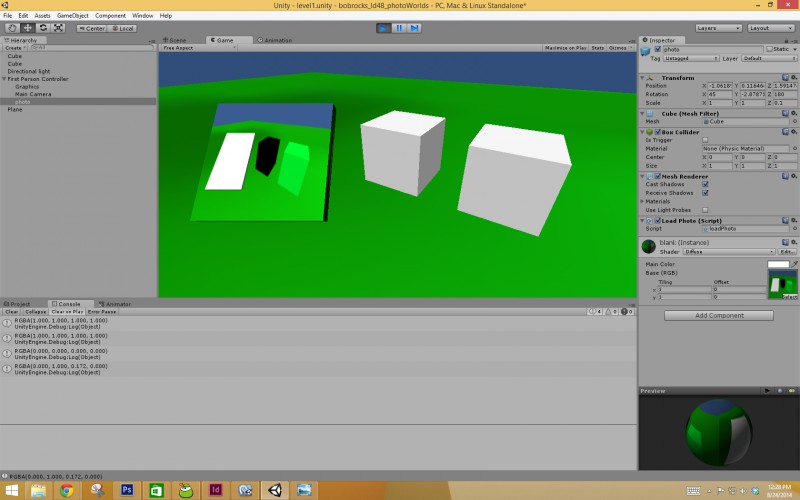
PhotoWorlds is a puzzle game in which the player will solve puzzles using a camera. The player will photograph and area to find clues hidden in the Photo World (White blocks become green, hidden passages are revealed, etc). I had some time constraints so I do not feel I will be quite where I want the game to be, but I am happy with what I have so far and will be continuing development after the competition!
I had a blast with my first ludum dare competition! I didn't get ANYWHERE near where I wanted to be but my time was limited. I want to thank my wife who let me work most of the day today (our 12th anniversary!). She was very understanding, but is not about to let me slide on taking her to dinner! Good luck to everyone, I hope you all had fun!
I found out that part of the main mechanic for this concept (displaying the screen shot on the "poloroid" picture) is not working anywhere but on my dev PC. Sigh... oh well. I'll flesh it out and have some fun with it in my own time. Thanks for stopping by. Let me know if you have a different experience!
Interesting concept, but as stated in the public comment, the "view photo" feature doesn't work, so this isn't playable in its current state. I wonder what this could turn into with some polish.
V
ViliX25 Aug 2014, 03:52
Unfortunately it didn't work :/ Needs a bit more polishing.
Thank you all for stopping by! I wish I had something better for you to play! I enjoyed myself and learned a few things. Hopefully that will result in a better game next time!
I like the idea, that the pictures reveal things, but having found out that the brick were green, what then? plus I coudln't really get all the picture in view.. just part of it
Thanks for commenting alvarop and harko12. Alvarop, I've updated the .exe changing where the game is saving the screenshot. That seems to have fixed the issue that caused displaying the image to not work.
Harko12, That is all there is to it, unfortunately. I had limited time to put toward this and spent most of it just figuring out how to make this feature work. I will be continuing on the project, though. I like the idea and want to see what I can do with it. Thanks again to everyone who tried it out!
That's no good, FinnMacd! Thanks for letting me know. I'm not sure what is causing that. My cousin is having the same problem (He's the only one I know locally that is). I'm looking into a different way to store the "photos" in general. I really appreciate you giving it another shot!
bobrocks, sorry for the past comment, It was writen by a rockie of the team. It think that it has a lot ot merit trying to do different kinds of games and working in a LD is always very difficult and stressing. Keep improving and doing original games! ;-) .javifugitivo.
Ikr: Thanks for trying. I did recently fix it, glad you like the concept. I will be working on it more as it seems it wasn't a 48 hour concept (for me, anyway!).
FinnMacd: Thanks for trying again. I'm not sure why it is working on some systems, but not others. I'm glad you got to try it out and I will post about updates here!
MechanicMoon (javifugitivo): Thanks for clearing that up. I understand how it is and thank you for the compliments!
Interesting concept. It could make for some tricky puzzles if the player had limited amounts of film. It was fun taking a bunch of pictures and seeing them stack on top of each other.
The concept seems interesting, too bad it's unfinished. Also, some Unity-specific things to change:
- The sky color should be something other that the default blue. - The standard MouseLook that comes with Unity is terrible, you should use something else (I like this one http://forum.unity3d.com/threads/a-free-simple-smooth-mouselook.73117/) - function Update() { Screen.lockCursor = true; }
If you manage to complete the game, it could be very interesting.
Well I took some photos of objects which had different properties in real and photo worlds. Is that all? I want more, it can be a great game!!! Don't stop now ;P
Look really good, innovative and good take on the theme, but it is kinds confusing and has no sounds, but I beleive it can go better if you continue developing it! :D

Comments31
Sorry :(
I'm sorry I couldn't really play your game, it doesn't work under wine either :(
Harko12, That is all there is to it, unfortunately. I had limited time to put toward this and spent most of it just figuring out how to make this feature work. I will be continuing on the project, though. I like the idea and want to see what I can do with it. Thanks again to everyone who tried it out!
I'd love to see where you're taking this intriguing concept :)
.javifugitivo.
FinnMacd: Thanks for trying again. I'm not sure why it is working on some systems, but not others. I'm glad you got to try it out and I will post about updates here!
MechanicMoon (javifugitivo): Thanks for clearing that up. I understand how it is and thank you for the compliments!
- The sky color should be something other that the default blue.
- The standard MouseLook that comes with Unity is terrible, you should use something else (I like this one http://forum.unity3d.com/threads/a-free-simple-smooth-mouselook.73117/)
- function Update() { Screen.lockCursor = true; }
If you manage to complete the game, it could be very interesting.