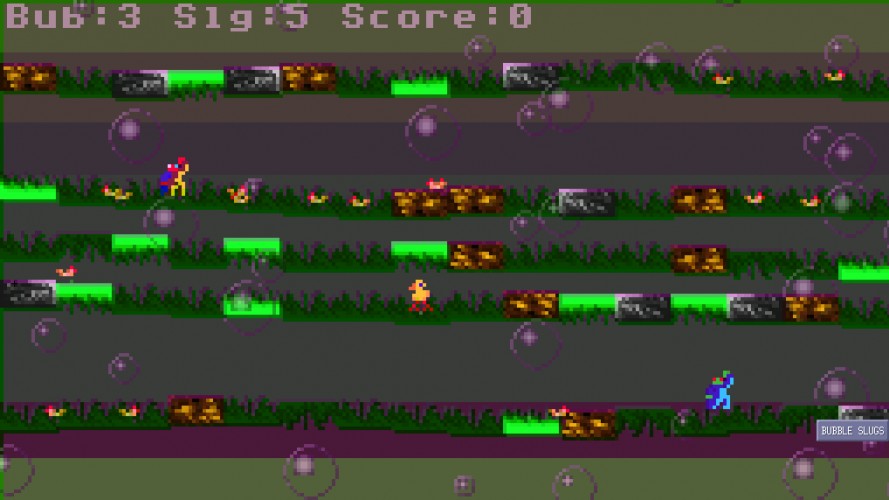
Some one was mean to you at school so you have decided to use your Slug Gun to destroy their Lettuce Garden.
Left Mouse (keep the button down instead of clicking) - Click on Bubble to collect it - Click on Slug to collect it - Click Helpers to spawn Bubbles and Slugs
Right Mouse - Click on a Chicken trap it any Bubbles you have. - Click on a trapped Chicken will make the bubble stronger (and cost a bubble). - Click on Left / Right Edge (Highlights Green) to Fire Slugs you have.
Once all the Lettuce has spawned and has been eaten you will progress to the next level.
NOTE: This is a JAVA Application so download the current version and install it from Oracles site if you need too.
General idea is to collect Slugs and Bubbles while waiting for Lettuce to spawn. Once the Lettuce has spawned you trap the Chickens and spawn your Slugs accordingly (till all the Lettuce has been eaten).
If you run out of Slugs or Bubbles the helpers are there to get more.
It is a small entry (that took a while to get momentum). Didn't make a start screen so the game just starts at Level #1.
Made all the Music, Pixel Art, and Code (minus libs).
Enjoy your unconventional weapons Bubbles and Slugs! :-)
-----------[ Technical ]---------------------
Windows: run_game.bat - to run on Windows run_game_slow.bat - if is a bit fast for you
Mac: run_game.sh - to run on Mac (NOTE: music will probably not play). run_game_slow.sh - if is a bit fast for you.
Nix: run_game.sh - Maybe? run_game_slow.sh - if is a bit fast for you.
Command Line Arguments ---- level: 1-8 delay: (slow it down if need be). cheat:chickens cheat mode
Example of level 5 running a bit slower and cheating java ld level:5 delay:20 cheat:chickens
-----------[ Unfixed Bugs ]---------------------- BUG 008: Music not playing on MacOS. BUG:009: Particle System not working.
-----------[ Fixed Bugs in order of fixed ]------------------ BUG 001: Loading outside Dev Environment. BUG 002: Level completion / Game completion not possible. BUG 007: Corrected invalid Config files. (font loading issue) BUG 006: Will not run on MacOS. BUG 005: Some spelling errors. BUG 003: Music does not loop. BUG 004: Slugs moving backwards. (Showing wrong animation)
Tried to run the game on OS X and got an error. ERROR: SpriteLoader.load_spr_imageio file does not exisit?
java.lang.NullPointerException at ce2.Font.init(Font.java:34) at game.GB.init_gfx(GB.java:167) at game.GB.run(GB.java:238) at java.lang.Thread.run(Thread.java:695)
I tried running it from the command line like you said but I just got a few file does not exist errors and a few others, I think its because I don't have a c:/_resource directory or a dev.bld file in the install directory
It' didn't run for me, here's the full console output:
ld32Game starting... ERROR: SpriteLoader.load_spr_imageio file does not exisit? doc_root = c:/_resource/Games/PocketRaiders/dev/media/image/fonts/console.gif EXCEPTION: GRTC stack... java.lang.NullPointerException at ce2.Font.init(Font.java:34) at game.GB.init_gfx(GB.java:167) at game.GB.run(GB.java:238) at java.lang.Thread.run(Unknown Source) load_sprite_list spr_list_loc:media/xml/game_mini.sprite.xml app_path: ERROR: load_music_tracks track #0[false].loc:ludum_32.ogg ERROR: Loader.load_game_config music tracks failed to load: media/xml/game_mini. ERROR: SpriteLoader.load_spr_imageio file does not exisit? doc_root = game/logo_mini.png EXCEPTION: Mini.pr_mini_init stack... java.lang.NullPointerException at ld32.ld32Game.bubble_slugs_init(ld32Game.java:78) at ld32.ld32Game.app_init(ld32Game.java:68) at game.GB.run(GB.java:238) at java.lang.Thread.run(Unknown Source) Stopping Application
Matt: Thanks for that. So Mac OS is out till I get a fix in, damn. BUG 006: added.
ianb96: What system are you using? (try the run_game.bat file if using windows). Both the dev.bld and debug.bld should not be there and are not required (just empty flag files anyway)
Creating a debug.bld file will make the game print debug information.
I am on Windows 8 64 bit, and when I run the run_game.bat file a window pops up with a command prompt, then both immediately close. when I add the debug.bld file nothing changes with the run_game.bat, but the running java ld from the command line is the same as ProjectX593's output but with some DEBUG FILE lines for sprite_list anim_list, gmae_logo, and so on. the line before the second spr_imageio file does not exist? error says Gameobjects.init
ianb96: Thanks! Hope you enjoy it! Completed it on delay:0 before, was not easy. Must fix the none looping music bug (app running in the first place was more important though and luckily not even code just some .xml).
Took me a while to understand a bit of what I was trying to accomplish and I had collected dozens of bubbles and lost all my slugs. Eventually finished the first level though. Maybe a super-basic intro level would be helpful?
Cool concept, I really liked the music. Had to open the ogg file in itunes since I'm on a mac so I could here it while I played. I'm glad I read the instructions first, I'm not sure I would've figured out what to do on my own. Fun game, nicely done :)
At first, I was quite lost on how to play the game with so many things moving around. After reading your description, the objective was clearer. I've realized there is no way to actually lose, which is alright since there are so much things moving around. Very interesting concept. Nice work!
jprogman: Thanks! yeah there is no way to loose but you do have to play the game to win the level. The chickens eat any free ranging slugs pretty quickly and also get "energized" after eating a certain amount of slugs making them even more challenging. :-)
I found quite interesting the idea of using bubbles and chickens, but found it a little confusing to play and not fully understood the goal of the game. the fact that they used simple blocks for the construction of the scenario is a total merit of creativity. Congratulations
rudra: Thanks. I am planning to make a better version (20 - 30 Levels and Custom Levels).
JDAivaliotis: The game is pretty fast (even the slow version). The idea is to collect slugs (save them up for the last few levels ), collect bubbles and trap chickens (do not click! keep both buttons down - see below). You collect more slugs via the left side helper while waiting for the lettuce to spawn. Once all the lettuce has spawned you trap chickens then use the slug helper to release a burst of slugs to get the lettuce. Difficult lettuce can be hit by right mouse clicking the sides after it lights up green, then any right mouse click launches slugs you have, careful though as you use them quickly. The launched slugs are very very fast and cover allot of screen space. Then you keep the chickens trapped by right mouse (down) on them to strengthen the bubble and they do not escape.
That is the long of it. :-)
elefantopia: It is better to keep both of the mouse buttons down than click. Then you pick up slugs / bubbles and also trap chickens at the same time (but do not go to the side edges of the screen and accidentally fire slugs).
Thanks guys. Have a draft Retrospective that will publish today.
A bit too much going on at once. Perhaps a tutorial level explaining the effects of each of your abilities would help. Felt like I was winning by just clicking at random.




Comments30
Bad Bug in level completion code that needs to be fixed so the first level is not completable.
You can use command line args to see the 8 levels, example:
java ld level:3
Getting back to bug fixing.
The game can now be completed!
Please download and enjoy!
:-)
java.lang.NullPointerException
at ce2.Font.init(Font.java:34)
at game.GB.init_gfx(GB.java:167)
at game.GB.run(GB.java:238)
at java.lang.Thread.run(Thread.java:695)
ld32Game starting...
ERROR: SpriteLoader.load_spr_imageio file does not exisit?
doc_root = c:/_resource/Games/PocketRaiders/dev/media/image/fonts/console.gif
EXCEPTION: GRTC stack...
java.lang.NullPointerException
at ce2.Font.init(Font.java:34)
at game.GB.init_gfx(GB.java:167)
at game.GB.run(GB.java:238)
at java.lang.Thread.run(Unknown Source)
load_sprite_list spr_list_loc:media/xml/game_mini.sprite.xml app_path:
ERROR: load_music_tracks track #0[false].loc:ludum_32.ogg
ERROR: Loader.load_game_config music tracks failed to load: media/xml/game_mini.
ERROR: SpriteLoader.load_spr_imageio file does not exisit?
doc_root = game/logo_mini.png
EXCEPTION: Mini.pr_mini_init stack...
java.lang.NullPointerException
at ld32.ld32Game.bubble_slugs_init(ld32Game.java:78)
at ld32.ld32Game.app_init(ld32Game.java:68)
at game.GB.run(GB.java:238)
at java.lang.Thread.run(Unknown Source)
Stopping Application
Thanks for that. So Mac OS is out till I get a fix in, damn. BUG 006: added.
ianb96:
What system are you using? (try the run_game.bat file if using windows).
Both the dev.bld and debug.bld should not be there and are not required (just empty flag files anyway)
Creating a debug.bld file will make the game print debug information.
Thanks! Hope you enjoy it! Completed it on delay:0 before, was not easy. Must fix the none looping music bug (app running in the first place was more important though and luckily not even code just some .xml).
Thanks! yeah there is no way to loose but you do have to play the game to win the level. The chickens eat any free ranging slugs pretty quickly and also get "energized" after eating a certain amount of slugs making them even more challenging. :-)
Thanks man, that is what I was aiming for.
mike.cullingham:
I do want to make a more fuller version at some point so will definitely add something like that.
rantt:
Thanks, been making music for a few years now, so much fun to do.
Sublustris:
Thanks. That is what I was hoping for! :-)
gene-z:
Thanks.
Snicklodocus:
Thanks. Did my best to make it feel old school. Coded "Sirius 7" on the Amiga back in the day. :-)
Thanks. I am planning to make a better version (20 - 30 Levels and Custom Levels).
JDAivaliotis:
The game is pretty fast (even the slow version). The idea is to collect slugs (save them up for the last few levels ), collect bubbles and trap chickens (do not click! keep both buttons down - see below). You collect more slugs via the left side helper while waiting for the lettuce to spawn. Once all the lettuce has spawned you trap chickens then use the slug helper to release a burst of slugs to get the lettuce. Difficult lettuce can be hit by right mouse clicking the sides after it lights up green, then any right mouse click launches slugs you have, careful though as you use them quickly. The launched slugs are very very fast and cover allot of screen space. Then you keep the chickens trapped by right mouse (down) on them to strengthen the bubble and they do not escape.
That is the long of it. :-)
elefantopia:
It is better to keep both of the mouse buttons down than click. Then you pick up slugs / bubbles and also trap chickens at the same time (but do not go to the side edges of the screen and accidentally fire slugs).
Thanks guys. Have a draft Retrospective that will publish today.