Eterlink

by aiaf
Overall★★★★★★★★★★2.50
Fun★★★★★★★★★★1.95
Innovation★★★★★★★★★★3.29
Theme★★★★★★★★★★2.76
Graphics★★★★★★★★★★2.57
Mood★★★★★★★★★★2.62
Coolness★★★★★★★★★★42%
Well its done.

Unfortunately i didnt have the time to make the help screen so here is the user manual. This is not user-friendly! Read if you want to play.

Game objects:

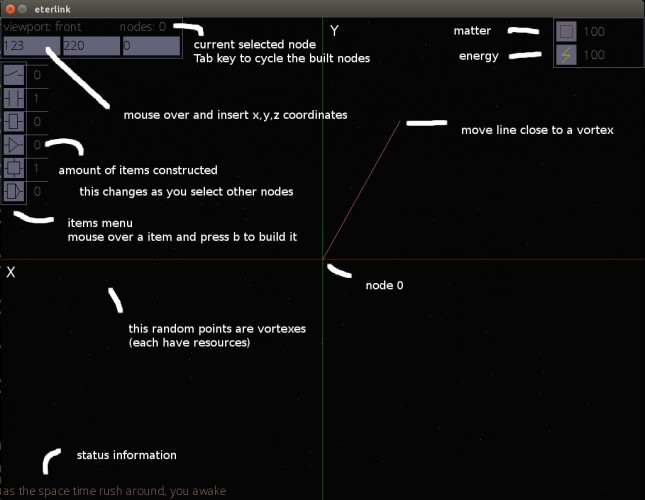
vortexes(the random points), nodes, links, items

resources: matter and energy , starts with 100 each

Game starts with one node at center of screen (coordinates 0,0,0).

Keys:

navigation

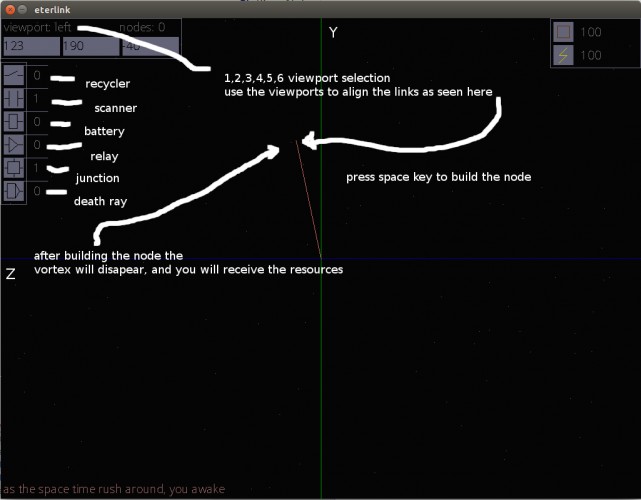
1 - view front

2 - view back

3 - view left

4 - view right

5 - view up

6 - view down

Mouse over the top left input box to insert coordinates (x,y,z)

For example input 150 70 0 to see how it works.

Change the view a bit, its a 3d world rendered on 2d screen.

From now on ill be refering to this lines as links.

move link into position then press Space key to build a node

Tab cycle selects the existing nodes.

On top left of the window "node: 0" means node with index 0 is selected.

For example after building the first node , Tab once to select node 1, mouse over the left menu to see what items are available to be build.

Use key b to build something.

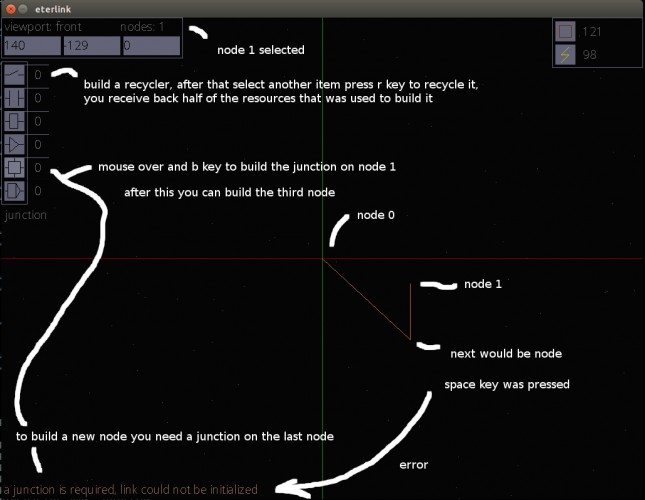
Build an recycler, once is available use the r key to recycle other built items

When you recycle something you receive half of the resources used at building time.You are unable to recycle a recycle item once built.

10 matter, 10 energy to build: recycler,scanner,battery,relay,junction

200 matter and 200 energy to build the death ray :)

To be able to build a node you need to have a junction on the last node.

When building a node you need it to be close to a vortex use the views (123456 keys) to align the link in 3d as close as possible.

This is one of the main game mechanics, the new link has to be placed near a vortex, after building the node it will increase the resources.

Scope is to build the death ray.

Death ray requires that the battery items build count to be greater or equal with the nodes count.

Second requirement is that the last node have a relay build.

Lots of features didnt make it but thats it,

Build for linux64 and windows with SDL2.

Comments14

jhell21 Apr 2015, 13:55
I really tried to play this, but what you describe in the readme here didn't work for me in game :(. Each time I managed to build a node (I think), and after I had the message "a junction is required" or something like that. It's a shame, it looked really cool. Tell me if you update the UI!
aiafauthor21 Apr 2015, 16:18
Sorry i think was me not writing everything in the help, ill update it.

Game starts with one node at center of screen (coordinates 0, 0, 0), node 0 is selected by default.
Tab key cycle selects the existing nodes.
In your case Tab to select node 1, mouse over the junction button on the left menu and build it (b).

Latest node must have a junction to be able to create a new link.

Hope this helps
mockthebear
mockthebear21 Apr 2015, 17:24
i cant insert the values, i dont know why o.o
aiafauthor21 Apr 2015, 17:29
hmmm , this should work on any graphic card with at least opengl 2
you can try and edit the configuration file eterlink.baf to make the game fullscreen

anyone else having this problem ?
Deal With It21 Apr 2015, 17:38
It was hard to understand for me(
Cryotube
Cryotube21 Apr 2015, 17:45
Feels like a graphing application :p
Not too clear on how to clear the game
track02
track0221 Apr 2015, 18:20
Sounds interesting but I can't figure out how to play.

I also had a problem inserting values, I tried your fullscreen suggestion but no difference.
vogon10121 Apr 2015, 18:22
Really tried to play it... cant figure it out but good concept
aiafauthor21 Apr 2015, 19:49
Problem with the mouse over is now fixed on windows, was not working because i linked an older version of a static library.

Sorry, all is working fine now.
Need to figure out how to make a better help.
terpin
terpin21 Apr 2015, 20:24
I just couldn't figure this out man. You may be able to patch this up a little bit since in its current state people are a bit confused. ON THE OTHER HAND, i love wireframes so that always gets an upvote from me :)
Shimmergloom22 Apr 2015, 09:56
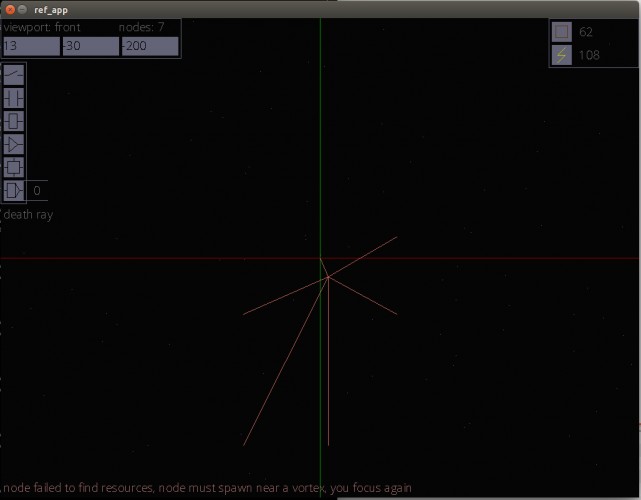
I tried really hard but I couldn't get it to work. Always getting that a junction is required. :(
aiafauthor22 Apr 2015, 17:32
Tab key selects the nodes.

In you case use Tab key, top left you should have node: 1
Mouse over junction in the left menu and press b to build it.

Continue like this to add more nodes.

It written in the manual, seems im not good at explaining :(
MonoS22 Apr 2015, 21:45
Ok, i tried, i tried very hard and this should be a thing http://abload.de/img/clipboard01u8utx.png

I had some problem understanding the position of a vortex in the 3d space, modern AAA games accustomed me to monodimensional environment.

Joking aside, mostly the control need some polishing.
Langouste29 Apr 2015, 16:45
Super Game! I love it ;) Thanks
Found a bug?
Tell us on Discord