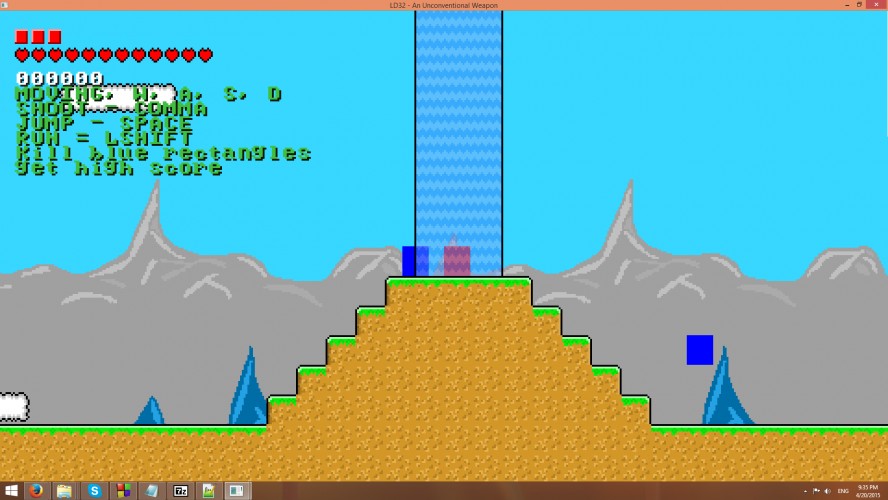
In this game, you are on an island, the goal is to shoot Blue Rectangles (yes, the graphics weren't finished) with your gun. You can switch gravity with the given powerups which spawn randomly around the map, same with enemies. Play till you die, get a high score. Post your high score in the comments if you can.
Controls: Movement: WASD Jump: Space Run: LShift Shoot: Left Click on Linux, Comma on windows The unconventional weapon is that you can kill you're self if you switch gravity and fall out of the map. NOTE: to run the linux version you need libsdl2, if you are using the apt-get package manager run: sudo apt-get install libsdl2-2.0-0
======== USING THE LEVEL EDITOR ======== to use the most useful features of the level editor, you need to run the game from a console, command prompt in windows, terminal in linux.
The level editor is not meant to be user friendly, made just so I could make a level for the game.
Once running from console, press F4 (in the game window, not console, the only time you use the console is when pressing 1 and 5) to enable the level editor, now you have more keys available.
Enemies and items should now stop spawning and you should see the spawn locations (where enemies and items spawn).
1 - Switch left mouse tile The game should freeze, this is normal. in the console you need to enter the layer and the tile id. (listed below), then you can place tiles with left mouse, and delete them with right mouse. 3 - Put down moving platform The type of moving platform is specified in 5 5 - Set type of moving platform There are a few factors that you will be asked: Width, Height (self explaining) Radius X, Radius Y (how far in both axis) Speed X, Speed Y (speed in both axis) Type (the type is the same as the tiles in the tile layer listed below) 0 - Delete entity, (this can be a moving platform, pickup item, or enemy) - (MINUS) - remove the entity spawner where the mouse is + (EQUALS) - add an entity spawner where the mouse is Page up and page down switch gravity
Layer 1 - Liquids: 0 = No Liquid 1 = Water 2 = Waterfall 3 = Lava Layer 2 - Tiles (moving platforms type variable uses this list): 0 = No Tile 1 = Dirt 2 = Grass 3 = Sand 4 = Metal 5 = Rock 6 = Dark Purple Brick 7 = Cloud 8 = Spikes 9 = Ladder ~~ 10 = Vine (planned, but NOT added) 11 = Sinking Sand (not used in the main map)
To save the level press ENTER while in level editor mode The game should make a leveledit.bin file, this is the map you have just created map.bin is the hardcoded file the game loads up as a map, so to play your new level again or give it to a friend, rename leveledit.bin to map.bin.
This is really good, and I had a lot of fun. I think just throwing in a few non animated sprites (even little pulsing circles) would have been nice, as I couldn't draw my eye of the very contrasting red squares. The rest of your graphics were so good too! The audio was good, and definitly added a lot of atmosphere too the game. The mechanic of the world switching was really fun too, although despite what you said in the description, I don't really see how close it is too the theme.
I really like this. It's good.
The small touches like the undenyable lava and water were cool, and the excitment of having enemies leap from the stars was cool.
Liked: - Graphics. They looked very nice and fit nicely with each-other. Gave the game a unified and polished feel; impressive for an LD game - Controls. They felt smooth and responsive. The physics was matched well to them. - The diversity of game objects. Water? Lava? Bouncy things? Moving platforms? COOL!
Disliked: - Didn't fit the theme. You used a machine gun (conventional), enemies were deadly to touch (gaming trope), and rotation-things aren't weapons. - The rotation-things felt unnecessary. They were easy to avoid, so they weren't a threat, and the level wasn't designed in a way that let you use them strategically.
Overall: Didn't really fit the theme, but looks nice and has an impressive amount of content!
Your work does have a lot of elements that can be turned into a nice platform game. Some glitches here and there, but I'm not too concerned about those. The rotation is a nice touch, but are usually in the wrong places. (I take it those are randomly placed.) Hope you'll continue developing this further.
Cool idea but the fact that gravity switching just kills you more often than not is pretty annoying. This would be awesome if the levels were more bounded & took more advantage of the gravity mechanic.
I loved the controls, very responsive and enjoyable. Also the gravitational changes that only affect your player, nice idea, and it also looks very well implemented!
The mechanics are great, the pacing too; the level design a bit less, enemies seem to keep jumping on me from nowhere and after some gravity switches many places become just unreachable… but with some carefully designed levels, it could become a great action game.



I really like this. It's good.
The small touches like the undenyable lava and water were cool, and the excitment of having enemies leap from the stars was cool.
Also, +1 cpp +1 linux.
Good job :D