Note: This entry was made in the last few hours of the Jam. So don't expect much :P
Every we check our various social and subscrition websites, but we are rarely exposed to new ideas or subjects that we may not be familiar with.
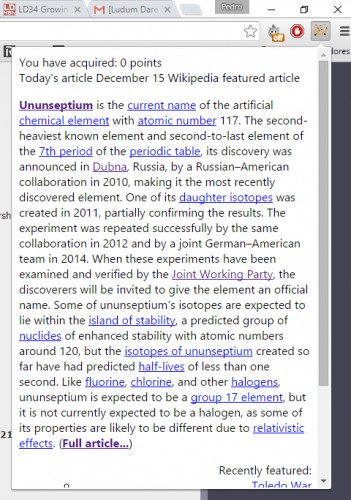
This extension counts how many unique wikipedia pages you visit (English only for now) and keeps the score. It also shows you the featured article of the day if you click the button.
Objective: Try to win as many points as you can (and learn of course), for each unique article you visit in en.wikipedia.org counts as point.
Any suggestion to make it more fun and interesting is always well received. I plan to update the extension once the Ludum Dare judging phase is over.
Installation Instructions for Google Chrome only (possibly Chromium too):
1) Download the .crx
2) Open the Extensions Tab (Tools -> Extensions)
3) Drag the .crx to the Extensions Tab
A word about security and privacy:
Privacy is a thing that I worry a lot, the extension operates only on data retrieved from wikipedia.org and wikimedia.org (for the wikipedia images). Also it only uses the hystory of your browser to check if a page's visit is unique or not.
Comments2
K
kanatohodets15 Dec 2015, 21:00
This is a cool idea, but I think the key to turning it into more of a game is a little more structure. Maybe more of a treasure hunt? Perhaps get some topics of interest from the player, do some quick link analysis on wiki articles and see if people can gather X articles about Y? Or perhaps "jump to random wiki page, discover why <insert some fact loosely associated with that wiki page topic>"

Keep it up!