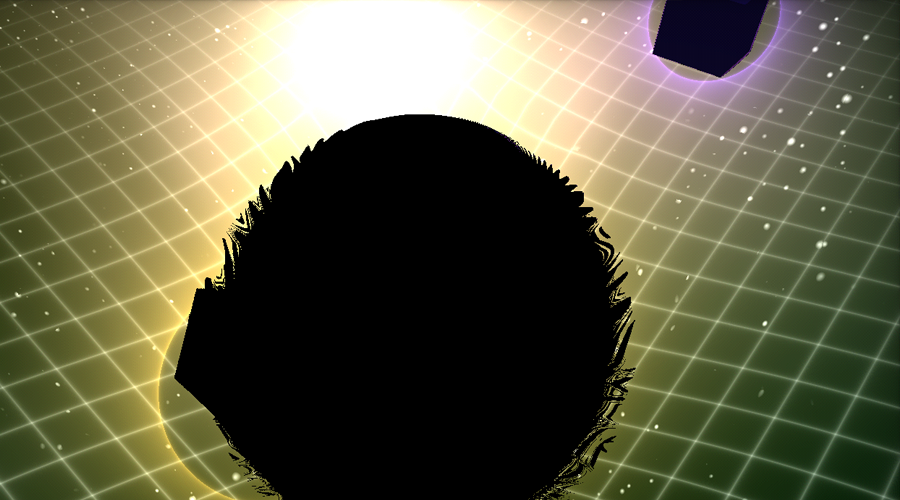
Edge Shift - Blackhole ----------------- The player must shift gravity and shape to match the particles from the black depths of another realm emitted from the aperture of a black hole. If the player doesn't reflect the shape, they will pulled into the darkness and pushed into another dimension.
Just touching elements from this other place triggers scenes from beyond space time.
Beware some shapes may look similar when rotating at high velocities. Don't be tricked!
---------------- How to Play!!!! ----------------- - Match the shape of the purple orb (player controlled) with the shape emitted from the blackhole. - You can change your shape by tapping W or S up and down. There are 4 shapes, Sphere, Hexagon, Prism and Cube. - Hold Down A or D and ramp up your orbit speed until you can collide with most if not all entities. - Challenge yourself to remember what shape you are and what you changed to as your speed increases. - If you are going too fast and forget what shape you are, hold down the alternate direction key to quickly slow down. - The higher the speed, the more score. ----------------
Controls: - W/S - Shape Shift - A/D - Control Orbit Speed / Direction (Hold one of the buttons down to Ramp up speed) - Mouse touch position to control camera - C - Credits on Screen - T - Next Dimensional Shader
----------------- Created by Dan Rosser (@danoli3) individually and coded in C++ with majority of the work being spent on OpenGL ES shaders and for the visual aesthetic. I curiously was in the end using my iPhone as my main test device due to it being really good at debugging and also uses OpenGL ES 2.0, even though my main target was WebGL via emscripten port (LLVM to JS compiler). Everything in the game is made programmatically. No 3d models, textures (aside from a Font) or sounds.
I did create sound effects and a background track myself as well, however ran out of time to properly master the sound quality / distortion effects, so I've left that out.
Touch Screen / iPad / Android / iPhone - Run the 900x600 version and tap 5 times on the center screen for Touch Screen Controls. You can hide the control UI once you get the idea (top left button).
Technical Web playing problems: - Gray Screen? - Try and use the Web URL rather than the embedded if you see a gray screen on LD site / clear browser cache / incognito tab may fix as well. Another fix add or remove www. from the url, seen this fix it! - No Keyboard command working? Try clicking on the center of the Game Window (click on the Black Hole), try again. - LAG? Performance issues? Try a Lower Resolution version of the game via one of the links. The shaders have a lot of Per Pixel work so higher the resolution, more possibility for lag on older systems. Try the 900x600 (same as live play above). - Windows 7 - White Screen? I'm not sure what's going on with that.
Looked lovely but quite hard to really play. Still, quite interesting to see this kind of thing actually "functioning" - most c++->web stuff I've seen has been a fiasco either in performance or compatibility (or both).
Sweet, I never thought I'd see anything made with openFrameworks in LD. I had a tough time with the camera at first - not sure if there's any advantage to moving it around really? I just locked it at the highest spot and played that way.
Yeah actually there's some camera automation code I turned off for the WebGL port, that takes the player to the top angle on game start... might turn that back on if camera was an issue @Gert! Cheers :D!
I did not succeed to start the game. The webgl context keep crashing when I click on the title screen. From the screenshot, the shader reminds me a lot of this shader from Inigo Quilez : https://www.shadertoy.com/view/llj3Rz But I don't see any credits for him. Have you really done this by yourself ? If not, you should at least credit the people that inspire you
Really cool graphics!! I think I'll look into openframeworks now!) The instruction dissapeared rather fast and I had to figure out what to do myself. I still don't understand if I really controlled something))
Blackhol Simulator 2016! :) The graphics are nice, I like the procedural look. Playing it is a bit hard, that is for sure, could not get more than zero point. But still nice. :)
Okay just updated to fix some minor issues with higher frame rates making the game impossible, 144hz peoples should be able to play now. Also now 1080p version listed. If you have issues with Framerates (f) to see, run a lower resolution version, there is a lot of per pixel stuff going on, so lower the res may be your best bet.
Interesting project and nice graphical stuff. It was a bit hard to get the outcoming shapes, because they fly on highspeed out of the screen. But i think i get the game idea.
A very unique entry, both in the visuals and gameplay, there's undoubtedly a ton of work here. It's quite an interesting experience trying to match orbits in order to get more points. Really impressive for a C++ OpenGL Ludum Dare creation, congratulations!
Love the art style, but I had trouble actually plating the game. Part of that was the window losing focus when I tried to move the camera unfortunately. From what I was able to play, it seemed very slow-paced, with lots of waiting for stuff to happen? I figure that could've just been the controls not working.
Just updated with Tablet Port Touch Screen controls (Tap 5 times center screen). Fixed issue with Key Presses not ramping up orbit speed on some browsers (FireFox D:) Added Numb Pad control for EU Keyboards (8=W,2=S,4=A,6=D)
nice job making this programmatically. I didnt have too much issue playing, though without sound my attention span is a little short :) was the Next Dimensional Shader added in as a little bonus?
Quite hard at first, but after I 'understood' the controls it was getting easier. Beautiful graphics for a LD game. The idea of matching shape and orbit is implemented in an interesting way. Only thing I would think about is capping the orbitalspeed to something more manageable so that you at least have the chance to match each new shape. If the speed gets too high matching becomes very difficult. Very nice LD game!
@SHLFStudios - Yeah I'll make a Post-Compo version with proper music and sound effects. Just time got the best of me in shader work. I actually did that shader first to stretch my ES 2.0 shader skills. There is actually a bonus if you get a higher score than 100,000 or 1,000,000 with the end credits "next dimensional shader".
I love the aesthetics the game is super cool visually, the flash whenever you match like objects is a little offputting those, the first couple of times i did it i actually thought I had done something wrong! Other than that, really fun game.
I really liked the concept and the visuals, took a few minutes to figure out the controls, but after i got the hang of it, it was easy to recieve a high score. Some shapes were impossible to catch due to overspeed tho. Nicely done!
Took me a bit to figure out what was going on. It's way too hard, after the first couple of pieces I get things flying out that requires me to orbit too fast to collide and switch controllably, IMO.
Kinda wish there was some audio but this was really fun and trippy to play (despite the occasional slowdown even on the lowest res available) plus I absolutely loved the shader work.
Wow, the graphics are incredible! My Highscore is 38015, it's really difficult in high speed and I dont want slow down ^^" Really cool idea! Good work :)
The graphics are nice and it worked really well for me. The game was a bit hard to understand in the beginning. But when you learned about the shapes and orbit stuff it became much easier. The game is actually pretty hard but I still enjoyed it. Nice entry!



Comments77
From the screenshot, the shader reminds me a lot of this shader from Inigo Quilez : https://www.shadertoy.com/view/llj3Rz
But I don't see any credits for him. Have you really done this by yourself ? If not, you should at least credit the people that inspire you
Seriously great work on the look though!
Fixed issue with Key Presses not ramping up orbit speed on some browsers (FireFox D:)
Added Numb Pad control for EU Keyboards (8=W,2=S,4=A,6=D)
hang of it, it was easy to recieve a high score. Some shapes were impossible to catch due to overspeed tho.
Nicely done!
My Highscore is 38015, it's really difficult in high speed and I dont want slow down ^^"
Really cool idea! Good work :)
It is a little hard to get used to tbe gameplay, maybe some fine tuning on the controls can improve it ;)
Also, +1 for using openFrameworks and special bacon points for c++->web :D