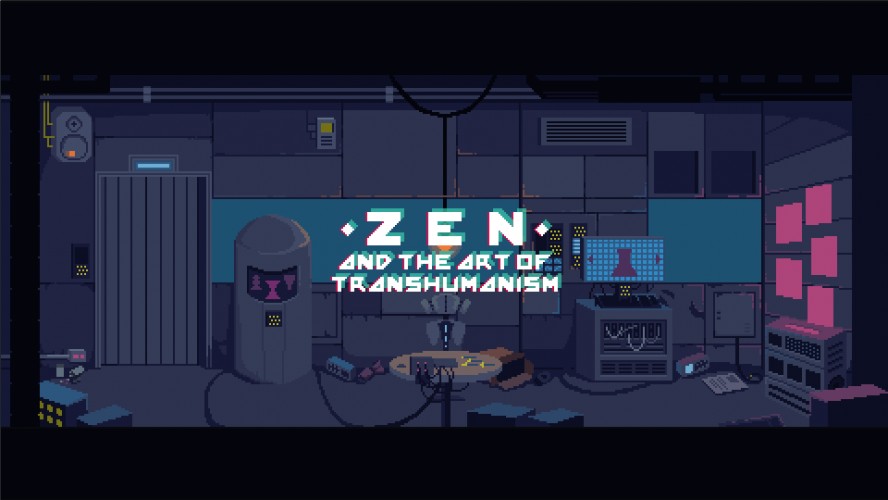
Zen and the Art of Transhumanism is a cyberpunk pottery game about improving the human race through technology.
Keyboard and Gamepad supported -- though I ultra recommend Keyboard. (Gamepad has a little issue with the pottery UI buttons, if problematic, switch to keyboard, sorry!)
UPDATE: Added a postocompo bugfix version. The game is exactly the same, just fixed a crash that triggers when you accept while scrolling through menus.
ALT + ENTER to FULLSCREEN, ALT + ENTER again to exit FULLSCREEN
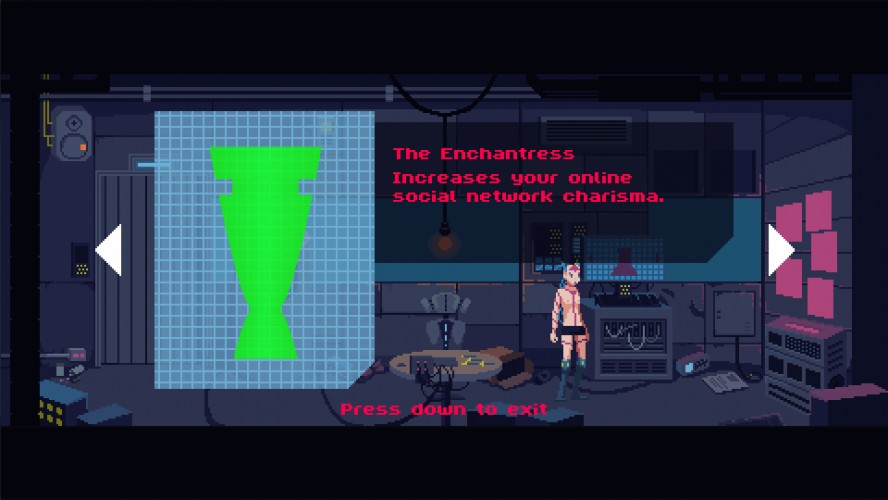
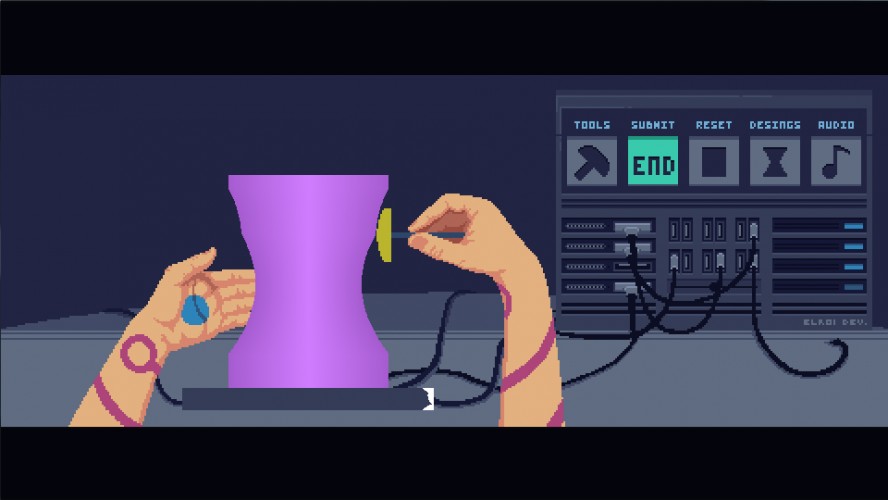
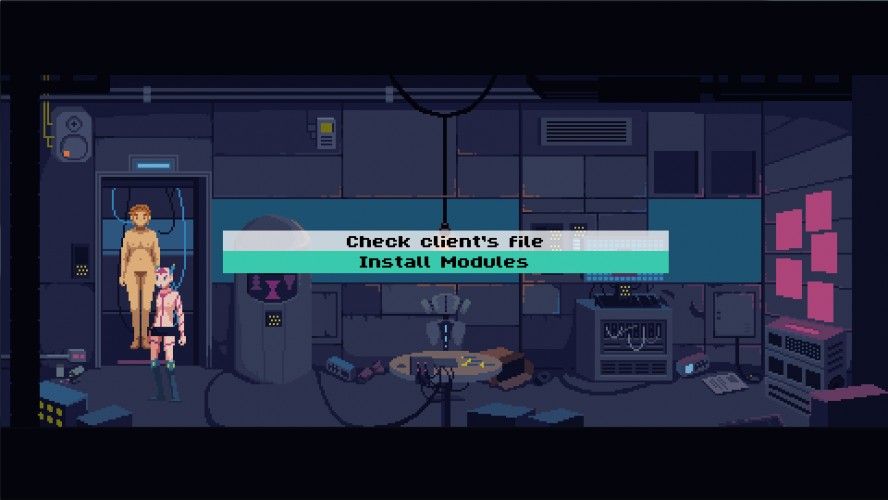
I suggest you play without reading this, but if you need help, these are the steps to create and install an implant: ----------------------------------------------------------- 1) Study the client's needs. 2) Look for an implant in the Database which matches the request. 3) Go to the pottery disk. 4) Select the design you want to produce with the Design Button (2nd from the right) 5) Select the appropiate tools to craft the correct shape. 6) Tap ACTION to spin the lathe disk. 7) Press the clay with your tool to shape it. 8) Make the whole holographic pattern detector turn green. 9) Press the submit button. 10) Go to the client. Select the crafted piece. 11) Repeat.
Great game! Some of the interactions seem a little redundant (I couldn't think of a reason to check the farthest-right screen) but that is the only criticism I have to offer.
Man, I wouldn't have thought a game about using a lathe would be at all interesting, but you've definitely managed that here. Love the little bits of humor, and the wonderful art. Obviously a little repetitive, but honestly pretty satisfying.
Amazing work as always. Gameplay is indeed tedious though, especially with the gamepad with which I encountered many little issues (switching tools, changing option in dialogues, etc.) Very audacious and solid entry nonetheless, bravo!
This was a great idea! I had a lot of issues actually trying to play it though. Using the gamepad didn't seem to work that well - I could move around and hit the action button, but I couldn't hit "down", and trying to press the buttons in the pottery phase often caused double clicks.
When I switched over to keyboard I could play properly, but when I tried to install the first client's upgrade I got this error message:
FATAL ERROR in action number 1 of Draw Event
for object o_db_stock_install:
trying to index a variable which is not an array at gml_Object_o_db_stock_install_Draw_0
Stunning, and I don't just mean the art; the theme is in there twice, on two different but linked levels, which also creates the connection between gameplay and narrative.
The weird shapes in the design database view looked weird when switching between them (the left green shape is "dragged" across the screen during the iteration) but besides that, great game! Love the art!
Impressive pixel skills, well done! Palette reminds me art of @Kirokaze (which is definitely a good thing). Do you have some place where you hold your art?
Me ha gustado mucho el concepto, se nota la mano de Jordi de Paco. Al principio me sentía un poco perdido ante "tanta" aparente información, quizá hubiera sido mejor mostrar los elementos en orden de uso, y luego manejar el torno y moldear es muy gratificante (cosa que al principio tampoco sabia hacer). Y es divertido ver como van reaccionando los personajes si le pones una prótesis "buena" o una "mala". Aunque a partir de la octava forma, lo he sentido un poco monótono.
LOVE the graphics. blade runner pottery! Great audio and atmosphere too, and the idea is very original. wish there was mouse or touch support though as it takes so much time to change tools, look up patterns etc. could totally see this being a phone hit. Great concept.
One of the most polished and ambitious game I've played so far! It's just amazing in every aspects, except for the "design your shape" phase that is a bit frustrating sometimes. It's just top notch otherwise!
Amazing game, one of the most complete I've seen. I absolutely love that you could solve people's problems in multiple ways... But some might lead to them to even more problems.
Played on a keyboard since the start, great game. Not challenging at all, but not all games need to be. Excellent work.
It triggers if you press action when installing a piece while you are navigating through menus because it tries to install 2 pieces at the same time.
I'll try to fix it as soon as I can, but in the meantime it can be easily avoided waiting for the scrolling transition to end while browsing pieces. Sorry for the trouble!
By the way, did soemone beat the game and see the ending? :)
I liked the core gameplay, although I didn't mind the sci fi setting and background. It's a great concept, but I'm not sure about mashing the spacebar.
While a bit slow and somewhat repetitive there's no denying how impressive the game is. It feels complete and really well made. Could be one of the best jam entries.
Awesome game, I love how you approached the shapeshifting theme.
S
smashful21 Apr 2016, 20:42
I love the pixel graphics and sound design which are beautiful in all Deconstructeam entries!! The controls were tricky at first but easy enough to master, that was the most entertaining carpal tunnel ever :d I only wish there would be some more follow-up to the morality aspect! The moment where the 97 yr old singer comes in and you can give her either the lifespan module or the accepting death module was so chilling!! Ah well... I can always hope for a full Steam release just like GWBW :^)
Oh my, this was so good. I wasn't expecting to enjoy sculpting away at the parts so much! And the mood, atmospheric audio, visuals... all great. I particularly enjoyed reading the clients' feedback on my choices (and regretting them!)
Only real downside was the controls being somewhat unreliable (I had to switch from game pad to keyboard to work the menus, and kept switching tools by accident). Otherwise, though, super awesome!
Really creepy cyberpunk atmosphere accomplished here - brr! Nice work! The lathe mechanic is really well done, but I think it could've been a little more forgiving. But overall really well done!
Excellent game. Very original and polished, great audio, visuals and concept.
The are only small things I would like to note: Installing modules can't be selected with controller and when hitting buttons it very often triggers the button twice (this is not as bad using keyboard). The end button between change tool and reset is poorly placed. It should be switched with the audio button, so you don't press it accidentally. This happened a ton when I was playing with controller (less so with keyboard).
The game concept and setting are brilliant, innovative and a really clever take on the theme, as expected. Same goes for the visual style, amazingly detailed.
However, controls are a bit frustrating. You end up getting the gist of the main interactions on the lathe, and I actually expected that part to be challenging (After all, I still remember some pottery games with a toy lathe from when I was younger, and the end results were always a failure :_D), but some UI interactions felt slightly glitchy.
Despite this, you managed to deliver one of the best entries so far this LD. ¡Felicidades!
That needed a lot of patience :P I liked the back stories and graphics.I found my self (while crafting) sometimes pressing rapidly on arrow to move the head just because I am pressing on the action button rapidly.
Great game. Pressing the buttons was a little frustrating because sometimes it would double register and skip right past the design or tool I wanted, but aside from that it was really cool. Love the graphical style and the sly humour. Very nice job.
Beautiful as always, the music is amazing, the audio design also incredible and the theme usage is perfect (kinda meta too).
I found the concept simply awesome, but I found too frustrating to play it :(
You have to memorize the design which makes no sense since you can choose the blueprint. The keep smashing action button to rotate was annoying. Changing tools was also a chore, it could be easily done by pressing 1234.
Such a great looking entry, love the pixel art. Also the interpretation of the theme is very clever. Liked the shaping aspect and trying to figure out what the clients needed, was a nice touch.
This was a really cool take on the theme. I found the controls would have been better if I could blend the mouse and the controller. I actually put the controller on the floor and spun the lathe with my foot. I really wanted to use mouse to make the carving action into the blank object though. Using the arrows was cumbersome. Great artwork and music, and very neat entry!
E
Erashul26 Apr 2016, 13:01
Very cool game and I like your art style !
F
Freank26 Apr 2016, 16:15
Hi, nice game ! We're realizing a video with several games of the Ludum Dare #35. Can you add your game on indiexpo.net ? (it's free) So we can include also your game in the video ;) p.s. write #LDJAM in the game's description
So original idea. I love the graphics and the ambient of the scene. I found the controls for modeling pieces some confused at first but it's ok. The music is awesome. Buen trabajo! ;)
WOW!!! Really great game I liked it a lot. enjoyed every aspect of the game.
played it until it crashed, the bug: ___________________________________________ ############################################################################################ FATAL ERROR in action number 1 of Draw Event
for object o_db_stock_install:
Push :: Execution Error - Variable Index [0,2] out of range [1,2] - 17.<unknown variable>(100260,2) at gml_Object_o_db_stock_install_Draw_0 ############################################################################################
Yay, I managed to complete the game without any game-crashing bugs whatsoever.
Well, that was certainly a curious take on theme, in a way more than one. The story seems rather interesting, too, but I can see quite a lot of unused potential here. The thing is, with how this game tackles the subject, I feel that: - the game is somewhat "inflexible", it kinda handholds the player - each client has 2 "effective" items and the rest are "useless" items, there's a clear pattern determining which is which, and player gets instant feedback from management (rather than leaving the consequences to discover for the player later) - the game is one-sided - literally all clients crave for something they don't need and might in fact harm them, and it appears the best thing you can do to them and the humanity is to remove their needs altogether; which has somewhat unfortunate implication that to make people satisfied is to strip them of their dreams - is it really what we want? O.o' - the game is unconvincing - despite giving customer files feedback when the player is on the wrong track (or no track at all), I've seen no feedback when I do things right; I could imagine the clickbait writer becoming a proper journalist and finding her true call there, or the sex-craving doc advance the research for common benefit, or the singer giving an epic goodbye tour or something like that; I can't immediately think of something for gamedev, and while I'd like gang member to settle down and pursue calm life, I'm afraid that's not how Yakuza works...; the thing is, the game doesn't really explain how exactly my actions benefited the clients or the humanity
How I'd rather do that instead: - come up with people who have some requests, which might or might not reflect what they actually need (I think that maybe not always, but sometimes people actually *might* know what's good for them) - have a bunch of enhancements, that might better or worse correspond to the needs/requests - for each client and enhancement, I'd consider what impact this enhancement would have on the client, even if it appears unmatched (it'd be rather curious, having wisdom enhancement on doc cause him to finish his research and realise all that sex stuff is unnecessary, anyway); some would more or less improve the clients' lives, some would cause smaller or larger harm, some would be indifferent - drop the opinion from management altogether, or make it just that - an opinion, which might or might not be accurate; and instead let the player discover the consequences through the client files feedback
Excuse my essay, it's just I feel that theme has so much potential it feels wasteful to me to use only a fraction of that. ^^'
All those points above aside, I still think it's a pretty great and well-executed entry (the crafting mechanics were rather cool, if maybe a bit clunky at times; I particularly disliked SUBMIT being so close to TOOLS). Definitely one of this Dare's better games. ;)
:O Well, this was amasing! This game has the best mood I've seen on this LD. Graphics is also excellent! Sounds are good too.
I like how you adapted the designs to make them require different instruments, but I was able to make everything I needed with only one tool, the stick. :P
Btw, I've found one tiny graphical bug: the 'tools' button remains stuck if you press it and then move mouse to the left.
Again, I'm amazed by this game. It shows why you need a team to make something big. No one would be able to make this solo in such a short time and with such quality. Nice job!
If you intend to extend the game, I suggest to upgrade the molding mechanism to add free molding and calculate the effect based on the shape player created.
Awesome game, took me some time to get what to do, but its simply great. Visual are awesome, music is great and all the text are really clever. I just think it could be nice if for exemple you can implant the one which stop all ambition (dont remenber the name) to the game developer client instead of the bishop or the no need of social feedback on the first client. :) really great stuff, you did well. But its crashing in full screen when i want to shape
Este juego es sublime en todos los sentidos, y no haría falta decir más. No decepcionáis, ni mucho menos. Es increíble que se pueda conseguir esto en tres días. De lo mejor que he visto.
En el contexto del LD tiene un valor incalculable. Juega con el tema propuesto en dos sentidos, en dos dimensiones distintas que se complementan para formar un todo excepcional. No sé cómo se verá esto desde fuera de la jam, sin esa apreciación, pero desde luego yo me quedé flipando.
Dicho esto, he de indicar que me recuerda bastante a Evangelion (el anime) :D Tanto por temática como por estética me parece un referente claro en este caso, pero corregidme si me equivoco. Excelente trabajo, en cualquier caso. Enhorabuena!!
So, to start with, the art is obviously exceptional. I think the nudity is done tastefully (even if it isn't strictly necessary). I'm also a huge fan of interpreting the theme in multiple ways (the clients shapeshifting, the lathe literally shapeshifting, and even the choice of which way you shape the client). Like others have already said, having to use the pottery disk each time became a bit repetitive, perhaps it would have been nice if each pattern only had to be done once, or if it produced more than one copy at a time, but I know that wouldn't make as much sense as the way it was done in the game. Other than that, I'm blown away by how much of a unique, standout game this is.
Absolutely beautiful art, and the lathe is an incredibly unique mechanic in a game, sadly it's not really that fun after a while. Maybe if there was a little more leeway to make minor mistakes it would be a bit more fun, resetting the lathe repeatedly for slight errors got annoying. Overall this is an excellent entry regardless.


Comments78
When I switched over to keyboard I could play properly, but when I tried to install the first client's upgrade I got this error message:
FATAL ERROR in
action number 1
of Draw Event
for object o_db_stock_install:
trying to index a variable which is not an array
at gml_Object_o_db_stock_install_Draw_0
Who whatches the shapers? ;-)
Do you have some place where you hold your art?
En definitiva, genial pieza, buena música, buen pixel art, buen juego :)
My only complaint was that some of the dialog moved faster than I could read. The writing is so good that I wish I could of read it.
FATAL ERROR in
action number 1
of Draw Event
for object o_db_stock_install:
trying to index a variable which is not an array
at gml_Object_o_db_stock_install_Draw_0
Anyway, cool looking and clever game, though I am not sure it would remain fun as a bigger and longer game. Still nice for the jam!
Now I want to see the end but I am too afraid to get another fatal error :(
Played on a keyboard since the start, great game. Not challenging at all, but not all games need to be. Excellent work.
About the bug:
FATAL ERROR in
action number 1
of Draw Event
for object o_db_stock_install:
It triggers if you press action when installing a piece while you are navigating through menus because it tries to install 2 pieces at the same time.
I'll try to fix it as soon as I can, but in the meantime it can be easily avoided waiting for the scrolling transition to end while browsing pieces. Sorry for the trouble!
By the way, did soemone beat the game and see the ending? :)
Great work!
It gets it's point across very well :) nothing much to complain about^^
Only real downside was the controls being somewhat unreliable (I had to switch from game pad to keyboard to work the menus, and kept switching tools by accident). Otherwise, though, super awesome!
But overall really well done!
The are only small things I would like to note:
Installing modules can't be selected with controller and when hitting buttons it very often triggers the button twice (this is not as bad using keyboard). The end button between change tool and reset is poorly placed. It should be switched with the audio button, so you don't press it accidentally. This happened a ton when I was playing with controller (less so with keyboard).
However, controls are a bit frustrating. You end up getting the gist of the main interactions on the lathe, and I actually expected that part to be challenging (After all, I still remember some pottery games with a toy lathe from when I was younger, and the end results were always a failure :_D), but some UI interactions felt slightly glitchy.
Despite this, you managed to deliver one of the best entries so far this LD. ¡Felicidades!
One of my favorite!
Great job!
One note - i'm often missed from button "Tools" to button "End" when play with gamepad.
I liked the back stories and graphics.I found my self (while crafting) sometimes pressing rapidly on arrow to move the head just because I am pressing on the action button rapidly.
I found the concept simply awesome, but I found too frustrating to play it :(
You have to memorize the design which makes no sense since you can choose the blueprint. The keep smashing action button to rotate was annoying. Changing tools was also a chore, it could be easily done by pressing 1234.
Solid entry!
Can you add your game on indiexpo.net ? (it's free)
So we can include also your game in the video ;)
p.s. write #LDJAM in the game's description
Really great game I liked it a lot.
enjoyed every aspect of the game.
played it until it crashed, the bug:
___________________________________________
############################################################################################
FATAL ERROR in
action number 1
of Draw Event
for object o_db_stock_install:
Push :: Execution Error - Variable Index [0,2] out of range [1,2] - 17.<unknown variable>(100260,2)
at gml_Object_o_db_stock_install_Draw_0
############################################################################################
I think, the walking part is odd here. It'd be simpler to just select the control units by mouse
Well, that was certainly a curious take on theme, in a way more than one. The story seems rather interesting, too, but I can see quite a lot of unused potential here. The thing is, with how this game tackles the subject, I feel that:
- the game is somewhat "inflexible", it kinda handholds the player - each client has 2 "effective" items and the rest are "useless" items, there's a clear pattern determining which is which, and player gets instant feedback from management (rather than leaving the consequences to discover for the player later)
- the game is one-sided - literally all clients crave for something they don't need and might in fact harm them, and it appears the best thing you can do to them and the humanity is to remove their needs altogether; which has somewhat unfortunate implication that to make people satisfied is to strip them of their dreams - is it really what we want? O.o'
- the game is unconvincing - despite giving customer files feedback when the player is on the wrong track (or no track at all), I've seen no feedback when I do things right; I could imagine the clickbait writer becoming a proper journalist and finding her true call there, or the sex-craving doc advance the research for common benefit, or the singer giving an epic goodbye tour or something like that; I can't immediately think of something for gamedev, and while I'd like gang member to settle down and pursue calm life, I'm afraid that's not how Yakuza works...; the thing is, the game doesn't really explain how exactly my actions benefited the clients or the humanity
How I'd rather do that instead:
- come up with people who have some requests, which might or might not reflect what they actually need (I think that maybe not always, but sometimes people actually *might* know what's good for them)
- have a bunch of enhancements, that might better or worse correspond to the needs/requests
- for each client and enhancement, I'd consider what impact this enhancement would have on the client, even if it appears unmatched (it'd be rather curious, having wisdom enhancement on doc cause him to finish his research and realise all that sex stuff is unnecessary, anyway); some would more or less improve the clients' lives, some would cause smaller or larger harm, some would be indifferent
- drop the opinion from management altogether, or make it just that - an opinion, which might or might not be accurate; and instead let the player discover the consequences through the client files feedback
Excuse my essay, it's just I feel that theme has so much potential it feels wasteful to me to use only a fraction of that. ^^'
All those points above aside, I still think it's a pretty great and well-executed entry (the crafting mechanics were rather cool, if maybe a bit clunky at times; I particularly disliked SUBMIT being so close to TOOLS). Definitely one of this Dare's better games. ;)
Well, this was amasing! This game has the best mood I've seen on this LD.
Graphics is also excellent!
Sounds are good too.
I like how you adapted the designs to make them require different instruments, but I was able to make everything I needed with only one tool, the stick. :P
Btw, I've found one tiny graphical bug: the 'tools' button remains stuck if you press it and then move mouse to the left.
Again, I'm amazed by this game. It shows why you need a team to make something big. No one would be able to make this solo in such a short time and with such quality. Nice job!
If you intend to extend the game, I suggest to upgrade the molding mechanism to add free molding and calculate the effect based on the shape player created.
En el contexto del LD tiene un valor incalculable. Juega con el tema propuesto en dos sentidos, en dos dimensiones distintas que se complementan para formar un todo excepcional. No sé cómo se verá esto desde fuera de la jam, sin esa apreciación, pero desde luego yo me quedé flipando.
Dicho esto, he de indicar que me recuerda bastante a Evangelion (el anime) :D Tanto por temática como por estética me parece un referente claro en este caso, pero corregidme si me equivoco. Excelente trabajo, en cualquier caso. Enhorabuena!!