Caelium Alpha
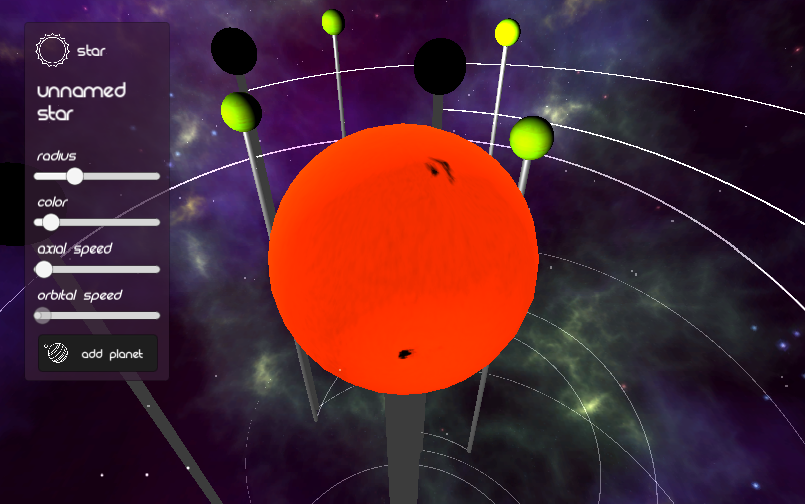
:waning_crescent_moon: Caelium Alpha is a digital orrery sandbox.
An orrery is a model of the solar system; small worlds you can carry with you. Make your own little planetary system orrery by adding planets, moons, and adjusting properties. Then marvel at the possibilities in the universe :)
The LD38 version has no moons, no audio, no auto-padding, and no random star names. The Post-LD version has these features. There was a multi-planet spawning bug in the LD38 edition, but I am apparently allowed to fix it, so it is fixed in both editions.
You should play the original LD version in order to review the game here, but I also insist that you play the improved Post-LD version because I wish to hear your feedback. Thanks!
-----------------------
Controls
- WASD or Arrow Keys: Move- Left Shift (also Right Shift in the post-LD version): Hold down to move faster
- R: Zoom In
- F: Zoom Out
- 4: Reset Zoom
- Right Click: Select a Star or Planet (or deselect by right clicking nothing)
- Esc: Quit
Downloads & Links
- :desktop: Desktop (Win/Mac/Linux) downloads available on itch.io (both original and post-LD)- :globe_with_meridians: Project page on my blog
- :notebook: Postmortem Post
-----------------------
Features
LD38 Edition:
- Start off with a star and adjust its properties (radius, color, etc.)- Add planets to the star, and adjust their properties (moons not available)
- Right clicking an astronomical body enables UI for adjusting its properties
- Properties include color, radius, axial speed (rotation), and orbital speed (revolution)
- Stars and planets will spawn with random surface texture (not adjustable at this time)
- Planar camera movement with fisheye-style zoom (I admit this is not the best zoom method)
- Holding Left-Shift will make the camera move a little faster
Added to Post-LD Edition:
- Music from Stephen Tanksley added- Sound effects from Glitchmachines added
- Add moons to each planet, and adjust their properties
- Moons will spawn with random surface texture (not adjustable at this time)
- Automatic padding (AP) between every astronomical body, fully adjustable as a new property
- AP includes inner padding, which distances an astronomical body from the nearest sub-body
- And AP also includes outer padding, which is only applicable to planets, which controls the distance between the furthest moon and the next neighboring planet
- Guarantee that most stars spawned will have a unique name
- Planet and moon names are based off stars (just like real exoplanets)
- Camera speeds adjusted to go much faster by default
-----------------------
Credits
- Sun Textures: James Hastings-Trew & Inove- Planet Textures: texturesforplanets.com
- Moon Textures: Robert Stein III
- Anurati Font: Emmeran Richard
- Rezland Font (only used in the LD38 version): Fraser Davidson
- Space Icons (used in Title and UI): freepik.com
- Mouse Cursors (Normal & Clicked): Muharrem Fevzi Çelik from the Noun Project
- Purple Space Nebula Skybox: TL Multimedia
- Hail Particles Pack: Luke Peek
For the Post-LD Edition:
- Font - Giant Robot Army: Gabor Vad
- Music - Interrupted Voices: Stephen Tanksley
- Sound effects: Glitchmachines
-----------------------
Feedback Friends
Genres: simulation
Comments30

HuvaaKoodia5 May 2017, 18:27
Is it a digital game? Is it a digital puzzle?! No, it is a digital orrery! The first one I've ever seen and, by default, the best one I've ever seen!
Pretty cool really. I'd like the camera zoom and movement speed to be faster (or even adjustable). A "Follow orbital" button would also be quite neat.
Good work!
Pretty cool really. I'd like the camera zoom and movement speed to be faster (or even adjustable). A "Follow orbital" button would also be quite neat.
Good work!

HolyBlackCat5 May 2017, 19:31
I really like the idea and graphics is nice, but it's sad that when I press "add planet" the amount of objects always doubles (lol).
Just FYI, you're allowed to fix bugs post-LD, so I suggest you to fix the bugs in LD edition too.
Just FYI, you're allowed to fix bugs post-LD, so I suggest you to fix the bugs in LD edition too.

juan5 May 2017, 20:25
Hoy!
It's quite nice visualy speaking, but I feel like it miss some features to be really interresting (just spend 10 min max, and i think I pretty much done all that as to be done )
My main concern is about the camera: I would love to see the whole think from a top view for example, but it seems you can't really do what you want here. Make the player able to rotate the system would make the whole thing less "rigid" (you can move, but you can't look where you want, quite annoying...)
Ofc, making a small menu to chose the nature of the planet, and where you want the orbit, or if you want the planet to have rings ect would be great. (well, in short, just more tools to play with ^^)
It's still a very interresting project, don't know if you want to make all this thing respect physics laws (that could be quite fun to do :D) or just make the player able to build is very own solar system (the way he want things to be). But in both case, you definitly got to empower the player with more tools to make the game interresting: the core mecanics are here, all it needs is some more content!
It's quite nice visualy speaking, but I feel like it miss some features to be really interresting (just spend 10 min max, and i think I pretty much done all that as to be done )
My main concern is about the camera: I would love to see the whole think from a top view for example, but it seems you can't really do what you want here. Make the player able to rotate the system would make the whole thing less "rigid" (you can move, but you can't look where you want, quite annoying...)
Ofc, making a small menu to chose the nature of the planet, and where you want the orbit, or if you want the planet to have rings ect would be great. (well, in short, just more tools to play with ^^)
It's still a very interresting project, don't know if you want to make all this thing respect physics laws (that could be quite fun to do :D) or just make the player able to build is very own solar system (the way he want things to be). But in both case, you definitly got to empower the player with more tools to make the game interresting: the core mecanics are here, all it needs is some more content!

🎤 jishenaz6 May 2017, 12:53
I really appreciate the reviews so far guys! :grinning: I definitely want to improve on the game, but progress will probably be very slow.
@thunraz: While gravity might be fun to implement, I would actually have to throw out my old code and start over, because my implementation was not designed for gravity simulation. Planetary movements rely heavily upon Unity's object hierarchy. If you want a fun gravity simulator, I think Universe Sandbox 2 already does a great job at this. Thanks for your feedback.
@huvaakoodia: I agree with your camera suggestions, because even I don't like my current camera implementation. I'll try to work on this in a future version of Caelium.
@holyblackcat: I am aware that you can fix bugs after the competition, but I didn't know how bad the bugs had to be to allow fixing. Technically, the multi-planet-spawn bug doesn't crash the program (at least not for me), so I don't know if it's a bad enough bug to have the permission to fix it. I could try to fix it though.
@juan: Thanks for your suggestions! Yes, the game would be much more fun with extra features like different types of planets and rings. These features will have to be developed slowly. I definitely want to refactor the camera system, so I'll take your suggestions into consideration. I actually never intended for Caelium to follow real planetary physics, because there are already better games for that (like Universe Sandbox). Caelium is more about imagining your own solar system without serious scientific considerations.
Thanks again everyone!
@thunraz: While gravity might be fun to implement, I would actually have to throw out my old code and start over, because my implementation was not designed for gravity simulation. Planetary movements rely heavily upon Unity's object hierarchy. If you want a fun gravity simulator, I think Universe Sandbox 2 already does a great job at this. Thanks for your feedback.
@huvaakoodia: I agree with your camera suggestions, because even I don't like my current camera implementation. I'll try to work on this in a future version of Caelium.
@holyblackcat: I am aware that you can fix bugs after the competition, but I didn't know how bad the bugs had to be to allow fixing. Technically, the multi-planet-spawn bug doesn't crash the program (at least not for me), so I don't know if it's a bad enough bug to have the permission to fix it. I could try to fix it though.
@juan: Thanks for your suggestions! Yes, the game would be much more fun with extra features like different types of planets and rings. These features will have to be developed slowly. I definitely want to refactor the camera system, so I'll take your suggestions into consideration. I actually never intended for Caelium to follow real planetary physics, because there are already better games for that (like Universe Sandbox). Caelium is more about imagining your own solar system without serious scientific considerations.
Thanks again everyone!
🎤 jishenaz6 May 2017, 13:43
As suggested, I updated the LD38 version to fix the multi-planet-spawning bug. That version is otherwise unchanged (no audio, no moons, no auto-padding, etc.)
zgragselus6 May 2017, 15:27
Alright, based on the comments you haven't hit any space enthusiast, well here I am.
The idea is nice and first of all good job on it, but I've found some major bugs in there (in terms of how actual orbital mechanics work), so here it is:
Planet orbital speed is heavily dependent on trajectory, basically all planets are in stable orbits and as this is an orrery it has to respect these laws, also known as Kepler's laws of planetary motion (mostly simplified to just circular, known as Copernicus laws). To have stable orbit, you need higher orbital speed at lower altitude (distance) from Sun and lower speed higher (hence speed can't be "set", but should be automatically calculated).
Apart from that, I really like the idea and the feel of the game.
It is chilling and I enjoyed it. From game side, I'd suggest looking at controls and camera (especially the camera). The game feels quite complex and interesting, even if it is not realistic.
Overall I can't point out anything negative about theme-idea pairing and the game play. Keep up the good work.
The idea is nice and first of all good job on it, but I've found some major bugs in there (in terms of how actual orbital mechanics work), so here it is:
Planet orbital speed is heavily dependent on trajectory, basically all planets are in stable orbits and as this is an orrery it has to respect these laws, also known as Kepler's laws of planetary motion (mostly simplified to just circular, known as Copernicus laws). To have stable orbit, you need higher orbital speed at lower altitude (distance) from Sun and lower speed higher (hence speed can't be "set", but should be automatically calculated).
Apart from that, I really like the idea and the feel of the game.
It is chilling and I enjoyed it. From game side, I'd suggest looking at controls and camera (especially the camera). The game feels quite complex and interesting, even if it is not realistic.
Overall I can't point out anything negative about theme-idea pairing and the game play. Keep up the good work.

abhimonk6 May 2017, 17:27
Good work. I only played the LD version of the game, so keep that in mind when you read this feedback. One small nitpick
- I know another commenter mentioned it, but orbital speed is proportional to the altitude, so if a planet is closer, then it's orbital speed must be higher. Another nice thing about this feature is that you could control the distance between the planet and the star without having to create another slider, just using orbital speed
I really like the VFX when you spawn a planet (the white glow that spawns). I know you already added sounds and other effects in the newest version, so I don't need to mention that. Overall I like the idea. I don't see a lot of sandbox games in Ludum Dare, so this was nice change of pace for me. Nice work!
- I know another commenter mentioned it, but orbital speed is proportional to the altitude, so if a planet is closer, then it's orbital speed must be higher. Another nice thing about this feature is that you could control the distance between the planet and the star without having to create another slider, just using orbital speed
I really like the VFX when you spawn a planet (the white glow that spawns). I know you already added sounds and other effects in the newest version, so I don't need to mention that. Overall I like the idea. I don't see a lot of sandbox games in Ludum Dare, so this was nice change of pace for me. Nice work!
kleinzach6 May 2017, 20:43
Very peaceful experience. I love the change of pace to a game without strict goals and lose states, always good to have a large variety. Elliptical orbits, negative values for speeds, and off axis orbiting (Like pluto) and rotation (like Uranus) would go a long way to developing your project. Zooming in and out seems to change the field of view of the camera, which makes it have a sort of fish eye effect which is a little annoying.
candlesan6 May 2017, 21:38
Fun little sandbox.
The textures on the planets is good, as is the background space texture.
Would like to have more camera controls I think to view and admire my galaxy from multiple angles, especially as the place starts to really fill up.
Would also love controls to change the orbital tilt. But I suppose these are all feature requests on top of the base of what has already been provided. Players always want more right? :)
The textures on the planets is good, as is the background space texture.
Would like to have more camera controls I think to view and admire my galaxy from multiple angles, especially as the place starts to really fill up.
Would also love controls to change the orbital tilt. But I suppose these are all feature requests on top of the base of what has already been provided. Players always want more right? :)
Smiling Cat Entertainment9 May 2017, 01:11
Good graphics for the stars and planets. I've not seen anything like this before. If you're not going for realism, then maybe expand this to allow some fantastic scenarios, like moons of moons, stars rotating around planets, etc. Great job!

starspell9 May 2017, 02:59
What a lovely idea for a sandbox game. I used to be fascinated by orreries so this was a very nostalgic game for me. Add some sound effects and some soothing tunes and this would be perfect!
starspell9 May 2017, 03:03
And for the post-LD version. Pretty much everything is awesome. It would be nice if the FOV of the camera stayed the same for both zooming out and in, instead of fish eyeing. Awesome job!

ColeSlaughter9 May 2017, 06:25
This is an interesting idea! I like the sort of diorama effect you got goin' on here. Really makes me feel like I'm a little kid playin' with a toy (in a good way!).
Given that this is kind of a sandbox game/toy, I was a little disappointed to see that there wasn't too much to experiment around with. I was able to make a bunch of planets, and change their colors and stuff, but it would have been really cool to see some sort of consequences or reactions to changing a planet's size or orbital speed. Seeing consequences for your actions is what drives the player to experiment! Unless I was missing something, I was only able to make planets. I saw an option that mentioned something about moons, but clicking on it didn't do anything...
Also, the fishbowl lens is a pretty neat effect, though it sometimes gets disorienting, particularly when planets get close to the camera. From what I can tell, all of the planets orbit on a sort of 2D plane (aka, no verticality). It would be REALLY cool if you could get planets to orbit in 3 dimensions. The fishbowl lens sort of gives the illusion of that, but the more I focused on stuff, the more I kind of wished I had more variety in my orbital directions.
Either way, I like where you're goin' with this. I hope you continue to work on it in the future!
Given that this is kind of a sandbox game/toy, I was a little disappointed to see that there wasn't too much to experiment around with. I was able to make a bunch of planets, and change their colors and stuff, but it would have been really cool to see some sort of consequences or reactions to changing a planet's size or orbital speed. Seeing consequences for your actions is what drives the player to experiment! Unless I was missing something, I was only able to make planets. I saw an option that mentioned something about moons, but clicking on it didn't do anything...
Also, the fishbowl lens is a pretty neat effect, though it sometimes gets disorienting, particularly when planets get close to the camera. From what I can tell, all of the planets orbit on a sort of 2D plane (aka, no verticality). It would be REALLY cool if you could get planets to orbit in 3 dimensions. The fishbowl lens sort of gives the illusion of that, but the more I focused on stuff, the more I kind of wished I had more variety in my orbital directions.
Either way, I like where you're goin' with this. I hope you continue to work on it in the future!

Rother Games9 May 2017, 14:32
I would have liked to see gravity and instable orbits with planets flying around all over the place. And some more things to do would be good.

Eli Delventhal9 May 2017, 17:12
As someone who is a bit of an orrery connoisseur and who has made one myself, I thought it was cool to see someone make one, but the lack of gravity and real physics made this uninteresting to me. In my mind, the point of an orrery is to mess with the what the universe would really be like – a legitimate sandbox, as opposed to simply a diorama, which is what this felt like.
blaster3919 May 2017, 17:54
I like this as a little sandbox, it's the kinda of thing I like to tinker with (similar to Universe Sandbox), it looks very nice, and I like all the little things, like the trail that is left as the planets move etc.
I have no complaints, only ideas for additional features
- Maybe make it so you can rename planets/stars/moons
- Be able to pause (when you have a planet orbiting fast it could be pretty difficult to catch them and change values)
- Delete things you've already made (I made a huge number of moons and couldn't work out how to remove them)
I like this LD, it was different :)
I have no complaints, only ideas for additional features
- Maybe make it so you can rename planets/stars/moons
- Be able to pause (when you have a planet orbiting fast it could be pretty difficult to catch them and change values)
- Delete things you've already made (I made a huge number of moons and couldn't work out how to remove them)
I like this LD, it was different :)

Mathiouza9 May 2017, 20:20
Cool entry :) That reminds me Universe Sandbox x)
Good job on this one ! Obviously it lacks a lot of things, but you know that. If I can advice you, I think it is more important to have bad sounds than no sounds. Remember that for further jam ;)
So keep coding :)
Good job on this one ! Obviously it lacks a lot of things, but you know that. If I can advice you, I think it is more important to have bad sounds than no sounds. Remember that for further jam ;)
So keep coding :)

mwcz10 May 2017, 00:30
great game! I loved that you can as many planets as you want!
athomicus10 May 2017, 07:36
good work as somebody wrote about a pause is a good idea - but great game

Kataware10 May 2017, 14:42
So I've always been a BIG fan of sandbox games. And when I saw this, a planetery sandbox made in 72 hours, I was like "No Way! AWESOME"
And I checked it out.
While it wasn't what I thought it was, it was still amazing! There was a certain level of depth and detail given, like to each planet that made the whole game fit together.
There were some problems though, such as where do I go? After creating all my planets, messing around with a few, I found there to be lack of gameplay, or lack of a reason to continue.
The backgrounds graphics and planets looked nice though. And it still was a very cool game/idea.
While I would have liked the option to rename planets, that was fine.
All in all, if you continued development (I could already see a post LD version you have there :) ) Then you could probably get yourselves a nice game.
And I checked it out.
While it wasn't what I thought it was, it was still amazing! There was a certain level of depth and detail given, like to each planet that made the whole game fit together.
There were some problems though, such as where do I go? After creating all my planets, messing around with a few, I found there to be lack of gameplay, or lack of a reason to continue.
The backgrounds graphics and planets looked nice though. And it still was a very cool game/idea.
While I would have liked the option to rename planets, that was fine.
All in all, if you continued development (I could already see a post LD version you have there :) ) Then you could probably get yourselves a nice game.

CPTN-B10 May 2017, 16:42
You know, neutron stars always fascinate me and being able to create a solar system with many satelites orbiting said neutron star was fun to watch. Thanks for the experience.
Would you like to play a game thats nuts? https://ldjam.com/events/ludum-dare/38/the-last-acorns
Would you like to play a game thats nuts? https://ldjam.com/events/ludum-dare/38/the-last-acorns

chispaLBC10 May 2017, 16:48
Good work with your sandbox!. If you continue with the development, you should try to improve the gravity or maybe add more options.

Louspirit11 May 2017, 11:52
I think the significiance of this game is high because it looks like a scientific game. It is well executed and you make the player create something, which is great. What misses is a music, and you chose the perfect one in the post version. This addition of moons is my second favourite feature. Looking at my small world operating was quite enchanting :baby:
Louspirit11 May 2017, 11:52
I
Louspirit11 May 2017, 11:52
I

blobo12 May 2017, 02:42
Nicely done! I really enjoyed this one. It felt like a cool scientific model with the way the placement is set up.

Skosnowich13 May 2017, 01:14
Nice sandbox-game. It looks great and it is fun to build your own solar system. The Post-LD Edition adds so much to it, very good job. :) And yes.. the fisheye zoom is strange. :D

Jezzamon14 May 2017, 00:51
It's an interesting little toy, shame it doesn't have much 'game' to it, as far as objectives go. I played something similar at a NASA visitor center recently :)
🎤 jishenaz15 May 2017, 03:04
I appreciate everyone playing! :smile: I already made a post-LD version, but I actually do intend to further develop this outside of Ludum Dare (although obviously progress will be very slow).
@zgragselus & @abhimonk: Thanks for the insights about orbital speeds. I'll take a look deeper at Kepler's laws and see how to implement this.
@kleinzach & @candlesan: The "off-axis" features you mentioned are actually partially implemented in the game, but I didn't give players the ability to adjust these properties because I still needed to test it out more. I appreciate the new camera suggestions; I would love to implement a reasonable camera of high versatility.
@smiling-cat-entertainment: That's so surreal :sweat_smile: I'm not sure if I would go that far. I wanted what I would vaguely call "semi-realism" in the game. It's a hard balance to pull between being ultra-realistic and surrealistic.
@starspell, @coleslaughter, @blobo, & @skosnowich: Yeah, the camera's zoom is bad (I was too lazy to implement a better zoom). What I should have done instead is physically move the camera forward and back; this is a better zoom effect for this game. Experimenting with consequences for altering planets sounds difficult but I agree that it would make the game more interesting. "3D orbits" will be implemented in future development as "orbital tilt". The "diorama effect" is actually intentional; glad that you like it!
@rother-games, @eli-delventhal, & @chispalbc: I admit gravity would be interesting to implement, but that's beyond the scope of this game. Universe Sandbox already does a great job at that, and I had no intentions of competing with them. This more of a tool for "imaginary solar systems" rather than a gravity simulator.
@blaster391, @athomicus: Renaming astronomical bodies is an important feature that I want to implement in the future. Same with deleting. Pausing I never thought of, and will take it into consideration.
@mathiouza & @louspirit: I appreciate your playing. I already implemented sounds and music in the post-LD version :)
@kataware & @jezzamon: I never intended to make Caelium Alpha a "game" in the formal sense of the word, but I do agree that it could have more features and dynamics to make it interesting.
@cptn-b: I was already considering multiple planet types, but having multiple star types (like neutron stars) might be interesting, but it will unfortunately be lower priority.
-------------------
Thanks again everyone! If you want to keep track of the game's (very slow) development, you could either follow me Twitter or bookmark/RSS my blog.
@zgragselus & @abhimonk: Thanks for the insights about orbital speeds. I'll take a look deeper at Kepler's laws and see how to implement this.
@kleinzach & @candlesan: The "off-axis" features you mentioned are actually partially implemented in the game, but I didn't give players the ability to adjust these properties because I still needed to test it out more. I appreciate the new camera suggestions; I would love to implement a reasonable camera of high versatility.
@smiling-cat-entertainment: That's so surreal :sweat_smile: I'm not sure if I would go that far. I wanted what I would vaguely call "semi-realism" in the game. It's a hard balance to pull between being ultra-realistic and surrealistic.
@starspell, @coleslaughter, @blobo, & @skosnowich: Yeah, the camera's zoom is bad (I was too lazy to implement a better zoom). What I should have done instead is physically move the camera forward and back; this is a better zoom effect for this game. Experimenting with consequences for altering planets sounds difficult but I agree that it would make the game more interesting. "3D orbits" will be implemented in future development as "orbital tilt". The "diorama effect" is actually intentional; glad that you like it!
@rother-games, @eli-delventhal, & @chispalbc: I admit gravity would be interesting to implement, but that's beyond the scope of this game. Universe Sandbox already does a great job at that, and I had no intentions of competing with them. This more of a tool for "imaginary solar systems" rather than a gravity simulator.
@blaster391, @athomicus: Renaming astronomical bodies is an important feature that I want to implement in the future. Same with deleting. Pausing I never thought of, and will take it into consideration.
@mathiouza & @louspirit: I appreciate your playing. I already implemented sounds and music in the post-LD version :)
@kataware & @jezzamon: I never intended to make Caelium Alpha a "game" in the formal sense of the word, but I do agree that it could have more features and dynamics to make it interesting.
@cptn-b: I was already considering multiple planet types, but having multiple star types (like neutron stars) might be interesting, but it will unfortunately be lower priority.
-------------------
Thanks again everyone! If you want to keep track of the game's (very slow) development, you could either follow me Twitter or bookmark/RSS my blog.


You could improve on the mechanics a bit by implementing gravity and watch planets collide with each other. :smile: