This game is best played using a controller. It was designed and tested (and it works) with an XBox 360 controller. If you have a different type of controller then you will probably need to remap the input using the Unity launch window. If you cannot get your controller to work then it's best to disconnect your controller and to play using keys (WASD for left stick, Arrows for right stick).
Gameplay Video
Without further ado, here's a video that shows the game being played (featuring the theme music for the game)...
The game is best played with a controller with 2 analog sticks. It was designed and tested using an XBox 360 controller. Since this is a "dual stick shooter" - use the left stick to move your ship and the right stick to fire in any direction. You can also play using keys: W,A,S,D are for movement and the arrow keys are for firing. You can press Escape at any time to quit out of the game.
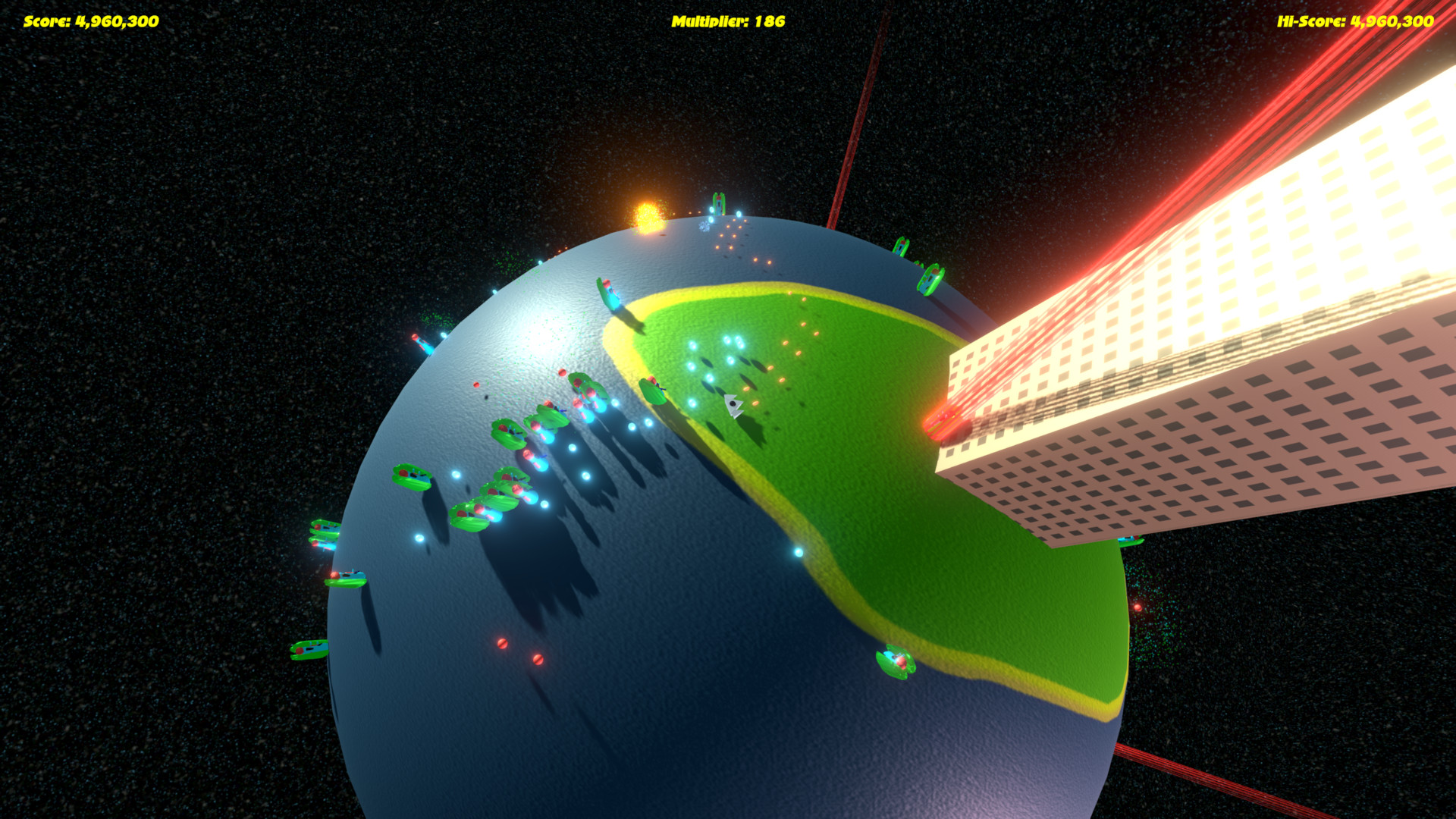
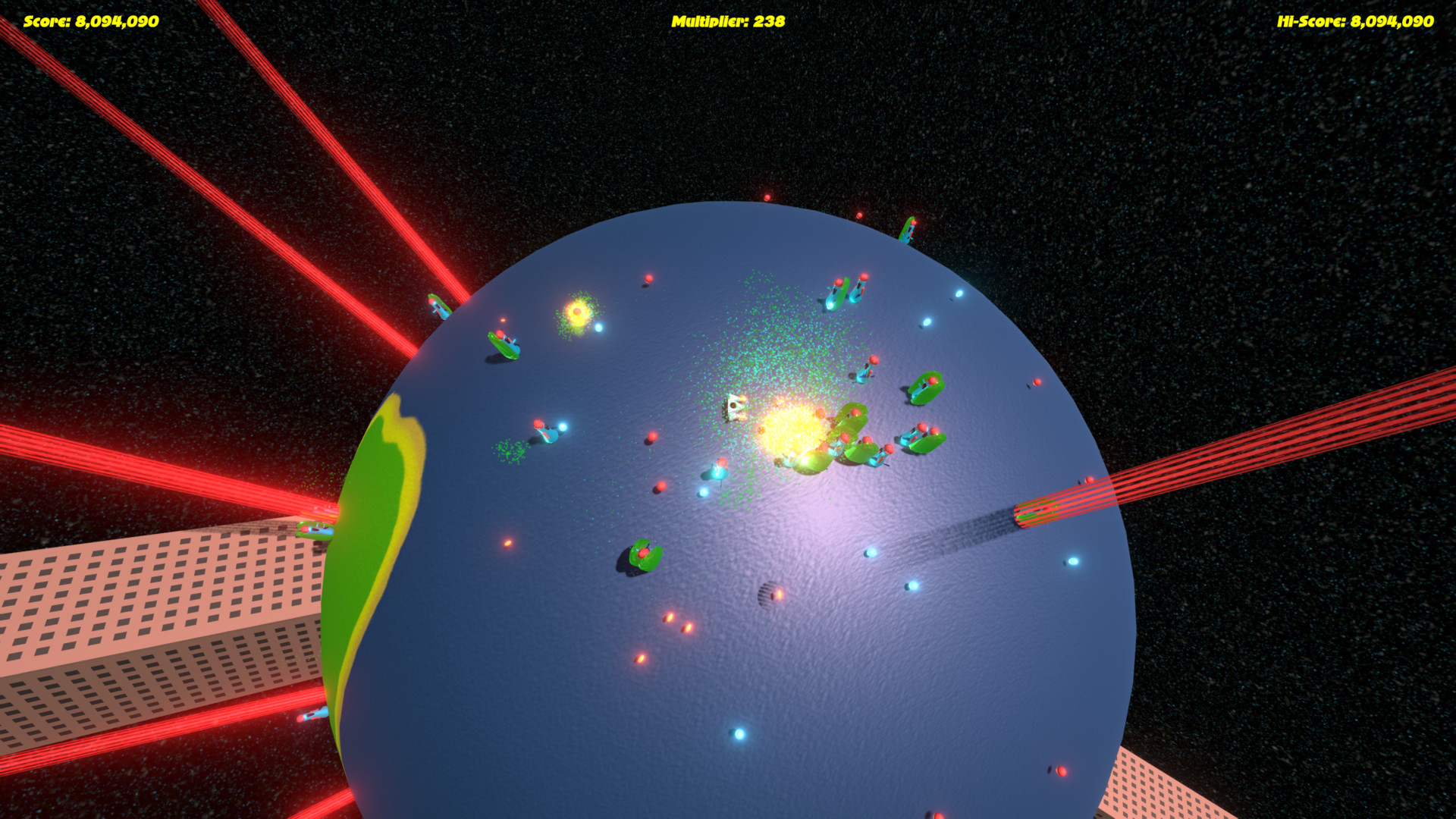
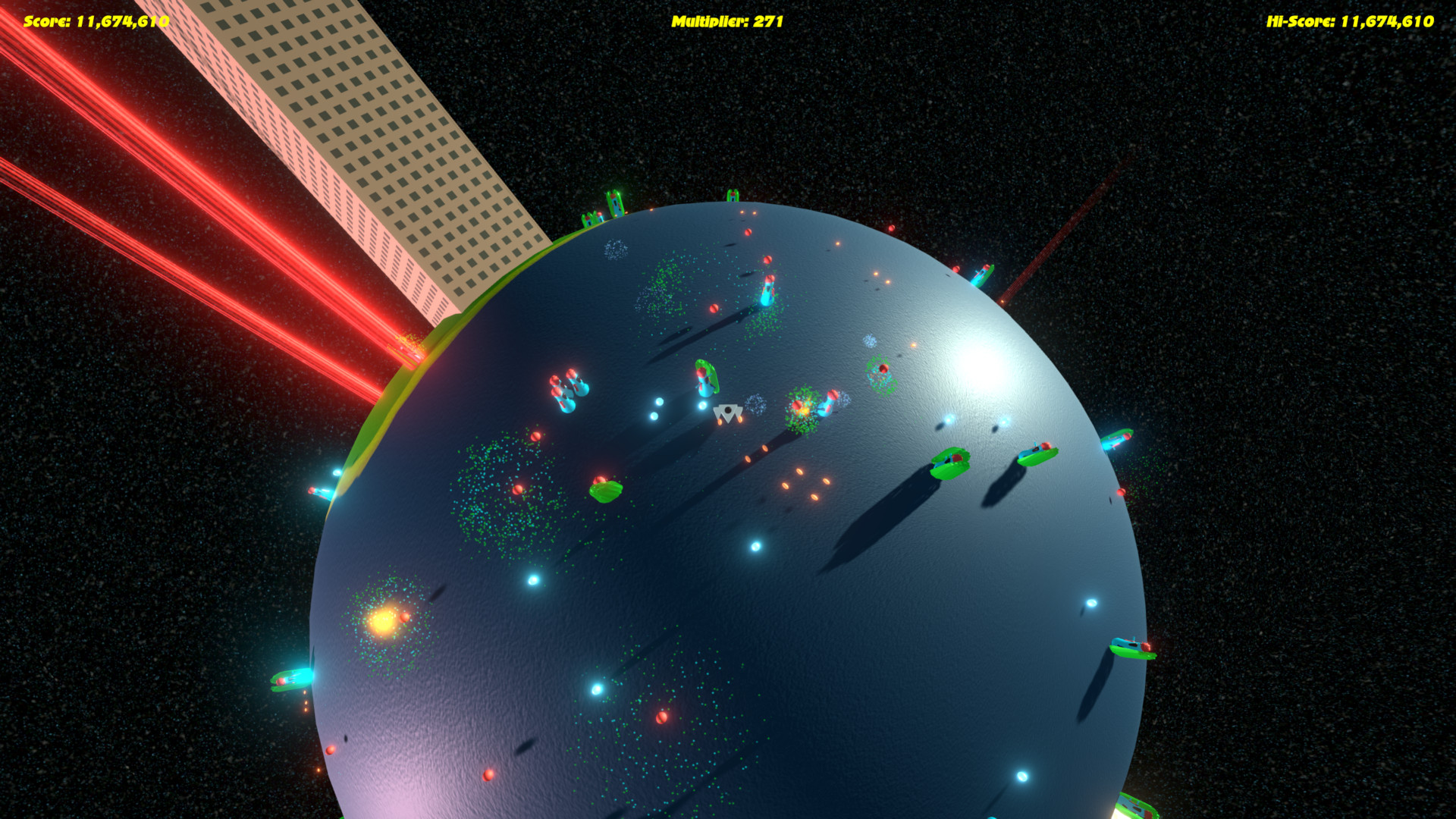
Your aim is to kill the aliens, pick up the multipliers and get the highest score you can.
The Idea
Like many others - I envisioned a small planet that you were tasked with protecting from an alien invasion. My greatest inspiration came from Geometry Wars 3. Originally I wanted you to protect the buildings on your planet however, this was dropped due to time constraints.
The implementation
Getting the movement mechanics was the highest priority. I was able to get the ship moving over the surface of the globe with movement relative to the camera. One problem that I encountered was what to do when the ship is directly beneath the camera (looking down at the planet) - this is effectively a "gimbal lock" scenario. I implemented a solution but I am not happy with it. After all that, it was a mad rush to get the shooting mechanics in followed by multipliers dropped by the aliens. I created two pieces of music (using a Sample Collection DVD called "sound essentials vol. 4") and I created various sound effects using sfxr. All the artwork was created by me - and I am most happy with the way the sky box turned out. Initially I started using a NASA space image but quickly realised that this was not in keeping with the "create from scratch" ideal so I used Paint Shop Pro and various noise, blurs, resizing and repeating to create something I like!
Time-lapse Video
For some reason I was very excited to make my first ever time-lapse video! I used "Chronolapse" capturing at 1 frame every 10 seconds. I then created a video at 10fps and am playing this video at four times normal speed, rendered at 60fps. Here's the result:
Sadly, I was not able to achieve all that I would have liked. Here's what was left on my wish-list:
* Have two types of enemy - one that hunts the player and the other that attacks the buildings. These would be differentiated by colour. * Buildings would have a health bar and, once depleted, the building is razed to the ground * 3 lives for the player? * High Score table * Power-ups (better firepower) * Pause menu (with options to Resume, Restart, Volumes, Exit) * Sound and music volume options (rather than just on/off) * Animated water
The fix list
Here are things that needed fixing/improving:
* Better texture on the world - with normal and/or displacement mapping? * Better (more detailed) buildings - with variety * Better player model * Why no shadows from the second directional light? * Handle the gimbal lock (when the player is directly below the camera) more smoothly * Optimise the enemy model - need fewer polygons and fewer materials
Final thoughts
I have thoroughly enjoyed trying to make a game in such a short period of time and I am looking forward to playing as many of the other submissions as I can. I will definitely be doing this again!
Thanks for reading and I hope you enjoy Globe Trot!
[Edit (25 April @ 16:17 GMT)]
I forgot to add a list of tools used, so here it is:
Tools
The following tools were used to make the entire game:
* Unity 5.6 (including the "Post Processing Stack" free from the Asset Store under "Unity Essentials") * Visual Studio 2013 * 3DS Max 2012 * Paint Shop Pro X9 * Sony Acid Music Studio 10 * Magix "sound essentials vol. 4" - DVD collection of sample loops * sfxr * GoldWave v6.27 * "Ultimate Font Download" (http://www.ultimatefontdownload.com/)
oh yes, and:
* Notepad (for my ToDo list...you've gotta have a ToDo list :grinning:)
I also used the following:
* Chronolapse - for the timelapse recording * ffmpeg - to compile the timelapse screen shots into a video * Sony MovieStudio Platinum 13 (to make the videos you see on this page) * WinRAR to compress the source and binary files
A super intense and a really fun game. The graphics is good, and the music is really intense. The difficulty level is perhaps a bit high, and it sadly made the game experience very short for me. But overall a really great game.
Oh man... I can really see your experience here. This is awesome, and I'm glad you're in compo - I'll be able to take a peek on your source code.
Intense gameplay, good graphics, non-intrusive, yet upbeat music - got my vote allright :)
Thank you @jk5000 - I should have added difficulty modes - perhaps Easy, Medium and Hard - I could have simply changed the rate at which the enemies fire.
Thanks @takusan - I'm glad you like it! If you have any questions about the source code then just let me know.
Fun and intense game, graphics are nice, the music is really cool. Found it easiest to play by not bothering to aim the shooting, just holding it down constantly while focusing on moving, the bullets last so long they'll hit something eventually.
Fun little game! The game is simple but quite enjoyable.
The movement of the ship was hard to learn for me, in the end I kept moving straight while firing in a cone in front of me, works much better than trying any real targeting.
I think it would be a better if both the movement speed and the bullet speed were lowered a bit, would give more room for targeting & planning.
I would also love it if I can see my final score when it say "Game Over".
Fun! I really appreciate the fast difficulty buildup. The effects are also strangely satisfying even if the performance drops a bit once there are a bunch of enemies on the screen.
When I first started playing I expected the movement and shooting controls to function the same way, i.e left arrow shoots left and A key moves left, but this is not the case. The ship rotates instead and the camera rotates with it. This is even worse when moving downward, the whole camera flips.
It took me a while to figure out that the movement controls are relative and even then I didn't fully get used to it or like it much. I don't know how Geometry Wars does it, but a simple directional movement system combined with a fixed camera would have worked just fine here I reckon.
Pretty good work overall. :peace: on :earth_africa:?
@avavt - Thanks for playing! Yes I should have kept the score on-screen during the GAME OVER screen - that was an oversight. I did have the ship moving slower at first but I wanted to ramp up the action...although that might have had something to do with the amount of caffeine in my system at the time!
@huvaakoodia - Sorry to hear the performance drops for you. I think there are too many polygons in the enemy models (and too many materials) so it does hit performance.
I tried to tie the movement to the camera view (just like in 3rd person games) however, as you mentioned, it all goes wrong when you move downwards due to gimbal lock. I tried to fix it but was not happy with the result. If I had more time then I am sure I could have done better!
hey nice game! it feels really good. its really tight and clean, its obvious that you have talent making games! the bullets have some interesting behavior when you are shooting and constantly spinning. the game is simple but enjoyable. i liked the tall buildings as well, they were fun to fly around. i would have liked some more variety in enemies and maybe powerups or different weapons. but tweaking is hard/impossible in ludum dare so i understand ha. nice job!
The whole neon style was really cool, and the music was really fitting. As others have said, the camera got very disorienting, but other than that there was nothing wrong with the gameplay. The whole concept of playing around a small planet is cool.
This game looks awesome, graphics are very well done. Gameplay is fun too, as others have said the camera is disorienting. The camera seems to be based on your velocity, which works great unless you want to slow down and reverse direction or something. The camera then kinda instantly flips. Other than that this is a great entry!
A very fun shooter! Gameplay is exciting and the audio and visual aspects of the game are well made and fitting. As others have already said, the controls for shooting are a little difficult to use on the first few games (with left and right arrow keys turning the whole ship), although its pretty intuitive after that and it would be nice to have the score show up after the game ends. While the camera can get a little disorienting after it goes through the gimbal lock fix, the transition is relatively smooth and the camera works well overall.
Alright, after some difficulties in the beginning I got to a score of 33,300.
Quaternionmath is hard as hell, but the camera going nuts on poles is really something you'll need to take a look at. Also on higher scores the soundeffects of enemies exploding is overmodulating like crazy and is completly overturning the cool game-music. Which to be honest was the reason for me to try the game again and again. Because when I started playing I kept dying the moment the bass came in - and I really wanted to listen to more of the song. x)
@elzach - Thank you! I'm glad you like the music. I added the ability to turn the sound off so you can just listen to the music...of course you have to survive too!
I've realised that I could have avoided starting so many sounds if I had simply used a looping sound for the player firing rather than instantiating a new sound each time.
As for the camera - I really want to re-play Geometry Wars 3 and see how they handle it - I can't quite remember!
Thanks for the feedback. I'm off to play "Super Small Worlds" now!
@jushiip - Strangely I never considered a static camera during the development! No idea why! When I do an update I will definitely sort the camera out!
Thanks for playing! I will check out Quantum Catburetor today!
@simonhutchinson - Apologies! Something must have gone wrong when I created the RAR file. I have re-compressed them (this time on a Macbook as a zip file). Here's the link:
The gameplay itself is very enjoyable and I love the keyboard controls. Soundtrack and fx
fits the gameplay well and brings you into the right mood. But I'd love a restart function without getting kicked out into the main menu. Never let your players escape. :smile:
But I still don't know if I was fighting space cucumbers, anyways I like them. ^^
Wow this is crazy. I get a bit motion sick, I have to admit, but this is really amazing work for a compo entry. I love the attention to detail in the 3D models and textures.
I think this game has some significant potential to be something great. Moving around at breakneck speeds trying to dodge projectiles and enemies alike is so much fun.
Please continue work on this, I could see a polished version with some more features making it on the Steam store.
EDIT: I would also love to see a hardcore mode where running into your own bullets kills you.
@richard-michael-smith, what an intense experience! Great music, really sets the pace for the game play. Seams very mechanically stable, It ran very well for a face paced game. Congratz on your first entry, you did good!
I really like your game, it's fast pace, and gives the player (me) a good challenge. I felt like it was hard to get a hang of the controls, I would have preferred a mouse to aim and shoot with, since it gives more directions and it seems more intuitive. Really cool graphics as well, and nice though that you collect orbs to gain points.
I missed a high score? That would be easy and fast to implement. Gratz on finishing this, I hope you continue to work on it :)
Very good entry! Graphism are simple yet effective! Good feedbacks implemented in the game (explosions, spawning points, sfx, etc). Game is nervous and addictive. The only weird thing I saw was when going backward: the camera rotation is a bit disturbing. However, I have no idea how it could be done otherwise. Anyway, it was great, it just miss bonus to me. Well done ! ;)
Nice work! The controls / camera movement took some time to get used to, but I'm not sure how much of that was because of the gimbal lock. After a couple of tries, I got into it. The red 'teleporting in' effect is really nice, and makes it clear where things are spawning, even if it's chaotic. The sfx were distracting sometimes, especially the bullets seemed too frequent, but I'm also getting old so...
The game looks great and plays decently well. The main problem i had is when rotating to much the camera movement gets pretty bad. The movement itself feels fast and smooth and shooting is fine too. The audio while good can get slightly annoying when to much enemies are there, some pitch and volume variation might be a welcome addition there. But outside those small issues i think you did a great job!
Nice game! plays well, looks good. I had bit of trouble with movement at start, but its learnable pretty quickly. Best strategy that worked for me was moving up + dodging while autofire-shooting sideways - Its a small world so it will hit something :)
I really like the visuals in this, and I had a lot of fun playing it. I like how the enemies spawn with the spotlight so you can find them from a distance and are rewarded for doing so by being able to blast them before they're mobile.
Like a lot of the comments above, I found myself just shooting straight forward. I think a big part of that is the way the camera swings wildly around. It would disorient me so much that it wasn't worth turning around.
Overall, great game. Even more great considering the compo time limit.
Nice game, following the theme pretty well. Simple concept but really well worked out. Game feels casual in the beginning but gets hard quickly. Love it.
I gotta say though, the camera at first really threw me over. I reckon a fixed camera would make controlling the ship much easier, and would have required less work from you at the same time :P (Since you can practically parent the camera to a dolly object or the like and get the rotation from there)
Also, while the music is nice and sets the fast-paced mood, I'd really wish for you to tone down the sound effects volume. The further you get and the more enemies you face, it honestly gets pretty horrid pretty quickly.
Other than that, I like the visuals and the gameplay. Very well done!
This game is rad! Gotta love to pew pew your way through hordes of incoming enemies. I actually love how it can be played BOTH as a twinstick shooter and a classic shmup. In fact, once I decided to only go one way I had the most fun and the highest score. The final moments were intense. You could even add bullet hell elements if you wanted, although I would have an extremely hard time playing that!
Also, my wife says she'd play that on her phone.
@devastus - Thanks for the feedback. Yes the two areas that let the game down are definitely the camera and the sound effects (when there are too many of them). I will definitely do an update that addresses these two issues but I thought I would wait until after the ratings so that the game is judged on what was created within the 48 hours.
@shodanon - Thank you very much! I'm glad you (and your wife) like it! Excellent score too! I really wish I had managed to add an online leaderboard in the time frame - it would have added a much needed "replayability" factor!
Good job! I loved the graphics and audio, which fit the sort of fast gameplay that you created. My only problem with the game, is that the camera made aiming hard, which would have been much easier, had you have used the mouse. If you could have locked the camera a bit more, it could have made shooting a lot better. Even so, the game was fun, and the fast-paced music brought everything together. Thanks for making this, and great job!
I had a great time playing it with a controller! (xbox 360).
Very cool graphics and the game run smooth. The audio is also on point!
As a feedback maybe you could add an instant restart button when you die and make it a bit more easy because right now even with a controller is very challenging.
Great graphics and sound as well as good world design. I used a 360 controller and the controls were good, although the camera movements made quick direction changes difficult.
The overall difficulty was quite high at first, but after a few plays it became a little easier as I learnt the game more, though still hard.
With a final high score of ~310k, this was a very fun and enjoyable game. Congrads on the your first Ludum Dare game.
The graphics and the soundtrack and the sounds are really good! I didn't really grasp the controls though, it was if the right stick was not originating from the ship but from the planet or something.
It is fun to see games that need 3d graphics but still does not aim for realism. Great work!
Really cool game, I had fun playing it! The music was pretty awesome and fit the game really well. The sound effects were nice as well (with a caveat in the feedback below). I played a few times and found a trick >=D If you just move forward while shooting right and slightly course-correcting to grab multipliers the game gets very easy. I was able to score 3,420,200 once I figured that out. FYI I played with an Xbox controller.
Feedback: the game started making me feel sick after a couple minutes (hence why I started only going straight). It's definitely the camera that's doing it. It looks like maybe you're trying to keep the camera above the car and pointing towards wherever the car is heading? I think this is fine, but it looks like the camera's up vector is rotating as well and that feels really unnatural. Another thing you could try is pointing it towards where the player is aiming rather than moving. Next feedback is that the sound effects started clobbering each other after a while and I couldn't hear anything anymore. This is really just some polish that you don't have time for, but if you come back to this entry later you should try to limit the rate at which the audio is playing.
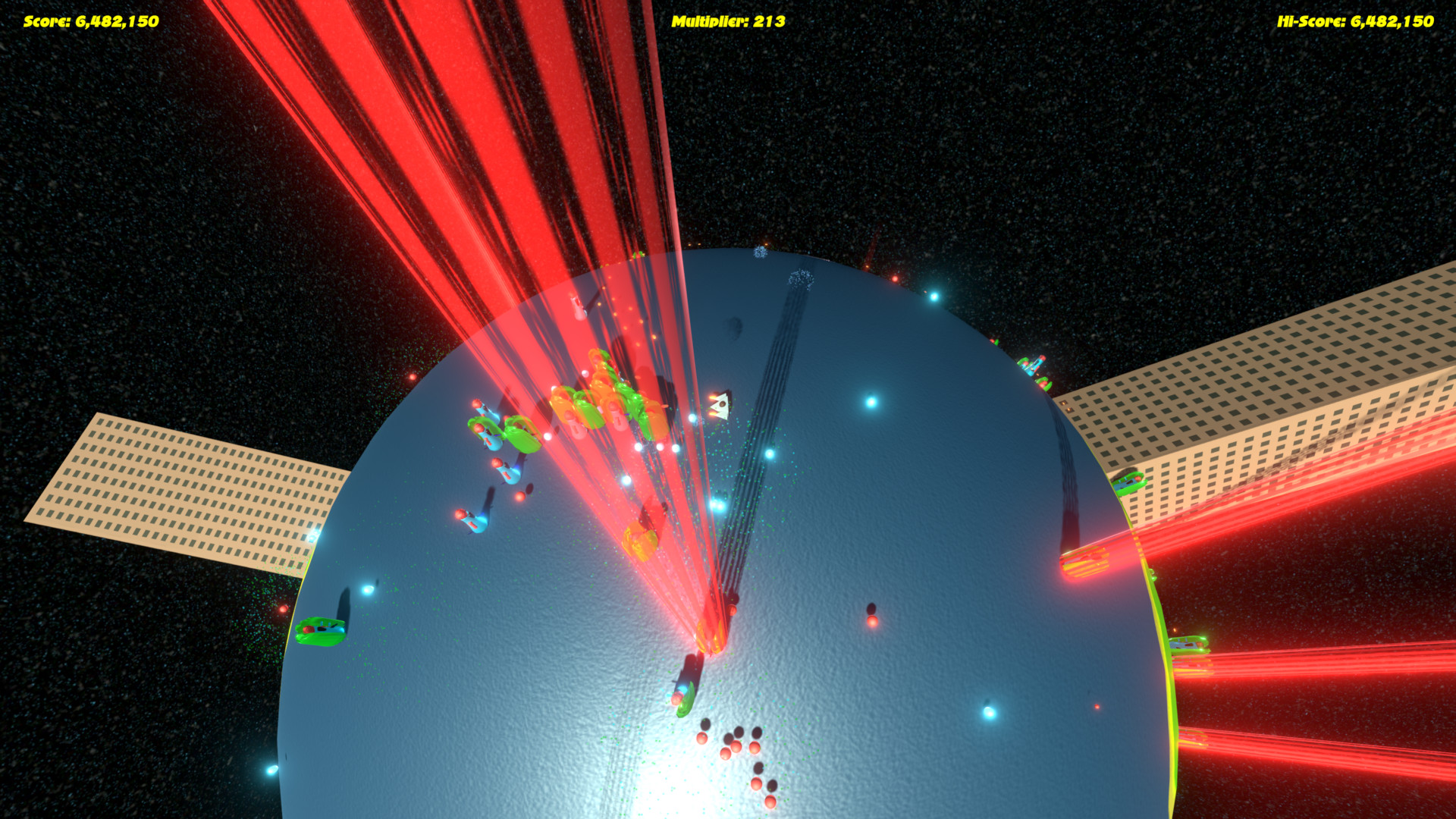
Really cool game. Looks really nice, and the sound is good in the early game, however it has a major balancing issue... I played with a keyboard since I don't have a controller handy, and it was really hard to control. But it turned out that the correct strategy is to just go forward, press up and alternate between left and right to create a wide spread of bullets in front of you. Since you can shoot down the enemies bullets, and the enemies shoot at your position, and not where you are going, the only enemies and bullets that could hit you are killed by your bullets. That's how I got that score:
To battle this issue, I would recommend having some enemies shoot where you are going, or have some stronger types of enemies whose bullets can't get shot down. By the way, going forward for a while and turning around to see a wall of bullets coming over the edge of the horizon was pretty cool!
Hey!! Great job on this! I was surprised to find that the camera is pretty damn smooth and it's always easy to know where I am on screen. It's also really satisfying, killing an enemy.
My least favorite thing is how the turning feels, I feel it's too severe, but that's probably just me.
GRANTED you said a controller was recommended, and I sadly do not have one.
nice entry over all. I had a horrible issue with the camera movement and controller input. doing dual stick input, I have a tenancy of changing directions frequently including lots of 'going backwards' The camera spin that happens when you go backwards over the middle area made the controls very frustrating.
Had the camera moved better (IE not done the 180 on me constantly) this would have been a very interesting game.
Intense game! I really like the visuals, the shadows and projectiles. I had some Issues with the controlls playing with the keyboard but besides that I really enjoyed your game :) Keep the work up mate.
@navot - I agree the AI needs to be a little smarter than just to fire at your current location - I will add that to the "must do" for the next version.
Speaking of - what is the correct policy regarding updates? Should we wait until voting ends to update or can we update and share new versions? Does anyone know?
Cool game. I played with keyboard and it camera was a little anoying (if I use left-right camera moves so fast and annoy me a little). Perhaps this could be fixed with smotth movement of the ship (lock the possibility to turn back fast).
Music was very nice along the game + 1.
Art looks nice (lighting is amazing). Perhaps models are simply and aliens are... weird xD
Obvisuly, there is no much time in compo jam so, for a compo jam you did a fun game. Good job!
the camera moving suddenly is a very big ergonomic no no in my book ( no saying you botched an easy thing it just a thing that didn't let me play the game as much as the quality of the rest of the game pull me to ). besides that i like the idea and the execution, good asset management and scoping(gamedwise). very well jammed!
the camera moving suddenly is a very big ergonomic no no in my book ( no saying you botched an easy thing it just a thing that didn't let me play the game as much as the quality of the rest of the game pull me to ). besides that i like the idea and the execution, good asset management and scoping(gamedwise). very well jammed!
It's a pretty fun, and possibly addicting game if you're into these score based games, where there is a good difficulty increase.
Only issues I had was the camera jumping around a bit, and the audio being distorted when you fought a lot of enemies at once. But these are just minor things imo.
Really well executed game, music and the graphical style made it feel really complete.
Also the implementation of controller support was a +1 for me.
I found the hot dog aliens very amusing and game had a lot of drive to it. And as other people already mentioned camera is a problem.
With regret I must say that for me it became a bigger issue. It was quite often rapidly changing direction. At first it was just disorientating when ship suddenly turning 90 or 180 degrees in random direction but after a while I started to get dizzy and had to stop playing.
Though I've enjoyed the time I had while playing it!
Quite attractive game, all elements supporting the high-octane action. However, I feel the game felt a bit unpolished in some parts.
- The player's death was not too spectacular. The "game over" image just stayed there, perhaps you could show the player's total points in large font + other stats?
- I'd also prefer a "Play again" approach there, instead of taking to the menu, but the replay functionality is there.
- Similarly, you could make the multiplier counter pop when you get a new multiplier. From my short play session, I didn't pay any attention to the top of the screen, perhaps due to font size.
I found it very difficult at first to control the ship in your game with the controller because of the acceleration of the input.
My game shares some things with this one, without the camera problems as discussed above (also the movement mechanics are different). Adding more smoothing to the camera's rotation could help, but the issue with player moving across is still there. Perhaps a better approach is to place the camera directly above the player, and making it always kinda face the same way? For example, see Super Stardust.
This game is awesome! I love the idea. The camera is very difficult. The controls are very difficult too, but I figured it out, you are trying to have a relative to the ship control, which means if I go down, then I'll turn around again and again. I know this is a normal control scheme (I've used it many times myself!) but I found it a little difficult in this game.
As someone else said, I was really wishing the score was still on the screen when the "Game Over" sign came up.
This is an awesome work and although the flaws are big it is still very impressive for a weekend!
It really had fun playing this! The camera feels a bit weird, I think maybe it would be easier if the planet was a little bit bigger. I would love to trash structures on that planet too. However, well made entry, had lots of fun. pew pew!
Very fun frenetic 3D bullet hell. Concept isn't particularly original, but visuals, audio and controls make gameplay smooth and exciting. As others mentioned, I'd like to see more interactions with structures on the planet (even as simple as smahing into the buildings and exploding). Solid!
@richard-michael-smith Wow that was an incredible entry! The game play, graphics and sound were all excellent, but most importantly it was FUN! While I was playing I couldn't stop thinking about how much fun this would be as a Multiplayer game. Are you on twitter?
I had a LOT of trouble with the camera and character controller. It was seems to have been inspired by twin-stick shooters but the controls did not work well, I had to use the bumpers to steer the ship.
Firstly - many thanks for playing! I am guessing that you don't have a 360 controller? In that case you will need to remap the controls in the launch window. The game is played using 2 sticks but your controller is mapping to different axes.
If you can't get that to work then I recommend disconnecting the controller and to play using the keys.
Nice and fun game! The biggest flaw for me is the camera. Not just the gimbal lock, but the general movement and positioning of the camera feels weird. Other than that, the gameplay is fun, the graphics and audio are more than correct, good job! Keep it up!
That was a really fun ~~chaotic mess~~ game. The movement was really smooth and the controls were good. The camera was a bit weird. The audio added to the game a lot. Good job I really enjoyed this.
Hi! I tried it on Linux :penguin: (well, sort of, in a virtual environent, hosted by Windows). First the important bits on your end:
1. You've compressed everything with rar, which would be fine, except that the ditro I've tried (Mint 18.1, based on Ubuntu which is in turn a Debian derivative) *thinks* it can unrar by default, but it really can't and gives a cryptic error message. I've had to `sudo apt install unrar` before I could actually get it to work.
2. The file permissions are not set up to 'execute', so the program won't start by default. Please do a `chmod -R 755 ./*` on the folder (or just the executables) before you compress and you should be allright.
Both of which are quite easily fixable by 'experienced' Linux users on their own, but are an anoyance and, more importantly, not everyone is 'experienced' :smile:
Anyway, it ran, but I'm pretty sure I've got my virtual environment installed wrong since it ran so slow it needed a minute to register a key-press. *Pretty* sure the problem is on my end though. I think it may have started from the .iso again instead of taking the install on the virtual disk or some such.
Then I remembered I could just run it on Windows as well :grin:
Anyway! On the the actual *review* ... :clipboard:
Wow! I had to double-check whether this was a compo entry :smile: On one end it's *really* simple, but everything feels just so smooth and polished and the music is *just right*.
Any real gripes I have I could basically find in your wish-list.
(Although I'm not sure having to worry a lot about the buildings *all the time* would improve it.)
Haveing a high-score table would be nice indeed, but before that, you could try featuring the last hi-score more prominently. I almost missed it!
Yeah, I missed more 'lives' or 'health' at first, but on the other hand, it does force you to learn some strategy. And the time to get back into the game is quite short! It's a tough balance...
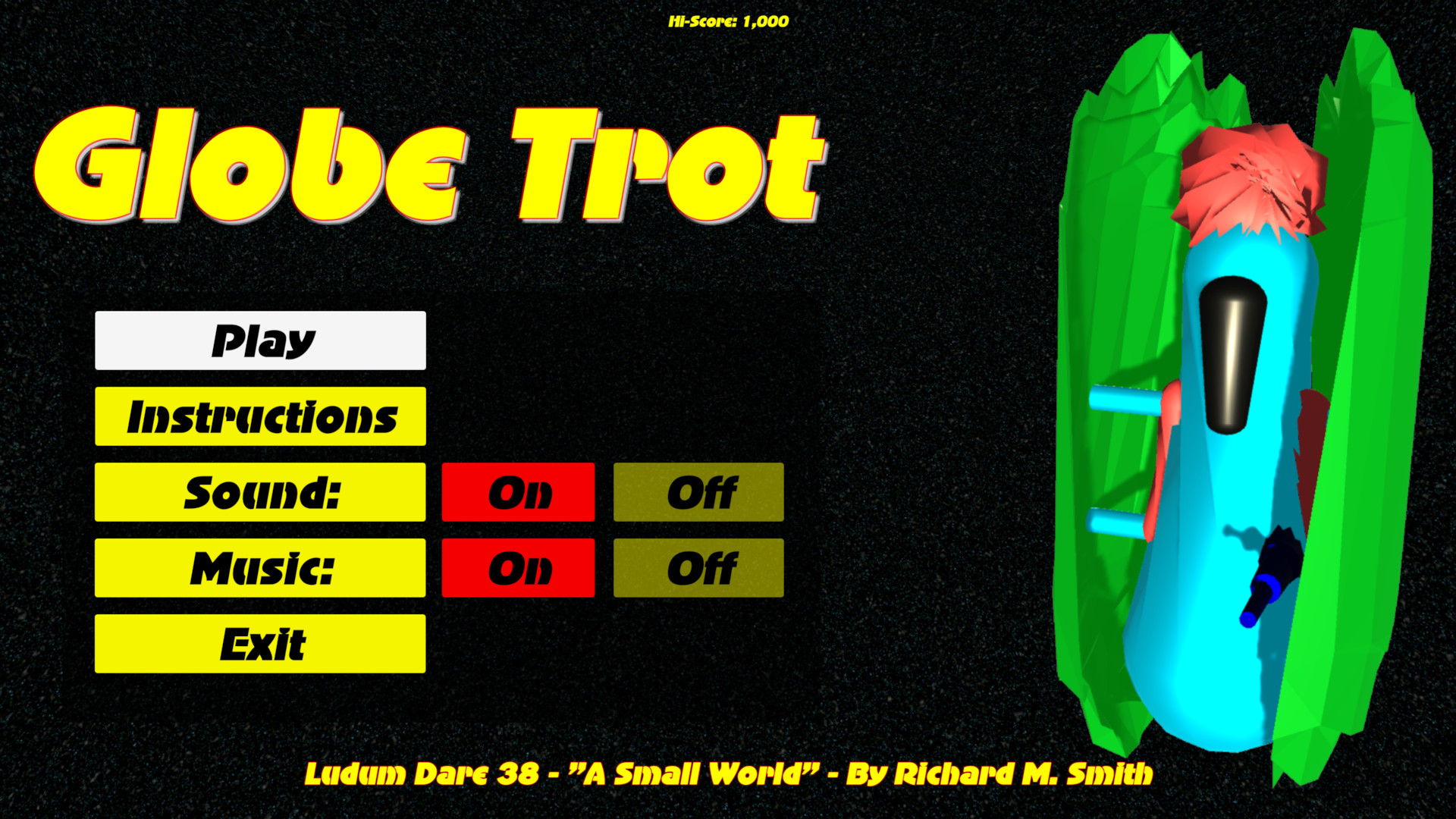
I'm not sure the alien model on the title-screen is the best idea... I spent some time trying to decide what I was looking at and decided that it was *probably* some sort of alien. They work as smaller models, and it's nice to have a larger image so that you can see that it's probably a shield that blows up when you've hit them the 1st time, but I'm not sold.
Other than that ... I just really like to glide around the planet and see the patterns my laser-shots make :smile:
Wow! Thank you very much to @remco, @mrchippy, @alexandr-rum and @buteratosgames for the amazing feedback! I will be sure to play all of your games and leave feedback for you too!
Thank you @remco for testing the Linux build - I will sort those problems out and create a new download - I think this time I will use Zip instead of RAR.
Hi @sagarpatel25700 - thanks for the feedback! Can I ask for more details about the shooting. Are you using keys? If so - I agree that it's tricky with keys since it's designed for controller sticks.
I was ready to write a review ten minutes ago, but I continued playing it - it was hard to stop that spinning mess! I loved it. Shoot controls is great (played with gamepad), but there is a cheap way of shooting - it was mentioned higher. I want you to bring more chais in this game - falling asteroids, blowing buildings, volcanos - it could be so epic!
But this game is still epic - spinning bullet hell. It was very fun to play it!
You did not just do geometry wars!? omg this is awesome. If you seriously refined the graphics and polished this up, it could really be something. I've had my share of space games but this is a great way of using the theme. great entry!
It's really hard to control with the keyboard and much more fun with a controller. The graphic effects are nice. The game-play difficulty rams up really fast and I would appreciate a bit more time to get into the flow before being swarmed by enemies. Otherwise a solid game. Great work!
I don't know how you did this in 2 days, this is awesome ! I feel like the biggest enemy in the game is the camera, but still the game is really fun! I love the music. But I have to ask why are we fighting green hotdogs ?
Yes, the "aliens" do indeed look like hotdogs...others say they look like a parrot...I can't repeat what my wife said they looked like originally (if you watch the time-lapse video you'll see that they changed shape)!
However, I answer your question with a question: if we were invaded by aliens, who's to say that they will NOT look like this??? Hmmmm???? :grinning:
I see, after seeing the food commercials we broadcast to space, the Intergalactic Fast Food Coalition decided to avenge their oppressed earthly relatives!
Fantastic game. At first its easy to lose but it encourages you to continue playing until you learn to control it well. The music fits very well. Well done!!
Played this a couple times. You'd never see me again with an instant restart. The last round, I am sitting out back, a huge moth flew into my face as I was spinning around the globe. don't know how you did it, but it made everything that much more real! ;) Srsly, tho- amazing. 48 hrs. You compo folk really inspire. Thanks you!
what a weird control system. I play games only with keyboard and I don't use the controller much, so it may be good for controller but not for keyboard. the graphics are fun and the idea too, so good job overall :slight_smile:
I am back to thank you for your great effort during this LD. This is my sixth LD, and this time we really need people like you who are willing to spend a lot of time with rating and give feedback to the many LD games.
@rahtainka - Thanks - yeah the camera is the biggest problem and the controls (being relative to that camera) are a close second.
@joemid - Then count yourself lucky that I didn't add an instant restart because you might have been so caught up in the your enjoyment that you forget to eat, sleep or poop (or all of the above) and nobody wants that!
@shubham-gupta - Thank you! Yeah I wanted the teleporting effect to be even more dynamic but sadly I ran out of time!
@dejvo - Thanks for the feedback. You're absolutely right about the keyboard controls. I created a WebGL version which forced me to play using keys and it was nowhere near as enjoyable! For that reason I didn't release the web version. It's a shame that controllers are not more readily supported in Unity's WebGL player.
@jk5000 - Wow sixth! Is there somewhere I can see your previous entries?
It has been a privilege and a fantastic experience to play as many games as possible. It's a shame that I have only sampled a tiny fraction. I can only imagine how many gems I have completely missed!
1. Mini LD is some small LD's game jams, made by users of the LD side. There are like in the normal LD a theme for the game jam, but usually there are no ratings, and you normally have much longer time to make your games.
2. No the game was not made for the mini LD, but the theme for this LD was "music", so I made all the music for the game doing the jam. In this mini LD you where allowed to make a new game with music or you could use a old game, and give the old game some music. I have worked on the “The Dog Handler Show” since last summer, but I had not made any music for the game, so when I so the theme for the mini LD and I decided to make music for the game. If you are interested I am still working on “The Dog Handler Show”, and I hope to upload an big updated for the game in August.
A fun, fast paced game but as others have said the controls made the game very difficult and the camera seemed to move around very suddenly. It felt like I was surviving by luck instead of skill, this was maybe due to using keyboard. With a bit of work this could be an excellent game. Graphics where good and the music was frenetic and suited the game.
Comments113
Intense gameplay, good graphics, non-intrusive, yet upbeat music - got my vote allright :)
Thanks @takusan - I'm glad you like it! If you have any questions about the source code then just let me know.
The movement of the ship was hard to learn for me, in the end I kept moving straight while firing in a cone in front of me, works much better than trying any real targeting.
I think it would be a better if both the movement speed and the bullet speed were lowered a bit, would give more room for targeting & planning.
I would also love it if I can see my final score when it say "Game Over".
When I first started playing I expected the movement and shooting controls to function the same way, i.e left arrow shoots left and A key moves left, but this is not the case. The ship rotates instead and the camera rotates with it. This is even worse when moving downward, the whole camera flips.
It took me a while to figure out that the movement controls are relative and even then I didn't fully get used to it or like it much. I don't know how Geometry Wars does it, but a simple directional movement system combined with a fixed camera would have worked just fine here I reckon.
Pretty good work overall. :peace: on :earth_africa:?
I tried to tie the movement to the camera view (just like in 3rd person games) however, as you mentioned, it all goes wrong when you move downwards due to gimbal lock. I tried to fix it but was not happy with the result. If I had more time then I am sure I could have done better!
Thanks!
The only thing I didn't really like is that I die in a single hit, except that minor minor complaint I thoroughly enjoyed it!
Really fun game. Sound's great, visuals are great, controls are tight - shame about the camera though, it really does get a bit disorienting.
Well done!
Overall a great game. Well done!
Quaternionmath is hard as hell, but the camera going nuts on poles is really something you'll need to take a look at. Also on higher scores the soundeffects of enemies exploding is overmodulating like crazy and is completly overturning the cool game-music. Which to be honest was the reason for me to try the game again and again. Because when I started playing I kept dying the moment the bass came in - and I really wanted to listen to more of the song. x)
Anyways, cool game, I liked it!
cheers~
I've realised that I could have avoided starting so many sounds if I had simply used a looping sound for the player firing rather than instantiating a new sound each time.
As for the camera - I really want to re-play Geometry Wars 3 and see how they handle it - I can't quite remember!
Thanks for the feedback. I'm off to play "Super Small Worlds" now!
https://ldjam.com/events/ludum-dare/38/quantum-catburetor
Did you consider keeping a static camera and not making it rotate with the player? Might be worth trying out. :)
Thanks for playing! I will check out Quantum Catburetor today!
https://www.dropbox.com/s/4rnflebymh6v4kn/MacOS%20%28Universal%29.zip?dl=0
The gameplay itself is very enjoyable and I love the keyboard controls. Soundtrack and fx
fits the gameplay well and brings you into the right mood. But I'd love a restart function without getting kicked out into the main menu. Never let your players escape. :smile:
But I still don't know if I was fighting space cucumbers, anyways I like them. ^^
Awesome work! :smile:
Wow this is crazy. I get a bit motion sick, I have to admit, but this is really amazing work for a compo entry. I love the attention to detail in the 3D models and textures.
I think this game has some significant potential to be something great. Moving around at breakneck speeds trying to dodge projectiles and enemies alike is so much fun.
Please continue work on this, I could see a polished version with some more features making it on the Steam store.
EDIT: I would also love to see a hardcore mode where running into your own bullets kills you.
https://www.dropbox.com/s/4rnflebymh6v4kn/MacOS%20%28Universal%29.zip?dl=0
...and I have tried to edit the page with that link also.
@jk5000 - Thank you! I will do the same for Space Travel!
I really like your game, it's fast pace, and gives the player (me) a good challenge. I felt like it was hard to get a hang of the controls, I would have preferred a mouse to aim and shoot with, since it gives more directions and it seems more intuitive. Really cool graphics as well, and nice though that you collect orbs to gain points.
I missed a high score? That would be easy and fast to implement. Gratz on finishing this, I hope you continue to work on it :)
Cheers!
Like a lot of the comments above, I found myself just shooting straight forward. I think a big part of that is the way the camera swings wildly around. It would disorient me so much that it wasn't worth turning around.
Overall, great game. Even more great considering the compo time limit.
@davidthelazar - Thank you for you nice comments. Glad you like the visuals. As a programmer it's the one area I fear the most!
@richard-weug - Glad you like it! Thanks very much.
@coomzy - Well played sir! 200k is a great score! You were clearly picking up the multipliers!
I gotta say though, the camera at first really threw me over. I reckon a fixed camera would make controlling the ship much easier, and would have required less work from you at the same time :P (Since you can practically parent the camera to a dolly object or the like and get the rotation from there)
Also, while the music is nice and sets the fast-paced mood, I'd really wish for you to tone down the sound effects volume. The further you get and the more enemies you face, it honestly gets pretty horrid pretty quickly.
Other than that, I like the visuals and the gameplay. Very well done!
Also, my wife says she'd play that on her phone.
@shodanon - Thank you very much! I'm glad you (and your wife) like it! Excellent score too! I really wish I had managed to add an online leaderboard in the time frame - it would have added a much needed "replayability" factor!
Very cool graphics and the game run smooth. The audio is also on point!
As a feedback maybe you could add an instant restart button when you die and make it a bit more easy because right now even with a controller is very challenging.
Cool game!
The overall difficulty was quite high at first, but after a few plays it became a little easier as I learnt the game more, though still hard.
With a final high score of ~310k, this was a very fun and enjoyable game. Congrads on the your first Ludum Dare game.
It is fun to see games that need 3d graphics but still does not aim for realism. Great work!
Feedback: the game started making me feel sick after a couple minutes (hence why I started only going straight). It's definitely the camera that's doing it. It looks like maybe you're trying to keep the camera above the car and pointing towards wherever the car is heading? I think this is fine, but it looks like the camera's up vector is rotating as well and that feels really unnatural. Another thing you could try is pointing it towards where the player is aiming rather than moving. Next feedback is that the sound effects started clobbering each other after a while and I couldn't hear anything anymore. This is really just some polish that you don't have time for, but if you come back to this entry later you should try to limit the rate at which the audio is playing.
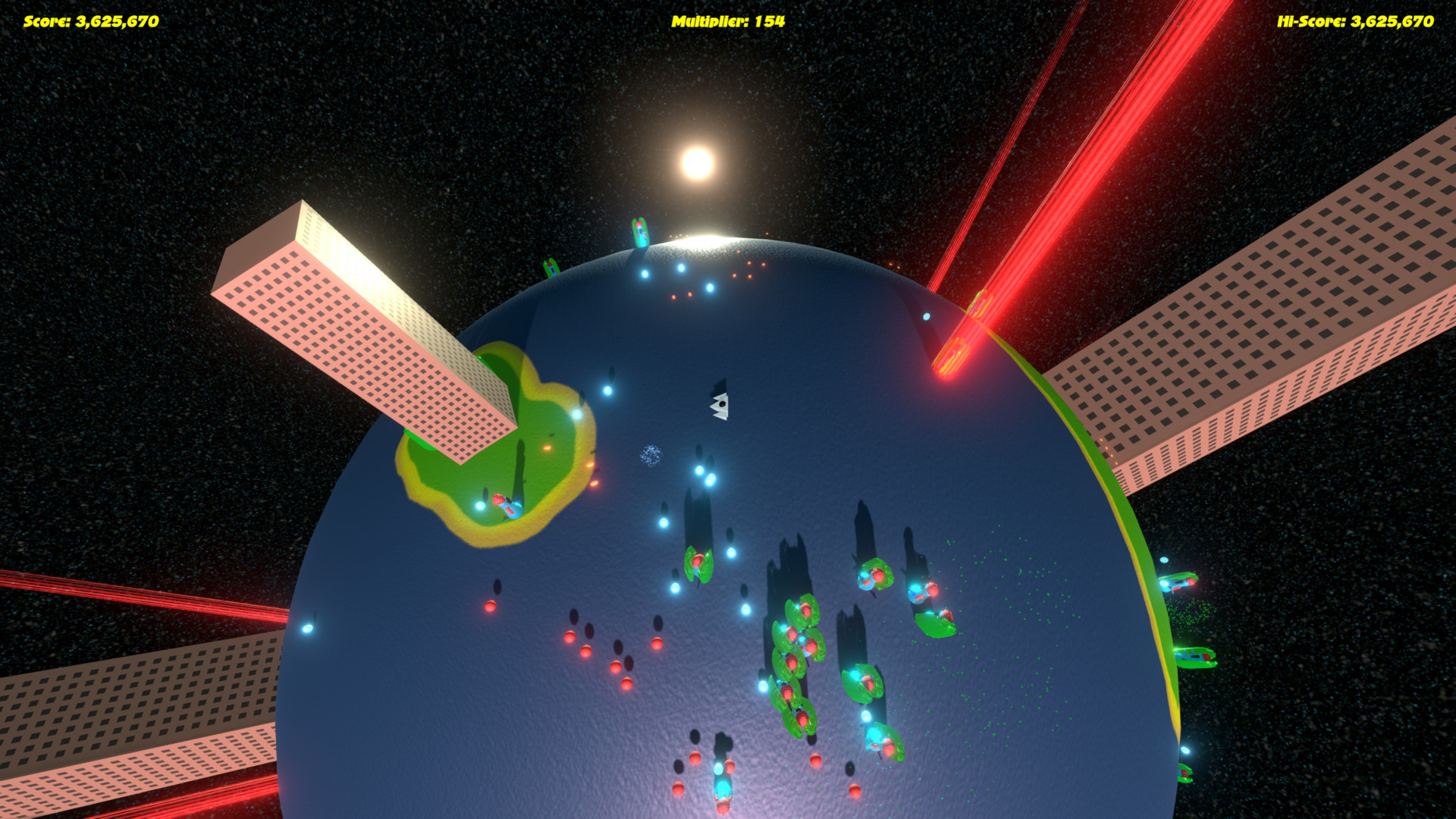
(3,625,670 on screenshot, really!? Is it possible? Am I so bad?!)
Even if I think it needs some polish (variety, camera, multiplier system...), it was really fun to play!
really good job for a first ludum dare!
Thank you for playing and the positive feedback.
To battle this issue, I would recommend having some enemies shoot where you are going, or have some stronger types of enemies whose bullets can't get shot down. By the way, going forward for a while and turning around to see a wall of bullets coming over the edge of the horizon was pretty cool!
My least favorite thing is how the turning feels, I feel it's too severe, but that's probably just me.
GRANTED you said a controller was recommended, and I sadly do not have one.
SUPER IMPRESSED with this! Great job~!
Had the camera moved better (IE not done the 180 on me constantly) this would have been a very interesting game.
and really smooth controls over the ship, really like the game. nicely done.
sometimes, it feels like, the camera moves too quickly, but other than that, everything is really neat.
love the graphical effects, and the enemies everything just blends really well togather.
really great job
Cheers
@navot - I agree the AI needs to be a little smarter than just to fire at your current location - I will add that to the "must do" for the next version.
Speaking of - what is the correct policy regarding updates? Should we wait until voting ends to update or can we update and share new versions? Does anyone know?
Music was very nice along the game + 1.
Art looks nice (lighting is amazing). Perhaps models are simply and aliens are... weird xD
Obvisuly, there is no much time in compo jam so, for a compo jam you did a fun game. Good job!
Anyway, congratulations on this.
Only issues I had was the camera jumping around a bit, and the audio being distorted when you fought a lot of enemies at once. But these are just minor things imo.
Really well executed game, music and the graphical style made it feel really complete.
Also the implementation of controller support was a +1 for me.
With regret I must say that for me it became a bigger issue. It was quite often rapidly changing direction. At first it was just disorientating when ship suddenly turning 90 or 180 degrees in random direction but after a while I started to get dizzy and had to stop playing.
Though I've enjoyed the time I had while playing it!
* The camera
* The audio (when there are lots of enemies)
* An online leaderboard to get people competing with each other!
Oh well....lesson learned for next time.
I will try and fix those three things though as soon as judging ends.
- The player's death was not too spectacular. The "game over" image just stayed there, perhaps you could show the player's total points in large font + other stats?
- I'd also prefer a "Play again" approach there, instead of taking to the menu, but the replay functionality is there.
- Similarly, you could make the multiplier counter pop when you get a new multiplier. From my short play session, I didn't pay any attention to the top of the screen, perhaps due to font size.
I found it very difficult at first to control the ship in your game with the controller because of the acceleration of the input.
My game shares some things with this one, without the camera problems as discussed above (also the movement mechanics are different). Adding more smoothing to the camera's rotation could help, but the issue with player moving across is still there. Perhaps a better approach is to place the camera directly above the player, and making it always kinda face the same way? For example, see Super Stardust.
As someone else said, I was really wishing the score was still on the screen when the "Game Over" sign came up.
This is an awesome work and although the flaws are big it is still very impressive for a weekend!
I had a LOT of trouble with the camera and character controller. It was seems to have been inspired by twin-stick shooters but the controls did not work well, I had to use the bumpers to steer the ship.
Firstly - many thanks for playing! I am guessing that you don't have a 360 controller? In that case you will need to remap the controls in the launch window. The game is played using 2 sticks but your controller is mapping to different axes.
If you can't get that to work then I recommend disconnecting the controller and to play using the keys.
Ps .. hey, just do not tell anyone, I found a cheat method-just hold D + Rigt or A + Left
Should be like this!
1. You've compressed everything with rar, which would be fine, except that the ditro I've tried (Mint 18.1, based on Ubuntu which is in turn a Debian derivative) *thinks* it can unrar by default, but it really can't and gives a cryptic error message. I've had to `sudo apt install unrar` before I could actually get it to work.
2. The file permissions are not set up to 'execute', so the program won't start by default. Please do a `chmod -R 755 ./*` on the folder (or just the executables) before you compress and you should be allright.
Both of which are quite easily fixable by 'experienced' Linux users on their own, but are an anoyance and, more importantly, not everyone is 'experienced' :smile:
Anyway, it ran, but I'm pretty sure I've got my virtual environment installed wrong since it ran so slow it needed a minute to register a key-press. *Pretty* sure the problem is on my end though. I think it may have started from the .iso again instead of taking the install on the virtual disk or some such.
Then I remembered I could just run it on Windows as well :grin:
Anyway! On the the actual *review* ... :clipboard:
Wow! I had to double-check whether this was a compo entry :smile: On one end it's *really* simple, but everything feels just so smooth and polished and the music is *just right*.
Any real gripes I have I could basically find in your wish-list.
(Although I'm not sure having to worry a lot about the buildings *all the time* would improve it.)
Haveing a high-score table would be nice indeed, but before that, you could try featuring the last hi-score more prominently. I almost missed it!
Yeah, I missed more 'lives' or 'health' at first, but on the other hand, it does force you to learn some strategy. And the time to get back into the game is quite short! It's a tough balance...
I'm not sure the alien model on the title-screen is the best idea... I spent some time trying to decide what I was looking at and decided that it was *probably* some sort of alien. They work as smaller models, and it's nice to have a larger image so that you can see that it's probably a shield that blows up when you've hit them the 1st time, but I'm not sold.
Other than that ... I just really like to glide around the planet and see the patterns my laser-shots make :smile:
Thank you @remco for testing the Linux build - I will sort those problems out and create a new download - I think this time I will use Zip instead of RAR.
- Shoot controls is very diffcult
- I like the way how enemy are spawned
- graphics and sound make playing your game more intresting
- Thans for the source Code
But this game is still epic - spinning bullet hell. It was very fun to play it!
...well, I tried to anyway :disappointed:
Yes, the "aliens" do indeed look like hotdogs...others say they look like a parrot...I can't repeat what my wife said they looked like originally (if you watch the time-lapse video you'll see that they changed shape)!
However, I answer your question with a question: if we were invaded by aliens, who's to say that they will NOT look like this??? Hmmmm???? :grinning:
*dan dan daaan!*
You're welcome.
-Great Visuals
-Smooth Controls
-Intense Music
- Effects were great ( like the red teleporting ..)
Overall a solid entry.
please do try my game also :
https://ldjam.com/events/ludum-dare/38/sunken-mystery
I am back to thank you for your great effort during this LD. This is my sixth LD, and this time we really need people like you who are willing to spend a lot of time with rating and give feedback to the many LD games.
WELL DONE!
@rahtainka - Thanks - yeah the camera is the biggest problem and the controls (being relative to that camera) are a close second.
@joemid - Then count yourself lucky that I didn't add an instant restart because you might have been so caught up in the your enjoyment that you forget to eat, sleep or poop (or all of the above) and nobody wants that!
@shubham-gupta - Thank you! Yeah I wanted the teleporting effect to be even more dynamic but sadly I ran out of time!
@dejvo - Thanks for the feedback. You're absolutely right about the keyboard controls. I created a WebGL version which forced me to play using keys and it was nowhere near as enjoyable! For that reason I didn't release the web version. It's a shame that controllers are not more readily supported in Unity's WebGL player.
It has been a privilege and a fantastic experience to play as many games as possible. It's a shame that I have only sampled a tiny fraction. I can only imagine how many gems I have completely missed!
You can find my old LD games here http://ludumdare.com/compo/author/jk5000/
"The Dog Handler Show" is brilliant! I'm a huge fan of both Portal games so I was instantly "in the zone"! I have two questions though:
* What's a "Mini LD"?
* Please tell me that the version I played wasn't what you created in the LD because it's HUGE!?!?
I will play all of your other games later on!
1. Mini LD is some small LD's game jams, made by users of the LD side. There are like in the normal LD a theme for the game jam, but usually there are no ratings, and you normally have much longer time to make your games.
2. No the game was not made for the mini LD, but the theme for this LD was "music", so I made all the music for the game doing the jam. In this mini LD you where allowed to make a new game with music or you could use a old game, and give the old game some music. I have worked on the “The Dog Handler Show” since last summer, but I had not made any music for the game, so when I so the theme for the mini LD and I decided to make music for the game. If you are interested I am still working on “The Dog Handler Show”, and I hope to upload an big updated for the game in August.