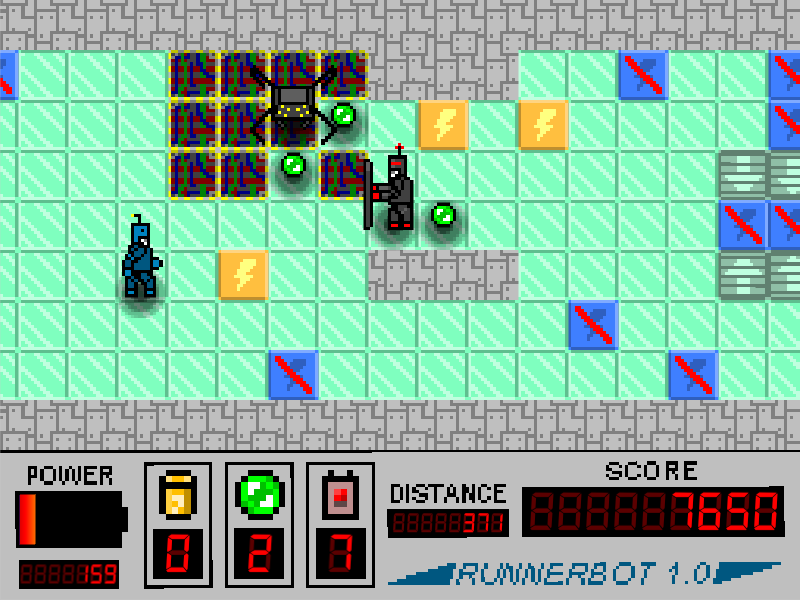
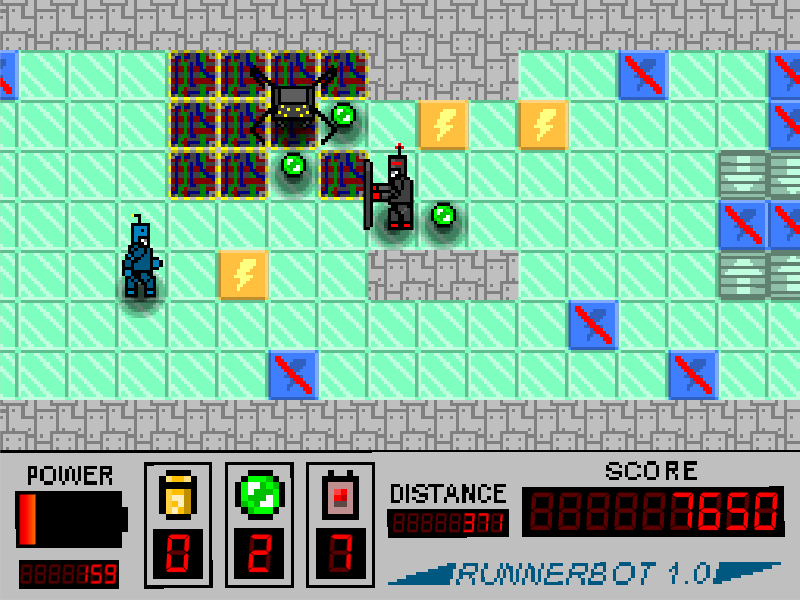
You are a robot. You were programmed to run, and to collect items. So... run as far as you can! Collect as many items as you can too! See how far you can go before your battery runs out. Can you get a score of 10000? For fun, feel free to post your highest score in the comments below!
This is my first-ever Ludum Dare entry. Developing a game in such a short time frame is a new experience to me! I had fun, and I'm glad to have something I can share with you!
HOW TO PLAY
You need a keyboard to play:
- WASD-keys - move up, lef, down, right (respectively)
- Space-bar - Pause or continue.
- Q-key - use a shield item
- E-key - use a pulse remote item
- M-key - toggles music (post-jam version only)
The main 'winning' goal for this version is to get a score of 10000. You increase your score by running toward the right side of the screen, and by picking up items. There are a few other small bonuses here and there too that you'll find (hint: try to get enemy bots stunned!).
Once you achieve a score of 10000, the game does not automatically end. Content is procedurally-generated, so you can theoretically keep playing indefinitely (maybe you want to go for 20000? Or 30000? :-P ). The game *will* automatically end when your power (shown by the battery in the lower left of the screen) runs out and when you have no more extra lives.
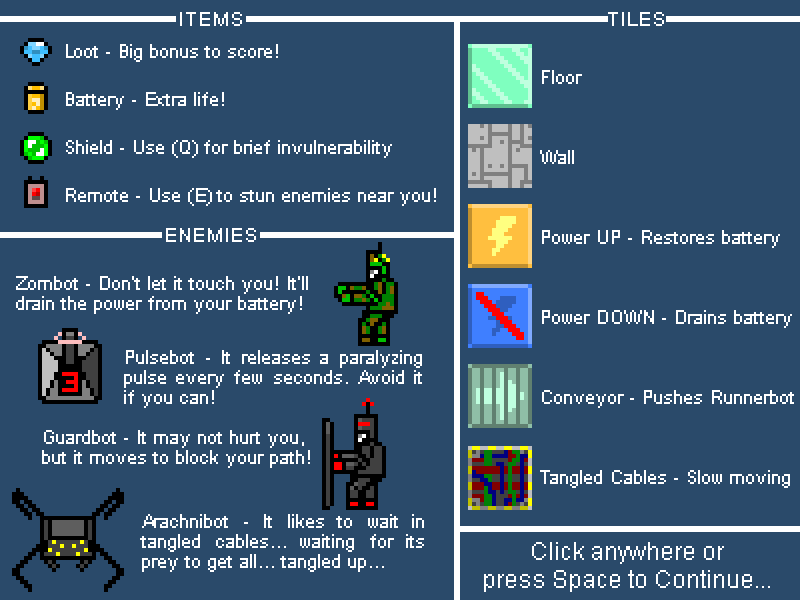
One more useful hint: when you pause, you'll see a cheat-sheet showing all the different items, tiles, and robots that you can encounter. Feel free to pause to consult this anytime. :-)
DOWNLOAD LINKS:
Jam Edition:
*For ranking the game.* *If you want to give helpful* *feedback, please use the Post-Jam* *edition below.*
*Improved version,* *for providing helpful feedback.* *Please indicate that you used this version when posting your comment. You should use the* *jam edition for ranking.* *See changelog from V.1.1a onward for all the differences.*
Although I spent as much time as I could in these 72 hours finding and squashing bugs, I'm sure I missed a few. If you find some, please let me know!
- The procedural generation is somewhat... crude. Although I implemented safeguards to make sure the game is playable, I have seen on very rare occasion a complete wall generate from the very top of the screen to bottom, blocking your way. If this happens to you, I'd love to see a screenshot so I can try to debug it.
- The high score only works for your instance of the game. If you close the game, and open it later... It'll reset to the default of 10000.
EXTRA FEATURE:
If you want to try something different... then turn on "Constant Running Mode" by pressing the P key while in-game. In this mode, you cannot stop - if you hit a wall or other obstacle, Runnerbot will simply choose a new direction to go in. If you don't like it, you can turn it off by pressing the P key a second time. :-)
ACKNOWLEDGEMENTS:
Tools:
- Unity3D Engine: Game engine. - Visual Studio Code: Coding! Yay! This works in Linux too! - GIMP: For making graphics - Blender: For making models - Beepbox: For making sounds
Commercial-use-friendly fonts from the following links:
- Removed some personal meta information from the build settings. - Changed a few things around supported resolutions.
V.1.0b
Bugfixes
- Fix for full-screen in web browser (I hope!) - Updated the pause screen to show the correct textures for "wall" and "conveyor" tiles.
V.1.1a (Post-Jam version starts here)
Many enhancements, tweaks, and bugfixes based on feedback from LD39.
New
- Added sound effects <3
Items
- Put a limit on the number of each item that can be held in inventory (this was the original intent, but it somehow slipped my mind) - Added a GUI indicator for when the maximum number for each item is reached
Procedural Generation
- Slightly more "Arachnibot Web" structure generation after 350 meters - New "Zombot Field" structure will start generating after 250 meters. Gets more and more common until 500 meters. - Put a limit on the total number of each helpful item that can be found - Made batteries rarer than other items - Item spawn rate decreases linearly after 100 meters, down to a minimum of 1/4 the original rate at 700 meters. - Power Up tiles are slightly more rare (3/4 the original rate)
Tweaks
- Power Up tiles now increase the power by 30% of the maximum, rather than 50%
Bugfixes
- Structures now generate at all levels, not just the upper part of the screen.
V.1.1b
Tweaks
- Made the enemy bot text brighter - The pulse remote now has a wider radius (3.5 tiles instead of 2.5) - When pulsebots stun the player, now causes immediate power loss and a much shorter stun. - Stunning bots now scores 100 points instead of 20, so it's more worthwhile
Bugfixes
- Sounds and item use now work on game restart - Walls should no longer generate in the middle row (prevents getting stuck because of bad gen)
V.1.1c
New
- Added some very basic music (if you can even call it that). Can be disabled with the M key.
V.1.1d
Tweaks
- Reduced length of power up tile sound - Made the background beat less loud - Pulse Remotes now emit a faster pulse (0.5 seconds to full expansion, instead of 1 second)
V.1.1e
Tweaks
- Zombots and Arachnibots now do 50% energy drain instead of (I think) 20% - Power down tiles now do 30% energy drain instead of 20% - Music disabled by default
This is a great start. I think what it could use is a scale up in difficulty somehow as the game progresses. Perhaps harder enemies or more of them could show up after a certain score. The procedural gen actually worked pretty nicely to generate interesting layouts. The graphics and feel of the game are solid. Great work!
Nice little game, you managed to put in a few mechanics in such a small amount of time so kudos! Although a little crude the procedural generated tiles works fine. I managed to get up to 1600m before I had to stop playing, it felt like the difficulty peaked a few hundred meters before that and that I could keep going forever with my spare lives. If you were to continue polishing and tweaking, it would be a great small game! Keep up the good work!
I reached 24760, and I'm not that good playing this kind of games, so I guess the only thing to be changed to have a better balance is to rise the goal to 30k or 50k ;) Except of that point, I think it's a very good first LD game, I wish I had done at least half as good for my first entry!
(and also, thank you for your detailed and wise comment on my game, I found a bug and correct it, so if you want you can try it again :P)
Great Start. A little to easy for my taste but overall a nice game with working procedural approach.
I found a minor bug. If you are in Fullscreen in the Web Gl build you can see the level load and unload the tiles on both sides. Not game breaking but a little confusing ;)
Thanks for all the comments everyone! I'm glad you're finding it fun. I'm actually kind of relieved that you're finding it easy. I was very worried it would be too hard at submission! I decided if I had to err, I'd rather it be on the easy side so it's... more inclusive. That way more people can have the satisfaction of reaching the goal. :-)
I'll make a note to adjust the spawn rates of some enemies/items. I would do it now, but I don't know that it's in the spirit of the jam. I could be wrong though. I'm leaving the spawn rates as-is until I know otherwise.
@pilarius Ah, dang! I'm sorry that happened to you and that it affected your experience.
Well, since the Web player seems to ignore the list of supported aspect ratios... I'll just put in some black quads to cover the areas that are off-screen. A bit hackish, but simple and it works. I hope this fixes your issue!
Pretty fun and innovative runner! Love the UI stylization.
Also, procedural generation is a cool feature to have! I implemented it for my game as well, and I can say it is really tough to execute under such little time. Great work!
Commonly, it's admitted that as soon as you don't add some content nor features (new monsters, better textures, sounds, new levels, new game modes,…), you can change some little things in your judged entry, frequently it's (minor) diffculty adjustment and/or fixing bugs. You are just supposed to say clearly you have done this changes. But, if you are not sure of what is good or not, you can also publish a post-jam version appart (with explicit links like "post-jam Windows"), so the competitors can judge you on the original entry, and the visitors can play the enhanced version, and everyone is happy ;) For your game, as you didn't made the win condition visible in game, I think you can just change the text in your description page from 10k to highter score :P
Addictive gameplay i just wanted to get a as far as possbile. I really like how many kinds of enemies are there, especially i like Archanibot (really creepy, when you step on wires he is charging at you really fast). Graphics are neat retro style and are easy to read. Gameplay is really fun but way to easy in my oppinion. I would suggest that generating level is less generous with power tiles and items as you progress (the higher your score is). I think i found myself in situation where i just got more and more stuff.
Other than that game is really great and fun to play, are you going to expand this project?
BTW: really impressive game for your first LD and first game published ever, congratulations
I think I might expand it a bit. I haven't decided yet. :-D
If I had more time during the jam, I would definitely have spent more time playtesting and balancing it. As it was, I had to made a last minute call to reduce difficulty (increase item spawn rates) because I honestly thought it was hard. XD
But other than that, I see quite a few possibilities for features: - Difficulty settings - Music and sound (Someone suggested sfxr, I wish I'd known about that tool!) - More 'end-conditions' - A "biome"-like system in the procedural generation - Different characters to choose from, perhaps with different abilities and items
Solid first entry :) now, i find the game being too easy, and i think that's because there are too many power up squares and they give you a lot of energy. You can adjust somehow the procedural generation to make them appear less (or you can tweak the energy drain, or the energy bonus that power blocks give you) and making little tweaks to the mechanics here and there and that's enough. Good game! :)
How would you suggest I balance difficulty in a game like this? Spawning more enemies and/or less items and/or less power as game goes on. What kind of specific feedback would you ask from playtesters? IRL. Giving them the game and telling them nothing. Usually they say what they don't like. How did you personally find the game difficulty/balance? Easy.
Pretty fun, but too easy!:) The main thing is that the power tiles give too much power, try cutting it to half of what is it currently and see how that plays. After a while I was just stacked with items and batteries, I played to 46,000 effortlessly. Adjusting the difficulty and adding different items and challenges will bring out this game's potential!
@ping78 Thank you LOADS for the screenshot, that's AWESOME! (Not that I'm glad you got stuck, but at least I can try to apply some reverse logic and figure out why my failsafe is... well, uh, failing)
Heads up -- I'm afraid I'm getting the following error when I try to load the WebGL version. I'm on a Mac with Chrome and Safari, if it helps. "An error occured running the Unity content on this page. See your browser JavaScript console for more info. The error was: ReferenceError: Can't find variable: UnityProgress"
I went ahead and downloaded the OS X version though, and that runs just fine! Great job with this one -- the graphics are really well done, and you managed to fit a lot into the game and make everything feel super-intuitive. Would be great if there were some sound, but it's a solid entry regardless. Thanks for sharing!
@ninjascribble I'm sorry to hear that the WebGL version didn't work for you. Thank you for letting me know about it. I'm afraid I don't have access to a Mac to investigate further, but if this problem keeps popping up... maybe I can work with a few players to pinpoint the cause and fix it. :-)
A real solid entry that's simple but that has heart, an interesting take on the endless runner :)
Positive stuff : - Easy to pickup and play - The Graphics are really cohesive and well made - The gameplay was smooth - The little details like the explaining sheet when you pause
Negative stuff : - A bit too easy - The lack of sound or music (this could really contribute to the atmosphere of the game i.m.o ) - Tiny nitpick but, maybe outline the wall tiles a bit more so they stand out from the other blocks
And that's all i'd say there is, the issues are not really that much. I really liked it ^^
I'll give you a silly award just because... (and also cause i liked the interface XD) :
You get the Retro SciFi award for LCD digits, Doc Brown would be proud :p
Nice game! I found myself playing for a long time! The controls are nice, there is a variety of enemies, the game isn't inforgiving, and you can recharge your battery if it gets too low, giving you a second chance!
I'm guessing you have an endless generating world too!
However, you should balance the gameplay because on the second try it was never ending, I stopped playing at 51000 because I felt it would last too long without any special change.
The game worked pretty nicely!. Some bugs come but they are obvious! 72 Hours is really a small time. It was difficult for me to, Overall Liked this game
If you raise the difficult, the game would be very good. At my third try I hit 50000, at 2400 distance with 13 batteries and gave up playing because I was too bored.
About balancing, I suggest you to divide by four or five the chance of batteries appears.
This is the first game EVER where I faced ROBOT ZOMBIES! Haha!
Likes: - reasonably paced runner game - ROBOT ZOMBIES, haha. - overall nice diversity of obstacles and opponents - graphics good enough to give the game a clean look
Try differently: - I couldn't get any sound to work... :( - at first I thought it was easy, but being on a conveyor to 5 drainers with two robot zombies coming for me taught me otherwise.
Overall: - funny entry that resonates well with the theme
This was fun, a good idea and well executed! After you understand how the obstacles and powerups work though, its no longer really difficult. Maybe the recharge tiles should give you less power each after a while?
This game, I liked :) Haven't played a game like it before, enjoyed the fast pacing and split-second decision making. Music would've added a lot, but I still enjoyed it quite a bit. I liked the comments from the robots, but they weren't always readable against the background colors, and I sometimes wasn't able to read them in time. The procedural generation kept it fresh, and made the slew of obstacles interesting / kept me on my toes. Overall fun game, and impressive variety in terms of enemies / obstacles for 72 hrs. Well done!
Well made with some *proper* retro graphics to boot (reminded me of Supaplex for some reason).
It's been said before and I'll say it again, there's a criminal lack of challenge. I suggest getting rid of extra lives for a start, never needed them. Then reducing the amount of energy power ups.
Good job for a first timer.
Edit Just tried the Post-Jam version. It is much better. I was invested this time and even managed to die naturally (well, being mauled by a zombie :robot:).
I did manage to find one bug through (HTML5). I restarted the run and the abilities didn't work anymore. It simply spawned the "Shield" and "Pulse" popups without the effect... Strange.
The Post-Jam edition contains fixes for a lot of issues that have been mentioned. Most notably there's more of a challenge now. When I submitted, I honestly believed the game was too hard. Clearly that wasn't so. XD
Since I seem to have trouble gauging difficulty, I'm hoping for more feedback in the Post-Jam version. :-)
@nokusu Thanks for the feedback! I've added some sounds, and I'm currently trying to figure out soundtrack. And thanks for the award! I love Doc Brown :-P
@thygrrr Thank you for the detailed feedback! The original version did not have any sound. The current post-jam version does. In the near future I'm hoping to get some original soundtrack in there.
@pilly I'm so sorry about the difficulty reading the robot text! I've made them brighter in the latest version. I hope that helps until I can find a more permanent/robust solution!
@huvaakoodia Yeah, the lack of challenge came as a surprise to me. XD I thought it was hard! Thanks for reporting the bug RE item use. It should be fixed now.
@ping78 Thanks again for the screenshot. It helped me to debug the failsafe. It *should* be working now.
This was a lot of fun. The procedural world felt natural and well places most of the time. It was always great to run into patches and have to choose to plow through a negative to get to the next power up.
I think the autorun should be the default mode, it's definitely the right feel for the game.
Nice! I like it! This is really impressive procedural level design. I didn't realize that it hadn't been hand-done until afterwards, it feels really natural and balanced.
Great graphics sound and gameplay controls too. Really nice work overall!
One of the most entertaining games I've seen this LD! I did not read that it was supposed to have a goal of 10K points, so at around 30K I started wondering if there was an end to what seemed to be an endless runner.
At >50K I closed the game because I had collected so many lives and items that enemies were no longer a threat to me, and I figured that perhaps the game was NOT supposed to run that long, lol.
I had fun though, loved the different enemies and obstacles. I'll probably play the Post-Jam version later. I really liked your game! Can't believe it's your first LD!
Very well for a first ludum dare! Just add some nice audio, and its' almost perfect. I got easily after 11000, but then ran out of power. Increasing the limit might help a little. Nice diversity of enemies and things to stop you. Very well for first LD.
Very fun game, I pushed up to 30000+ with 4 lives remaining :)
The high points of this game are its art and especially its level generation, which is varied and interesting enough to never feel like we're going twice through the same place.
The enemies are mostly interesting, especially the arachnid which is actually frightening :O
The main improvements I could see would be:
- to make the difficulty ramp up more with time - to turn the stun remote into something that shoots forward, rather than around us. Or maybe making it instantaneous rather than a slowly expanding curcle. In the current state, given the fast pace of the movement I found the remote to be not too useful.
This is a great skeleton of a game and could be made a ton of fun, I think! Nice job on the overall idea, the art, and just having so many features and so much stuff in the game!
It really needed sound to give weight to it, and a bit more difficulty. It was really easy to breeze through just staying alive for quite a long time, just avoiding all of the challenge.
Eventually I noticed that all of the scoring items were nestled away in dangerous spots, and started trying to intentionally tackle harder challenges, but I'm not sure that's quite the right formula, it may be better to compel me to face danger rather than merely offering it for me to opt into.
Another element that diminished challenge was the way the just two energy squares would totally replenish my energy. And they were so plentiful. A game like this does have to watch out for that awful doomed-but-not-dead state where I am not dead, and I'm running, and I can see the energy square, but I cannot make it there. Ramping up the difficulty on this game while avoiding that might be tricky.
Anyway - this is a nice entry, but I think it didn't capitalize on the high potential in its core. It could have been REALLY fun. Next time maybe cut a few features to make time for adding sound!
EDIT: played the post-jam version after that. Sound is a helpful addition, one small tip though is that your sound for stepping on the recharge square is quite long for such a really common action. To my ear, I'd have preferred something about 1/5th as long since it plays over and over. The increased difficulty of the post-jam version is welcome!
I'm a bit hesitant to shoot pulses forward because the intended target might be diagonal, or somewhere in between. And in that case there isn't any good way to aim.
That's a good idea about having the pulse expand faster though! I've made the change in the latest post-jam version. I'm going to experiment with the idea of having it go even faster or instantaneous.
Yeah, had I known about the sound-generating tools out there (and how incredibly easy they are to use), sound probably would have been added really early on. Ah well, next time.
Thanks for the tip, I've reduced the length of the sound you mention.
How did you find the difficulty in the post-jam version?
You game is great. Maybe you could put a inside tutorial or a explaining of the controls. Sometimes i did not know that i had shield or stun, it could improve the experience. Good job!
Fun game, nice graphics and surprisingly addictive. The UI in particular looks fantastic! The details are so simple but it really does a lot for the look of the game. It was a bit on the easy side, but I suppose that's part of the hook for endless runners to keep you playing for longer. I did find very few instances were using the pulse item was all that necessary, given that it was pretty easy to get back to full energy even after getting ambushed by one or two enemies.
Comments49
(and also, thank you for your detailed and wise comment on my game, I found a bug and correct it, so if you want you can try it again :P)
I found a minor bug. If you are in Fullscreen in the Web Gl build you can see the level load and unload the tiles on both sides. Not game breaking but a little confusing ;)
I'll make a note to adjust the spawn rates of some enemies/items. I would do it now, but I don't know that it's in the spirit of the jam. I could be wrong though. I'm leaving the spawn rates as-is until I know otherwise.
Well, since the Web player seems to ignore the list of supported aspect ratios... I'll just put in some black quads to cover the areas that are off-screen. A bit hackish, but simple and it works. I hope this fixes your issue!
Also, procedural generation is a cool feature to have! I implemented it for my game as well, and I can say it is really tough to execute under such little time. Great work!
For your game, as you didn't made the win condition visible in game, I think you can just change the text in your description page from 10k to highter score :P
Other than that game is really great and fun to play, are you going to expand this project?
BTW: really impressive game for your first LD and first game published ever, congratulations
I think I might expand it a bit. I haven't decided yet. :-D
If I had more time during the jam, I would definitely have spent more time playtesting and balancing it. As it was, I had to made a last minute call to reduce difficulty (increase item spawn rates) because I honestly thought it was hard. XD
But other than that, I see quite a few possibilities for features:
- Difficulty settings
- Music and sound (Someone suggested sfxr, I wish I'd known about that tool!)
- More 'end-conditions'
- A "biome"-like system in the procedural generation
- Different characters to choose from, perhaps with different abilities and items
We'll have to see!
How would you suggest I balance difficulty in a game like this?
Spawning more enemies and/or less items and/or less power as game goes on.
What kind of specific feedback would you ask from playtesters?
IRL. Giving them the game and telling them nothing. Usually they say what they don't like.
How did you personally find the game difficulty/balance?
Easy.
I went ahead and downloaded the OS X version though, and that runs just fine! Great job with this one -- the graphics are really well done, and you managed to fit a lot into the game and make everything feel super-intuitive. Would be great if there were some sound, but it's a solid entry regardless. Thanks for sharing!
Thank you for feedback!
Positive stuff :
- Easy to pickup and play
- The Graphics are really cohesive and well made
- The gameplay was smooth
- The little details like the explaining sheet when you pause
Negative stuff :
- A bit too easy
- The lack of sound or music (this could really contribute to the atmosphere of the game i.m.o )
- Tiny nitpick but, maybe outline the wall tiles a bit more so they stand out from the other blocks
And that's all i'd say there is, the issues are not really that much. I really liked it ^^
I'll give you a silly award just because... (and also cause i liked the interface XD) :
You get the Retro SciFi award for LCD digits, Doc Brown would be proud :p
I'm guessing you have an endless generating world too!
Overall, I liked it! Nice concept!
However, you should balance the gameplay because on the second try it was never ending, I stopped playing at 51000 because I felt it would last too long without any special change.
72 Hours is really a small time. It was difficult for me to, Overall
Liked this game
About balancing, I suggest you to divide by four or five the chance of batteries appears.
Likes:
- reasonably paced runner game
- ROBOT ZOMBIES, haha.
- overall nice diversity of obstacles and opponents
- graphics good enough to give the game a clean look
Try differently:
- I couldn't get any sound to work... :(
- at first I thought it was easy, but being on a conveyor to 5 drainers with two robot zombies coming for me taught me otherwise.
Overall:
- funny entry that resonates well with the theme
- MMMM, TASTY CIRQUITS! :grin:
It's been said before and I'll say it again, there's a criminal lack of challenge. I suggest getting rid of extra lives for a start, never needed them. Then reducing the amount of energy power ups.
Good job for a first timer.
Edit
Just tried the Post-Jam version. It is much better. I was invested this time and even managed to die naturally (well, being mauled by a zombie :robot:).
I did manage to find one bug through (HTML5). I restarted the run and the abilities didn't work anymore. It simply spawned the "Shield" and "Pulse" popups without the effect... Strange.
The Post-Jam edition contains fixes for a lot of issues that have been mentioned. Most notably there's more of a challenge now. When I submitted, I honestly believed the game was too hard. Clearly that wasn't so. XD
Since I seem to have trouble gauging difficulty, I'm hoping for more feedback in the Post-Jam version. :-)
@nokusu Thanks for the feedback! I've added some sounds, and I'm currently trying to figure out soundtrack. And thanks for the award! I love Doc Brown :-P
@thygrrr Thank you for the detailed feedback! The original version did not have any sound. The current post-jam version does. In the near future I'm hoping to get some original soundtrack in there.
@pilly I'm so sorry about the difficulty reading the robot text! I've made them brighter in the latest version. I hope that helps until I can find a more permanent/robust solution!
@huvaakoodia Yeah, the lack of challenge came as a surprise to me. XD I thought it was hard! Thanks for reporting the bug RE item use. It should be fixed now.
@ping78 Thanks again for the screenshot. It helped me to debug the failsafe. It *should* be working now.
Good job!
The procedural world felt natural and well places most of the time. It was always great to run into patches and have to choose to plow through a negative to get to the next power up.
I think the autorun should be the default mode, it's definitely the right feel for the game.
Kudos man, I really enjoyed it.
Great graphics sound and gameplay controls too. Really nice work overall!
At >50K I closed the game because I had collected so many lives and items that enemies were no longer a threat to me, and I figured that perhaps the game was NOT supposed to run that long, lol.
I had fun though, loved the different enemies and obstacles. I'll probably play the Post-Jam version later.
I really liked your game! Can't believe it's your first LD!
The high points of this game are its art and especially its level generation, which is varied and interesting enough to never feel like we're going twice through the same place.
The enemies are mostly interesting, especially the arachnid which is actually frightening :O
The main improvements I could see would be:
- to make the difficulty ramp up more with time
- to turn the stun remote into something that shoots forward, rather than around us. Or maybe making it instantaneous rather than a slowly expanding curcle. In the current state, given the fast pace of the movement I found the remote to be not too useful.
Overall it's a super fun arcade same so congrats!
(NB. I only played the original Jam version)
It really needed sound to give weight to it, and a bit more difficulty. It was really easy to breeze through just staying alive for quite a long time, just avoiding all of the challenge.
Eventually I noticed that all of the scoring items were nestled away in dangerous spots, and started trying to intentionally tackle harder challenges, but I'm not sure that's quite the right formula, it may be better to compel me to face danger rather than merely offering it for me to opt into.
Another element that diminished challenge was the way the just two energy squares would totally replenish my energy. And they were so plentiful. A game like this does have to watch out for that awful doomed-but-not-dead state where I am not dead, and I'm running, and I can see the energy square, but I cannot make it there. Ramping up the difficulty on this game while avoiding that might be tricky.
Anyway - this is a nice entry, but I think it didn't capitalize on the high potential in its core. It could have been REALLY fun. Next time maybe cut a few features to make time for adding sound!
EDIT: played the post-jam version after that. Sound is a helpful addition, one small tip though is that your sound for stepping on the recharge square is quite long for such a really common action. To my ear, I'd have preferred something about 1/5th as long since it plays over and over. The increased difficulty of the post-jam version is welcome!
@wan
I'm a bit hesitant to shoot pulses forward because the intended target might be diagonal, or somewhere in between. And in that case there isn't any good way to aim.
That's a good idea about having the pulse expand faster though! I've made the change in the latest post-jam version. I'm going to experiment with the idea of having it go even faster or instantaneous.
@pkenney
Yeah, had I known about the sound-generating tools out there (and how incredibly easy they are to use), sound probably would have been added really early on. Ah well, next time.
Thanks for the tip, I've reduced the length of the sound you mention.
How did you find the difficulty in the post-jam version?