Final Football Tactics
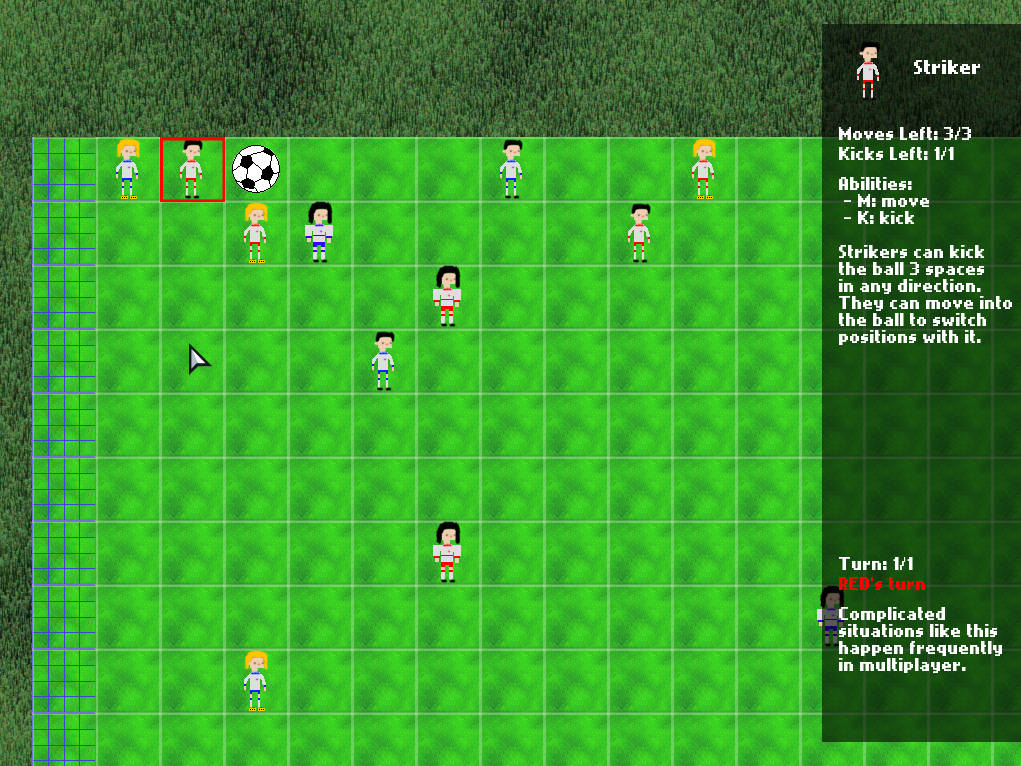
Link to game (HTML5/Windows/Linux/Mac): https://cluedo.itch.io/final-football-tactics
Final Football Tactics is a turn-based tactical football game!
Control your team of players and outwit your opponent in the competitive multiplayer mode, or score goals as quickly as possible to progress through the single player challenge mode.
Note to Ludum Dare players
The single player mode is designed to be enjoyable on its own, and also introduces all of the main concepts of the game. However, we highly recommend getting a friend to play the multiplayer mode if possible, as we think it best demonstrates the theme of combining two incompatible genres (sports + turn-based tactics). Since the game is turn-based, it can be played online through screensharing.Bugs causing the controls to freeze after completing single player, and allowing balls and players to occupy the same square after goals were fixed on the 24th.
Instructions
Note: The game can be played with just the keyboard, or with both the mouse and keyboard. Using just the keyboard may give the smoothest experience.- Press I in-game to see full controls
- Use the mouse or arrow keys to select players
- Use M when selecting a unit to move it
- Use K when selecting a unit to kick with it
- Use R to restart a level
- Use - / + to adjust the volume
Credits
Programming/Design
Mitchell Lee, Colin Lu, Jon Schneider, Anderson WangMusic
Mitchell LeeSprites and Graphics
Colin LuMade with HaxeFlixel. Applause sound effect is from here and licensed under Attribution 3.0. Striker sprite drawn using this sheet as reference.
All of the other sprites, music, and effects are original.


Comments31
Polishing side, I would love to see this game with an emphase on the soccer feel, maybe with more animations, ball weight, and crowd shouts !
Saving this game for later to play with a friend!
I haven't been able to play it in multiplayer but already I can see the possibilities for high-level strategy and I agree with the chess comparisons a lot of people are making. In terms of game design this is a big winner.
Issues:
- Controls were alright but some minor adjustments could make things a whole lot better. For example WASD would make a whole lot more sense than arrow keys seeing as my right hand is already occupied with the M-K keys. Also might want to let us select players with the 1-9 keys or tab through them.
- Apparently other people have beaten the whole single-player mode but I legit don't understand how that's possible. I get 2 kicks, a kick moves the ball 3 squares, and the goal is 7 away from the start point.
The music is pretty pleasant, but didn't screen *football* at me. There are many improvements that can be done to the art---the clash of green tones between the field and the grass (or carpet?) around it is painful, Y U DO DIZ? 😛 The character art is quirky, but I see you based it on someone else's tiles so that's a shame.
Please keep working on this one post-jam, I think you have a very valid prototype here!
The single player plays more like a puzzle game than a tactics game, but I think that works well
That level you mentioned makes use of the fact that you can walk a player into the ball to swap their positions, allowing you to get the ball one unit closer to the goal.
Me: *presses Tab*
Game: *pauses*
I mean, you can select the player you want to move with your cursor easily, but I did find it a bit amusing that the game suggests a control that doesn't even seem to work. 🤣 I see you addressed that, however. As a whole though, I thought it was a fun little puzzle game. I only tried the single player mode so far, but I thought the challenges were interesting enough. Some were deceptively easy, and they made use of the tactics learned throughout the levels. The tutorial was much appreciated because I was pretty lost on what to do, and the levels were helpful in gradually introducing you to the tactics of the game.
If I had to pick out some issues, I don't really understand why some of the controls are set up the way they are. For example, you have to select M on the player to move the player, and selecting M deselects the player, yet when you use the "Kick" controls with the same player, K on the player again does not deselect the Kick function, and you have to hit Escape instead. It would have been more consistent (and also...nice?) to have K, if already select, deselect the Kick on the player if the key is pressed again - since you only initiate the Kick on the ball, anyway...
Also, the turn system was a little strange in that I could initiate Turn 2 or the last turn with the Space bar and start the game out like that, such that after I make my first move, the game's just like "Oh yeah, you messed up" and then resets me back to the start of the level. I know it's just a matter of pressing the space bar to ensure that you are on the very first turn, but is there any way you could make the turns automatic? I mean, each athlete has a limited number of moves and kicks anyway, so once those are all exhausted, would it not make sense for the next "turn" to immediately commence?
The game's presentation looked fine enough, but it seems like there's some inconsistencies in art styles, what with the almost realistic grassy field on the outer borders (are they playing in a barren field?) with the cute pixel art players to the super opaque soccer ball...they all looked nice, though it did feel like there were lots of different art styles being meshed together in a way that doesn't quite seem...cohesive. Ah well, at least it looked fine as a whole. The music was also very nice - I'm a sucker for the more jazz style game tracks, and it's fitting for a game that's mostly about puzzles and thinking. As Flaterectomy suggests, the music doesn't really sell me as a "sports" theme, so maybe something to keep in mind would be to try and go for a mix of the two? Both puzzle and sports...could be interesting.
I think you had some good mechanics at work here, and the strongest aspect for me was the tutorial on how to play. If there's time, I might try to go for the multiplayer mode.
PS Mad props for making a game that saves progress. 👍