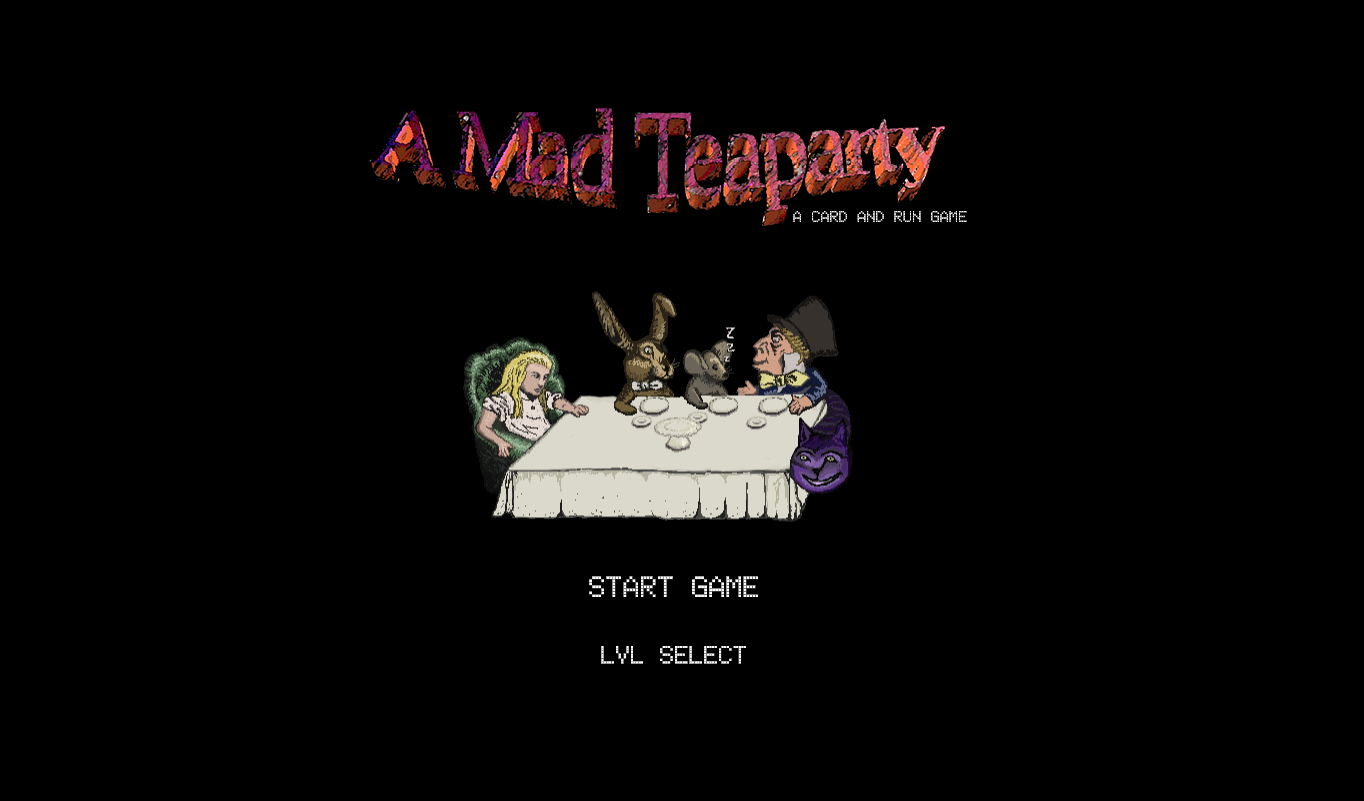
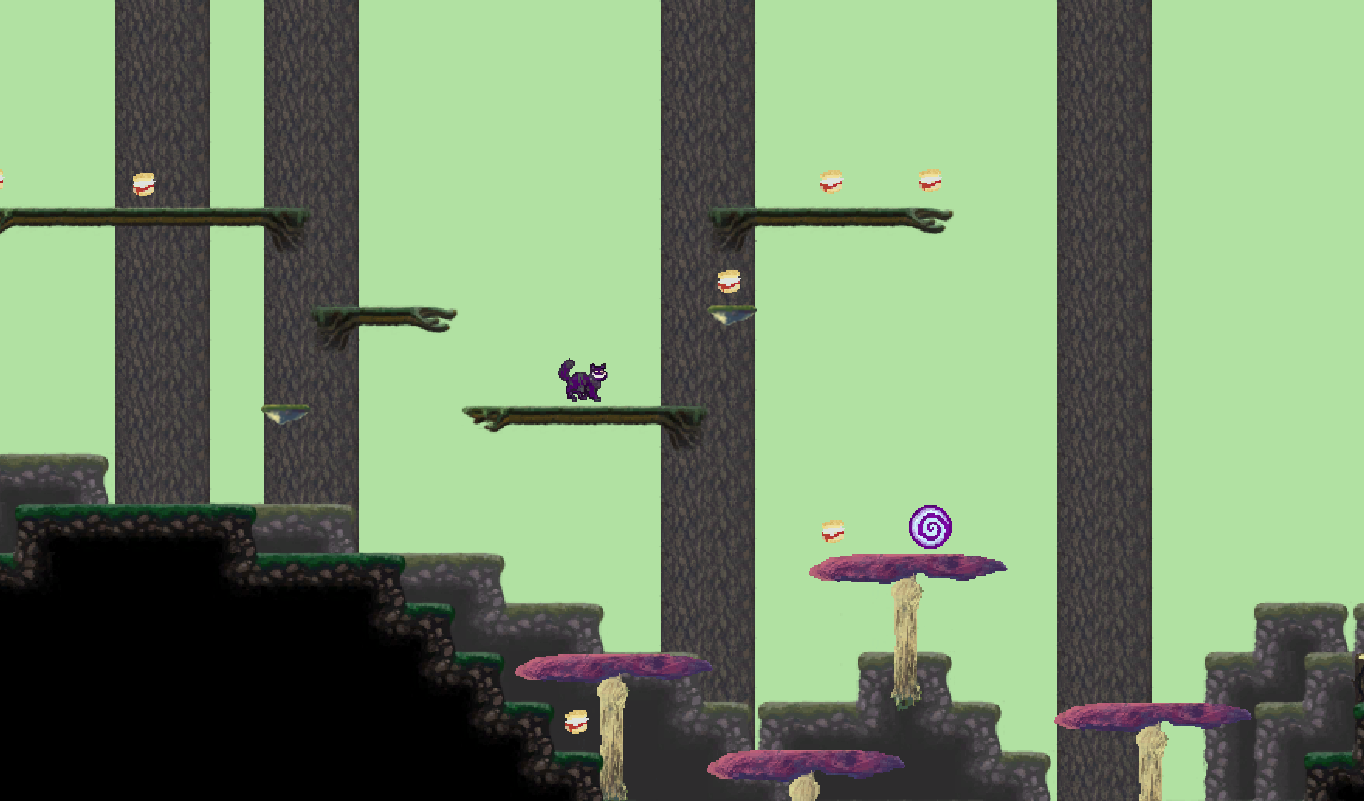
Our entry combines being a Deckdrafting Card game with being a Jump 'n Run game and in the process also becomes somewhat of a Puzzle game. As a setting we chose Lewis Caroll's 'Wonderland'. The player takes the role of the Cheshire Cat collecting items for the mad tea party. * Play the game as WebGL build in your Browser athttps://purplesloth.studio * Desktop builds for Linux and Windows are available for the postjam version only at https://purplesloth.studio
Features
* Build a deck of movement abilities * Traverse three different zones, collecting pickups and evading foes. * Learn how to play in a separate tutorial. * Enjoy the story in several fully voiced cutscenes. * Upload your highscores and compare them to your friends. * Carefully explore each zone to be sure that you found every secret.
Postjam Version 1.1 released
* There is a Postjam Version and you can find out more about it here.
Game FAQ
* I got Stuck somewhere - what can I do? There are often multiple ways of getting out of bad spot: jump-chain-multijump against a wall. Port up, port out if you set a portal beforehand. Remember you can jump through semi-solids (branches, mushrooms, etc). If you really can't get out the reset icon in the top left allows you to reset the stage.
* I don't like one specific level. Is there a way to skip it? Yes there is! If you are in the tutorial you can skip to the first cutscene after the tutorial by pressing 'escape'. [Note: this does currently not work in the WebGL version due to 'escape' being used for quitting fullscreen-mode. We will address this in a postjam build until then: the answer for any scene applies here as well.] For any other scene: you can 'quit to menu' with the door button on the top left above the minimap. Here chose 'lvl select' and click on the scones, Teapot or cup in order to access one of the three main stages directly.
* Is there an easier way to see how many tiles ahead a foe/jump/pickup is? Yes there is! You can click on the grid-button on the top left above the minimap to enable a grid. [Note: It seems anti Aliasing currently culls the grid in the build game even thought it did work during testing. A postjam build will address this.]
* I keep dying to the enemies. What am I doing wrong? There are several ways to avoid enemies. First there usually are several paths so you might want to chose/plot one that doesn't include too many foes. If you observe the foes you can learn their movement patterns and weave between them, resting at save spots. Finally if nothing else works dashes allow you to move trough enemies without taking damage. dashes can be chained and you will be invulnerable from the beginning of the first to end of the last chained dash - but be advised in all levels except for the tutorial you will have to buy dash-cards during the draft period for 3 draftpoints.
* Are there any Hotkeys? You can press Space during the planning phase to execute your setup. But be careful not to execute an empty setup by accident.
* How does the high score work? When you beat a level a score is calculated for your run(see below for more on how the score is calculated). You are then prompted to put in a up-to-10-letter-nickname and submit the score and it gets written to our database server.
* How is the score calculated? You get points for several aspects that are then added up for the final score: * time - every turn you land under par awards you points, every turn over costs you points. But don't worry there is no sudden death once the time is up. * pickups - Each pickup gives you points. * combos - you get stacking points for completing moves. When you fail a move (e.g. try to run while in the air) you lose your previous points(from this turn only) and your combo gets reset. Trivial tasks ("wait" and "turn around") will simply award you 1 point but you can continue your combo with the card following it.
* The Audio doesn't seem to be working. This is most likely a bug with WebGL and chrome. The latest chrome build has fixed it, so consider updating your browser or simply running a different one if you have one (e.g. firefox).
* I found a bug - do you want me to notify you? Pleas do. This is a gamejam build, so: there will be bugs. We are already aware of some and working on a post-jam version that will hopefully fix most of them. If you want to tell us just leave a description in the comments.
Tools and Development
Everything code, graphics, audio was handmade during the duration of the Jam.
Engine
* Unity
Graphics
* Gimp * Photoshop * Krita
Audio
* Audacity * lmms * sfxr
Version controll
* gitlab
misc
* an unspecified amount of *Club Mate Ice-Tea* and vegan ice cream
Help
Aside from the persons listed as part of our team on ldjam.com we thank the rest of our team: * the Cat * Tulgey Wood * Koralle Krawalle * the B18 flat share for allowing us to squat their living room for the weekend.
I like the concept, grahpics where like nes which is not bad. the controls where pretty neat. The voice over was ok but a bit off, though i'd not hold that against you.
Kind of unfortunate, but I fell in the ditch in the tutorial after trying to figure out how the portals work. There isn't really a way to get out once you're down there. I really liked the blend of genres you picked and it looked really nice!
@tg1397 you can jump-chain-multijump against the wall. with jumps if there is only space at one diagonal or 2 up (rather that 2 up 1 across) the jump/multijump will take you there instead. If you really get stuck the reload button in the top left let's you restart the level.
This is a really novel idea, and has a ton of potential. Currently I started to lose interest purely because of how long everything took. Having to wait for all of the cards to go even if I only put a few in really slowed the pace. It may just be a caveat of the genre blending that it ended up feeling slow. I did love the card sequencing, I just wish I had the patience to get further. Overall this is extremely impressive for a Jam, there is a lot of content, I just couldn't get to it all. Also the music was great.
@MartinTristan we had this originally, but wanted the puzzle-difficulty of having a drawback for not thinking ahead the full 8 turns (or rather beeing rewarded if you do). If you don't fill in all cards the game interprets the empty slots as "waits". At one point wait cards on the end of the sequence would execute much faster, but since the enemies also move at that time it became eally hectic and hard to understand where an enemie moved at what turn.
@Evan Leibman I totally understand that feeling. It took us quite some time to notice that a sequence that would be fast and trivial in any regular platformer takes quite a bit of time and in some cases forethought in this version. The levels were originally planned to be even longer and difficulty wise there is a mario-maker-troll-level inspired leveldraft that we wanted to put in as last level, to see what the highscores would be. By the mtime we realized we really needed at least some shorter levels we were really pressed for time and had to warp things up. But we will make one or more postjam releases over the next couple of days that should help adress this.
@RamiaD thank you! It took quite some work to get the VA in in the end. We actually have more cutscenes ready (and also have to fix some glitches with the text-roll and text positioning), but there weren't more level ready for shipping. If you enjoyed those you might want to check out the postjam release we plan on shipping sometime this week.
A nice idea and a fitting theme. Voice work was a nice addition! Simple tasks felt long to get through to begin with, but the strategy and slower pace works better as things get more complex. Great work!
I love the concept of the game, it's very interesting and you do a lot of things with it. The Alice In Wonderland theming is also great, it give to the game a strange vibe very fitting with the gameplay. The only problem is the game being too slow, maybe a fast forward button could have been added. But anyway, great game, good job !
Really enjoyed it! The voice acting had me hooked and the mood was great - I think that made me want to play more. The controls were neat and enjoyed having to pace out the sequence. I'd love to see what it could become with unique characters/stories.
I could totally see this is a programming board game! Agree with earlier comment that it was a little slow to start out. Overall good concept and nicely executed - I didn't encounter any bugs while I was playing.
@Toulou the slow tactical/puzzely gameplay seems to be what makes it harder for most people to get into the game. We'll certainly consider options to make it faster without compromising the tactical nature of the game.
@soylalluvia thanks! We're really glad that we managed to get the voice acting and cutscenes into the final jam-build. We have some more ready that will be included in a postjam version together with more levels, bugfixes and possibly tweaked game mechanics to make the game more accessible.
Came for the theme, stayed for the mechanics! Nice Job. If something you should add a command that sees if there's a card on the spot of the empty prefab. If there's none, just skip it, for the sake of gametime
@K1mpp4 thanks. We basically have this, but right now instead of skipping the turn the game assumes you played a wait card. This seemed most logical to us at the time, but seeing that there are quite a few comments asking for something along these lines we are currently working on changing/streamlining things a bit for a soon-to-be-released postjam version.
It's fun and great use of the theme. It reminds me of a game I played when I was younger on my browser too, and it goes to show that the combination of things you think are strange together or 'incompatible' are actually really fun! Also, I love Alice and wonderland, and this is a super cute idea. I love the art too!
Wow that's quite impressive, getting in so much in so little time. The graphics are nice and I really liked the voice over. Think it added a lot to the game. Good job, really good entry!
Smart design! Reminds me a little bit of lemmings, with the need to be a bit more planned and methodical. Title screen / level select was well made too!
10/10 Cat voice acting! I just didn't have the patience to play much further than the tutorial. Perhaps hotkeys would have drastically quickened the gameplay? Also the graphics were fun. :)
@Rebecca Kremer there is [Space] = execute. We thought about adding more, but settled on the changing the original double-click or drag to slot a card to single-click or drag. We might consider hotkeys for the postjam version and will probably add a small additional level that does not require as much patience.
@Tay it was quite hard to get everything in at the end (and thee was a bunch of stuff that didn't make it), but we're glad the VA made it. There was a lot of work put into doing several takes with everyone and then going through the whole thing.
One thing that would've really helped here is showing (with tiles otherwise) exactly how far you move with a walk card when you use it. I had to guess a lot and sometimes he would fall off. But otherwise - very solid and well executed. It felt like those programming games like Human Resource Machine! Good stuff!
First game I play that has a voice acting, definitely like that. The game really needs some way to tell the player to know how far you will go or jump with each card. I don't know exactly the distance so I play with 1 or 2 cards per turn and that made the mood felt very low after some time. Like the music and art. Keep up the good work.
@TQV5964@diptoman You are absolutely right. There actually is a grid feature, but the grid is invisible due to AA in the current web build (the button next to the mute button is supposed to toggle the grid). We are doing some testing for the postjam version to make sure it works.
The tutorial is brilliant, the art very cool and in general very enjoyable. It's the second game I see on the LD41 with very similar mechanics and they are very very funny (only if you have time to play it, like in my case 😁). Maybe it could be a little faster and more dynamic, but I loved it.
@MegRabbit thank you! That is certainly an interesting idea. I think that the portrayal of physics in it's current form (there is no parable when jumping etc) might somewhat limit it, but it might be an easy and fun way to learn about path analysis, programming (in the sens of predetermining movement) and similar concepts.
@cristiano.m.garcia I'll make sure to check it out.
We just release postjam version 1.1 and have made some significant changes based on your feedback, aiming to push the game to be more dynamic and a bit faster-paced, make it easier to recognize distances and also added two significantly shorter levels. Thank you all for helping us with making the game more fun. If you want to paly the new version or read the changelog you can find both here.
This game was really cool. I had a blast. The cats voice is on point. Why can't I eat the birds, they should be health potions!?! Other than that; spot on. 10/5 good work!
Overall Overall congratulations on your entry, it's an interesting way to do platforming, something that feels quite incompatible as platforming is normally always moving!
Fun It has some nice funny parts, the voice acting make it so much more entertaining.
Theme Good combination of incompatible genres! Unfortunately I still feel that it's weird combining platformer with card game, as then it just feels like a puzzle. But nonetheless the execution of it was done well!
Graphics
Graphics were good and had a good cohesion for the whole game. Nonetheless I feel that they were too small. It took me some time to notice that the main character was a cat. Instead of making the game show up in a small window make it in the whole window and the UI just on top. With a bit better UI you guys could have made it without using the grey background at all.
There are some inconsistencies with the sizes of the screen. For example I have a 2k screen and there it shows me alot of whitespace which shouldn't be seen: https://i.imgur.com/NatddYE.png. While when I'm starting a game not on fullscreen it's a bit too small and some UI elements start to go over each other: https://i.imgur.com/X7jTj4M.png
Audio The music is quite good. The only thing I would say that the game theme don't really feels as sequence of the menu theme. It feels like a different game. On the sfx I've nothing to say they were good.
The voice acting was something quite unexpected and really nice. I would have added maybe an background noise or music when they are talking.
Gameplay Gameplay wise it's interesting but boring. True that these kind of games are not really my style, so that could also be my fault. Nonetheless it was a good experience. Though there are some things that can be done better like: Level select menu seeing more clearly withouth hovering over the items what are the levels. In the start level/draft phase of the game, being able to exit back to the level select/main menu would be nice, also a way to move the camera through the map to see the whole map. Cause only then I would be able to make a good draft. In-game, add a number of the order execution of the cards for easier understanding. While the minimap is handy, it's too small to understand it well.
Nonetheless, I enjoyed the minutes I played the game for, and we understand the hard work needed to create something like this! 😊 Our team also worked hard to create a game for the jam. You can check it out here! 🐳
This was a great experience. The theme incorporation is interesting, I personally like this kind of game a lot. The puzzle mechanics were refreshing. It was a little flat but challenging and rewarding nonetheless. The graphics seemed small and dated, still enjoyed the visual style though, very unique. Keep up the good work! Impressive entry!
Love the voice acting. Never seen that on a ludum dare game. Besides that I think the idea of having cards move the player/cat is really interesting. I had to plan some of my moves and experiment.
Comments44
If you really get stuck the reload button in the top left let's you restart the level.
@Evan Leibman I totally understand that feeling. It took us quite some time to notice that a sequence that would be fast and trivial in any regular platformer takes quite a bit of time and in some cases forethought in this version. The levels were originally planned to be even longer and difficulty wise there is a mario-maker-troll-level inspired leveldraft that we wanted to put in as last level, to see what the highscores would be. By the mtime we realized we really needed at least some shorter levels we were really pressed for time and had to warp things up. But we will make one or more postjam releases over the next couple of days that should help adress this.
@RamiaD thank you! It took quite some work to get the VA in in the end. We actually have more cutscenes ready (and also have to fix some glitches with the text-roll and text positioning), but there weren't more level ready for shipping. If you enjoyed those you might want to check out the postjam release we plan on shipping sometime this week.
It's cool that you dub text.
Birds are really hard ^^
The only problem is the game being too slow, maybe a fast forward button could have been added. But anyway, great game, good job !
@soylalluvia thanks! We're really glad that we managed to get the voice acting and cutscenes into the final jam-build. We have some more ready that will be included in a postjam version together with more levels, bugfixes and possibly tweaked game mechanics to make the game more accessible.
@Tay it was quite hard to get everything in at the end (and thee was a bunch of stuff that didn't make it), but we're glad the VA made it. There was a lot of work put into doing several takes with everyone and then going through the whole thing.
@Seanale & @dijaguy thanks =)
Like the music and art.
Keep up the good work.
I don't have much feedback to add, I think you did a great job and would love to see what you have planned for future releases!
I left my rating of your game, if you can leave your feedback in our game, Witch's Escape.
https://ldjam.com/events/ludum-dare/41/witchs-escape
@cristiano.m.garcia I'll make sure to check it out.
We just release postjam version 1.1 and have made some significant changes based on your feedback, aiming to push the game to be more dynamic and a bit faster-paced, make it easier to recognize distances and also added two significantly shorter levels. Thank you all for helping us with making the game more fun. If you want to paly the new version or read the changelog you can find both here.
Onto the feedback:
Overall
Overall congratulations on your entry, it's an interesting way to do platforming, something that feels quite incompatible as platforming is normally always moving!
Fun
It has some nice funny parts, the voice acting make it so much more entertaining.
Theme
Good combination of incompatible genres! Unfortunately I still feel that it's weird combining platformer with card game, as then it just feels like a puzzle. But nonetheless the execution of it was done well!
Graphics
Graphics were good and had a good cohesion for the whole game. Nonetheless I feel that they were too small. It took me some time to notice that the main character was a cat. Instead of making the game show up in a small window make it in the whole window and the UI just on top. With a bit better UI you guys could have made it without using the grey background at all.
There are some inconsistencies with the sizes of the screen. For example I have a 2k screen and there it shows me alot of whitespace which shouldn't be seen: https://i.imgur.com/NatddYE.png. While when I'm starting a game not on fullscreen it's a bit too small and some UI elements start to go over each other: https://i.imgur.com/X7jTj4M.png
Audio
The music is quite good. The only thing I would say that the game theme don't really feels as sequence of the menu theme. It feels like a different game. On the sfx I've nothing to say they were good.
The voice acting was something quite unexpected and really nice. I would have added maybe an background noise or music when they are talking.
Gameplay
Gameplay wise it's interesting but boring. True that these kind of games are not really my style, so that could also be my fault. Nonetheless it was a good experience. Though there are some things that can be done better like:
Level select menu seeing more clearly withouth hovering over the items what are the levels. In the start level/draft phase of the game, being able to exit back to the level select/main menu would be nice, also a way to move the camera through the map to see the whole map. Cause only then I would be able to make a good draft.
In-game, add a number of the order execution of the cards for easier understanding. While the minimap is handy, it's too small to understand it well.
Nonetheless, I enjoyed the minutes I played the game for, and we understand the hard work needed to create something like this! 😊 Our team also worked hard to create a game for the jam. You can check it out here! 🐳