Ludum Dare #42compo
grOw

Note: The extended version was done after the Ludum Dare 42 submission time, and as such should rate the browser version or the original windows build for Ludum Dare.
grOw is a puzzle game where you are constantly running out of space. As you move your orb will gather energy and grow until it can contain no more and it bursts.
Avoid red lasers and orbs at all cost! They grow you until you burst!
Use arrow keys, WASD, or the left thumbstick on a 360 controller to move. Change Player Orbs (if more than one alive) by pressing space/shift or the left and right bumpers of the controller.
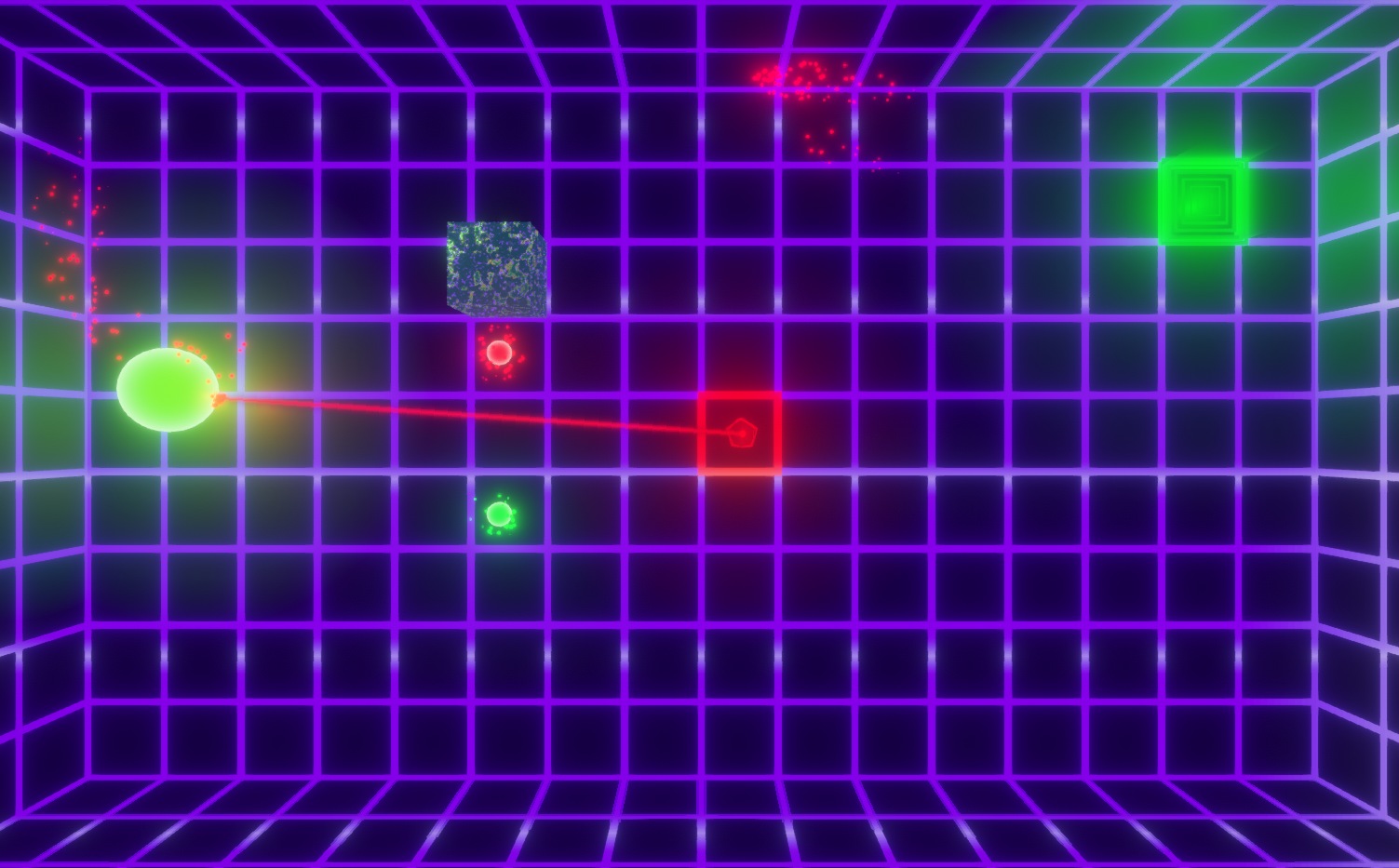
I planned on making more levels, but ran out of time for the compo. There is no sound in the compo entry, as I'm not good at making music or sounds (plus I ran out of time).
Only play the extended version if you want to play more of the game and experience more (and more balanced) levels, as well as get a preview of what the game will feel like with sounds.
I plan on adding more levels and more sounds, and a level selection screen next. Thanks for checking out grOw, and if you play the game I hope you enjoy it 😄
Tools used:
- Unity 2018.2 (Used their new Shader Graph tool as well)
- GIMP
- Blender


Comments51
@anstabo Thank you very much! The shaders were made easy by using Unity's new Shader Graph tool. It's super awesome, and simplifies making shaders a lot.
@duandi Thank you so much! I'm glad you enjoyed it 😄
@netguy204 Thanks very much, it really means a lot to me! The last level (and all other levels) were made in a hurry in the last hour leading up to the Compo submission time, so I apologize for the unbalanced level... (I actually didn't have enough time to test the last level until after I uploaded the game, and didn't even know if it was beatable until I beat it the first time 😆 )
@naver Thank you very much! I apologize for the unbalanced final level!!
@rexpeppers Thank you, I'm really glad you liked the game!! 😃
@theslate Thank you, I'm glad you liked the first puzzle game I've made 😉 I plan to use those puzzle mechanics more in other levels in the future too!
And thanks to everyone else who played and rated grOw!! It means so much to me to get this kind of reception for my second Ludum Dare entry and first Compo entry! I plan on working on the game more and adding way more levels, and just adding overall polish to the game. I'll add a link to the extended version once I make the first version of it for anyone who wants to play it (but of course I'll make sure to make note that this isn't the version the game should be judged on, and make the extended version downloadable only).
I've also played and rated everyone's game who commented here, and think you all did amazing jobs 😄 thanks again for playing my game and I'm so glad so many of you enjoyed it!!
Seriously, I love the look of the glow effect on everything. It's pretty great!
The game is like an invert agar.io, cause if you grow too much, is more probably you will die.
interesting concept, great game!
I got stuck on a level with 4 moving cubes, since I just couldn't fit into the hole.
The room with the moving cubes though, I kept getting stuck on the corner several times from different positions. Felt like an invisible wall.
The double start menu is a bit odd. And the ending for me was an empty room (after the moving cubes room). Not sure if that's a bug or how it's supposed to be. If it's supposed to be then it's unclear whether I beat the game or not.
Thanks so much for all the kind words from everyone! I'm super glad so many of you have enjoyed my little puzzle game!! 😄
@luis-giron Thanks so much! I'm super glad you liked the graphics so much 😄 and I'm glad you liked the concept too! Thanks for the review!
@prv Thank you for the kind words! I'm really glad you enjoyed the game 😄
@plusminus If you're talking about the room with the moving blocks then you're right. I didn't have time to balance that level (all the levels were made in the final hour before submission hour). Sorry that level frustrated you! It's been scrapped for the extended version I'm releasing tomorrow.
@himadri-sekhar-mahanta Thank you, it means so much to me!! I'm really glad you enjoyed my little compo game, it took about 32 hours of the 48 hour time-frame to pull off 😰 Thanks again!!
@webthingee No thank you! Thank you so much for the kind words, it means a lot to mean 😄 I do like to think I have a good attention to detail, but I'm my own worst judge and found tons of things to scrutinize about my game haha. I've fixed a lot of the bugs and issues I've found and will be releasing the fixes in an extended version tomorrow.
@truc-e Thank you so much! I'm glad you liked the game's aesthetics! I did try to set out the levels in a way that teaches you how to play without ever showing you or telling you. I find puzzle games that are intuitive like that are my favorites 😃 As for the crash, there are several possibilities to why that might've happened. I've been looking into the issue as it's happened to me randomly as well, but have yet to find the root cause.
@holyblackcat Thank you for the kind words! I'm really glad you like the game, and I apologize for that last level! It was completely unfair and a result of me rushing to get 5 levels into the game (and putting moving blocks and green lasers into at least one level). It has been scrapped for the extended version being released tomorrow!
@grey That's an interesting issue, and explains why it hasn't happened to me. I'll download Chrome soon myself so I can test it out and see if I can't find the cause of that issue. Thank you for the report!
@rk3omega Yeah the gravity to the particles was a last minute touch I thought made them look much better! I'm glad to know someone else agrees 😄 As for that level, it was unfair and I rushed out that level. I apologize if it frustrated you, and that level has been completely scrapped for the extended version I'm releasing tomorrow.
And for those of you reading this, you probably already read about the extended version I'm releasing tomorrow up above. It will be downloadable only and build for Windows. I'll be sure to make note that this is not the version people should be judging the game by, and that it was made after the jam to expand upon my compo entry!
Eventually (and especially if people show interest) I might port the game to Android, and/or make a level editor for people to make their own levels and share them with others.
Thanks to everyone who played my game and rated my game! I'll be streaming a bunch of Ludum Dare games (including the games of people who commented above) tomorrow, feel free to catch me on Twitch.tv
I have rated your game, but all of my feedback was captured in the stream.
You can hear my comments in the archive at https://www.twitch.tv/videos/298329090
@saoi-games I know you played my game on stream, I submitted it and then watched you play it while I was in chat trying to help you! Haha, I really appreciated all feedback and for you playing through the game. Again I apologize the last level was so unfair.
@zeriver Thanks so much! Thanks for hanging out in my stream as well, I agree that the lack of audio sucks. It was one of the last minute things that I ran out of minutes to do for the compo. Had I taken the extra time for the Jam I could've added sounds. The extended version has a couple sounds as a test for adding sound feedback to everything. Thanks again for playing through grOw! (And you did beat it, I ran out of time for a thank you victory screen, sorry about that).
@matt-tuttle Thanks so much! I'm glad you like the shader work I did, even if it was some quick simple Unity LWRP and Shader Graph magic. I'm sorry the game crashed on you, what browser are you using? Did you try to reload and run the game after the crash to see if the bug was recurring? Thanks again!
I meant to upload the extended version earlier today but got distracted with streaming Ludum Dare games. I've uploaded the extended version now and it has two times as many levels, infinite times more sounds (2 sounds), more balanced and thought out levels with a better difficulty curve (no more unfair fifth level), and it fixed tons and tons of bugs (most of them hopefully). I'll be building the extended version to Linux and MacOS within the next few days too, for those of you running on those machines.
Note you shouldn't rate the game based on the Extended version. For the Compo entry you should play and rate the browser version or the non-extended windows build.
Firstly, the graphics look stunning. With some cool futuristic music you can get a really good thematic experience. When it comes to your level design I have a few issues though. While it's perfectly fine to have games be either easy or difficult, it's important that they're not unfairly difficult. For example, on level 2 there's no way to not get hit by a laser the first second, and even though that doesn't kill you, it feels unfair. Generally it should be impossible for the player to lose or take damage the first second after a new level loads. We who try your game for the first time have never seen the level before and need a second to understand what's going on. A quick countdown timer before each level starts could also be a good idea. Lastly, I feel like the game is a little bit slow. I'd probably double the character speed.
But still, the game is pretty cool, especially for a compo entry. With some more work I think it can be a great puzzle game. Good work, and good luck next jam :)
@matt-tuttle Awesome! I'm so glad you were able to play through it 😃 Congratulations on beating that last level too, most people found it too difficult to squeeze through!
@ryanjavanshir Thanks so much for the kind words! I'm really glad you like the aesthetic and the concept, I've been working on extending the game lately! So check back if you want to see a longer version of the game 😄
@johnny-turbo Thank you so much!! That was my original concept was shrinking and growing to get past levels, and I've been working on making the levels better suited towards that idea in the extended version. As for why the extended version links to the original, that has to due with the fact that Unity's Windows 64 bit build was crashing on startup (even though the game ran fine in play mode). I've changed the build to 32 bit Windows, and it seems to run fine now. So if you click the link now you can download and try the extended version! 😄
@jamison Thank you so much for the kind words, rating and review, and joining my stream! I'm glad you enjoyed the aesthetics of grOw 😄 The extended version should be up now if you want to try it out!! Sorry for the delay on that, Unity seems to have a bug with the UnityPlayer on 64 bit builds due to security permissions. (They said it was fixed on 2017.2 but lots of people on that thread all claim it was never fixed, so thanks for that Unity).
@luckyfeathers Thanks so much for the rating and review, and for the kind words! I'm really glad you like the graphics and the game concept, I apologize for the unfairly balanced levels. I made all the levels in a rush in the last hour before submission time, and as a result they were poorly thought out and hastily designed. I've rebalanced the speed of the rotation on that level you're talking about in the extended version, and I love the idea of a countdown timer at the start of the levels (or perhaps even a button that allows you to start the level on your own time). As for the character speed, with the way I hastily put together the player "squishing" between the blocks increasing the player's speed caused them to die on contact with the red blocks. This was obviously undesirable so I lowered the player speed to lower the chance of that happening (but it still happens sometimes). I've been working on ways to stop that from happening, mainly only having kill zones on moving blocks and having them further inside the red blocks. These seem to help and should be out on the next extended version. Again thank you so much for the kind words, rating and reviewing my game, as well as joining my stream and hanging out in chat!
The extended version has now been fixed, and the cause is a bug with Unity's Win 64 bit builds. As such the current extended version is only built for 32 bit (which you can still run on 64 bit machines of course). However the extended version is out now for anyone who wants to try it! Sorry for the delay on this fix, and sorry to anyone who tried to download it but couldn't find the link...
Thanks so much for all the kind words and feedback from everyone. It's more than I ever could have hoped for and means so much to me! Thanks again everyone, cheers!
Controlling the game was good, and the puzzles felt though out. On the last level, it didn't occur to me that I was getting stuck moving between the walls because I was "grOwing", but once you said it in chat, it made perfect sense lol. There is also a description on the page about what the red lasers do, but nothing explained the green lasers (and the pickup like in last level). I wasn't sure at first what they were doing at first, since the change was subtle.
Overall a solid entry
Here is a video of the play through from the stream:
https://www.twitch.tv/videos/300335639
- Nice aesthetics
- Good concept and mechanics
- Good level design
Cons:
- I think the controls are too slippery
- Sometimes you die for seemingly no reason
I like the aesthetics, with sound could be awesome! :)
I think I ran into a bug. After dying quite a bit on the level where you had to go clockwise around a cube with lasers pointing counterclockwise and moving blocks, I finally beat it. I loaded into an empty level - just the pulsing grid and nothing else. The pause menu is functional.