Ludum Dare #44compo
Maintenance Costs

Hello! And welcome!
Maintenance Costs is a puzzle game in which you give instructions to your robots. Unfortunately, robots are pretty expensive to maintain, and greatest economists of the world say that it would be more efficient to avoid maintenance costs.
Keep your focus on two things: achieving level objectives and letting go the old robots that hold you back.
Difficulty level only change the amount of money you get when you start the game. More money, more place for errors.
This game is difficult.
Seriously, I didn't want to make it that hard, but it is. Some tools were created to help you:- In-game help: enable it on the launch screen (enabled by default, recommended).
- In-game tooltips: if you don't understand what something means (UI or tile), there is probably a tooltip linked to it. Place your cursor over it and see a message box appear at the top of the screen.
- In this description ("More about game mechanics"), you get advanced explanation about the programming mechanic (I suggest you try the game first; read this section if you don't understand how to play)
- There is a walk-through page to help you if you get stuck in a level at http://nathanistace.be/ludumdare/44/walkthrough/
Changelog
I provide two links to the game, the original version and a fixed version. Original version is working correctly, but fixed version gives better comfort, without changing the gameplay.Added in the fixed version (you are not rating this):
- Fixed a visual bug that would show the level on the menu scene
- Lowered the default volume of some sfx
- Cheat code: in game, type "money" to get +$1000 ("But... Isn't that a way to avoid the theme?" "Well if you need to restart the game you lose time, you lose parts of your life, and time is money. So we could say that this cheatcode is actually more in the theme than anything else in the game!")
- Cheat code: in game, type lvl# where # is 0-9 to jump to another level.
- Walkthrough page
Good luck and have fun!
More about game mechanics
If you get stuck and can't understand how the game works, here is a more complete explaination than the one you can find in game. If you didn't start the game yet, you should start it and give it a try before reading this.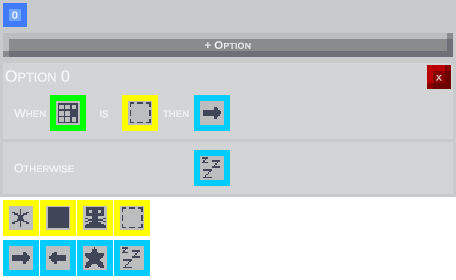
Conditions work as a IF .. ELSE IF .. ELSE. Each turn, the robot will do the action corresponding to the first matched condition.
A condition is given as IF [A] CONTAINS [B] THEN DO [C], where
- [A] is a tile next to the robot
- [B] is the content of the tile
- [C] is the operation to do
Example: Option 0 on this screenshot tells the robot IF [tile on right] CONTAINS [nothing] THEN DO [move to the right]
The OTHERWISE case only contains the [C] part, that will be executed if no other option condition is matched.
Content conditions:
- The star matches anything on the tile: steel blocks, wooden boxes, flags, spawn platforms & robots
- The full square matches fixed or pushable items: steel blocks, wooden boxes & robots
- The robot matches robots
- The empty square matches empty tiles
Operarations:
- The left arrow tells to move left
- The right arrow tells to move right
- The star tells to do the robot's special action
- The Zzz's tells to do nothing


Comments18
I just created a web page with the walkthrough (http://nathanistace.be/ludumdare/44/walkthrough/), maybe it will be a nice help if you want to give it another try! :wink:
Good job anyway and unusual idea!
I understood how to get it working without the walkthrough, though it probably cost me a lot in maintenance testing out what things did.
Great work!
i have to say, after i first played this, my mind cant realy stop thinking about it, 7 hours later. there was just something realy interesting about the gameplay. and i do like my puzzles :dog:
I have given up trying to clear it in one go without cheating and looking at the walkthrough, but I still want to say this is some great work!
Thank you for your reviews!
I think this game could be expanded on in the future and still be fun!
Music is awesome :)
Very well done :thumbsup: :D