You wanted to go to the open outer space but now you are in the Confined Space. You start with nothing. You need to build a rocket that would take you out — checkpoint by checkpoint.
🚀 This is a physics-based puzzle game with indirect control.
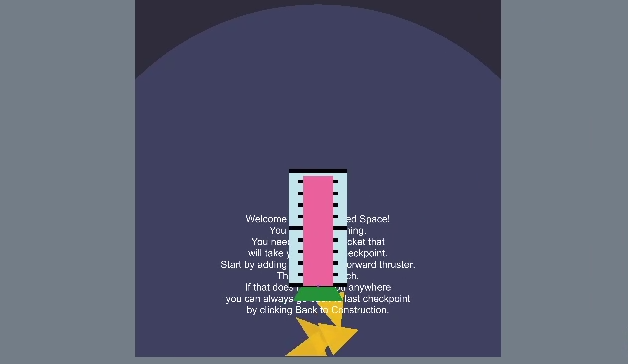
🚀 You can choose one of two hull shapes for your rocket. Then add thrusters to it. There are four types of thrusters: forward, backward, left-sided and right-sided. There are two important mechanics you can use to control thrusters: - Drag them around to change where their force is applied. This can result in acceleration and/or rotation, blah blah physics... - Change when they kick in and stop working. For this select a thruster and drag those orange triangular marks. Pink fuel bar will gradually decrease when the rocket is launched, indicating when a thruster is turned on and off.
Play around and learn to use these features to get the rocket where you want it!
🚀 Note: sometimes you can accidentally click on a thruster button several time, resulting in adding multiple thrusters stacked on top of each other and totally not see it! I only realised it later when watching people play (and would not have time to fix it during *compo*) so *fixing* this by letting you know, so it's not a bug, it's a feature!
It was interesting to play, but I felt like it was hard to see where the rocket was going with the thrusters all being triangles. I feel like this game would have benefited by having the campaign/normal mode, and a sandbox mode where you test all of the features. Otherwise it was interesting to play!
It starts to get super frustrating after just a few levels. There's already a lot of challenge in working with the physics, the timing sliders need many more steps to be able to fine tune better.
Nice idea, Fun to mess around in. Quite a lot of trial and error, which made the transition back to construction mode feel quite long after a while. Is it that I didn't get very far, or is that this game give you everything to start with? Overall, really interesting concept, good job
Interesting concept. It was a bit confusing at first, but when you get the grasp of how it works, it's really fun to play. A bit hard I think, two turns in a row, tough. I think that a sandbox mode could have been nice too, experimenting things. But great work ! 👍
Now this is cool, a physics-building-puzzle game! I genuinely enjoyed playing through this one, the levels were well designed, it never felt frustrating to beat and was very satisfying to clear each level. The length was great too. I hope you might expand on this in the future with improved building tools, levels, etc.; it's fun! If a polished mobile-game version of this was out there I'd play it for sure.
The music is good and very aesthetic use of zoom too. Graphics are simple of course, but everything else makes up for it.
P.S. I think the download links should mention it's in HTML5!
I really like this. I love that you can "time" the rockets firing. I love that the puzzles are mostly a simple path (at least where I'm at, level 6), but you have to design the rocket and timing to complete the levels. Great work! Would love to see this taken further.
at first though those multiple thrusters must be a bug but then later realized if more thruster are added more thrust so maybe its not a bug but intentional. Coming from an Aeronautics Background, i just enjoyed it.Good work. Liked it.
I love phyiscs puzzle games like this. Ui could use some work - coloring thrusters or assigning them to groups. I noticed that the outcomes are sometimes inconsistent, but maybe it was because I was playing the webGL build.
I completed it! Really cool idea. One thing that annoyed me a little was how it felt a bit... inconsistent? Like, considering that I'm in space and there's no air drag, if I put a thruster to the left for 2 ticks followed by a right thruster for 2 ticks, I should end up stationary a certain distance to the left. In Unity there's a field on the rigidbody component (I think that's where it is) for air drag. I think if you had set that to 0 it would do what I mean. I also wish there was more flexibility in the thrust duration. But hey, really good entry for a compo game! Good job, and good luck next Ludum Dare.
hey @luckyfeathers, thanks for your feedback, it's really deep :)
I actually started off with that but then I realised that if I don't add some drag the rocket would be indefinetely randomly bouncing around the level and often "accidentally" complete levels because of that. So I gave up some realism for the sake of playability.


Comments19
Downloaded the repository and played from Unity
Please spend the time and go rate others as well 🤔
Fun entry - evne for it's simplicity 😄
💜 🎯 🐸
It starts to get super frustrating after just a few levels. There's already a lot of challenge in working with the physics, the timing sliders need many more steps to be able to fine tune better.
The music is good and very aesthetic use of zoom too. Graphics are simple of course, but everything else makes up for it.
P.S. I think the download links should mention it's in HTML5!
I actually started off with that but then I realised that if I don't add some drag the rocket would be indefinetely randomly bouncing around the level and often "accidentally" complete levels because of that. So I gave up some realism for the sake of playability.
If you’d like to rewatch the playthrough, you can find it here: https://www.twitch.tv/videos/494941349?t=10h6m7s
Hope you got some valuable feedback on your game and looking forward to seeing you next LD jam if I dont catch you before then! :D
💜 Elysia Griffin AKA Button Feedback Lady
https://www.twitch.tv/elysiagriffin