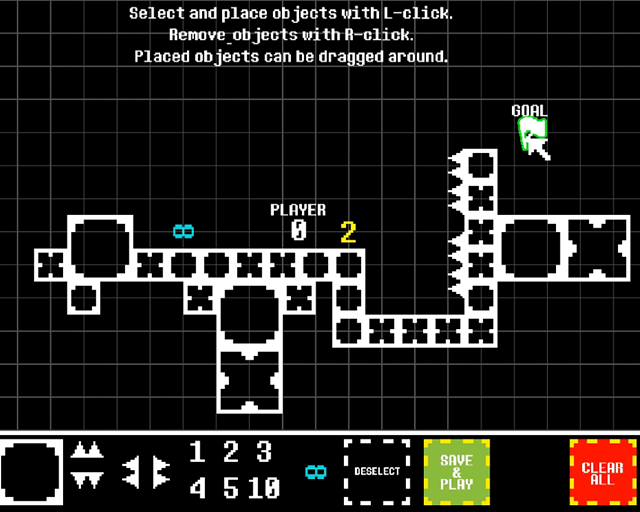
S.W.N is a platformer with a level editor where you start as a total zero, not even able to jump. Touch other numbers, gain and spend their powers to perform normal platforming actions. Be mindful, as performing a jump or dash reduces your number until you're back at zero. Touch flag to win!
As mentioned, the game comes with a level editor. Literally start with nothing and build your own cool level. I'd love to see what you come up with so if you make a level, please share it! You should find your created level in the folder \AppData\Local\LD45_SWN under the name "saved_room.sav".
I suggest playing the tutorial first to get a grasp of the mechanics before getting into the editor.
:rotating_light: Post Jam Update 1: Checkpoint Added!
-
:rotating_light:User created levels (replace the saved_room.sav file)
Very fun game. The movement is precise yet feels very fluid, and the camera movements help this a lot while staying mostly subtle. Passable graphics and great music make it possible to sink quit a bit of time into this. The only problem I see is that I'm unsure how far you can take the main mechanic. Most of the time the mechanic meant you have to hit every jump exactly perfectly or else you restart the level, which will not last long as a mechanic. The dash is a great solution. You added a fun mechanic that also used your number, meaning there was choice between jumping and dashing. More of these mechanics, and perhaps being more generous in how many numbers you give the player, would make every jump, dash, and other mechanic an interesting decision.
@herman-chau That's AWESOME! Just played it and yeah, it requires some timing to pull off. Although I was aware you could do this, I didn't expect or intend someone to base a level around it so that's really cool to see.
Great game! I really liked it. The last stage of the tutorial is a little bit hard for me. It would be great if there's checkpoints in that level. And in level editor too!
The game feels great in every aspect. In fact I liked this game the most out of 30 I've played so far. The last challenge was a bit hard for me but I enjoyed it very much!
Awesome platformer, with a really clever tutorial. Controls are great, the existing levels are challenging, and even a level editor.
The presentation is top notch as well, the music fits and adds extra pressure in a really good way and the graphical style is great, no frills, just the necessary communicated clearly.
Cool game, looks really nice and being able to create levels is always a great feature. I feel the game would be a little bit more palatable with checkpoints as it never feel good to the player if they accomplish something to die at the next challenge. which results in them starting over.
Kudos! This game is fantastic. The controls are crisp and the concept is a really smart twist on the theme. I'll admit I have yet to beat the last level of the tutorial, but I will come back to it!
@momori@lekiy Made a Post Jam version and added a checkpoint. I definitely agree that you need one, especially for longer levels. Might add some more levels later too.
Gameplay is so good and fits the theme, controls are responsive, graphic and sounds feels great. The level editor was a terrific idea, I'd have suggested checkpoints but you already did that :D Terrific entry, my favorite at the moment.
Would love to see a timer and death count as well! There are also some minor issues with the physics it looks like, e.g. if I dash into a wall and then try to dash in a different direction and input the second dash while still stuck against the wall, it continues to dash towards the wall instead of in the new direction.
EDIT: @silkworm-sweatshop, would you consider releasing a fan-created level pack for the post jam version? I'd love to make more levels of varying difficulty and to explore interesting ideas in the game!
Very good! Responsive controls, movement feels great, good level design, good use of theme and bonus level editor! I would have kept playing if there were more levels.
@herman-chau I made a small change and the direction change should be a bit tighter now. Note that you still need to hold a vertical direction if you want to dash vertically in any way since I want you to be able to simply release to default into a horizontal dash. I'll put any user created levels in the OP and if there are enough levels I'd love to put them together in a level pack!
Whenever I have time I'd also like to implement a multiple save system so you don't have to keep replacing the save file.
That was so satisfying! Didn't feel all that much in a building mood after just going through three days of LD myself, but honestly, the editor is just a really amazing bonus on top of what was already a really nice and solid game to play. The tutorial levels were great! Everything felt very responsive and good, except the directional thing which you've now fixed of course. Very snappy, also in terms of animations and general flow. The death reset is nice and quick. Music and audio are really catchy. Character being the number indicator is lovely. And lots of nice touches everywhere!
This is probably the most interesting LD45 game I've played. I love the action system and the platforming feels really really good. Great job with this, I didn't play around with the level editor, but it looks polished.
Very pleasant platformer! I loved the main mechanic. As mentioned in a previous comment, not sure how far you can take it, but it seems pretty obvious to me that a lot of upgrades could be imagined. The gameplay is super responsive, music is great, and I liked the graphics. A little bit disappointed by the fact that "start with nothing" brings you to a level editor, I'm a lazy man, I wanted more levels :) But of course this a jam, and I still measure how much work it required to make it. Congratulations, great entry!!
This is really good! I wasn't personally in the mood to do level editing at the end of the tutorial, but the tutorial definitely proved the mechanics were solid, and the fact you have a level editor at all is insane. If you put this on Steam and added workshop support, you'd have something really great on your hands. Amazing job!
Really great game! The theme is interpreted in a innovative way and tightly connected to platformer gameplay. I am not a good platformer player and failed on the "infinity" phase of the last tutorial. Still I believe the system is of great potential. Besides the controlling is smooth and comfortable. Good job!
Amazing game ! The concept is awesome, and the game is fun to play : good controls wtih cool graphics and music. And also a level editor, which is really nice.
The interpretation of the theme is quite interesting. The "tutorial" introduced the mechanics very well, and had a smooth difficulty curve. Like others have said above, it did leave me wanting actual levels rather than an editor at the end. Despite that, it's really amazing that you finished a level editor within Compo. Nice game overall!
Wow this is such a well polished game I am blown away. The animations, the camera, the player movement, the sound, everything works so well together. I could totally see this being expanded upon into a full game! Amazing work here, I wish I was creative enough to work more with the level editor, but having that plus the tutorial is astounding.


Comments25
Here's a small level I made that makes use of an "advanced" technique in the game :)
https://www.dropbox.com/s/ell83x8lt723ivz/saved_room.sav?dl=0
I also might try making a level based on riding up walls with diagonal dashes later.
The presentation is top notch as well, the music fits and adds extra pressure in a really good way and the graphical style is great, no frills, just the necessary communicated clearly.
The level editor was a terrific idea, I'd have suggested checkpoints but you already did that :D
Terrific entry, my favorite at the moment.
Would love to see a timer and death count as well! There are also some minor issues with the physics it looks like, e.g. if I dash into a wall and then try to dash in a different direction and input the second dash while still stuck against the wall, it continues to dash towards the wall instead of in the new direction.
EDIT: @silkworm-sweatshop, would you consider releasing a fan-created level pack for the post jam version? I'd love to make more levels of varying difficulty and to explore interesting ideas in the game!
@herman-chau I made a small change and the direction change should be a bit tighter now. Note that you still need to hold a vertical direction if you want to dash vertically in any way since I want you to be able to simply release to default into a horizontal dash. I'll put any user created levels in the OP and if there are enough levels I'd love to put them together in a level pack!
Whenever I have time I'd also like to implement a multiple save system so you don't have to keep replacing the save file.
Good job !