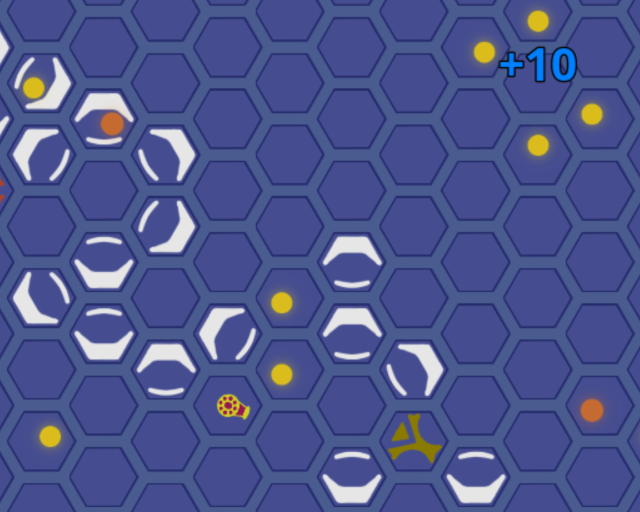
Explore Tiny Reactor's innovative system of generating energy by colliding balls on a hexagonal grid. Some studies say it's going to be the next big thing [citation needed]! There is a minor problem, however. The QA department took an entire month off before the launch, so we need someone to test each piece of our technology to make sure that it helps to achieve the required energy output and doesn't crash the system... and our stock. Click the link below to access the reactor remotely and help us create a better future for everyone!
Controls: - Click buttons on the GUI to select tools in the editor, click (or click and drag) on the grid to place them - Eraser is a separate tool, the "empty button" on the GUI - There are keyboard shortcuts for almost every button, and tooltips (hover to see them) for every one - To edit the grid, the simulation must be stopped, not just paused
Notes: - If the game shows black screen on start, try reloading the browser tab, we couldn't get Godot to play well with the HTML5 export. - We have playtested the game and verified that all lock targets are achievable with the corresponding technology level. If you think it's not possible, try another approach :) - Some of the rules of the game (e.g. how some of the tools work) are meant to be discovered by testing, but in general these things give you more points: - colliding balls at more obtuse angles (head-on is always best) - colliding balls of the same tier - colliding balls of higher tiers - Remember the tools you will see, their names serve as save points, so you can always go back to the game and explore more.
This game was made (almost) from scratch in Godot by 2 people. We used godot-gdhexgrid by Mel Collins to avoid reinventing the wheel.
This is a really cool game (: It looks really polished, so well done on that front! It's pretty fun to play, I love simulation type games and things like this!
The only thing I'd add, is maybe just a bit more instruction in game on what to do, but once I figured it out, which didnt take long haha, everything was fine :D
I got a bit carried away with some of these setups, and I made it to the fourth item. Not gonna spoil it, because you have a nice and easy to use "save/restore" system built in. Really liked the intro story here too, nice primer. Could play this one a lot more, well done!
@sarah Thanks! We wanted to have a bit more info about how things work inside the game, but didn't have the time - were too busy fixing bugs and validating that everything works as expected :)
@tohubohu Thank you :) The fourth one is where (we think) the difficulty ramps up quite a bit.
Love the idea of the game, very addicting! Controls could be a bit better, I keep instinctively trying to use right click to erase stuff. Seeing the balls collide with each other and gaining score is very satisfying. Great entry!
This game has a very clever puzzle mechanic. I've decided I'm pretty bad at it, but it's still amazing! I wish I could drag around parts rather than having to delete and replace.
A damn interesting puzzle game, feels like the basis of something bigger here. Loving the concept, the web version seems to run at a stuttered fps here but I really dig the concept a lot! Good stuff :)
I love games like this, this is great! Can get a bit too chaotic at times, but I think that was intentional lol.
I figured out how all the items worked, but I wasn't sure how to effectively use some of them (in particular, but not to spoil, I never used the "F" item). I mostly just used brute force.
Would love to see a more polished release of this!
@d5r thanks! After your message I started to instinctively try erasing with RMB as well 😅 This change is definitely going in as soon as I get some more free time.
@nisovin yeah, I wish we had time to implement proper editing (copy/paste, undo/redo, etc.) This was definitely on the list of things we were sad to let go due to time constraints. Thanks!
@neonlare thank you :) Some of the stuttering might be due to how we implemented animations - it was supposed to be step by step (and it is), so you can see easier what happens when, but then in the fastest mode it doesn't look very pleasant. We've added a smooth animation option to help with that (upper right corner), but now I think we should have just made step-by-step the default for speeds 1 and 2 and smooth for speed 3.
@alchemic interesting! I felt like I need to add this item to the game to make the setups look less static, and then, when it was implemented I accidentally stumbled upon a good initial setup for late levels/goals using this item so it got into the game. I've seen @kajko solve the same levels in a different way and I'm delighted to learn that you didn't use it at all! We really like free-form puzzle games and wanted to make this one feel the same way :)
Wow, this is so good, you should work on it a bit more and release a full game, maybe with levels and stuff. The concept is amazing. Even though I didn't beat every challenge I enjoyed a lot!
Now this is a game i could spend hours on, but i have to try more games. I also really liked the narrative in the description. If you work on this a bit, maybe add a little variety, a bit of a tutorial for the basics (place items in the grid) and the narrative, you could sell this!
Very interesting. I had trouble understanding the goal and how things interact with each other. Maybe updating the instructions with more images to make it easier to consumer would help. But I like the puzzle elements to this and the freedom we have to solve as we want
Fun game! I'm immensely proud that I was able to get 112 with only sources and mirrors. Can anyone beat that? I believe the theoretic maximum for those is 120.
Edit: On stage 3 (sources, mirrors and amplifier) my record is 199.
@prodigalson I agree on the instructions for new players. We tried to make the mechanics discoverable, but due to time constraints it still feels like some parts are definitely more cryptic to a new player than we would have liked.
@faiorb I actually did think about an "erase all" button, but then thought that manual erasing is not _too_ bad, so we left it as is. Actually, until very late in the development process you could only place/erase tools by clicking each individual cell instead of "drawing" with LMB held - now _that_ was terrible :D
@u-tsang-clan wow, great job! I only did 110 in sources+mirrors, now I feel like I need to try and beat 112 ha ha :D
Definitely could play around with this for a long time! All of my nitpicks have already been mentioned by others (Instructions and erase all feature) so wont go into detail haha. Regardless, awesome work!
Really like this mechanic. Will have to get back to this game. Only gameplay issue I've had is that it was hard to "move" stuff around. So drag&drop interface would make experimenting easier.


Comments25
The only thing I'd add, is maybe just a bit more instruction in game on what to do, but once I figured it out, which didnt take long haha, everything was fine :D
@tohubohu Thank you :) The fourth one is where (we think) the difficulty ramps up quite a bit.
I figured out how all the items worked, but I wasn't sure how to effectively use some of them (in particular, but not to spoil, I never used the "F" item). I mostly just used brute force.
Would love to see a more polished release of this!
@nisovin yeah, I wish we had time to implement proper editing (copy/paste, undo/redo, etc.) This was definitely on the list of things we were sad to let go due to time constraints. Thanks!
@neonlare thank you :) Some of the stuttering might be due to how we implemented animations - it was supposed to be step by step (and it is), so you can see easier what happens when, but then in the fastest mode it doesn't look very pleasant. We've added a smooth animation option to help with that (upper right corner), but now I think we should have just made step-by-step the default for speeds 1 and 2 and smooth for speed 3.
@alchemic interesting! I felt like I need to add this item to the game to make the setups look less static, and then, when it was implemented I accidentally stumbled upon a good initial setup for late levels/goals using this item so it got into the game. I've seen @kajko solve the same levels in a different way and I'm delighted to learn that you didn't use it at all! We really like free-form puzzle games and wanted to make this one feel the same way :)
I also really liked the narrative in the description.
If you work on this a bit, maybe add a little variety, a bit of a tutorial for the basics (place items in the grid) and the narrative, you could sell this!
Great work!
It would be great to have a "erase all" item, but it's still fine. Congrats!
Edit: On stage 3 (sources, mirrors and amplifier) my record is 199.
Congrats for the subscription, had a lot of fun! :)
@faiorb I actually did think about an "erase all" button, but then thought that manual erasing is not _too_ bad, so we left it as is. Actually, until very late in the development process you could only place/erase tools by clicking each individual cell instead of "drawing" with LMB held - now _that_ was terrible :D
@u-tsang-clan wow, great job! I only did 110 in sources+mirrors, now I feel like I need to try and beat 112 ha ha :D