How to play: Conduct orbital trade to obtain needed materials and use them to resupply and fix the station. To do that, just move pods from one locker to another with gamepad or WASD and Space. The only question is what to move, where to move, and in what quantities :).
Local co-op: You don't have to do it alone - the station supports up to 8 crew members in local co-op multiplayer, so bring your friends and family with you. However, you might need 4 gamepads and a couple of keyboards connected to comfortably support all 8. And be aware of increased life support materials consumption as the number of crew grows.
----
Station Systems
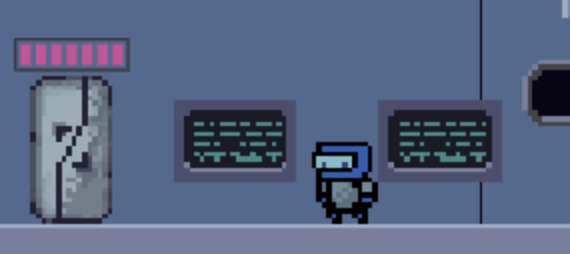
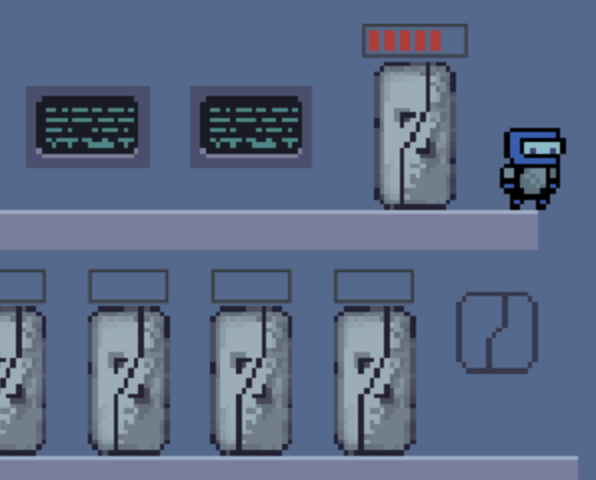
The station has 3 main systems - energy, propulsion and life support. Each system consists of a control locker and materials locker. A control locker must have at least 4 working chips for a system to function properly. A material locker should have additional pods with appropriate material to refill when needed.
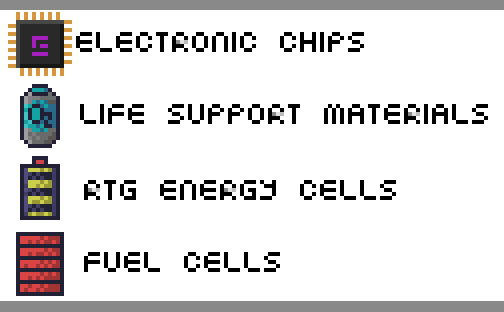
So keep energy, propulsion and life support material lockers filled with batteries (yellow), fuel (red) and oxigen (blue).
Also make sure, that control lockers electronics are fine. Broken chips are marked black on locker indicator and although 1 or 2 is fine, you eventually need to replace them, so the system will not be compromised with the next chip failure.
There are indicators on the screen showing system status for energy (yellow), propulsion (red) and life (blue).
When materials are in short supply, an appropriate bar indicator start blinking. When the levels are critical, you can hear alarm buzzing all over the station.
Replenish appropriate locker with lacking resources or replace the broken chips to remedy the problem.
----
Trade Ports
You station has 2 docking ports that can be used for trade.
Each port has 2 lockers - a sample locker and a cargo locker. The first item in a sample locker shows what kind of material you require. And the trade control panel nearby show the quantity you need. A cargo locker contains any materials you are trading for these items.
Let say the station needs additional fuel. Pick a docking port and place a spare fuel pod into a sample locker Now you need some material to trade fuel for. You see, that it is high demand on system chips right now. Act quick before demand changes. Take 3 chips and place them in cargo locker next to a sample locker with fuel. Assuming that demand for fuel is regular, select 5 bars on trade control panel near the sample locker. That way you are saying that you are ready to trade 3 chips for 5 fuel pods.
Now, enable the docking port by pressing the button at the edge of the port module. The button should turn green. And once there is a ship ready to commence the trading operation, the docking port control button will blink red-green and soon you will see a spaceship docking at the port
Note, that supply and demand constantly changing, so the price for fuel can be two high (e.g. fuel is in high demand and you will not be able to get 5 fuel pods even for 5 or 7 chips). Also, there could be not enough materials currently in orbit ready for trade. So you can wait for a long time until there will be a ship ready to trade.
You can adjust a trade setup even with an open port by providing additional materials in the cargo locker or changing the desired number on trade control panel (e.g. reduce the number of fuel cell to 3 or even to 1 if you need them really badly).
----
Resources
There are 4 resources available - RTG batteries, fuel cells, life support pods and electronic chips. All are crucial for station life.
RTG batteries are used to generate station energy supply. Fuel is used by the propulsion system to keep station in orbit. Life support matterials are crucial for environmental systems.
Electronic chips are needed by all of the station systems to function properly.
----
Waste
The station generates waste in the form of broken chips.
And since you are in space, you can't dispose it by throwing it out of the window. But you can place broken chips in free slots in a cargo locker during trade operations. The incoming spaceship will pick up and dispose of your waste.
----
Controls
Console Player (up to 4 gamepads are supported) * move with analog stick or d-pad * press A/B to use * press X/Y to close a menu
WASD Player * move with WASD * press E or Space to use * press Q to close a menu
Arrow Player * move and jet with Arrow Keys * press Page Down or use with Right Shift or Enter * press PageUp or End to close a menu
VIM Player * move with HJKL * press ] or Enter to use * press [ or \ to close a menu
Accountant Player * move with Numpad Arrows (8426) * press Numpad 9 or Numpad Enter to use * press Numpad 7 or Numpad Substract to close a menu
----
Tools
* Collider.JAM game framework + JavaScript * Aseprite for graphics * Ogmo for tiles * Bfxr and Audacity for sound effects
I fell down to the bottom, and honestly could not figure out how to get out. A brief description of controls would be really helpful. Other than that I think this is a great concept and a good start. I think you could make this into something really awesome. Nice job.
I am sure there is some really clever mechanics going into this game, unfortunately I just can't quite figure out what those are :( As Birchy says, a description would be super helpful!
I think this game has a lot more to offer, it reminds me to burger time from atari and Mario's Cement Factory of the Game & Watch Gallery. That retro feeling you have needs to be used
Err... I didn't understand a thing of what I've done and I'm dead xD Maybe a too much complex mechanic without reading a full book of instructions is a bit of burden... And why 4 players ? Meant to be multi-players game ? a keyboard can't handle that much inputs at a time x) I feel you tried something, and it have certainly some potential, but... err... TL;DR and my head gonna explode.
Quite complex game, a lot of things going on at the same time, but the mechanic is very good, I like this kind of games. The game has some potential in my opinion, just may need to make a little more clear all these information... at the beginning it can be a little overwhelming. Maybe if you started the game with just a few items and start to improve with time, just an idea...
I managed to do a few trades, but I wish it was clearer what "Extreme/normal/low" means. I figured that all I needed to do was start making a profit, so I tried to trade 2 Extreme demand chips for 4 Low demand fuel. But no ships seemed to want it. The best trades I managed to make were 3:4 profit ratios, and I wasn't fast enough to keep my station afloat.
I think it's pretty hard to make any kind of trading sim interesting. It eventually just boils down to buy low, sell high. The fun part is usually about predicting the market, but I couldn't detect any trends. It's also usually more fun when there's big swings up and down. It might be easier with a graph of demand over time, and maybe some news stories or a twitter feed that helps you predict demand. "New orbital solar farm under construction" could signal to the player that energy is going to be cheap tomorrow.
Station keeping is a fascinating idea. The name had me expecting something with gravity maneuvers, or asteroid mining. Replacing and trading for resources is an OK mechanic, but it's not something that usually gets me excited. Platforming controls were fine, but it would have been more interesting if there were hazards within the ship.
Sprites were quite nice, and the sound effects were a good touch. I liked the warning sound when resources started to get low. The level of polish and complexity was very impressive. The UI was fairly intuitive after reading the instructions, the resources were all conveniently color coded, and the trade interfaces were very smooth. Really impressive work for a game jam.
Played it a couple of minutes but couldn't really get into it. The game didn't really click with me, nor did it really tell me, what it's about or what the goal was or obstacles I had to overcome. Seemed kinda complicated and the user interface was never clear what is doing what. Even just standing there and doing nothing seemed to be fine for the longest time. The running and jumping controls seemed off, like I was on some kind of frictional ice.
I'm not a huge fan of those kind of strategy/survival games so I guess maybe I wasn't the actual target group. The art was nice though, no complaints on that front :) some chilly ambient sound would've been nice
Seemed cool, the graphics are nice. Feels like Kairosoft... But its difficult to understand without in-game description bubbles. Yes its hard to manage so many things in just 3 days
@Keppu thanks for the review. The game supports coop with up to 8 players at the same time (need x4 game pads + couple of keyboards attached though). I've playtested it with my kid - works much better than in solo mode. Like somebody is changing the broken chips while others are filling up docking ports for trade and resupplying fuel and stuff... It can get pretty intense when supplies are running low :smile:
The fact that you managed to pull off a local co-op multiplayer game in a jam is actually a really cool feat! I do feel this title fell victim to feature creep though, in future jams it may be a good idea to build simple and expand out in order to ensure you hit the time limit without compromise.
That said, I did enjoy this game after me and a few friends figured it out. It was difficult without any in game or in level clues as to controls or goals (not necessarily handholding or tutorials - it's not an easy task!), but you can poke around and eventually figure it out natively. I'd love to see this continue to be worked on in the future and can't wait to see your future game jam entries!
I love the concept in this game and although I couldn't try the multiplayer I can see the potential. My only request is that the movement be less floaty (I know it is in space) but sometimes you get stuck on the ground.
It was so overly complicated to begin with. So many numbers and buzz words everywhere. The tutorial too did a pretty poor job at explaining stuff. It was just like do this and do this, not explaining anything really. Oh and it was so overly structured that one missed move (like not picking up what you were supposed to) completely hard locks you out of progressing...
There was just way too much crammed to the beginning. Could have started with a small ship with like only one locker of each type (if even that). Then introduce the mechanics way better and more thoroughly and let the player get used to them in a less complex environment. Then extend the tutorial some to have a portion of that freeform action too. And then finally after some good enough accomplishment, throw them to the actual game. Even after playing for quite some time, I'm still pretty clueless what the top row lockers and panels are all about. Or those blue screens, tutorial didn't even mention those.
I guess that fact that the trade ship takes ages to arrive makes sense in the actual game but on tutorial it was just irritating. Making the player just straight up wait is almost never fun. Made it even worse that due to all the bugs, I played the tutorial several times and also had to do the ship waiting way too many times. Sure, I could have skipped the tutorial but was still very unfamiliar about the mechanics and wanter a bit of a refresher.
The pixel art was pretty good. Having more distinction between the lockers would have been nice. Especially on the tutorial where you're pointing to some locker, first you have to read the text from bottom corder (ie. not a great placement for that either) and then scan the screen for the mildly blinking locker. Some way more easily visible flashing indicator on what locker you were supposed to go to and having the text appear close to that point would have made sense too. Just like when you have that "-1 fuel" text fly on the screen. It is very easily noticeable but funnily enough, serves like no purpose to player at all since it's a very non-critical information.
Cool to see a multiplier addition too. Well sure, you probably have all your player behaviour in that object and just throwing another one there and binding different keys isn't too hard. Really nicely done! But I just don't see it working for four people as of it's now. Even when playing alone you get these lull periods where you have like nothing to do. Can't even think what it would be like with four.
I wasn't a big fan of the inventory system. I don't really know why but I kept confusing which row is which for like the longest of times. Even though the way they were made perfect sense. Just having them look visually different might help alleviate this. Esc also didn't work on closing it like you said and I completely forgot about Q which did seem to work. Clicking on empty space was a nice addition but as a sole closing mechanic, it was clunky as hell.
Another thing I didn't enjoy very much was the controls. Well they were fine kinda and served their purpose really but didn't feel good. Especially the horizontal movement while floating or falling down got easily out of hand. Glad that there was like no precision required anywhere. I also think that the jetpack would have been better as a continuous lift instead of those bursts. Would give more control to player. For example they do like a slight bursting to slow down a descent.
@antti-haavikko Thank you so much for your deep gameplay analysis! I really appreciate your time and effort :cool:
I've struggled with that tutorial trying to lock out and check every step and every possible action. But looks like it still has a long way to go before it becomes clear and reliable :smile: Scaling down the station size for tutorial is a great idea for sure. Different station sizes is a great idea overall when you consider multiplayer layout - this station can become crowded with 4+ players.
As for the local co-op - the keyboard is just a backup option, since the main control supposed to be through x4 gamepads. But still, couple of players can join form the keyboard. And you can have multiple keyboards connected as well. That is something nobody considers for local co-op these days.
The "stuck in metal" problem is the result of my "quick and dirty" tile collision implementation. That is something to rework completely. Along with platform mechanics - your comments make me realize, that I have to introduce air friction to slow horizontal movement down. Currently the friction works only when moving on the ground.
Well, it is already a long to-do list. I hope I will make time to fix all outlined problems to make it more playable :smiley:
This is certainly up there as one of the more complex entries. Despite the tutorial it took me a bit to really figure out what I was doing, and even then it's far from mastery. (not to mention not having anyone around to try multiplayer with~)
That said, I think in a game with a trading focus, complexity can absolutely be a good thing. Having to keep track of demand fluctuations, how many resources you still have, etc makes for a really interesting system I would definitely like to see more of in the future. If you're releasing a further polished version (or expanding into a commercial release) eventually, message me so I can check it out!


Comments24
Maybe a too much complex mechanic without reading a full book of instructions is a bit of burden...
And why 4 players ? Meant to be multi-players game ? a keyboard can't handle that much inputs at a time x)
I feel you tried something, and it have certainly some potential, but... err... TL;DR and my head gonna explode.
I think it's pretty hard to make any kind of trading sim interesting. It eventually just boils down to buy low, sell high. The fun part is usually about predicting the market, but I couldn't detect any trends. It's also usually more fun when there's big swings up and down. It might be easier with a graph of demand over time, and maybe some news stories or a twitter feed that helps you predict demand. "New orbital solar farm under construction" could signal to the player that energy is going to be cheap tomorrow.
Station keeping is a fascinating idea. The name had me expecting something with gravity maneuvers, or asteroid mining. Replacing and trading for resources is an OK mechanic, but it's not something that usually gets me excited. Platforming controls were fine, but it would have been more interesting if there were hazards within the ship.
Sprites were quite nice, and the sound effects were a good touch. I liked the warning sound when resources started to get low. The level of polish and complexity was very impressive. The UI was fairly intuitive after reading the instructions, the resources were all conveniently color coded, and the trade interfaces were very smooth. Really impressive work for a game jam.
I'm not a huge fan of those kind of strategy/survival games so I guess maybe I wasn't the actual target group. The art was nice though, no complaints on that front :) some chilly ambient sound would've been nice
That said, I did enjoy this game after me and a few friends figured it out. It was difficult without any in game or in level clues as to controls or goals (not necessarily handholding or tutorials - it's not an easy task!), but you can poke around and eventually figure it out natively. I'd love to see this continue to be worked on in the future and can't wait to see your future game jam entries!
There was just way too much crammed to the beginning. Could have started with a small ship with like only one locker of each type (if even that). Then introduce the mechanics way better and more thoroughly and let the player get used to them in a less complex environment. Then extend the tutorial some to have a portion of that freeform action too. And then finally after some good enough accomplishment, throw them to the actual game. Even after playing for quite some time, I'm still pretty clueless what the top row lockers and panels are all about. Or those blue screens, tutorial didn't even mention those.
I guess that fact that the trade ship takes ages to arrive makes sense in the actual game but on tutorial it was just irritating. Making the player just straight up wait is almost never fun. Made it even worse that due to all the bugs, I played the tutorial several times and also had to do the ship waiting way too many times. Sure, I could have skipped the tutorial but was still very unfamiliar about the mechanics and wanter a bit of a refresher.
The pixel art was pretty good. Having more distinction between the lockers would have been nice. Especially on the tutorial where you're pointing to some locker, first you have to read the text from bottom corder (ie. not a great placement for that either) and then scan the screen for the mildly blinking locker. Some way more easily visible flashing indicator on what locker you were supposed to go to and having the text appear close to that point would have made sense too. Just like when you have that "-1 fuel" text fly on the screen. It is very easily noticeable but funnily enough, serves like no purpose to player at all since it's a very non-critical information.
Cool to see a multiplier addition too. Well sure, you probably have all your player behaviour in that object and just throwing another one there and binding different keys isn't too hard. Really nicely done! But I just don't see it working for four people as of it's now. Even when playing alone you get these lull periods where you have like nothing to do. Can't even think what it would be like with four.
I wasn't a big fan of the inventory system. I don't really know why but I kept confusing which row is which for like the longest of times. Even though the way they were made perfect sense. Just having them look visually different might help alleviate this. Esc also didn't work on closing it like you said and I completely forgot about Q which did seem to work. Clicking on empty space was a nice addition but as a sole closing mechanic, it was clunky as hell.
Another thing I didn't enjoy very much was the controls. Well they were fine kinda and served their purpose really but didn't feel good. Especially the horizontal movement while floating or falling down got easily out of hand. Glad that there was like no precision required anywhere. I also think that the jetpack would have been better as a continuous lift instead of those bursts. Would give more control to player. For example they do like a slight bursting to slow down a descent.
Actually got stuck in a corner too...
Anyways, good job! :thumbsup:
I've struggled with that tutorial trying to lock out and check every step and every possible action. But looks like it still has a long way to go before it becomes clear and reliable :smile: Scaling down the station size for tutorial is a great idea for sure. Different station sizes is a great idea overall when you consider multiplayer layout - this station can become crowded with 4+ players.
As for the local co-op - the keyboard is just a backup option, since the main control supposed to be through x4 gamepads. But still, couple of players can join form the keyboard. And you can have multiple keyboards connected as well. That is something nobody considers for local co-op these days.
The "stuck in metal" problem is the result of my "quick and dirty" tile collision implementation. That is something to rework completely. Along with platform mechanics - your comments make me realize, that I have to introduce air friction to slow horizontal movement down. Currently the friction works only when moving on the ground.
Well, it is already a long to-do list. I hope I will make time to fix all outlined problems to make it more playable :smiley:
This is certainly up there as one of the more complex entries. Despite the tutorial it took me a bit to really figure out what I was doing, and even then it's far from mastery. (not to mention not having anyone around to try multiplayer with~)
That said, I think in a game with a trading focus, complexity can absolutely be a good thing. Having to keep track of demand fluctuations, how many resources you still have, etc makes for a really interesting system I would definitely like to see more of in the future. If you're releasing a further polished version (or expanding into a commercial release) eventually, message me so I can check it out!