Lord of Hosts
Lord of Hosts
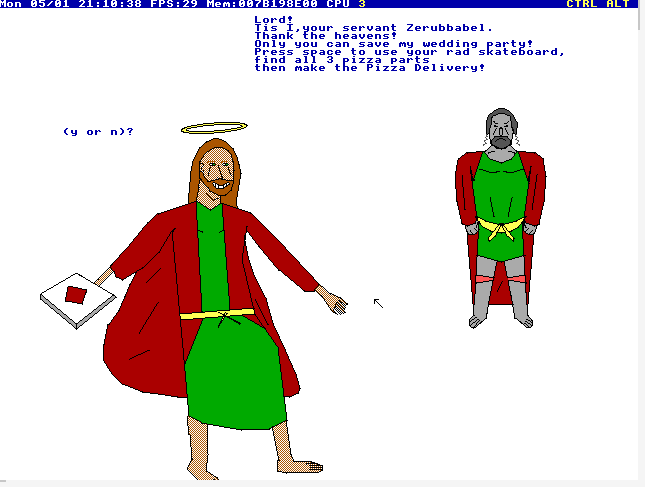
What a heavenly court the Lord of Hosts has prepared for us. In this game built for the Temple operating system (TempleOS), you play as the Only-Begotten Jesus Christ on a mission to throw the best party ever.
Jesus spoke to them again in parables, saying: “The kingdom of heaven is like a king who prepared a wedding banquet for his son. He sent his servants to those who had been invited to the banquet to tell them to come, but they refused to come.
Then he sent some more servants and said, ‘Tell those who have been invited that I have prepared my dinner: My oxen and fattened cattle have been butchered, and everything is ready. Come to the wedding banquet.’" Go ahead as Jesus on your skateboard and collect as many pizzas as you can.
My best score is 461! I got to Level 7. Can you beat it?
Avoid glowie FBI drones who seek to ruin your fun and good times. Dodge the prickly cacti and palm trees so you don't lose your momentum.
Make the wedding celebration as wonderful as you can.
Installation:
This Game is for TempleOS
There are a few ways to install. Depending on what emulator you use, virtualbox, VMWare or QEMU.
*Note you won't be able to hear sound with VirtualBox*
Attached is the disk that you can load into VMware, which supports sound. In VMWare Select OS ‘Other’ and ‘Other 64-bit’. Make sure memory is set to 2048MB. The disk contains the entire operating system already installed. This game has audio, which only works if you use VMWare, QEMU or a physical install. Virtual Box does not support audio, so please, avoid ranking Audio if you can't hear the music.
If you use QEMU get the disk with wget:
```wget https://archive.org/download/lord-of-hosts.-iso/LordofHostsv3.ISO.C ```
```qemu-img create -f qcow2 temple 2G ```
```export QEMU_AUDIO_DRV=pa ```
```qemu-system-x86_64 -soundhw pcspk -m 512M -enable-kvm -drive file=temple -cdrom LordOfHostsv3.ISO.C -boot order=d ```
Once inside the operating system you can type the following commands to run the game if you are loading the harddrive:
```Cd(“LD2”); ```
```#include “Load.HC”; ```
If you have trouble loading the operating system please let me know for assistance.
Controls:
Space bar to jump. Time your Arrow keys to navigate the skateboard and get the pizza.
You must collect pizza and do cool tricks.
Commit tricks and get pizza to increase score, but if you don’t deliver the pizza back you will lose.
ESC To quit; CTRL+ALT+X To close the window
DEMO (prebuild):
Credits:
Design and Sound Austin Sierra
Programming by Clayton Rhodes
Art by John Bilgin
Bug Fixes
v1 Release buildv2 Fixed the score/pizza calculation and bugged collider
v3 Fixed a bug where your cart would get stuck after replays
If you play this game on Windows 11 or newer hardware please excuse any lag.
It is not the OS, it is not the game. Blame modern hardware acceleration and hypervisor companies. Use QEMU or a computer made in the early 2000s for the best experience.


Comments16
I'm not able to set it up but I appreciate the dedication
This is an achievement. Some kind of ultimate post-modern statement. I love the idea behind it more than the execution, but by only using Gods tools, who can say what isn't perfection? Not only did you have the big brain to pull this off, but the balls. Kudos and respect from this dev.
Great concept, sry I couldn't play since I don't want to install new OS!
Also, play my game!! It has WebGL version!
Using template OS hahahaha
Fantastic.
The theme fits in so well.
Nice job. I think you win on the most OUT THERE game :P