
Ludum Dare #58compo
Fractal Collector
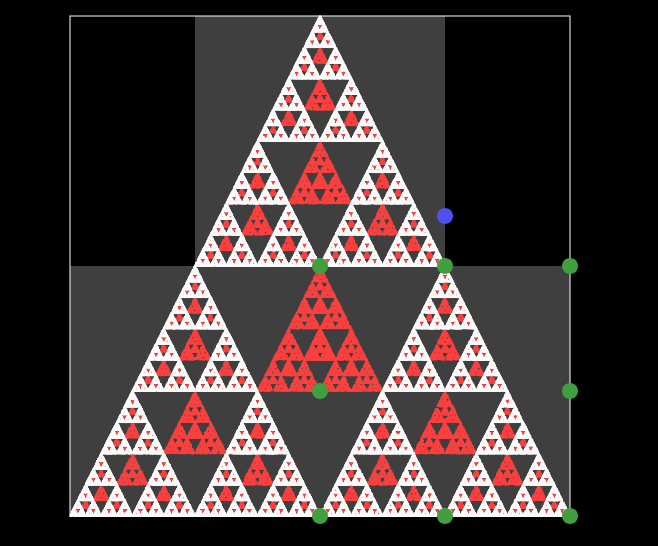
Goal
Get the white shape to match the red shape behind it and add the fractal to your collection.Rules
The white picture is made out of parts (the partially transparent grey squares) which describe how to make the picture as transformed copies of whatever is in the square.Controls
Mouse
- Click: Select part- Drag blue circle: rotate part
- Drag handles (green circles around a selected part): resize part
- Drag (anywhere in part except the circles): move part
- Buttons to create and delete parts
- Button to reset a challenge
- Button to save a fractal
- Click on a fractal saved in collection to admire it again at full size.
- Button to see more hints / get the solution
- Flashing button to advance to the next challenge if you've completed it
Keyboard (optional)
- Tab or n: Cycle through parts- Arrow Keys or wasd: Move selected part
- q/e: Rotate selected left/right
- Space: redraw with detail
- Delete: Remove selected part
Strategy
Try to work out how the red shape could be made out of copies of itself (e.g. a square can be made by putting 4 smaller squares together).Create as many parts as you need copies (most challenges have the right number of parts to start with).
If the copies should be rotated relative to the original, then rotate the parts.
Position the parts so that the picture looks right.
Control Configuration
There are some checkboxes that affect the controls by putting restrictions how and where things move (e.g. making rotations snap to the nearest multiple of 15 degrees). Free movement is a bit more useful for getting the hang of things, but these make it much easier to neaten things up.It should be possible to complete every challenge with any combination of checkboxes being checked.
Hints
See the strategy section above and read the in game hints. Don't be hesitant to click the "More hints" button, particularly on the early levels where you're supposed to get the hang of the controls and how the game works. The first levels don't need anything except movement, then rotation. The hints will tell you when a new kind of manipulation is needed.Comments21
Tesseract5 Oct 2025, 23:37
@appoxgames Thanks for looking at it, I appreciate you letting me know about the difficulty. Did you look at the in game hints? For the early levels, I try to be very explicit about how to solve them, since the point of them is to get the hang of how it works.
AppoxGames5 Oct 2025, 23:40
@tesseract Ah i missed the fourth triangle. Yes i solved it now, thank you for letting me know.

Sthor7266 Oct 2025, 01:38
Super cool concept. I kept instinctively trying to use CTRL Z to undo my actions and it would've been really nice to have that functionality. Overall its very interesting and unique, great work!

CamComDuck6 Oct 2025, 01:50
I love a good math and puzzle game! I'm curious about how did you make the fractals graphics? I found the levels' difficulty ranging wildly from level to level, some levels I could solve in seconds and others I couldn't solve at all without hints. Maybe getting a playtester to try it out first or try ordering the levels from easy to hard would help especially for newer players!
Tesseract6 Oct 2025, 03:34
@camcomduck I'm glad this was up your street.
To draw the fractals, begin with a point in the middle, then repeatedly choose a random part (a grey square) and send the point into that part. Do 100000 iterations, plot all the points visited, and you've drawn the fractal. See https://en.wikipedia.org/wiki/Chaos_game
I had another idea for rendering things using filters and drawing copies of a square on top of itself, which would be deterministic and sometimes look nicer; but there wasn't time to try that out.
Sorry about the strange difficulty curve. I reordered the challenges very late based on which manipulations were needed - most don't involve resizing or creating/deleting parts, so I hoped to get some interesting puzzles in before everyone left after a long struggle to find the right button (for some reason, controls tend to be less obvious to people who haven't spent the last 48h working on the game).
I should probably have made a way to let players choose which challenge to try, with some challenges locked behind tutorial levels.
To draw the fractals, begin with a point in the middle, then repeatedly choose a random part (a grey square) and send the point into that part. Do 100000 iterations, plot all the points visited, and you've drawn the fractal. See https://en.wikipedia.org/wiki/Chaos_game
I had another idea for rendering things using filters and drawing copies of a square on top of itself, which would be deterministic and sometimes look nicer; but there wasn't time to try that out.
Sorry about the strange difficulty curve. I reordered the challenges very late based on which manipulations were needed - most don't involve resizing or creating/deleting parts, so I hoped to get some interesting puzzles in before everyone left after a long struggle to find the right button (for some reason, controls tend to be less obvious to people who haven't spent the last 48h working on the game).
I should probably have made a way to let players choose which challenge to try, with some challenges locked behind tutorial levels.

dhim7 Oct 2025, 22:09
What a neat entry : clever and original concept. I'll come back fresh to fully enjoy this one, cause my brain is not braining enough tonight!
I agree that a bit more of a tutorial on how the square interact to guide the player would have been nice, the hints help a bit ( I brute force solved 6 by adding a bunch of parts..?)
I myself collect GitHub entries: So it's super nice to see you have used GitHub during the development process of the game : 15 commits but only one html file to rule them All!
I have also collected a few tricks to make the repos shinier across my Ludum Dare participations
---
You can update the repository name (I always name my repo ldXX and I rename when I have found a name for my game) without breaking links (GitHub redirects old names to new ones), and add a description for inclusion in the list
( still redirect to my repository)
```
```
Consider using these topics on your github description to make your Ludum Dare entry more discoverable:
- `game`
- `game-development`
- `ludum-dare`
- `ludumdare`
- `ludumdare58`
- `ludum-dare-58`
- `ld58`
You can also use your cover art for the ```Social preview``` image in the repository ```Settings```
I have starred and added your repository to a list of ld58 compo:
(Also, I am on a quest to collect 10 stars. If you play my game, consider leaving a star on my repo as well.)
I agree that a bit more of a tutorial on how the square interact to guide the player would have been nice, the hints help a bit ( I brute force solved 6 by adding a bunch of parts..?)
I myself collect GitHub entries: So it's super nice to see you have used GitHub during the development process of the game : 15 commits but only one html file to rule them All!
I have also collected a few tricks to make the repos shinier across my Ludum Dare participations
---
Repo name and Description
You can update the repository name (I always name my repo ldXX and I rename when I have found a name for my game) without breaking links (GitHub redirects old names to new ones), and add a description for inclusion in the list
( still redirect to my repository)
Readme and Badges
Include the link to your ldjam entry in the Readme. I also have created badges that you can use to decorate your README:```
```
Topics
Consider using these topics on your github description to make your Ludum Dare entry more discoverable:
- `game`
- `game-development`
- `ludum-dare`
- `ludumdare`
- `ludumdare58`
- `ludum-dare-58`
- `ld58`
Cover Art
You can also use your cover art for the ```Social preview``` image in the repository ```Settings```
Stars
I have starred and added your repository to a list of ld58 compo:
(Also, I am on a quest to collect 10 stars. If you play my game, consider leaving a star on my repo as well.)

Linus Lindberg8 Oct 2025, 16:16
Very unique concept for a puzzle game! Well done!

vidarn10 Oct 2025, 20:38
Super cool and interesting! I'm impressed both by coming up with the idea and then with actually implementing it! It was very cool and enlightening to be able to play around with fractals like this.

good.enough11 Oct 2025, 18:08
Ah. I can see why you're the only one who's played my game so far. :P Figuring out how to combine squares in different orientations to amazing fractals is kind of similar even if objectively more beautiful than combining runestones to get other runestones based on some really hacky prime number logic...
Loved it btw! I played until I got bored, lol! I finished 8 levels. The 8th was my favorite, and I figured I'd end on a high note.
Loved it btw! I played until I got bored, lol! I finished 8 levels. The 8th was my favorite, and I figured I'd end on a high note.
loveapplegames12 Oct 2025, 07:58
Super original game! Worthwhile and interesting concept, though it needs some polish. I needed to turn off snap to make it work. I managed to complete level 2 through sheer luck, and for level 4 I had to move part of the fractal off-screen. In level 16, the resolution was too low to match the fractals properly. I seemed to get an exact match but it didn't accept it after a lot of fiddling. So I gave up there.
Tesseract13 Oct 2025, 00:44
@loveapplegames Thanks for playing; I completely agree that it could use some polish. It is possible to solve everything except the final level (the fern) with snapping turned on, although it's sometimes easier to move towards a solution with snapping turned off.
In your screenshot for the last level, it looks like there are some areas covered by white bits that don't have red behind them, which is why it won't accept your solution. Deleting the smallest part (in the middle) might fix it. I should probably have made the white bit slightly transparent.
Congratulations on getting so far!
In your screenshot for the last level, it looks like there are some areas covered by white bits that don't have red behind them, which is why it won't accept your solution. Deleting the smallest part (in the middle) might fix it. I should probably have made the white bit slightly transparent.
Congratulations on getting so far!

LDJam user 35249013 Oct 2025, 23:16
As someone who knows basically no math, I kind of love fractals, and thought this was entrancing. It felt like I was learning a new language -- I'd mess with the positions and rotations in each puzzle little by little, and get almost an intuitive understanding of how my changes affected the shape.
I was able to complete all of them without hints except for the last two (I had to show solution).
I was able to complete all of them without hints except for the last two (I had to show solution).

atsh15 Oct 2025, 12:07
Very cool brain burner. I was able to complete 5 shapes, before getting a triangle filled with "noise" I couldn't solve. It was very interesting to learn about the various shapes that can be created from arranging and rotating fractals. Good job!

Shoalmuse19 Oct 2025, 10:14
Super cool concept! Really loved this one. Rotating the fractals was very zen and could result in some some surprising outcomes. I feel like this could be a fantastic iOS game relax with.

cagibi19 Oct 2025, 18:05
Very original puzzle game and very trippy too. I agree with the need for an undo function, but it's still a solid game and an impressive programming exercise nonetheless.

auxiliarymoose20 Oct 2025, 04:49
This is a super cool concept! I don't think I've ever seen a jam game like this (or actually any game for that matter). This could be really interesting to expand into more dimensions also, maybe even as a VR game?? Even though I wasn't able to solve all of the puzzles, I still enjoyed playing with the fractal generators. Thanks for making and sharing it!
HomoLudens20 Oct 2025, 08:55
Fascinating idea. I would think it might be useful to prune off some of the less interesting fractals.

Fractal21 Oct 2025, 21:17
Really cool! Obviously I am biased given my username, but really nice idea! At the beginning I just solved the puzzles intuitively, but at some point I remembered what a fractal is and understood better how it worked :D
I managed to solve all of them except for the last one, I got very close (0.11) but somehow not all the way there.
I wish the drawings were a bit crispier, they were not always easy to distinguish and become quite messy when dragging, but I know it may be quite computationally expensive.
Well done and thanks! ;)
I managed to solve all of them except for the last one, I got very close (0.11) but somehow not all the way there.
I wish the drawings were a bit crispier, they were not always easy to distinguish and become quite messy when dragging, but I know it may be quite computationally expensive.
Well done and thanks! ;)
Tesseract21 Oct 2025, 23:27
@fractal I'm glad you've played it :). The process to draw the fractals is randomized, which is where the noise comes from - there's a tradeoff between resolution, stability and runtime. I try to give it a higher framerate while it's being moved, and more resolution when you release the mouse. I could have tried to measure how fast the machine it's running on is, but that's hard to get right.
If you want to see higher resolution fractals when the mouse is released, you can set `carefulDrawCount=200000` or higher using the browser console.
For the last fractal, any score less than 1 should count as complete and cause the red image behind to disappear - I ran out of time to make a proper end screen, so it keeps updating the score for the final level once you click "ok" on the last alert. The random nature of the rendering also means that you might never see a score of 0 even if you get all the parameters exactly equal to the target (having tested it, it scores about 0.0001, but that might require more accurate positioning than is possible to achieve manually).
If you want to see higher resolution fractals when the mouse is released, you can set `carefulDrawCount=200000` or higher using the browser console.
For the last fractal, any score less than 1 should count as complete and cause the red image behind to disappear - I ran out of time to make a proper end screen, so it keeps updating the score for the final level once you click "ok" on the last alert. The random nature of the rendering also means that you might never see a score of 0 even if you get all the parameters exactly equal to the target (having tested it, it scores about 0.0001, but that might require more accurate positioning than is possible to achieve manually).
Tesseract21 Oct 2025, 23:37
@homoludens Thanks for playing. Some of the boring fractals are there to try and teach things about the game. For example, the rotated square is meant to show that you should resize and rotate an image by moving the parts, rather than by resizing and rotating the parts. I'd agree that there's much that could be improved on that front.


Cant imagine the programming it took to make this, well done!