Space Age is a planet building game of sorts where your goal is to progress through the ages (Stone, Iron, Industrial, and Space) and make a Spacecraft Factory at the end. You start out with a limited number of resources to get your planet off the ground, and you will then get resources from your tiles every thirty seconds. Your resources are obtained from the universal resource pool, which connects your world and your enemy's in the space race. Tiles in later ages cost more resources than tiles in earlier ages. There are also special tiles that can help your production or hurt your enemy's production (your enemy is a simulation that is probably pretty unrealistic, but that's what came out of the very limited time remaining). The game usually lasts around 20 minutes, although you can get a good feel of the game very quickly.
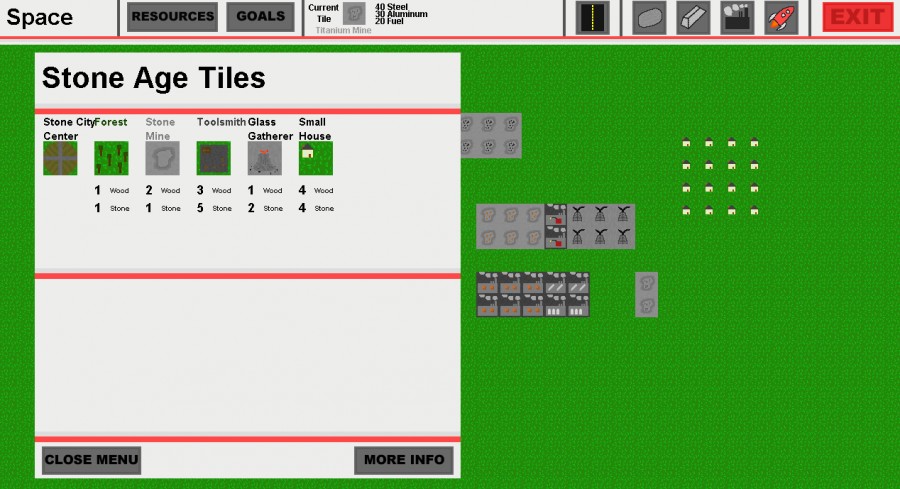
I did not have enough time to create an in-game tutorial, so you can come back to this later if you're confused or read it now if you want. The "Resources" and "Goals" buttons at the top will show you the resources (of you, your enemy, and the universal resource pool) and your goals to progress to the next age. If you have a tile selected, it will show up to the right of that with its resource costs. The buttons with icons to the right are where you select a tile to place. There is an icon for roads (which did not end up having a use), and icons for each of the ages. They are unlocked as you unlock each age. Inside the tile selection menus, you can click on the tile images to select the tile you want. You can also click the "More Info" button to get more information about your selected tile. To place a tile, just left click on the space you want. A menu will appear for you to confirm the placement.
Controls: Arrow Keys - Move around map Mouse Wheel - Zoom in and out of map Left Mouse Button - Menu buttons and tile placement
The menus are very clunky. Buttons don't work if you're moving your mouse when you click them. You need to confirm every time you want to replace a tile which gets tedious.
The UI becomes a bit tedious after awhile, and the gameplay is just trying to build as many things as possible. But for 48 hours, this is stellar. I love the ambition, and it's awesome to see a city management game in such a simple state.
@Frugle Thanks for the feedback. I should have considered the mouse moving while clicking on the buttons in the menus, because that is very easy to fix. As for the confirmation for placing the tiles, I think it can help to stop any frustration from placing a tile in an incorrect spot, but I can definitely see how it gets tedious. I possibly could have removed that menu when you are replacing a grass tile, so it only shows up when you are replacing a tile that you placed.
@RodRoy1 I'm not sure why the menus wouldn't be working. Have you tried clicking the buttons without moving your mouse, just clicking? That was an issue that other people have noticed.
@Marcellus Yeah, it seems like a lot of people are having issues with the menus. I did not get any issues with overlapping menus when testing it, but I only have one computer to test it on. Thanks for trying it, though!
It was tedious having to confirm each tile click though (I think closing the resource menu should be enough). I'd also have liked to see my resources without having to open the menu, but that's just a minor detail.
I'd really like to try this game, and I can see the buttons and the tiles - however the menu is blank. It's white with red horizontal stripes... And there are buttons to close it, but I still can't really play that way :(
Need to work a bit on menus, confirmation is dull for every tile, and the menus don't need to be hidden behind buttons, maybe under tabs instead so you can have 'iron age' open for easy tile selection for example. Other than that, nice job! Cool little resource building game!
The UI is pretty bad so I'll admit I didn't get further than placing a few brown tiles - don't ask for confirmation on each placement, I'm not erasing my harddrive so don't need to confirm...
I really enjoyed this. There's been some good feedback about the UI so I won't reiterate that.
It wasn't clear what exactly made the "enemy" my opponent until I got to the Space age and saw that goal. I'm not sure how I'd change that to make it more apparent, but I'd have paid more attention to them earlier if I knew exactly what we were competing for.
I was a little skeptical at first - the stone age seemed to go a bit slowly. But as the production tree expanded, I had a lot of fun once I realized how much depth was there.
Great job for 48 hours - I'd love to see an expanded version of this.
The tile replacement windows wasn't a really good idea ^_^" I think the center and the roads were not necessary to build, but hey, I built them :3 Nice game though, the transition between the ages is good and it has a lot of content. But I think you misunderstood the theme :/

Comments35
The menus are very clunky. Buttons don't work if you're moving your mouse when you click them. You need to confirm every time you want to replace a tile which gets tedious.
The UI however... :X
It was tedious having to confirm each tile click though (I think closing the resource menu should be enough). I'd also have liked to see my resources without having to open the menu, but that's just a minor detail.
Would love to see more feedback for how much each building produces (+xx when it generates? or/and on the menu or mouseovers) and the 30 second timer.
The UI is pretty clean. Good padding and contrast. Maybe find an aa'd font?
To increase tension you might show the enemy progress or at least what stage they are on all the time as a bar or something.
GJ overall.. you had me play until the end :)
It wasn't clear what exactly made the "enemy" my opponent until I got to the Space age and saw that goal. I'm not sure how I'd change that to make it more apparent, but I'd have paid more attention to them earlier if I knew exactly what we were competing for.
I was a little skeptical at first - the stone age seemed to go a bit slowly. But as the production tree expanded, I had a lot of fun once I realized how much depth was there.
Great job for 48 hours - I'd love to see an expanded version of this.
I think the center and the roads were not necessary to build, but hey, I built them :3
Nice game though, the transition between the ages is good and it has a lot of content.
But I think you misunderstood the theme :/