Post-Mortem for Music of the Spheres

I teach computer science at a small liberal arts college, and this semester I have been leading 17 students in a course on game development with Unity. Ludum Dare 32 was perfectly situated near the end of the semester to serve as a kickoff for my student’s final projects, so we all wrote a game over the weekend! My students worked in teams, and I entered solo. For all of us, this was our first Ludum Dare.
Part of their project is to make a post-mortem assessment of their games, so it only seems fair that I do the same for my game: Music of the Spheres
What was the genre, objective, and theme you chose for your game?
I admit, I was a little disappointed in the theme initially, I had been rooting for Companion. An Unconventional Weapon implied combat and fighting of some kind, and I was hoping to make a puzzle game, where weapons aren’t usually a core element.
Eventually, I went with a timed puzzler with a Tetris-like feel, themed in space, and I used sound as my weapon of choice. The goal of the player is to create harmonies out of randomly generated tones, and eventually explore the whole tonal space.
What were your initial goals?
- My wife’s favorite game is Eufloria, and I wanted to make something for her that had a peaceful and relaxing flow.
- I had not used sound and music in a game before, so it was a priority that I gained experience using sound files in Unity.
- I like to explore how games can be also educational, so for this game, I wanted to teach people about the elements of musical harmony as they play the game.
- I wanted to explore Sprites and 2D games in Unity, since I was least familiar with writing these types of games.
- Also, this game was meant as a demo of all the elements we have learned over the semester, such as using a GUI, incorporating AI Steering Behaviors, using Physics and Collisions, etc.
Which of these goals were you able to meet?
The game turned out to be more stressful than relaxing! When you get a major or minor chord, it sounds great, but the dissonance moments quickly interrupt and overtake those peaceful times.
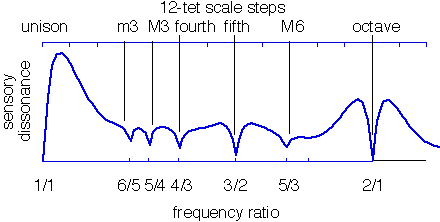
I found an excellent mathematical explanation of the dissonance and consonance between two tones. I hard-wired this graph into my code, and calculated the sum of the pairwise dissonance metrics for all current spheres on the screen. If the dissonance exceeded some threshold I set, then the player’s harmony would begin to erode. This worked surprisingly well! The calculations mapped almost perfectly to how good or awful the note combinations sound when played.
I also added in the restriction that you started to lose harmony if you duplicated a tone, to make the game a challenge, since you could have easily cycled through all the tones if every sphere was the same note.
I feel much more comfortable with Sprites and animations in Unity. I still need to work on harnessing the physics of 2D games. This game should make a good demo game for my students in future semesters and demonstrate what is possible with the tools we have learned.
I started out with each of the spheres making their own tones with an AudioSource per sphere, but this quickly proved a hassle, since each sphere then needed an array of all twelve tones. When there were two spheres playing the same tone, it sounded very muddled and duplicates. So I instead moved to a scheme where there was a Manager object that Instantiated all the spheres and kept them in a list. Every tenth of a second, the manager would cycle through the spheres, determine their tones, and then play the current tones as a central sound source. I used some dirty bit recording optimization from databases and operating systems to make sure that tones are turned off when a sphere no longer is on the screen.
This central accounting also helped with scoring, since I just had to read the array of current tones to see how long a tone has been playing. A separate array accumulated these times, enlarging the spheres accordingly until they reached a specified maximum size. When all spheres were found to be at maximum size, you would win the game. The screen cap posted above is from my best score in the game with the current difficulty level, and I really had to work hard and have patience to get that far. I ramped up the difficulty level to where an average player might last less than a minute, but someone more experienced with music theory could survive longer and get closer.
What asset tools did you end up using?
Unity proved to be an excellent game engine. I had participated in another game jam a few years ago and used Processing as my development environment, but found myself implementing many things that just come standard in Unity, such as the GUI, Sprites, Collisions, etc.
I created the spaceship and the wave sprites using Pickle, with their free 7 day trial version. It excelled at letting me make a sprite sheet quickly that could easily be imported in Unity. If I were to make another 2D game, I would definitely pay to use Pickle for all my crunchy pixel graphics.
The background and splash screen were made in Gimp, with just a few airbrush strokes of a random pen tool. I used the fonts Murmur and Kaushan Script. I’m not sure if I like them for the mood, but they worked.
bfxr was a neat little sound effect generator. I wish I had a little more control, but that’s sort of the point, you hit buttons until you get something you like. The background beats were an explosion that I harshly modified and filtered until it was just mild rhythmic thumping.
For the score spheres at the bottom, I wanted them to be just clean diffuse spheres from Unity, however the spheres in the game needed some texture. I found a free tile website with normal maps, they look like frozen ice planets. I’m happy.
I wanted to make the 12 musical tones myself, but didn’t have time, so I found just the clean frequencies on a meditation website. They are a little harsh because they are pure, with no built-in overtones, but they work really well when played together.
Where did you spend unexpected amounts of time?
I went down the unfortunate path of not thinking about the GUI and game flow until after the core of the game was built. This meant I wasted so much more time than expected trying to figure out what state the game is in, tracking when you could or could not click the escape key for help, and I ended up duplicating large portions of code because I was in a hurry. I should have prototyped the mechanics, and then started a fresh project to framework out the GUI state transitions. I plan to post the source code later, but right now, I’m ashamed of my ugly code.
What broke at the last minute?

I had tested mostly in Unity itself, and so when Monday came around, it was time to try out deployments. I was shocked to see Chrome would no longer play games make with the Unity Web Player; what horrible, horrible timing for everyone in this competition! (I’ve since nuked Chrome on my computer and switched my default browser to Firefox in retaliation.) I couldn’t seem to get the OpenGL and HTML5 option to work for me, so I stuck with the Unity Web Player.
I must have done something strange with my camera and screen size ratio, because the GUI in the Web Player is definitely not in the same location as in the Game window in Unity. The Mac build looked even worse than the Web Player. I need to spend time figuring out what went wrong here before I post ported versions.
I also forgot initially to make my game time independent. I was just moving my transforms around the screen every Update, and when I exported the game, the frame rate changed drastically, speeding everything up and completely changing the flow. By adding in the dependency on Time.deltaTime, I could consistently set the speeds and tune the difficulty.
How do you plan to improve in the game over the next two weeks?
- Revise the menu flow. It needs to be more clear when the player loses the game, instead of returning to the start screen. There should be some sound indications of this as well, and maybe some visual effects, speeding up the spheres as they leave the screen when you lose.
- Tweak the difficulty. The sounds should slowly fade in when spheres arrive, so there are not these dissonance bombs that destroy your score too quickly. The ship movement speed should be optimized. Most of the comments I’ve received have been “This is cool, I suck at this game!” While I like the game being difficult, I might have gone too far. Also, for aesthetic reasons, I should slowly fade the sounds out when the spheres leave the screen.
- Clean up the code. I need to eradicate the copypasta that inevitably showed up when the deadline approached. If I want to use it as an example in future classes, I will need some comments and a better GameObject hierarchy.
- Create level structure. It might help if there were different levels, maybe start out with just the major 8 tone octave? I’m not sure how to conceptualize this yet, but it could also alleviate some of the concerns about difficulty.
- Add harmonic increase. When you have at least three spheres in the space and you have a beautiful chord playing, there should be a way for harmony to increase. This gives you a separate goal, and a way to recover from some disastrous dissonance along the way.
Final Thoughts
I never expected the high level of community engagement after the games are submitted. The feedback I’m receiving from other Ludum Dare participants is awesome! Everyone is genuinely interested in helping you make better games! The algorithm behind the voting mechanism for “coolness” seems like magic; every time a make a rating, one appears from someone else on my game. :)
I’m having a great time playing other games and providing my own feedback. My two favorites so far are The Rock, The Paper and The Scissors and Blink Gun.
Also, please check out my students’ games! Six teams submitted a game for the jam, and they are revising their games over the next two weeks, so any feedback would be greatly appreciated.
Thanks for reading, Ludum Dare 32 has been a wonderful experience for all of us. Can’t wait for the next one!
Source: ludumdare.com archive