Ludum Dare #33compo
Hero's Quest
================================================================================
About
--------------------------------------------------------------------------------
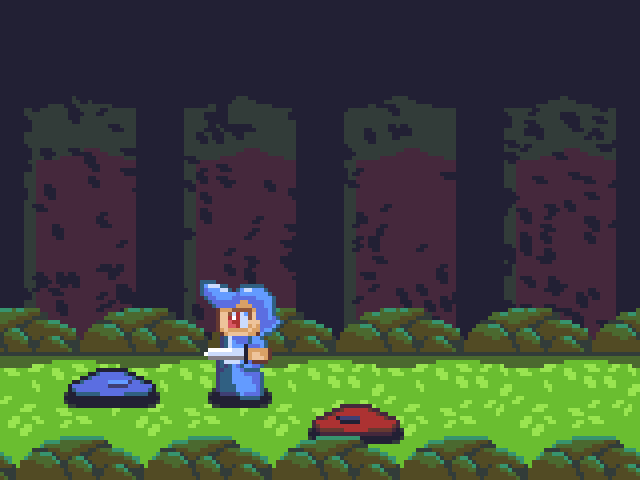
As the Hero of a village, you must follow the orders when you are told that
there are menacing creatures on the forest...
================================================================================
Compiling
--------------------------------------------------------------------------------
Refer to the README.md found on the repository.
================================================================================
Dependencies (linux)
--------------------------------------------------------------------------------
Note: The Windows build has all the necessary libraries.
This game depends on SDL2 and GFraMe.
You can get SDL2 from the its site (https://www.libsdl.org/) or from your
distro's package manager (well, on linux). On Ubuntu, run:
$ sudo apt-get install libsdl2-dev
Note that to run the game you should simply install the runtime libs;
$ sudo apt-get install libsdl2-2.0.0
GFraMe can only be obtained from its repository
(https://github.com/SirGFM/GFraMe). Clone/Download it and run
$ sudo make install
================================================================================
Installation
--------------------------------------------------------------------------------
No extra steps are needed. Just be sure that the 'assets' directory on the same
one where the application is.
================================================================================
Instructions
--------------------------------------------------------------------------------
movement - WASD / arrow keys
attack - space bar / 'X'
quit - esc
Double tap in a direction to run
To start in fullscreen mode, start the game through the command line with the
option -f.
If the audio is lagging, run with the option -m to disable it.
Note: There are scripts for running with those options, on Windows.
About
--------------------------------------------------------------------------------
As the Hero of a village, you must follow the orders when you are told that
there are menacing creatures on the forest...
================================================================================
Compiling
--------------------------------------------------------------------------------
Refer to the README.md found on the repository.
================================================================================
Dependencies (linux)
--------------------------------------------------------------------------------
Note: The Windows build has all the necessary libraries.
This game depends on SDL2 and GFraMe.
You can get SDL2 from the its site (https://www.libsdl.org/) or from your
distro's package manager (well, on linux). On Ubuntu, run:
$ sudo apt-get install libsdl2-dev
Note that to run the game you should simply install the runtime libs;
$ sudo apt-get install libsdl2-2.0.0
GFraMe can only be obtained from its repository
(https://github.com/SirGFM/GFraMe). Clone/Download it and run
$ sudo make install
================================================================================
Installation
--------------------------------------------------------------------------------
No extra steps are needed. Just be sure that the 'assets' directory on the same
one where the application is.
================================================================================
Instructions
--------------------------------------------------------------------------------
movement - WASD / arrow keys
attack - space bar / 'X'
quit - esc
Double tap in a direction to run
To start in fullscreen mode, start the game through the command line with the
option -f.
If the audio is lagging, run with the option -m to disable it.
Note: There are scripts for running with those options, on Windows.



Comments26
Also, I feel like the weapon should go farther forward in the attack.
I played it a couple of times and would've liked to skip the beginning story as well.
There's definitely something there! Just need to make it a bit more forgivable.
I admit that the game lacked any actual playtest, so it's to be expected that it isn't quite playable to anyone but the developer... XD
I'll soon write a post-mortem in which I intent to address the reason behind most of those issues. But it was pretty much lack of time and direction (I went through most of the jam thinking about doing a game but ending doing something pretty different...).
On a side note, use the scripts to skip the intro or run in full screen! Next time, I'll parse the options from a file... that should be clearer for the user...
I liked how you introduced each of the different slimes in their own area before combining them. It wasn't clear that they got stronger, and so I died when I didn't expect the red slime to survive the attack.
The controls were a bit clunky in that attacking never felt right, but otherwise it was smooth.
The theme was a bit on the nose, although from many other comments, apparently it is still too hard to tell that there's a question of who the real monster is even though it is telegraphed from the intro and the "good ending?" screen, and it definitely shows in the "bad ending?" screen.
Good work!
BTW, since your engine is based on SDL2, maybe you can give Emscripten a try. This could compile your code to javascript and let people paly it on browsers. I use it for this LD and the performance is acceptable.
I've made a post to try to explain the theme, for those who did quite get it. http://ludumdare.com/compo/2015/08/29/explaining-the-theme/
@KK
I had given up on doing web games after I moved from AS3 to C. I tried Chrome's NaCl but it didn't work and I didn't want spend a lot of time trying to get it to work... But you have given me back some hope about being able to do it.
As soon as I boot into Linux (erm, OK... Ubuntu... XD), I'll try that! =D
Thanks for the tip!!
I do have to agree with the others about the difficulty of fighting with the dagger, though. One improvement would be to widen the input window for follow up attacks (or store inputs for them), so players trying to combo slimes don't have to time their attack so carefully or be left standing. Widening the doubletap window for dashing could be nice too, or just implementing a dash button.
I did play it all the way through, though the number of times the slimes killed me before I reached the end made me feel like they would indeed present a threat to the village! I tried for a pacifist run and couldn't get that, but I managed to get through the game only killing slimes that attacked, and was a little dissapointed to find the ending was still the same. Still, good work with the time you had!
The gameplay was not very interesting due to the shortness of the dagger. It could have been a lot better with a longer range, a faster attack, or a variety of slashes.
Nice attempt!