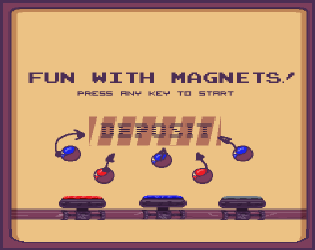
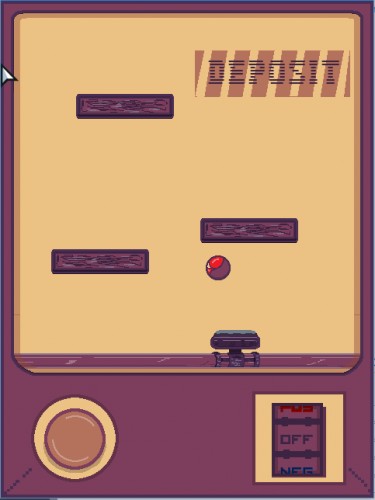
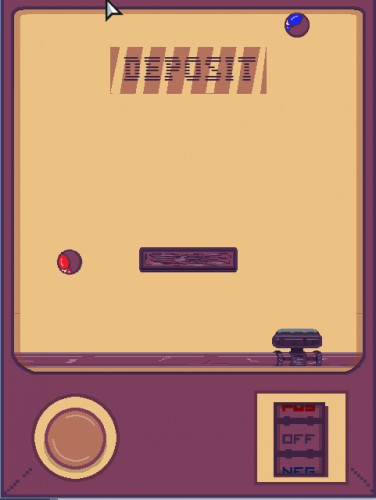
Your goal is to lead as many balls as possible into the "deposit" area by using a magnet. You can control the polarity and activate/deactivate the magnet's movement along the bar it's attached to.
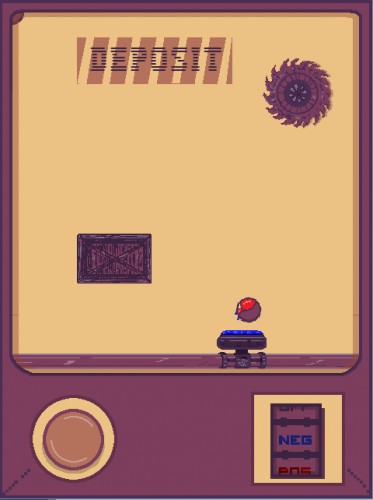
Beware of obstacles and specially wheels, that can destroy balls (however, there's only one at the last level and you may beat it if you only lose one of them, so this warning will better apply to a hypothetical post-compo version).
The web link should be playable on mobile devices. At least I've tested it on a Nexus 5 using Chrome.
IMPORTANT!! While it's possible to combine keyboard and mouse (left hand for the keyboard, right for mouse or vice versa), I recommend to stick to keyboard controls to avoid confusion.
I would have liked to set an intermediate screen with control schemes so that the player could select one and disable every other input, but I ran out of time (surprise!).
Keyboard controls emulate interaction with the two buttons on the machine. Since I wanted to adhere strictly to the theme, I only used two keys, too. This is the reason why you can't switch directions (I tried it at first, and together with the polarity it was a nightmare)
* F: Press to activate the crane moving the magnet. You can't change direction (the machine is old!)
* J: Press to cycle between polarities (or disable the magnet).
U and H should also work (for Dvorak users), but it was never tested.
With the mouse or a mobile device you can interact with the magnet controls in a more direct way.
* Press left button: Activate magnet motor. Release to stop it.
* Swipe up: Change polarity to the value below the current one (it's displayed in the middle of the wheel).
* Swipe down: Change polarity to the value above the current one.
================================================ >>>>>> Known issues <<<<<< ================================================ * The motor sound effect glitches occasionally.
* Occasionally the ball repel directions go a bit wild because of some bugs related to the angle thresholds when they get close to the magnet.
* Probably because of the previous issue, you may see the balls overlapping. Hopefully this is quite infrequent.
================================================ >>>>>> Tech <<<<<< ================================================ * Haxe + Flixel using FlashDevelop as the IDE. * Photoshop * LabChirp + Audacity + Bosca Ceoil * Fonts: Flixel defaults, except for the main screen, which uses "Visitor" by Ænigma and "Press Start" by Codeman38.
The right dial is a bit tricky to yuse with the mouse but it is a solid concept and is well executed. Maybe if the room was round, the balls wouln't have corners to get stuck in.
Really fun. The controls are a bit confusing at first (I really wanted to use d or g to move the other way) but one you get the hang of it its really cool
Nice, really good game! Very polished and felt like a real complete game, with the menus and everything. It was fun to mess around with the magnets. :)
Great job with sound/music and visuals, it has a really distinct style that was fun to see. Nice use of the theme as well (and clever to make the movement change direction!). I would definitely play more levels of this, especially after hazards are introduced.
Very fun and polished game! Mechanic fits the theme perfectly and the visuals are great, I love the palette! I don't know why but I keep expecting the balls to rebound like in an arkanoid game :)
@tuben999: Yeah, I'm afraid that's one of the glitches I noticed at the last minute, I'm currently thinking of fixing it. Maybe one option if I have the spirits to create more levels and elements is to revise that so that past a certain distance the charge just sticks to the front.
@Zener: Sometimes I too imagine the ball will bounce n_nU One of the ideas I had for other elements was a bumper (or even bouncy walls), but I'd probably need to be very careful about level design.
@blackname I'm actually thinking of a post-compo version with more levels (and some of the ideas that couldn't make it, such as switches, other magnetic fields and so on). Right now the only penalising prop is the wheel and it appears right at the end level, so it's a bit absurd.
The style is lovely and I like the idea of the gameplay. Personally I found it to be a little slow to ramp up, and the controls (not being able to go left and right when you want) were frustrating. It would have been really cool if pressing left/right would move the platform and pressing both buttons together would toggle the polarity.
This game is really well polished. The gameplay is nice, the graphics and the audio fit the game really well. I really like the way you made the gameplay with the magnets so intuitive.
Was a nice little challenge, however the puzzles mostly consisted of trying to use the mechanics instead of solving how to complete it. This ultimately ended up making it a little tedious :P The games mechanics and design however were very good :D
Nice clean pixel art. Theme met well with the 2-buttons. Fun challenging puzzles that I felt very satisfied with after solving, and definitely see potential crazy puzzle designs with these mechanics. Audio was pretty nice. Nice, dialogue that kept me smiling as it went along. Overall really nice polished game.
Nice concept with lots of potential. I would love to see it go more into a puzzle direction, maybe by limiting the number of polarity switches you can do (right now you can solve any level with trial and error). The presentation is very polished, congrats!
One chainsaw and I'm game over… Extensive game with good, simple mechanic exploited properly. Very nice. Good consistency and tone of visuals and audio.
Neat, though I wished there was more to it. Every level ended up being 'attract the magnet, then reverse the polarity when directly underneath the target, rinse and repeat'.
When I attracted a ball while listening to the contemplative music, I felt mesmerized. If you continue to develop this, when I pressed the button to move the magnet and swiped to change polarity, and then the ball flew farther to the side than I expected, I felt awkward.
Nice entry! The idea of interacting with magnets is interesting. I wish it is a bit more challenging since there is no loosing condition. Adding traps could be a solution (in the last level, I saw one, but when my magnet was destroyed by it, nothing happened). Appart from that, it is well made. Good job ! ;)
Nice game, the idea of attraction/repulsion as a control scheme was really cool. You matched the theme well, but I feel like the game would be better with an easier control scheme (allowing for harder puzzles).
The game seemed more about electric charges (or magnetic monopoles) than real magnets! :P


Comments43
Maybe if the room was round, the balls wouln't have corners to get stuck in.
I would play this game with more levels.
@tuben999: Yeah, I'm afraid that's one of the glitches I noticed at the last minute, I'm currently thinking of fixing it. Maybe one option if I have the spirits to create more levels and elements is to revise that so that past a certain distance the charge just sticks to the front.
@Zener: Sometimes I too imagine the ball will bounce n_nU One of the ideas I had for other elements was a bumper (or even bouncy walls), but I'd probably need to be very careful about level design.
@blackname I'm actually thinking of a post-compo version with more levels (and some of the ideas that couldn't make it, such as switches, other magnetic fields and so on). Right now the only penalising prop is the wheel and it appears right at the end level, so it's a bit absurd.
The presentation is very polished, congrats!
The game seemed more about electric charges (or magnetic monopoles) than real magnets! :P