Game created solo in 3 days with use of Unity 5.6, Visual Studio Community 2017, Paint.Net, Audacity and Bfxr.
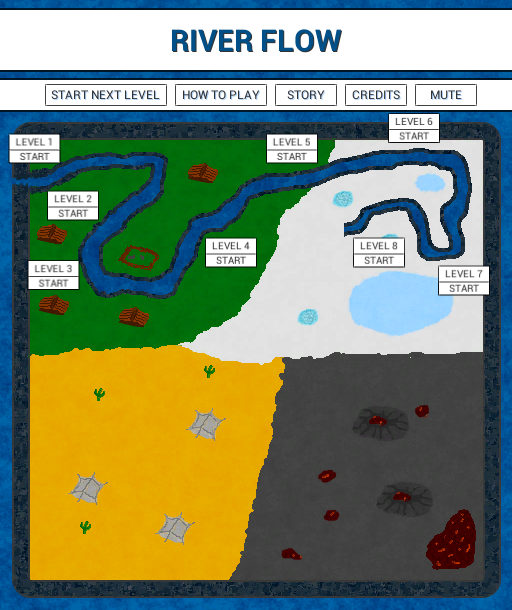
8 levels are available.
Restart button in game is not working, but it is still possible to restart the game by using R keyboard button
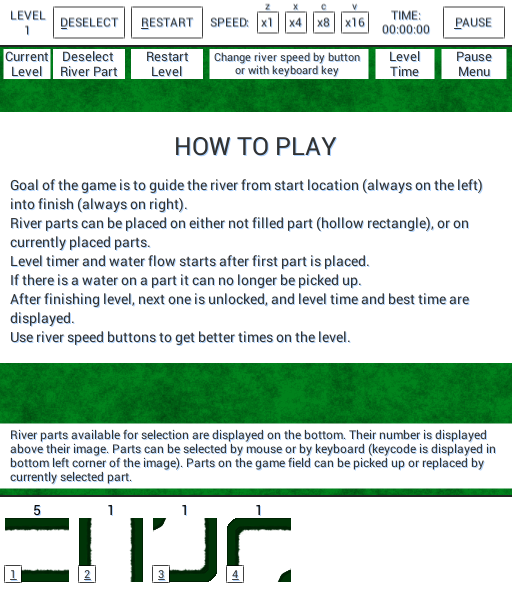
Key bindings are marked with underline, and the options on level are: * 1 - 6 (varies by level) - select one of the river part displayed on the bottom * left mouse button - place selected part * z x c v (available after placing first part) - change river speed to be 1, 4, 8 or 16 times faster * d - deselect currently selected river part * r - restart level * p - go to pause menu
Every option can also be selected by left mouse button.
Gif below shows how to complete the level fast with the use of keyboard.
Very nice game, solid game play, puzzles are fun and if you fail to realize that the water doesn't start to flow until the first piece is placed (like some genius here) the mad dash to keep one step ahead of the water is rather fun as well
Cool puzzle game! Picking the correct type of river was quite hard sometimes, might improve if icons would be more clear somehow, dunno... Liked it anyhow!
Good game. One suggestion is to grab pieces on the button down event rather than waiting until button up. I kept leaving the pieces behind by leaving too soon.
Interesting puzzles. I don't really like solving puzzles under time pressure though, so I didn't like it that much personally. But the implementation was solid and the idea was interesting.
Thank you all for the comments. I am currently working on post ludum dare version, and I am taking all suggestions into account. @jaenis I've changed the parts placement, so that they will be shown on top of the part currently hovered over and not in bottom. @howardcs Thank you for noticing this - I haven't noticed it because I've always clicked on the part. I've now changed all occurrences of Pointer Click event to Pointer Down @smbe19 Thank you for the idea, I will add a new game mode, that will allow to play the level without timer, and with option to manually start water flow.
Fun puzzle-oriented take on Pipe Dream. I was playing using the keyboard to pick pieces instead of using the mouse and I kept pressing the number corresponding to the # remaining rather than the correct slot number on accident. I'm not sure if a slightly different presentation would help, or perhaps using a contiguous row of keys for the shortcuts (e.g., zxcvbn). The latter would probably need a couple of options for different keyboard layouts though.
Nice little puzzle game with quite a few levels, although I'd like to see some lava levels! I think the speed of the water is spot on and once you learn which keys correspond to which pipes it becomes a fun race against the clock.
The UI is detailed and functional but could do with some simplifying, perhaps use some icons instead of text. Also, the in-game restart button doesn't seem to work. Some potential mechanics could be branching pipes, tunnel pipes, faster pipes.
Nice game! This mechanic is known for sure but the execution is great and the fact we really have to rush against the water is well balanced! Good job!
I Liked the game, I enjoyed my time with it. It does feel complicated at first, but once you get the hangin fo it it becomes second nature. I did feel that the game could be solved by applying "shortcuts", then executing. This may thought process.
1. Check all the number of tiles I had available. 2. See what route was feasible with the tiles that had the lowest number (and sometimes, check on the highest). This assumes than in each level you must use ALL the tiles. 3. This would give m a god rough draft of the solution, even I didn't have the whole thing figured out. If I got those "key tiles" done, then the rest was easy, just fighting my fingers and time.
Now, the thing is...I don't know if this is a good thing or a bad thing... it left me pondering if is better to try to obstruct that way of thinking, or maybe encourage it? Not sure... maybe with more tile variety you can explore the gameplay much better and get a better feel for how it should go :).
In any case, I really enjoyed the game, it was really cool :D!
Nice puzzle game. The water speed was a tiny bit too fast for me.
The level menu showing the eventual path to the lava pool was a nice touch.
Levels and music are kinda repetitive after a few stages. Would love it if there were different music for each zone and a larger variety of tiles (tunnels, uphill requiring pumps that have to be powered by water wheels etc)
Also, an option for .8 speed would be nice too.
Oh. And your restart button wasn't working for some reason.
A very neat, challenging puzzle game! I loved the background music and SFX, they definitely added to the overall mood of the game. I felt frantic almost right away! Perfect! =) Great job!


Comments16
Picking the correct type of river was quite hard sometimes, might improve if icons would be more clear somehow, dunno... Liked it anyhow!
I was way to long stuck on level 3 though! hahahaha :p
@jaenis I've changed the parts placement, so that they will be shown on top of the part currently hovered over and not in bottom.
@howardcs Thank you for noticing this - I haven't noticed it because I've always clicked on the part. I've now changed all occurrences of Pointer Click event to Pointer Down
@smbe19 Thank you for the idea, I will add a new game mode, that will allow to play the level without timer, and with option to manually start water flow.
The UI is detailed and functional but could do with some simplifying, perhaps use some icons instead of text. Also, the in-game restart button doesn't seem to work. Some potential mechanics could be branching pipes, tunnel pipes, faster pipes.
I did feel that the game could be solved by applying "shortcuts", then executing. This may thought process.
1. Check all the number of tiles I had available.
2. See what route was feasible with the tiles that had the lowest number (and sometimes, check on the highest). This assumes than in each level you must use ALL the tiles.
3. This would give m a god rough draft of the solution, even I didn't have the whole thing figured out. If I got those "key tiles" done, then the rest was easy, just fighting my fingers and time.
Now, the thing is...I don't know if this is a good thing or a bad thing... it left me pondering if is better to try to obstruct that way of thinking, or maybe encourage it? Not sure... maybe with more tile variety you can explore the gameplay much better and get a better feel for how it should go :).
In any case, I really enjoyed the game, it was really cool :D!
The level menu showing the eventual path to the lava pool was a nice touch.
Levels and music are kinda repetitive after a few stages. Would love it if there were different music for each zone and a larger variety of tiles (tunnels, uphill requiring pumps that have to be powered by water wheels etc)
Also, an option for .8 speed would be nice too.
Oh. And your restart button wasn't working for some reason.