This is all I have for now. I will CERTAINLY be releasing an updated version later, which will include a mac, linux and hopefully web release. Due to conflicting arrangements throughout the weekend, I lost a fair amount of time. This is my first attempt at a Unity game, so feedback is greatly appreciated.
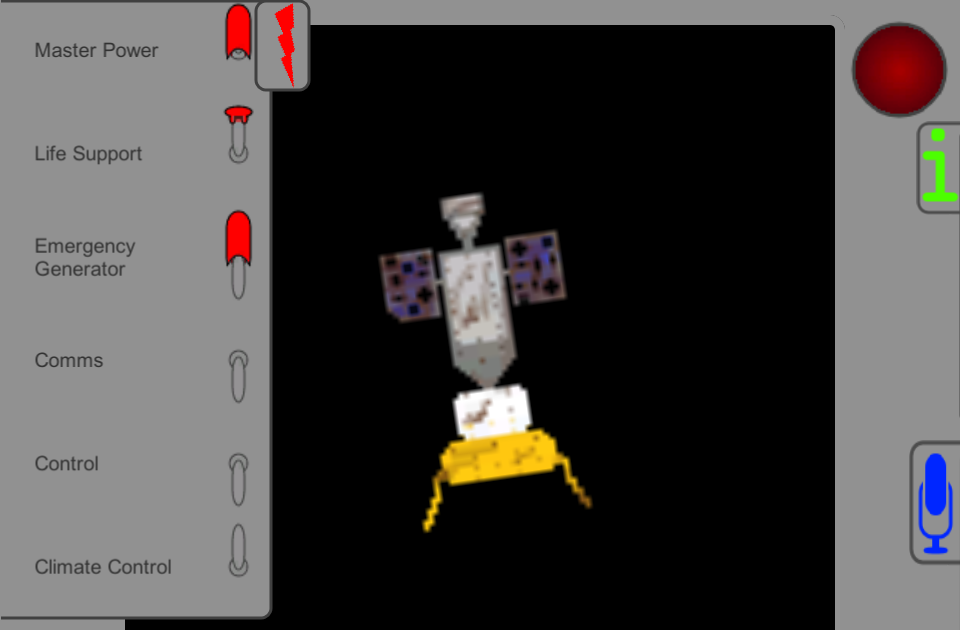
Instructions: Your goal is to survive as long as possible in your damaged spaceship. You do so by regulating your power usage with the toggles on the left. To view your amounts, open the info panel on the right.
The toggles control:
-Master: Disables all other systems except for the emergency generator
-Life Support: Provides O2 and removes CO2
-Emergency Generator: This converts fuel into power, due to no other use for fuel yet, this is basically free power
-Comms: Communications systems, useless after the opening communications
-Control: The ability to control the ship will be in future versions, so just leave this off
-Climate Control: Controls the temperature in the ship
Notes:
-Up is on, down is off
-Right-click covered switches to toggle the cover
-Click on icons to show/hide the panels
-You loose when you run out of power, O2, or the temperature is too low
-The red light in the top-right corner will flash if a stat is critically low, or if master power is off
-Clicking the red light will temporarily disable it
-Clicking on the sides of the info panel will scroll to a placeholder screen, to exit, click the sides again
-Any questions, issues, or bugs, leave a comment and I will answer/fix ASAP
There will be a mac release post LD.
A proper name will be given when I come up with one, suggestions are accepted.
Good job on your first attempt at a unity game! With regards to the game, I like the concepts but everything happens so _fast_. I ran out of power the first time I opened the game in around five-six seconds, and I didn't have time to orient myself. And everything else drains really fast too, so it might be some sort of frame dependency thing? The Oxygen meter drains in under a second, so I have to keep that on because the moment I toggle it it's game over. I feel like I'm doing something wrong, but I'm not sure.
Aside from the speed, I like the features you have implemented, and I like the visuals. Toggling switches is fun and opening the little covers is good too. I guess that because everything drains in seconds I don't have time to really get a handle on what I need to do. Maybe an easy mode?
Great work though! Game jams are tough as it is, and I think with an even more limited time on your end you did a good job, _especially_ while learning a new engine. Hope to see you again for the next LD, I'm excited to see how you'll apply the things you've learnt!
Thanks @futil! Unfortunately, I've never understood how to properly implement delta time, and thus all my components end up tied to the frame rate. I am currently working on a updated version of the game, and I will try to add delta time now that I know there is a need.



Aside from the speed, I like the features you have implemented, and I like the visuals. Toggling switches is fun and opening the little covers is good too. I guess that because everything drains in seconds I don't have time to really get a handle on what I need to do. Maybe an easy mode?
Great work though! Game jams are tough as it is, and I think with an even more limited time on your end you did a good job, _especially_ while learning a new engine. Hope to see you again for the next LD, I'm excited to see how you'll apply the things you've learnt!