I managed to finish and figure out how to publish this game right before the deadline. This is my first Game Jam submission that I am somewhat proud of, its a combination of two of my favorite genres and I think it worked out pretty well. I srcewed around for the first 12 hours or so but I think I really pulled it together in the end.
Shooting Stars
""""""Plot"""""" <- Sarcastic Air Quotes
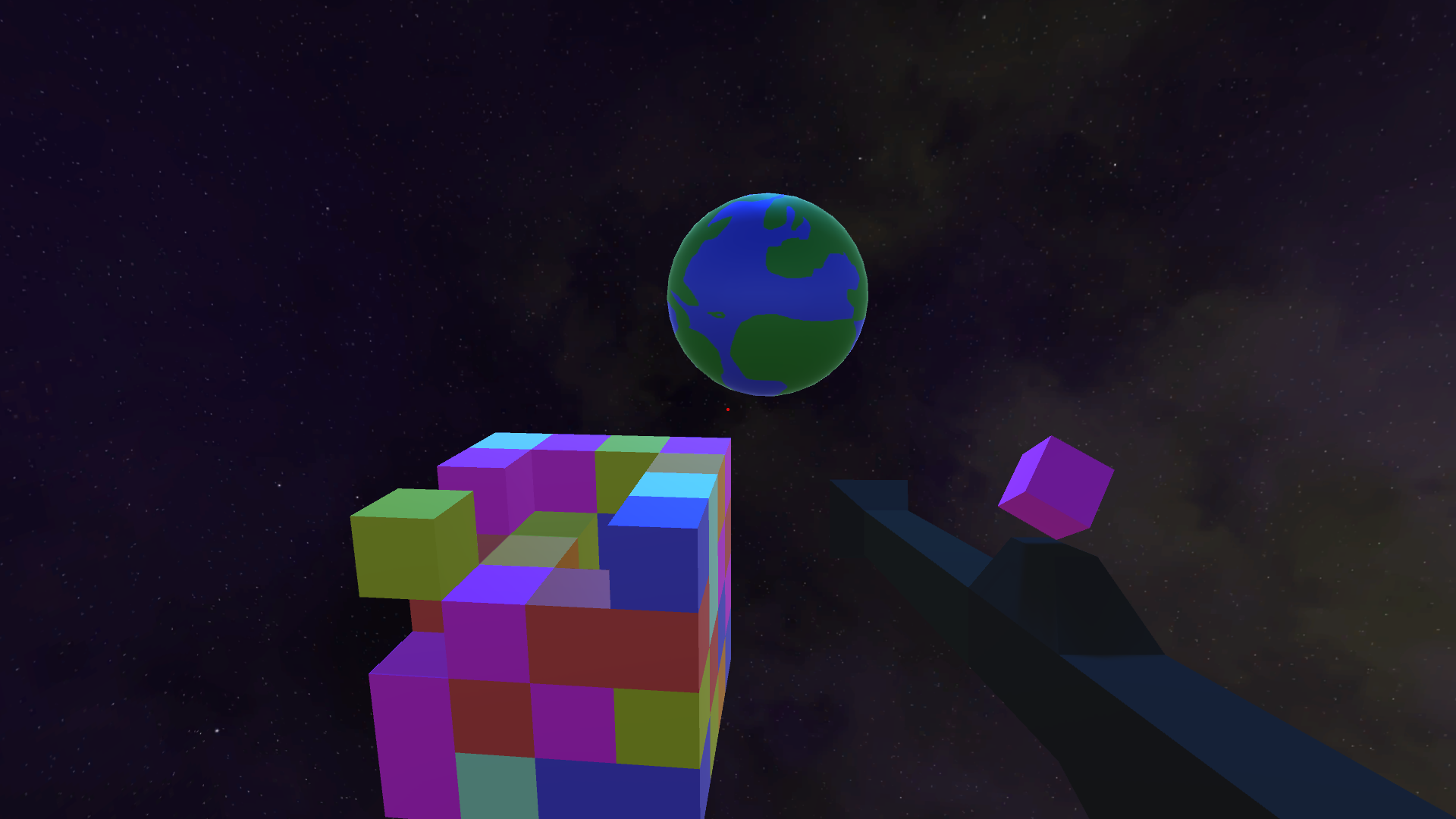
A giant multicolored Meteor is hurtling towards the earth! The meteor is made of space materials virtually indestructible to man, luckily scientists have discovered that if 3 or more chunks of these materials are placed side by side they will disintegrate saving the earth! They created a gun that launches these chunks at eachother and have sent you out in a last ditch effort to melt the asteroid and save the earth!
Gameplay
Shoot the asteroid to make match 3's and decrease its mass. You are given a random color and then have to either change a cube of the asteroid to that color with left click or add a cube of that color to the asteroid with left click. If you match 3 or more in a column or row the cubes will disintegrate. You need to get the asteroid down to at least ten cubes
w and S - Move Back and forth in 3D space
A and D - Strafe
Space and Shift - go up and down
Escape - Quit
Left click- change color of brick
Right click - create brick of that color
Changelog:
I did a 2 fixes but nothing that adds features. I changed the restart function as it wasnt updating difficulty correctly, and in testing that I messed up the speed at which the earth moves towards the cube and had to change that value in the inspector.
The idea for this game is really interesting, but the controls make the game really hard to play. The graphics is overall fine, but I would also have liked some music/sound effects in the game. Overall a fine first LD game.
@creepyounguy when I hit something else than the blocks I was supposed to hit and then I would go back to the blocks some blocks would just stay in spot and didn't count as block, but were registered by the game so idk what's happening
@DarkAnice :P yeah I can't reproduce that error, but I've encountered stuff like that before, I'll look out for it when playtesting. Thanks for the feedback it was useful!
A puzzle FPS!? Interesting and surprisingly fun combination. Tighten up the controls and improve the graphics and you could have a solid real game here.
Wow, I really like the 3D match-3 puzzle - balancing between adding vs changing was way more interesting than I expected it would be! A major feedback I could give that I haven't seen yet - change the shader/material of the cubes so they are always the same color - IE they shouldn't respond to light/shadow. There are a few colors that are close to each other (grey and light blue for instance) and when they're next to each other, the lighting can make it confusing to know which is a shaded blue or a lit grey or whatever.
That said, if you adjusted the controls (faster deceleration when no button is pressed would do the trick), this could be a really solid full indie game once you added some additional mechanics - consider allowing for more types of combinations, like matches that wrap around in an L shape, or getting some kind of bonus thing for matching four in a row.
edit: Also, having Earth literally approaching and getting bigger and bigger was hilariously freaky once it got really close.
@Aaron Nemoyten yeah I thought about geting rid of the shader/light a lot while I was playtesting but then I got used to it and forgot. I am probably gonna do what you suggested, or change the color scheme if/as I continue development. Ty for feedback.
A cool puzzle game with an interesting mechanic, way harder than it looks. I lost because of a lot of misclick :P Anyway, good job, I really liked your game !
Though the "Medium" game turned out to be a little bit too hard. Also the RNG that picks the new color appear to be glitched givin me the colors that were already cleared from the field this turn and this makes finishing the level a bit more complex than it should be. ((I guess the problem is because new color picker works before the blocks are removed, so it doesn't recognize that this color should now be gone.))
Also a minor thing, but you can paint over tutorial screens if you left-click on them. :smiley:
@Hilvon Yeah I am gonna fix the final block rng thing when I work on the game next, its cuz it selects the color before the blocks are destroyed. Also you can paint the rocket ships as well (and now that I think about it you might be able to paint the earth) cuz I didn't do tag/object checks in my painting code :P.
If you are using Unity, I recommend using Layers. The LayerMask can be exposed to inspector for configuring. And it is used directly in raycasting checks. Just note that if you want to use them you HAVE to use max distance as well.


Comments33
A would really enjoyed if I have some "pew pew pew" when I fired the cube, it would be fun ^^
Otherwise, the game is quite cool, that is a nice concept (but for now, that is a way too easy)
Keep coding :)
You should definitely make a webGL build so it's easier for people to play!
Maybe I would make the controls more approachable by making them faster or something. Overall, good idea.
That said, if you adjusted the controls (faster deceleration when no button is pressed would do the trick), this could be a really solid full indie game once you added some additional mechanics - consider allowing for more types of combinations, like matches that wrap around in an L shape, or getting some kind of bonus thing for matching four in a row.
edit: Also, having Earth literally approaching and getting bigger and bigger was hilariously freaky once it got really close.
Anyway, good job, I really liked your game !
Though the "Medium" game turned out to be a little bit too hard. Also the RNG that picks the new color appear to be glitched givin me the colors that were already cleared from the field this turn and this makes finishing the level a bit more complex than it should be. ((I guess the problem is because new color picker works before the blocks are removed, so it doesn't recognize that this color should now be gone.))
Also a minor thing, but you can paint over tutorial screens if you left-click on them. :smiley:
If you are using Unity, I recommend using Layers. The LayerMask can be exposed to inspector for configuring. And it is used directly in raycasting checks. Just note that if you want to use them you HAVE to use max distance as well.