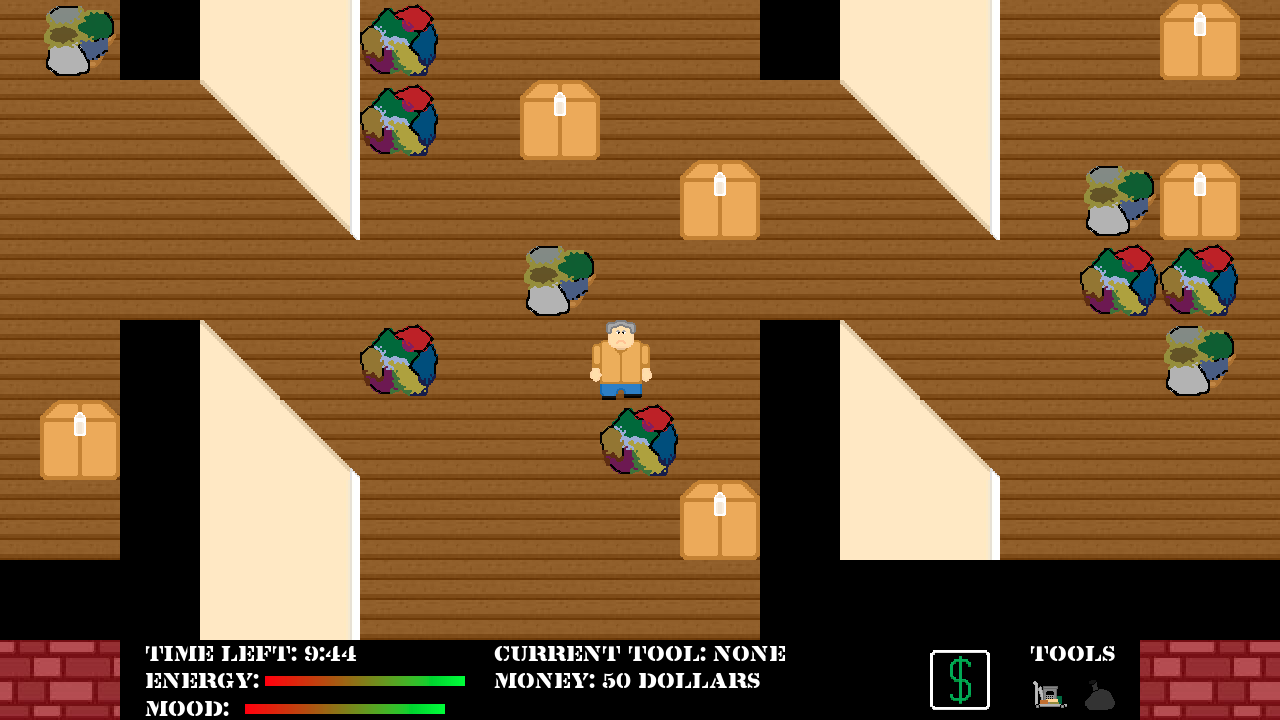
Don't Take my Stuff! is a game about a hoarder who needs to clean up his house. But, he needs to move out in just a couple of hours! He needs some help!
Run around the house to collect trash and junk using only trash bags and a cart and to throw them away into dumpsters. Keep an eye on your energy level and mood. Wait a while to part sentimental items, or else your mood will drop significantly! Clean up ALL the junk before the time runs out.
CONTROLS
Arrow Keys - Move Around
Left Click - Pick Up Junk
Right Click (on Dumpster) - Throw away Junk
Switch Tools - Click on the tool you want to use on the right side of the Toolbar under "Tools"
Buy Trash Bags and a Cart - Click on the Green Dollar Sign, that will take you to the shop, you can buy trash bags and a cart, or even upgrade your cart here.
OBJECTS
Boxes and random messes are junk you need to get rid of.
Dumpsters are bright green and have numbers on them indicating
@ianlux@benburgh Thanks for the feedback. I also noticed that there were some problems with lag that happen when you start to render too many objects at once. I tried multiple ways to fix it, but they didn't work so well.
Nice idea! I know you've already observed issues with lag and aren't sure how to fix it, but I'd like to share my experience: The moment I enter the house, the game slows to a crawl. It's about 1 frame per second - or even less - by the time I get far enough into the house to reach one of the first two doorways. At that point, the controls often freeze so I cannot move at all, no matter how long I hold down an arrow key or mouse button. I know the game itself hasn't frozen because the clock is still counting down, though it is usually counting in increments of 2 or 3 seconds by that point. If I do make it back out of the house, the game speeds back up again, so I think you're correct about it being related to the number of objects onscreen. That said, it's not like I'm playing on a super-old machine - my computer has a GTX 970 - so it should be more than capable of handling a game like this. I have a couple guesses that may be of help: - Maybe there's an issue with the PNG files that's making it take longer for libpng to render them. I'm guessing this because the console window that pops up with the game displays many copies of the following warning: "libpng warning: iCCP: known incorrect sRGB profile". This StackOverflow thread has some solutions to that problem. I don't know enough about sRGB profiles to know if that may cause performance issues, but it's something to look into. - Maybe something that's only supposed to be called once per object per frame is being called multiple times per object per frame. Try checking your main game loop to see if pygame is giving you repeat events or something (I have experience with Python, but less so with pygame, so I don't know how likely this is).
Despite the performance issues, this seems like a neat (and relatable) concept. If you figure out the solution to this problem, I think you'll have a solid game here.
Hmm... it seemed like you didn't use a constant update- or frame-rate, movement was very inconsistent and the game started to be unplayable (0.5 fps) as soon as I entered the house. From outside it looked really funny, and from your description it seems like a simple but effective concept. The graphics could use some work though... ;)
Ran really slow, not sure why it was so slow. I was able to figure out some of the ui, the pace of walking was super fast to start before it dropped off. Just needed to have a consistent framerate.
Game ran fine, but then it started to lag uncontrollably up to the point of just not moving at all. In the background cmd window it kept spamming something about sRGB profiles.
As others have noticed, this lags to the point of being completely unplayable. Which is a total shame, because it looks like an interesting idea. Even in the main menu, the sound effects lag, so you click an option and hear the "beep" about a second later.
I feel like you should have gone for the Compo rather than the Jam, and given yourself more time to try and fix the slowdown issues. At the very least, it would have softened the poor ratings you're inevitably going to get. I hope this doesn't discourage you, though, and you try again next Ludum Dare. Maybe consider a different game engine? I know nothing about Pygame, but perhaps you wouldn't have suffered such horrendous lag if you'd used Unity or Game Maker Studio...

Comments14
@mrwillowb Thanks for the feedback, and I'm glad you weren't offended by it.
Sadly it starts running very slowly after some game time :(
- Maybe there's an issue with the PNG files that's making it take longer for libpng to render them. I'm guessing this because the console window that pops up with the game displays many copies of the following warning: "libpng warning: iCCP: known incorrect sRGB profile". This StackOverflow thread has some solutions to that problem. I don't know enough about sRGB profiles to know if that may cause performance issues, but it's something to look into.
- Maybe something that's only supposed to be called once per object per frame is being called multiple times per object per frame. Try checking your main game loop to see if pygame is giving you repeat events or something (I have experience with Python, but less so with pygame, so I don't know how likely this is).
Despite the performance issues, this seems like a neat (and relatable) concept. If you figure out the solution to this problem, I think you'll have a solid game here.
I feel like you should have gone for the Compo rather than the Jam, and given yourself more time to try and fix the slowdown issues. At the very least, it would have softened the poor ratings you're inevitably going to get. I hope this doesn't discourage you, though, and you try again next Ludum Dare. Maybe consider a different game engine? I know nothing about Pygame, but perhaps you wouldn't have suffered such horrendous lag if you'd used Unity or Game Maker Studio...