In this game you act as a one man band trying to please your audience. To accomplish this you will need to play all of your instruments.
The ardor of the audience is represented by the fire in the top left corner. When it blazes vigorously the audience is moshing and dancing exuberantly. But when this flame dies... Rotten Tomatoes!
The overall satisfacfion of your listeners is shown in the HUD in the top left corner. The three little bars represent how satisfied your audience is with each indiviual of your instrumental skills. After a while they will forget about how badass you were and you have to play that instrument again to remind them.
When playing the according instrument and hitting your notes well the bars will replenish. Missing or barely hitting them will deplete them even faster.
The longer your concert lasts the more demanding the audience becomes. Over time the penalty for a badly played note increases. Also the crowd demands more and more alteration between your instruments, resulting in more rapidly depleting satisfaction bars.
_________
__Your Setup:__
From here you can choose which instrument to play next. Choose your weapon (and a difficulty) and wait for your solo to start.
*Controls:* Press the shown keys to highlight your desired instrument and difficulty and then wait.
Keep in mind that harder parts are obviously more difficult, but also yield a bigger reward when played well!
_________
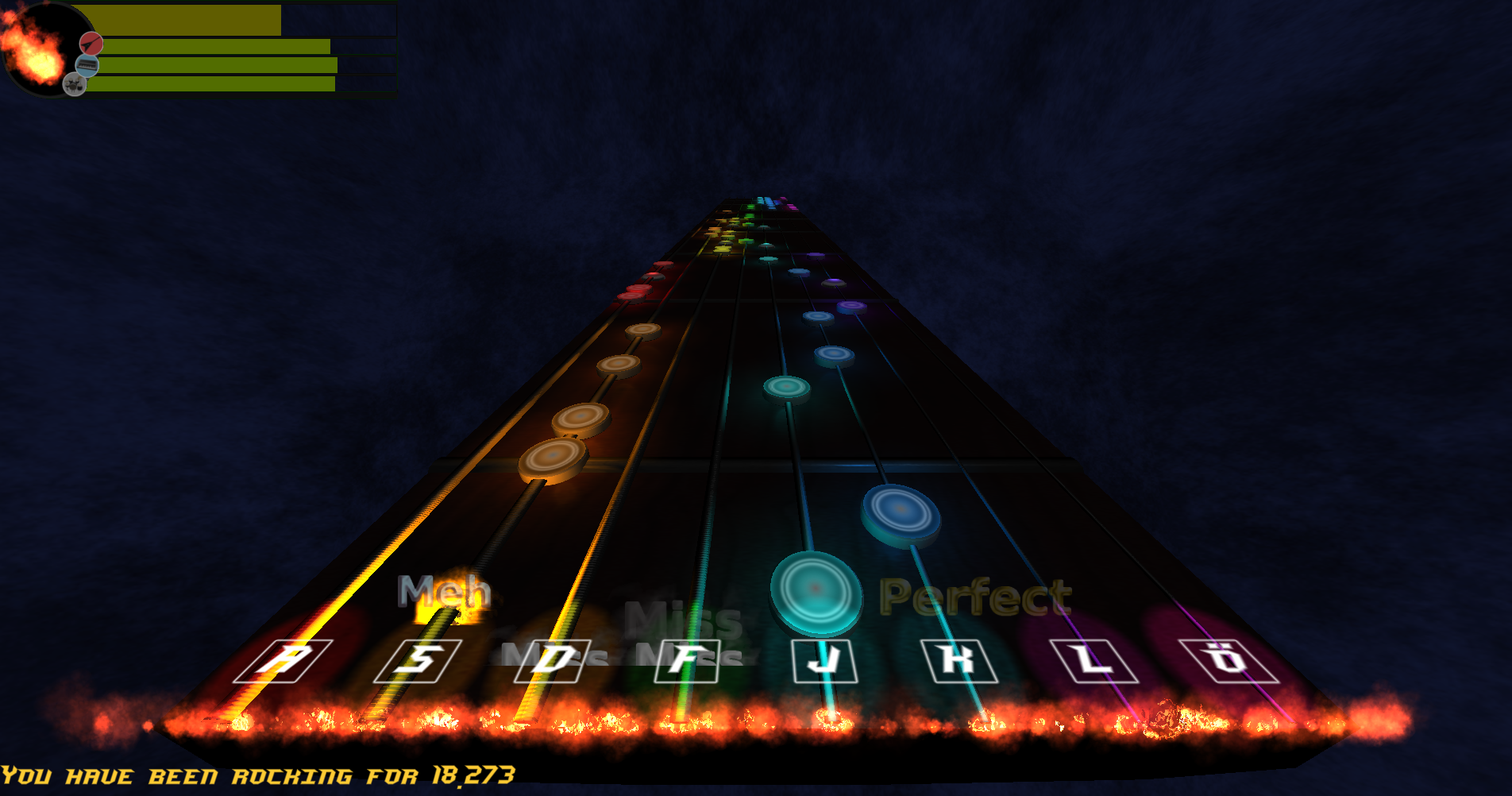
The Guitar: What would be a good rock band without a guitar? With this limited edition LudumDare46 Deluxe 8 string axe you can be sure to rock the stage.
*Controls:* Press the shown keys in the exact moment as the notes pass them. The dome shaped notes are muted notes. Hold Space while hitting them.
_________
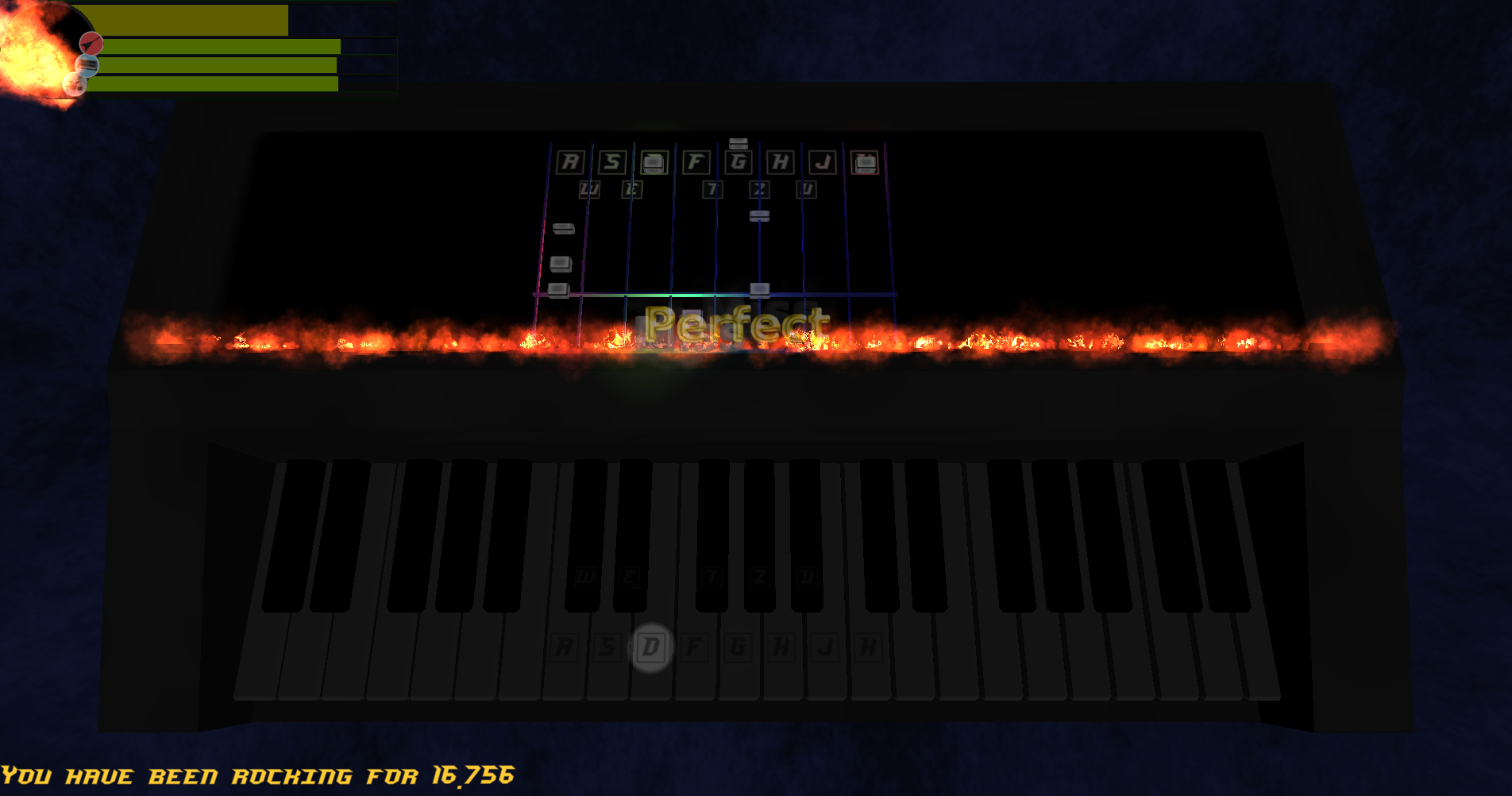
The Keyboard: A highly modern keyboard that even shows you what to play on its display! Its almost like it plays itself!
*Controls:* Press the shown keys when the notes reach the bottom of the display. Release the key as soon as it has completely disappeared for an optimal performance. _________
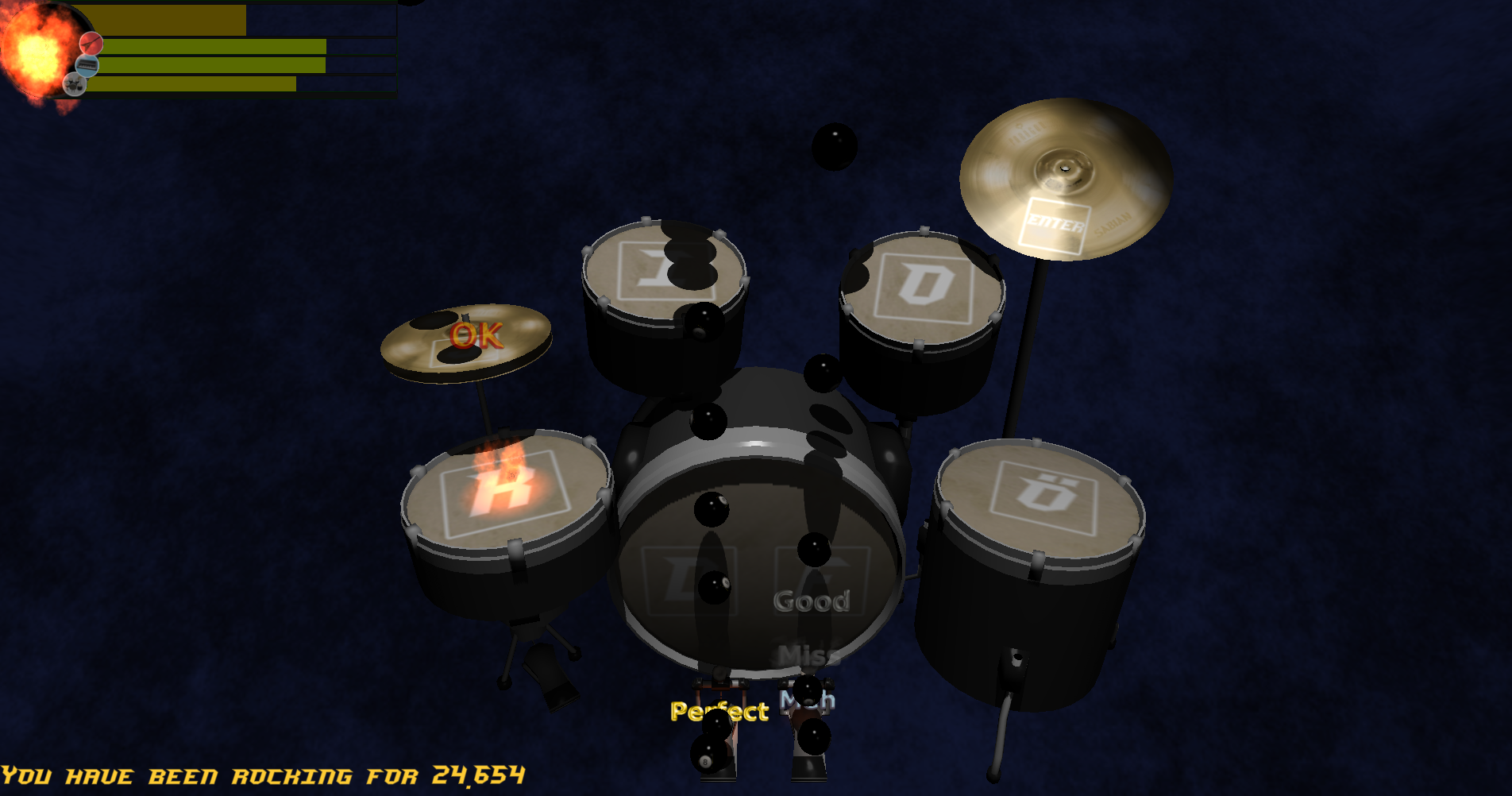
The Drums: Sadly you already broke all of your drum sticks, but for some reason you happen to have a giant amount of billard balls, so why not stick to those?
*Controls:* Press the keys printed on the drums the exact moment the balls land on them. The keys for the double bass pedals are interchangable. (Note: the black balls land on the pedals of the bass drum rather than the drum itself)
_________
__Settings:__ You can modify the games settings in the settings.ini file delivered in the executable directory.
Syntax: settingName = value ; optional comment after semicolon
_________
We made this game using our self written game engine that uses OpenGL 3.3 for graphics and OpenAL 1.1 for sound. Both the engine and the game are written in C#. Shaders are written in a self designed language that transpiles to both GLSL and HLSL. All graphics, models, textures, sounds, music and recordings are self made.
Tools: - Visual Studio 2015 - Self written IDE for shader programming - Gimp 2.6 and 2.8 - Blender 2.8 - Notepad++ - Sandwich Maker
_________
If you encounter any bugs or similar insects feel free to contact us!
In case of a crash or bug please include information of how to produce it or error messages if you get any! _________
__Hardware requirements:__
- Graphics card with at least OpenGL 3.3 support - CPU or sound card with OpenAL 1.1 support - RAM: 500MB
You may need to install OpenAL for this application to run. *Edit:* We now included OpenAL32.dll in the download. So it should run now without seperately installing OpenAL. If for any reason this does not work delete the dll, get the installer here and run it.
Important: Although it is possible to play the game without sound due to the visual representation of rythm and tones it is highly recommended to play this with sound (and to enjoy the music!).
Note: You can commit suicide by pressing Escape anytime.
_________
__Post Mortem: Keep the Flame Alive 1.1__
What has changed? - Fixed a bug on the keyboard tracks. Notes that have to be held now display their note length properly and also recognize their release time correctly, making things a lot easier. - Drums got new (easier) notes to play, making the game more balanced. - Did some visual improvements on the keyboard lighting. - Made some minor changes in how a well played riff affects your total audience satisfaction. Also this is a thing that is customizable now through the settings.ini file in your game directory. - Added a borderless windowed mode (and made it default)
![1_1Keyboard]
![1_1Settings]
Neat looking new lighting on the keyboard
New settings options
_________
__Post Mortem: Keep the Flame Alive 1.2__
What has changed? - Added optional notes to drum tracks. - These notes are represented by striped or white balls. - They can be played for bonus but do not yield a penalty if missed entirely. - When played, they yield their usual reward though, even if it was horrible. - Added quality tracker to top right corner (see images). - Improved hud fire indicator in top left corner. - Fixed some race conditions on note disposal. - Very rarely a stray billard ball would stick around.
![1_2Drums]
![1_2Break]
![1_2Score]
During your riff or solo you can see how well you currently perform.
During breaks you can compare your last riff performance to your overall performance.
At the end of a riff you get an indicator of your average performance during that riff.
_________
[imgNewDrums]: ///raw/121/42/z/33111.png "New Drums.png"
The music is nice, but playing drums was pretty hard to me. I would like there was some kind of tutorial to learn how to play every instrument. I didnt have any problems to run it. Good to see a hard programmer here!
@modalmodule Thank you very much. We did not test it on Intel Graphics and only Intel seems to complain about that issue. But now it's fixed so we hope you can play it now!
@beardmage You need OpenAL installed to play the game. The download link is in the description. You can either put the OpenAL32.dll in your game directory or run the installer which puts it in your system32 directory.
__Edit:__ I also added the installer link to the downloads section to make it harder to miss.
__Edit 2:__ We now included OpenAL32.dll in the download. So it should run now without seperately installing OpenAL. If for any reason this does not work delete the dll, get the installer here and run it.
We clearly have different understandings of the word "easy" :). Really polished rythm game. Only managed to do ok on the guitar. Drums and keyboard were brutally difficult.
@mneubrand Actually, you're not wrong about the difficulty of the game. I had a tough time arranging a track that would both sound cool and be managable to play, so I kinda butchered the difficulty - even I can't play the drum and keyboard parts above easy and medium respectively. I plan on fixing this up as a post mortem though, since we now have the engine all done and I can focus a lot more on actually making something playable.
@hernz I assume you also did not hear any music? In this case the OpenAL32.dll ist not working on your computer. Delete it from your game directory, download the OpenAL32 installer from here and run it.
I'm not entirely sure what's the right way to deal with OpenAL in this case. If not included people are missing they should install it and then complain that it does not work. If included it works on some (or most?) machines, but on those where it doesn't it just does not play music (and therefore our application is not able to sync the playable track or start levels).
@insanitycode It worked, thanks ! So i just wrote a long comment and closed the tab before sending it... i'm going to go quicker on it this time. Congrats on making you game engine, it works well, to bad for the dependences issues. Graphics are great exept for the keyboard which is too dark. The game is fun but really hard. The music is awesome ! Amazing job, keep going !
Really nice game concept. I love rhythm games and haven't seen any in a ludum dare yet. Drums and keyboard are unfortunately really hard. I think it would be a good idea to lower the used keys on lower difficulties. Also volume slider would be great. But other than that a really solid entry. Good job!
Nice ! A rhythm game is always tricky to get right, you guys did it perfectly ;) Plus you did it on your own game engine ? That is also very impressive !Keep up the good work !
Really nice game, I am always a fan of people using their own engines, the game looks and sounds great, I am terrible at hitting the notes, but player skill isn't a category, so you're good ;)
I love it! Nice idea and concept, also enjoyed the musics as well. And somehow my PC getting hotter while playing and then I realized that this game is using more power than I thought.
This is a really cool game, well done! And the level of polish is impressive for a game created over a weekend.
On the OpenAL side - when I used the DLL bundled with the project, the game started but it didn't play any music and it got stuck in the main menu. I could switch between difficulty levels and instruments, but the game never started. Deleting the bundled DLL and installing OpenAL from the site fixed the problem.



Comments29
__Edit:__ I also added the installer link to the downloads section to make it harder to miss.
__Edit 2:__
We now included OpenAL32.dll in the download.
So it should run now without seperately installing OpenAL.
If for any reason this does not work delete the dll, get the installer here and run it.
I'm not entirely sure what's the right way to deal with OpenAL in this case. If not included people are missing they should install it and then complain that it does not work. If included it works on some (or most?) machines, but on those where it doesn't it just does not play music (and therefore our application is not able to sync the playable track or start levels).
Drums and keyboard are unfortunately really hard. I think it would be a good idea to lower the used keys on lower difficulties. Also volume slider would be great.
But other than that a really solid entry. Good job!
On the OpenAL side - when I used the DLL bundled with the project, the game started but it didn't play any music and it got stuck in the main menu. I could switch between difficulty levels and instruments, but the game never started. Deleting the bundled DLL and installing OpenAL from the site fixed the problem.