This code was put together in a few (around 3) hours to fit the theme. I had this idea to make a game with the final executable having the smallest size as possible, ideally bellow 16 KB, since I was not able to think about anything else with this theme.
Unfortunately I lost the first two days of the jam trying other (more complex) ideas, so I was not able to put this in the Compo, even making it in 3 hours. I think it would be a perfect game for the category. But I'll leave it open source anyways!
The game itself is very simple, just a Sokoban clone with no sound and a few levels. But it have some interesting features, such as procedurally generated textures for the sprites and a hand drawn character pixel art using nothing but binary. :P
Code is a bit of a mess, but given the short amount of time I had, I'm happy with it. It uses no external lib, just Windows.h, which sadly makes it window specific, but I think it would be a bit harder to make it extremely small in size and still cross platform.
Update (Before Jam Ends):
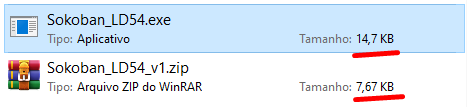
One hour remaining for the end of the Jam, I managed to remove LIBC from the project, saving another ~8 KB. I'll keep BOTH versions for download here, so you can try them all. The only difference is the size in disk and I made both versions DURING the jam (so keep that in mind). This is how it looks like now:
This was my first attempt to make an executable small, I know that there are plenty of advanced techniques out there that I'm not using and that I could same a lot more space on stack and not using any default lib, but I'l already happy with the result.
It was fun to develop this little project! :)
---------------
Bonus: Building the Source Code
If you want to check how I manage to make it so small or even try to add new levels yourself, you can follow those steps:
In order to build this project, you must be on Windows and have MSVC and Make installed. Then you need to follow those steps:
- Open the Native Tools Command Prompt for VS (so you can use msvc's `cl` and `link`) - Navigate to this project's root folder - Type `make`
very peculiar interpretation of "limited space", couldn't have thought of it, nicely done The game is straightforward, short, some of levels are more challenging and interesting
I actually really enjoy this type of theme implementation, very outside of the box. Also I'm kinda respect when games are created with limited instruments and resources. This is something I do in some way. And thank you for the last level, I was already scared after 5th XD
I concur with Stronf above me. I saw your post and was intrigued by the concept. It's a fun, challenging sokoban game, and while it's not particularly innovative, it's a solid game and the fact that it's under 16kb is very impressive.
I love the fact that you took the theme and interpreted it as "limited disk space". Surely, with the hex code you gave, it can be ported to pretty much anything nowadays.
Thanks everyone for the amazing feedbacks! @ralian I have the source code linked with the game (it's on my github) and you can check the Makefile, but yes, I've used a lot of compiler flags and tricks to optimize it even more. One of the coolest ones is to not use LIBC (the default C library, that have important stuff like malloc, free, rand, memcpy and so on). I had to implement my own versions of those functions using the Windows APIs. It was a very interesting experience!
@daniel-grinshpon thank you! I wanted to make a game that fits on a QR code or a business card as well, but it turns out that I would have to reduce it even more to be able to fit, sacrificing some cool stuff I had. For example: I can reduce it by around 2 KB if I remove all the tutorial text in the game, making it ~6KB. But then it will be considerably bad in my opinion. So I think that 8 KB is a good trade off and I'm very happy with it.
Impressive game! ~~Looking forward to receiving the stack of punch cards by postal mail~~
If you really want to fit it on a QR code, and if you know javascript very well, you could port it for the web. Although good luck wrestling with the Canvas API when your budget is in bytes, especially for texture generation.
Nice sokoban implementation. A couple of the levels were tricky. Bypassing libc was interesting. I tried building it with mingw but that ended up being 24k.
@someone thanks! Interesting to know that you tried it on mingw. Did you replicate the flags I used for msvc? They will certainly make a lot of difference in the executable size, specially the optimizations and the defaultlib removal. Let me know!
Amazing! I loved the Idea, besides the size, the gameplay is really fun, the way you interpreted the theme is incredible, I would never have thought of that. Great job!
Really good use of the theme! Game itself while not original is fun, since the original game is fun :p You did good designing levels, quite hard already by levels 3 and 4. It was a little wonky tho, the graphics wobbled and the occasional frame was completely artifacted, and the cursor was showing loading icon constantly when hovered over the window as if the program wasn't responding, so might want to look into that 😅 Otherwise enjoyable! But the main attraction here is of course the meta.
@ava-skoog Thanks! Regarding the bugs, I had to remove so many code for it to fit in such a small executable file, that some of them where sort of hard to completely get rid of without adding back some Kbs. 😄
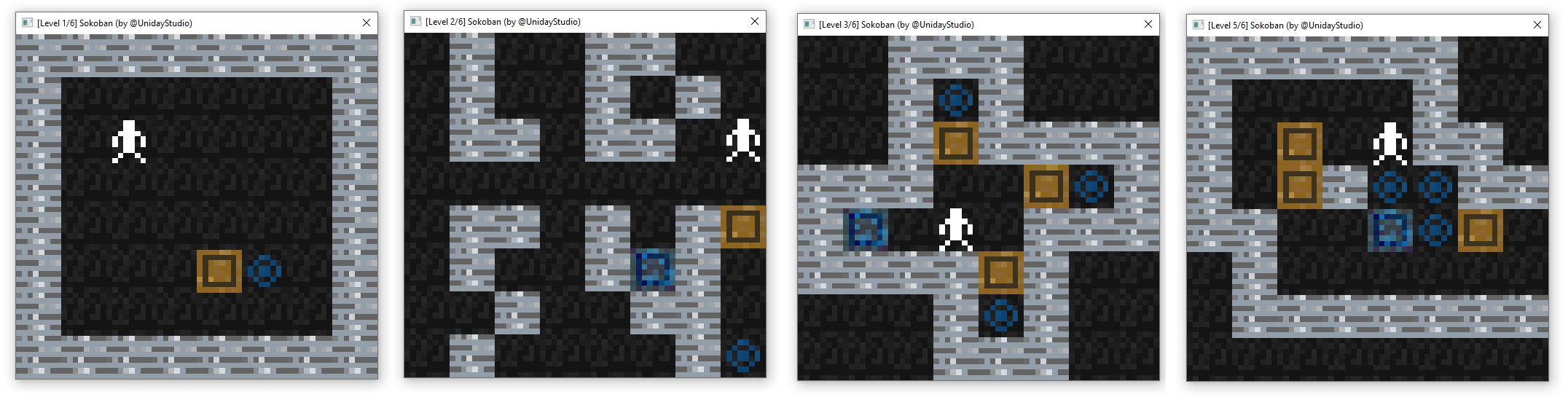



The game is straightforward, short, some of levels are more challenging and interesting