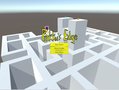
Well as the title indicates, I intended a lot more platforming between different buildings in there. When I realized that I don't have that much experience and time to do that right now, I scaled down to having basically a 3D Pacman game... with a jump button.
For my first submission I'm kind of proud that it actually is a playable game.
But that said, in the current state the game isn't too creative and the jump button currently pretty useless. (would have loved some cool platforming action, but well maybe another time)
Controls: WASD - Movement Space - Jump (useful for cutting corners...) Esc - Pause/Unpause
Yellow Orbs - Score! Yay! Red Orbs - Power Pellets... Go eat those Ghosts!
Currently the game is missing a Victory Screen/Message... so when you've collected everything... welp you've beaten the game. (which currently isn't too hard, due to bad AI)
Tools used: Unity3D Visual Studio Sfxr - quick solution to get a few sound effects (found it on this site in the tools section) OpenCanvas - for the few pictures used in the game
No guarantee on the Linux/Mac-Builds... hope they work, couldn't test any of those two.
It's actually pretty fun to play pacman in 3D, I like it. a bit stressing when you can't see from above like in the original and too afraid to stop and look back to see if they are behind you XD I'm a beginner with unity too, how did you make the circling camera? and what did you use for the AI/Path-finding?
* just a note, the back button didn't work in the credits, and pressing ESC doesn't exit.
Thanks for the bug report on the credit button... Curse me for changing sth in the method in the last second. :D Reuploading that now... (not really important, but otherwise it will annoy me ^^)
For the circling camera it's just basically only one line in c# code:
The reference point is a public variable where I assign a GameObject placed in the middle of the map.
The pathfinding is basically all done by unity. Setting up a NavMesh is basically 1 click. After that you give the enemy gameobjects a navmesh agent component and have to tell that one what it's destination is. The navmesh agent will handle the rest. Just have a short glance at the unity navmesh tutorial. There is really not much you have to do. As long as your map/level is pretty easy the automatic functions work great.
I probably screwed up when chosing the destination... since I tried to imitate the original Pacman AI for each personality/ghost.
Nice work! I liked the incorporation of jumping. Just my opinion, but I think it would have been cool if the player keeps moving along a path and when a turn is necessary the player presses the corresponding key. This would make it so the player sticks to a grid like the original pac - man. Also, maybe make the dots a bit bigger because I found that walking along the path i would easily pass them and would have to go and recollect them. Overall, great work!
@geekguy: Yeah I thought about having the orbs gravitate towards the player when you're close/them beeing sucked in. But wasn't sure at the end, since you could use it as a tactical choice at which time you want to use the red powerups by avoiding them...
Putting the players "on rails" would be quite the opposite I tried to achieve originally, which would be more freedom and some parkour between buildings (which was obviously way too much for me). But if I continue the game it would be still going into this direction...
All in all thanks for your feedback. :) And thanks to you too Steven. ^^



I'm a beginner with unity too, how did you make the circling camera? and what did you use for the AI/Path-finding?
* just a note, the back button didn't work in the credits, and pressing ESC doesn't exit.