Warmup Checklist: Learn your development tools! Write some code, run it. - check Make some art, get it on screen, make it move. - check Print some text to the screen. Print some text to a log (if applicable). - check and check Make some sound, get it in game, make it play. - check If you're motivated enough, make your experiments in to a game! - somewhat check Make something that should take 'hours', not 2 days. - check Then package it up, put it online. - check
Took about 12hrs all-in all, including about 4 hours of work that got completely thrown out. :D
Known issues: There are some... issues... with collision. Doors are wierd; hitching on walls; building materials push player; etc... 'Use' only checks for usable options in the direction you last moved, and it's a bit finicky too. Usable objects are doors and trees at the moment. In order to grab, your cursor must be positioned so that the central dot is directly over an object. You cannot grab trees. Grabbing unfortunately snaps the object to the cursor's upper-left.
Original plans included multiple areas (town, forest) and buying selling lumber/furniture at stores. Plans also included Sims-like hunger, energy, etc. meters and actions that took time to complete, running down hours from your lumberjack's day.
Included in the links are the Source(flixel required) and a script for AutoHotkey that will interpret gamepad controls to the keyboard presses used in the game.
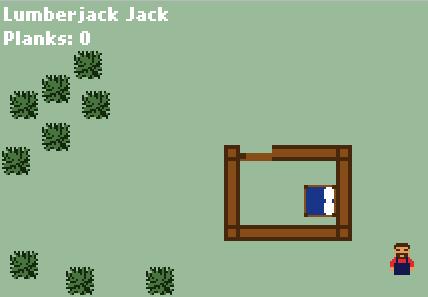
This is nice. I built a tiny new room with another bed in it :D But have been great also to "use bed" for sleeping (I'm still very tired). I would say you are well prepared for upcoming LD. Keep on rocking
Looks good, works good, I'd complain about the lack of useful interaction but my game has no interaction in the first place so that'd be a bit silly. Just, for the love of all that is undead, don't put zombies in it.
One very very small issue is that I felt the commands were a bit inconsistent: You pressed W to enter build mode, then W again to choose the block to build, but then you had to press D to place the block, because W would leave the building mode. I was kinda expecting W to place the block you chose.
@caranha: I may switch the controls around a little bit, so thanks for the input. It does seem to be a bit inconsistent.
@Gemberkoekje: Are you by any chance involved with Sauropod Studios, or is that just a fan avatar? The plan was to have more interactables with some more point to them, but I didn't get around to it. No zombies, though I may add a fight with the big-bad-wolf.
@dertom: Using the bed is a planned upcoming feature, along with others.
Man I cut down a lot of trees trying to cut them all down. The controls felt clunky though having the build button and the place button be in separate places.


Comments6
One very very small issue is that I felt the commands were a bit inconsistent: You pressed W to enter build mode, then W again to choose the block to build, but then you had to press D to place the block, because W would leave the building mode. I was kinda expecting W to place the block you chose.
@Gemberkoekje: Are you by any chance involved with Sauropod Studios, or is that just a fan avatar? The plan was to have more interactables with some more point to them, but I didn't get around to it. No zombies, though I may add a fight with the big-bad-wolf.
@dertom: Using the bed is a planned upcoming feature, along with others.