update #2: I provided an additional love file for macos which uses the space key for laying bombs (since some mac machines don't have a right control key). The other versions are kept the same. (I hope this conforms to the rules.)
Instructions for macos uesrs: (untested, since I don't have a mac myself)
From the love2d webiste: > On Mac OSX, a folder or .love file can be dropped onto the Love.app application bundle. On the Mac OSX Terminal (commandline), you can use love like this (assuming it's installed to the Applications directory): open -n -a love "/home/path/to/game"
update: I FINALLY GOT INTERNET :) So. Dropbox link ftw ^^
old entry:
Jay. My internet broke down.. Tethering FTW. Main download is on google drive.. Which doesn't download automatically.. Please click on File -> Download. Sorry for that, but dropbox didn't like my Tethering.
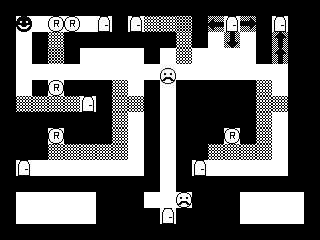
So. It's Rocks-n-Blaster, a boulderdash/bomberman type game. But You Only Get One Bomb ;-) Tutorial included.
Written in lua with LOVE2D 0.8.0, Tiled level editor, The GIMP, and many other things.
The Rocks-and-Blaster.exe file can usually be run in linux as well. Just make sure you have installed LOVE 0.8.0 and type $ love Rocks-and-Blaster.exe
A very nice little puzzle game and a good implementation of the theme.
You designed some nice levels with a bunch of variety between them. You also seemed to delight in dangling victory in front of the player before cruelly snatching it away. Good job! :)
I like the simple art style kind of reminds me of mine sweeper. I can see how this could be even better with multiple bombs. One Issue: On my macbook keypad(I duel boot) I could not play(no right ctrl). I ended up using the On-Screen keyboard.
From the love2d webiste: > On Mac OSX, a folder or .love file can be dropped onto the Love.app application bundle. On the Mac OSX Terminal (commandline), you can use love like this (assuming it's installed to the Applications directory): open -n -a love "/home/path/to/game"
You will need a right control key though.
@squibbons: Neat idea. Unfortunately no, there's only one solution. :(
Nice retro style game and a lo of levels! First i thought its a puzzel game but then i realized that reflexes are more needed. Some levels are very hard :-) Can't pass map 8.
Like these levels where you try to solve somethig and then you see - hey, there's another way, the first one was just to trick you. But the controls are kinda unflexible. WASD would be nice.
I really quite enjoyed this, and there seemed to be a good amount of content. I gave up on map 10 though, because I kept getting stuck on corners.
In fact, the controls were my only problem with the game. WASD would have been a nice option to have, since I'm more used to moving with my left hand now. It also would have been nice if you'd made the movement snap to the grid (still smoothly sliding between them), as that way there wouldn't have been the problem fitting through gaps.
Nice little game. Figuring out where you needed to put the bomb was very fun. It started out quite simple but eventually got more difficult. My only major complaint is that the character moved rather quickly, making it extremely difficult to fit into one block wide hallways, of which there were several. This flaw was only magnified by the quick moving enemies. Segments with enemies become less about timing and more about whether or not you'll actually be able to fit into the doorway. Other than that, this was a very solid entry and one you should be proud of.
I like the minimalism of the graphics, full on monochrome baby. I managed to complete all 10 levels too. For those getting stuck on hallways, I've found moving diagonally made it pretty easy to get through them.


Comments23
You designed some nice levels with a bunch of variety between them. You also seemed to delight in dangling victory in front of the player before cruelly snatching it away. Good job! :)
From the love2d webiste:
> On Mac OSX, a folder or .love file can be dropped onto the Love.app application bundle. On the Mac OSX Terminal (commandline), you can use love like this (assuming it's installed to the Applications directory): open -n -a love "/home/path/to/game"
You will need a right control key though.
@squibbons: Neat idea. Unfortunately no, there's only one solution. :(
In fact, the controls were my only problem with the game. WASD would have been a nice option to have, since I'm more used to moving with my left hand now. It also would have been nice if you'd made the movement snap to the grid (still smoothly sliding between them), as that way there wouldn't have been the problem fitting through gaps.
Overall a good entry, though.