Desktop versions are probably recommended as the WebGL version may have some stability issues.
Updates:
17/12/15 - Fixed a minor typo where the instructions were actually written the wrong way.
20/12/15 - Took out the unnecessary debug files from the Windows build so the download size is much smaller now :)
IMPORTANT STUFF: This is a multiplayer game which requires at least 2 people to play so grab a friend/sibling/relative/etc. (The game supports up to 4 people so the more the merrier) Controllers are most definitely recommended for this game (I haven't accounted for sudden controller disconnections though so do be aware). If you're playing the desktop version, I recommend not to change the controls when you start the game up.
And here we are with Ludum Dare Entry "Lucky" Number 7.
After using a different game engine last Ludum Dare, this time I've gone back to my usual choice of using Unity. Since this is the first (and probably only) time there's been two themes for this Ludum Dare, I wanted to create something that makes use of both themes.
This is also the first time I made a multiplayer entry for a game jam(Although to be fair I did make a 2 player game for MiniLD 58 -the only difference is this one supports more than 2 players-)and the first time I've created a game with multiple controller support out of the box (although it was a bit of a hassle trying to map inputs properly since not all controllers have the same button mappings).
There may be some slight issues with collisions as the physics system is a bit buggy in Unity 5.3 otherwise it's perfectly playable.
Mac and Linux builds are available on my GameJolt and itch.io pages.
Don't forget to leave a comment as well so I can play and rate your entries too :)
Controls:
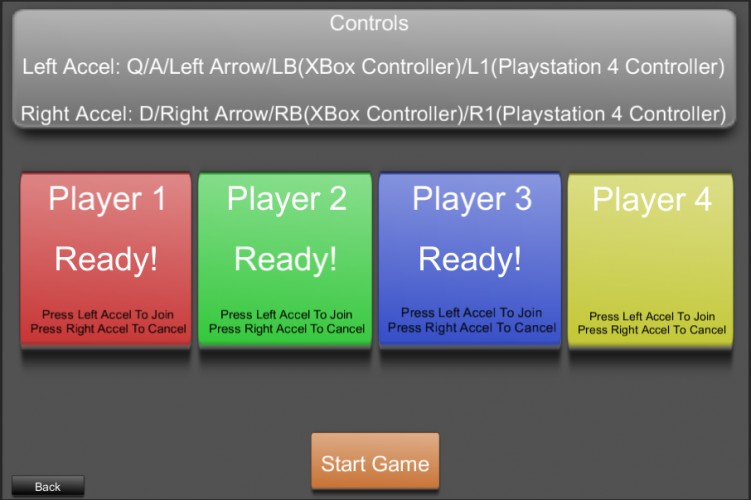
Left Accel: Q/A/Left Arrrow/LB(Xbox Controller)/L1 (PS4 Controller) Right Accel: D/Right Arrow/RB (Xbox Controller)/R1 (PS4 Controller)
To jump, press both buttons at the same time.
Game has been tested with Xbox and PS4 pads but other controllers should work. Just find out which is Button 4(Windows/Linux) or 13(Mac) for Left Accel and Button 5(Windows/Linux) or 14(Mac) for Right Accel.
Instructions:
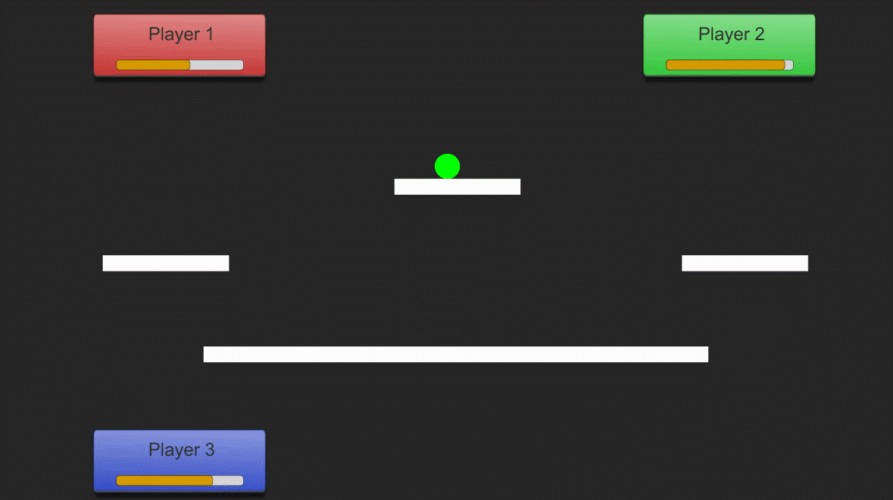
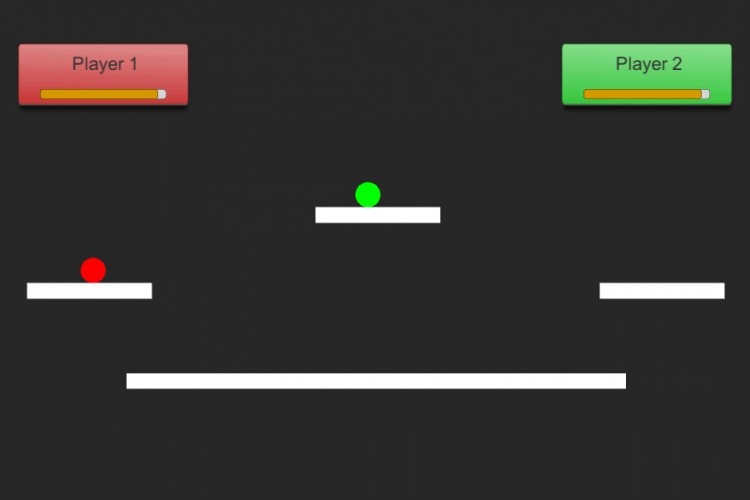
Press the Left Accel button to move your ball to the left Press the Right Accel button to move your ball to the right Press both Left Accel and Right Accel to make your ball jump Your ball grows in size when you are moving and shrink when you are not
Survive for as long as possible by knocking opposing balls out of the arena. Every time your ball is knocked out of the arena, you lose some energy and will respawn in 3 seconds If you run out of energy then you cannot respawn and therefore you are out of the game The last ball standing wins
Tools Used:
Language: C# IDE: Visual Studio Library/Framework: Unity Sounds: bfxr, BoscaCoeil
The game was alright, had some issues with gameplay controllers (I'm using an Xbox 360 controller), such as no analogue stick input and left and right d-pad controls are cleary inverted.
The idea was fun, I can imagine two or three people playing this for a few minutes.
Fun idea, and minimalistic. The audio makes me want to hurt people though. Could definitely see this being made into a proper brawler, although the friction probably needs to be reworked for that to work properly. Fun game though, but that audio-loop is just.. sooo.. annoying..
@TeamDromedare: Yeah, I don't even know why I kept that audio loop in the first place (since I'm no audio person). Even I found it annoying (and I made that damn loop in the first place :|)
This is a neat idea :) Very fun to play! Some kind of AI to play against would have been nice though. Also, the controls in the menu were reversed for me (Firefox 42, Web version embedded on this page). So I had to press right to mark as ready and left to cancel. In the game itself everything was as it should be. Also, the music gets quite samey after a while, some kind of option to turn it off / down would have been nice :)
The theme usage is pretty cool, interesting ideas combined. However over all it feels like it needs a bit more design care:
- The controls don't feel "tight", I don't feel like I am in control of my character. The initial startup speed is slow for too long and the top speed is mad, and turning around isn't even an option really once you get going. - The jump is unreliable - It seems you have to release both buttons at *exactly* the same time - the exact same frame, which is unrealistic for anyone to consistently do, which means frustration. I suggest a solve by flagging when both buttons are down, then flagging when both buttons are released, to trigger the jump.
And even then multiplayer games are tough for LD! It's hard to get a feel for it for players!
Simple, but really fun. I included it in my Ludum Dare 34 compilation video series, if you’d like to check it out :) https://youtu.be/XuTLfsOkf7k
Nice game, but I didn't have anyone to play it with.. (too many kilometers away) :( .. so in that sense, I failed to unlock it's full potential. The game seemed to run pretty smooth thought, music was a little bit too repetitive. But anyway, nice entry :)
Had a lot of fun playing 2 player and we had a blast! liked the way you made it so you pressed both buttons to jump, but it would nicer if you would jump higher so to avoid your foes. Probably best to leave the music out, but enjoyed the sound effects. :) Good job mate!
I have to say, I haven't seen a whole lot of multiplayer stuff so far so props for that. Now that the jam is over and you're not restricted to 2 buttons I'd say a little more control on the left/right accelerations and a jump would do this game well. Anyway, excellent job!
Cool idea, a Smash Bros. feel with rolly physics. Graphics are simple but effective. Agree with rogberth about the Mario Party thing - like a 2D Bumper Balls. Music could be a little less repetitive. Interesting start.
kids thought this was fun - i felt like i was penalized for getting someone out of the arena because i would follow them - maybe a boundry or reset for the remaining player - nice game
The effects of bouncing off someone, and missing when you tried to launch at someone else, made for some hilarious results. Felt like it became more about trying to stay on as long as possible, and wondering if it was worth the risk of trying to knock someone else out. Good fun!
I had a play on this but because it's multiplayer I don't think it's really fair to judge it on anything except the audio and the theme - it *looks* like a pretty neat attempt to make a multiplayer combat game with just two buttons each which sounds very cool. :)
Congratulations for making a multiplayer game. I like the simple idea and it's fun to play. Sadly it's really easy to kill yourself and the music could use some variation.
We had a ton of fun playing this and experimenting with the physics. We managed to get Two (IIIV) people on xbox 360 controllers and 1 guy on keyboard (me). We got a lot of decent laughs out of this one. My first instinct was to make fun of the song, but it was just so damn catchy and I couldn't stop humming along with it :) Thank you so much for making this!
Cool concept - and quite fun with two people. But I have to say, the very short music loop went on my nerves pretty quickly :) [I really shouldn't complain, I can't do it any better.. that's why my sheep don't have background music.] Also the webversion seems to be oversized by just a few pixels in chrome (you get scrollbars around the game).
The jumping controls were hard, so a non-two button version would be nice. I didn't like the music, but the slamming into people at high speeds was fun.
I loved the idea, but we found very quickly that (at least with just 2 players) it was too easy to end up deadlocked. Also way too easy to self destruct. With a bit of balancing, this could be a fun party game. Thanks!
Hey! Had no friends or controllers around, so I had to play a few rounds on my own.
The concept might be a bit too shallow, just moving left and right on a versus platformer doesn't give the players many strategic options. Control isn't really polished, and playing the game is kinda confusing.
Congrats on finishing the jam and making the game!
This is pretty fun! The controls are a bit touchy, so it's easy to die on accident. That adds to the tension, and nervousness of the battle, but also the frustration. The music was a bit grating on me after a few minutes, I think it would need to be a bit in the lower register so it feels more in the background. The bumps of the players felt good.
finaly got someone to test with and we had a blast. its simple and minimalistic but the banter was real! just need a bit of polish in the graphics and audio department. and some power-ups for more banter and broken friendships! good job.
The music was perhaps better left out. I don't have any friends (around) so had to play with lefty against righty. Given that you can't move up might be cool to have the level scroll up with new platforms popping in from the bottom now and then. Good to see multiplayer stuff at LD.
Interesting local multi-player game - simple but effective. Would require some more interaction to bring it up a notch. (some way to go up again, or powerups) Sound... well that needs some changing. :)
Thanks for leaving a rating and commenting on my game! I included your game in an episode of my Let's Play Ludum Dare 34 series to show my gratitude! :D
It needs a few tweaks on controls and physics (and on the music, plz)
But, dude... ...you made an Super Smash Bros in 3 days!
Seriously. I just discovered that channel called "Extra Credits" on Youtube, saw them first on the Unity site. In on of the videos, they talk about "minimum viable product". Your game is a little above of "minimum" accordingly with their idea, but, that's it, your game is that game's core.
I have no friend near to help testing it, but for what I've seen by fighting with myself, this game seems to be entertaining. However, I have to say that sometimes it's better to have no sound instead of a short repetitive one... :P
I don't have a second person to play against so i can't rate it, but the growing/shrinking concept seems interesting. The music is really grating, though.
We really like the growing/shrinking while moving/not-moving game mechanics. Perhaps adding hazards to the level so as to moving is not that good could be a nice touch. This entry could turn out an amazing party game with slightly better level design. Congrats on it!
M
Martin Vilcans3 Jan 2016, 23:27
I can't rate the fun factor as I didn't have any opponent to play against. But even without an opponent the controls were difficult to master. Jumping is hard.
Wow, a kinda smash bros game. Nice idea and done pretty well. As everyone else already have said, it needs some more polish (especially on the audio and the jumping part), but i can imagine this being a fun multiplayer game.
First off, I didn't play with anyone else. Kind of hypocritical considering I also made a 4-player brawler, but whatever. I'll try to rate fairly, and won't mess with the fun category!
Very interesting idea gameplay wise. The controls were well done, I like how you solved the jumping and moving problem. Better than what I came up with, hahaha. As said before, the music loop is awful. The sound effects are nice though.
P
Pixel-boy5 Jan 2016, 02:02
Nobody to play with me unfotunatly but brawler with just 2 buttons is a cool concept and seems fun to play with others players well done !



Good job!