(The graphics for level 4 are heavily inspired by Inigo Quilez demo Slisesix)
A couple of buttons worth mentioning:
SPACE - start the game
W/S/A/D - guess...
1 - Turn off shadow algorithms
2 - Only turn off reflected light algorithm
3 - Turn on all shading algorithms
4 - Use the FPS counter to automatically determine which detail level to use.
B - Skips a level
C - Will kill you
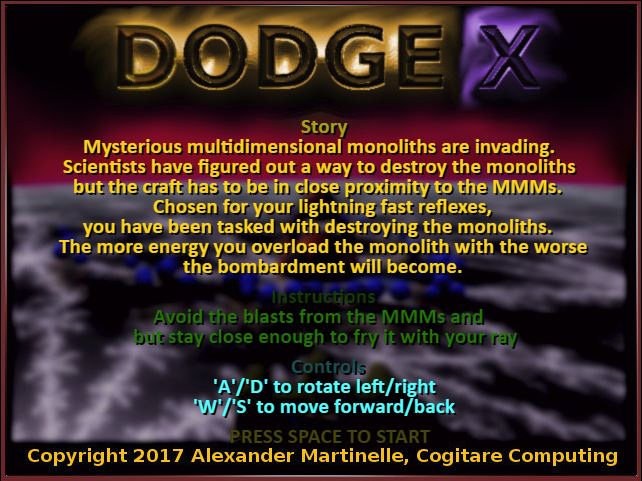
The rest of the instructions are on the title screen. Good luck! ;-)
As you might've guessed. Since this game uses naive unoptimized distance field rendering, you have to have a pretty good grafix card for it to work.
Since I've hardly ever seen anyone try this before I would be really happy if you mention what the FPS counter said and what graphics card your computer has.
The game works in Firefox & Chrome.
It most definitely doesn't work in Edge or Internet Explorer.
I have no idea if it works in Safari or Vivaldi...
Graphics performance on a couple of different cards:
* Nvidia GTX 660 : 25 fps * Nvidia GTX 960m : 18 fps * Intel HD Graphics 530 : 9 fps * AMD Radeon r7 series 200 : 5 fps * And about 0.5-2.5 fps on a 5 year old low-end 32-bit windows tablets internal Intel HD graphics.
The game has a very nice 90's style aesthetic. I feel like the projectiles fired a bit too quickly for the player to dodge consistently but it could just be me being bad. Nice music also.
I tried playing the game without a nice graphics card! The game was still playable, technically, but the strategies I could employ were quite limited (i.e. stay far away from the MMM and whittle away its health)
Nice graphics! This was what the future looked like in the 80's/90's :). I like the gameplay concept, but my FPS was too low to dodge the projectiles on time.
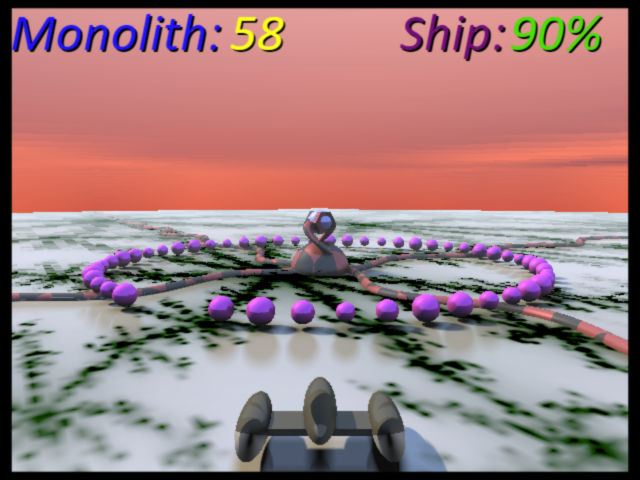
Cool game ! I loved the music ! There is just one thing that is a little annoying : that is that I did not understand how to know where I have to be placed to get no damage ... The pattern that shows up with little squares does not seem to be the same that the next one, but maybe I missed something. So I found it a little too hard. But dispite that little thing, I really like the game !
Cool idea, nice menu screen, interesting graphics, unfortunately I didn't understand how I was meant to avoid taking damage - the first two levels didn't really teach me anything about that, then the third level seemed to have some kind of attack pattern but I couldn't see the pattern forming because the shape was too big? so I was continually surprised by which pattern occurred, and couldn't dodge! otherwise neat game! :)
Cool idea, nice menu screen, interesting graphics, unfortunately I didn't understand how I was meant to avoid taking damage - the first two levels didn't really teach me anything about that, then the third level seemed to have some kind of attack pattern but I couldn't see the pattern forming because the shape was too big? so I was continually surprised by which pattern occurred, and couldn't dodge! otherwise neat game! :)
Gameplay got quite boring fast, but the controls were responsive and the ship behaved nicely. The audio was quite loud and got a bit annoying after a while.
I'm not sure how I was supposed to figure out the pattern. The "pre-fire" pattern shown didn't seem to necessarily match the actual firing? Also, first three levels you have enough health to get through but level 4 is all of a sudden way harder. Anyway, it was good jam game though, graphics are decent and music is cool setting a good mood. Controls responsive. Perhaps balancing the game more would make it even better?
Sorry to report that using the web version on a laptop I was around 15fps most of the time. I liked how you changed it up each level. It kept it fresh.
Great concept! I really like the gameplay - it's simple to figure out but has a lot of room for expansion. I had a similar problem with it only running around 10fps on my laptop, but I get the idea of the game and I love the central mechanic. Nice work!
Nice graphic and music though I had to run it on my GTX1080ti computer where I got 60fps no problem, maybe fullscreen would have give it some troubles. Controls and gameplay aren't very funny. Kudos for distance field rendering, this is cool (I played with them too). I didn't know about webstorm (using vscode) will check-it out as I'm a resharper fan.
Not a bad game at all, although I'm not too much of a fan of the trashy art style (though it is well executed). The gameplay is simple, but it works. In the first levels I did not have to move at all, because my life was decreasing slower than the monoliths'. What I'm most impressed by is the variety of complex objects, which look great! :)
I really dig the aesthetic/vibe going on with both the graphics and audio. The concept is also pretty interesting, though perhaps a bit tedious at times. Another small nitpick is the screen shake being a bit abrupt and disorienting. All around, nice little bullet hell game from a perspective I've never seen done before!
So, uhm, the first small wave is supposed to show where the real attack will hit, right? If so, then it never worked for, except for like two of three attacks in stage 3. The shaking is also quite bad, couldn't really go past the level 4 for these two reasons.


Comments29
My graphics card is a GTX 1060 6GB and it ran at 44-49 FPS.
FPS: 9-10
RAM: 16 GB
Graphics Card: Intel Iris Pro 1536 MB
I like the gameplay concept, but my FPS was too low to dodge the projectiles on time.
FPS: 11
GPU: Intel Iris Graphics 6100 1536 MB
Good job ! Keep coding :)
Gameplay got quite boring fast, but the controls were responsive and the ship behaved nicely.
The audio was quite loud and got a bit annoying after a while.
The rays SFX could have been a bit louder. The first levels was a bit easy and didn't take much skill to beat but after level 3 it got way harder.
Well done!
Simple but fun game! I really liked the feel about it, felt like an old tech demo.
As you asked: I have an Nvidia GTX 1080, running chromium on linux and get a pretty stable 60FPS with some 30 FPS drops (vsync?)
What I'm most impressed by is the variety of complex objects, which look great! :)